Python Variables
Updated 6 min read Aimerscrew
Almost every program needs to remember something: a user's name, a score in a game, the total of a shopping cart. In Python, you remember things with variables. In this lesson, you'll learn how to create Python variables, change their values, and avoid the mistakes beginners make most often.
🌍 Real-life example
Think of the contacts app on your phone. You save a number like +1 555 0100 under the name Mom. Later, you don't type the number again; you just tap "Mom". A variable works the same way: you give a value a name once, then use the name everywhere.
What is a variable in Python?
A variable is a name that points to a value. The value (like 25 or "Alice") is stored in your computer's memory, and the variable name is the label you use to reach it.
age = 25
name = "Alice"

print(name)
print(age)
Alice
25Here, age and name are variables. The = sign means "store this value under this name". It does not mean "equals" like in math.
How to create a variable in Python
Creating a variable takes three parts: a name, the assignment operator =, and a value.
city = "London"      # text (a string)
temperature = 18.5   # a decimal number (a float)
is_raining = True    # True or False (a boolean)
Unlike languages such as Java or C, you don't declare a type first. Python looks at the value and works out the type by itself. This is called dynamic typing.
💡 Tip
Read city = "London" out loud as "city gets London" or "store London in city". It helps you remember that = assigns a value instead of comparing two values. (Comparing uses ==, which you'll meet in the Operators chapter.)
How variables work behind the scenes
When Python runs score = 10, it creates the value 10 in memory and attaches the name score to it. When you later write score = 15, Python doesn't erase the 10 and write 15 in its place. It creates a new value and moves the label.
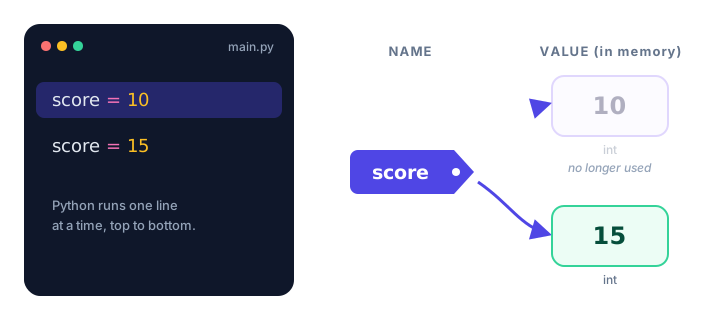
Changing the value of a variable
Variables are called "variables" because their values can vary. Assign a new value at any time and the old one is replaced:
likes = 120
print(likes)

likes = 121          # someone liked the post
print(likes)

likes = likes + 1    # use the current value to calculate the new one
print(likes)
120
121
122The line likes = likes + 1 looks strange in math, but in Python it simply means: take the current value of likes, add 1, and store the result back in likes.
A variable can hold any type of value
Because Python is dynamically typed, the same variable can even hold a different type later. You can check what type a variable holds with the built-in type() function:
data = 42
print(type(data))

data = "forty-two"
print(type(data))
<class 'int'>
<class 'str'>⚠️ Be careful
Just because you can change a variable's type doesn't mean you should. Code like the example above is confusing to read. Keep one kind of value per variable, and give it a name that says what it holds.
Assigning multiple variables at once
Python lets you create several variables in one line. The values are matched to the names from left to right:
x, y, z = 4, 7, 9
print(x, y, z)

first_name, last_name = "Ada", "Lovelace"
print(first_name, last_name)
4 7 9
Ada LovelaceYou can also give the same value to several variables:
wins = losses = draws = 0
print(wins, losses, draws)
0 0 0Swapping two variables
In many languages, swapping two values needs a third "temporary" variable. Python does it in one line:
left = "coffee"
right = "tea"

left, right = right, left

print(left)
print(right)
tea
coffeeConstants: values that should not change
Some values should stay the same for the whole program, like the number of minutes in an hour or a tax rate. Python has no special keyword for constants. Instead, programmers write the name in ALL CAPS as a signal to everyone reading the code: "don't change this".
SALES_TAX = 0.08
price = 50

total = price + price * SALES_TAX
print(total)54.0Deleting a variable
You rarely need to, but you can remove a variable with the del keyword. After that, using the name causes an error:
password = "s3cret"
del password
print(password)
NameError: name 'password' is not definedReal-world example: a shopping cart total
Here's how variables work together in a small, realistic program. Each value gets a clear name, and the final line uses those names to build a message.
item = "Wireless headphones"
price = 59.99
quantity = 2
shipping = 4.99

subtotal = price * quantity
total = subtotal + shipping

print("Item:", item)
print("Subtotal:", subtotal)
print("Total to pay:", total)
Item: Wireless headphones
Subtotal: 119.98
Total to pay: 124.97If the price changes, you only update one line (price = 49.99) and every calculation that uses it updates too. That's the real power of variables.
Common mistakes with variables
1. Using a variable before creating it
print(total)
total = 100
NameError: name 'total' is not definedPython runs code from top to bottom, so a variable must be assigned before the line that uses it.
2. Spelling the name differently
Python is case-sensitive: Score, score and SCORE are three different variables.
score = 10
print(Score)
NameError: name 'Score' is not defined. Did you mean: 'score'?3. Putting the name on the right side
25 = ageSyntaxError: cannot assign to literal here. Maybe you meant '==' instead of '='?The name always goes on the left of =, and the value on the right.
4. Forgetting quotes around text
country = CanadaNameError: name 'Canada' is not definedWithout quotes, Python thinks Canada is another variable. Text must be inside quotes: country = "Canada".
Practice exercise
🏋️ Try it yourself
You're tracking a workout. Create variables for your name, the number of push-ups you did on Monday (20) and on Tuesday (25). Then calculate the total and print a message like Sam did 45 push-ups this week.
Show solution
name = "Sam"
monday = 20
tuesday = 25

total = monday + tuesday
print(name, "did", total, "push-ups this week.")
Sam did 45 push-ups this week.What's next?
Now you know how to create and use variables. Next, learn the rules for naming variables in Python, so your code is valid and easy to read.
Key takeaways
- A variable is a name that points to a value stored in memory.
- Create a variable with name = value, for example age = 25. No type declaration is needed.
- You can change a variable at any time; reassigning moves the name to a new value.
- Python is case-sensitive: score and Score are different variables.
- Assign several variables in one line with a, b = 1, 2, and swap them with a, b = b, a.
- Write constants in ALL_CAPS to show they should not change.
Frequently asked questions
How do you create a variable in Python?
Write a name, an equals sign and a value, for example: city = "London". Python creates the variable the first time you assign it; there is no separate declaration step.
Do you need to declare a variable type in Python?
No. Python is dynamically typed, so it works out the type from the value. You can check the type at any time with type(variable).
Can a Python variable change its type?
Yes. You can assign a string to a variable that held a number, but it makes code harder to read, so it is best to keep one kind of value per variable.
What is the difference between = and == in Python?
A single = assigns a value to a variable (x = 5). A double == compares two values and gives True or False (x == 5).
Does Python have constants?
Not built in. By convention, names written in ALL_CAPS, such as MAX_USERS = 100, are treated as constants that should not be changed.