Java Sorting Collections
Updated 10 min read Aimerscrew
Leaderboards, price filters, alphabetical contact lists, "newest first" feeds: sorting is everywhere. Java sorting collections comes down to two questions: which list do you want to sort, and what order do you want? In this lesson, you'll sort lists of numbers and Strings, give your own classes a natural order with Comparable, define any custom order with Comparator, combine sort rules with thenComparing, and sort a map by its values.
🌍 Real-life example
On a hotel booking site you can sort results by price, by star rating, or by name, and you can even say "most stars first, and among equal stars, cheapest first". The hotels never change; only the rule for ordering them does. In Java, that rule is a Comparator.
How do you sort a list in Java?
There are two equivalent ways to sort a list in place (the list itself is rearranged):
Collections.sort(list): the helper method from theCollectionsclass.list.sort(comparator): a method on the list itself, where you pass the ordering rule.
import java.util.ArrayList;
import java.util.Collections;
import java.util.Comparator;
import java.util.List;

public class SortBasics {
    public static void main(String[] args) {
        List<Integer> times = new ArrayList<>(List.of(42, 17, 58, 23, 17));
        Collections.sort(times);
        System.out.println("Fastest first:  " + times);

        times.sort(Comparator.reverseOrder());
        System.out.println("Slowest first:  " + times);

        List<String> cities = new ArrayList<>(List.of("lima", "Berlin", "austin", "Cairo"));
        Collections.sort(cities);
        System.out.println("Natural order:  " + cities);

        cities.sort(String.CASE_INSENSITIVE_ORDER);
        System.out.println("Ignoring case:  " + cities);
    }
}
Fastest first: [17, 17, 23, 42, 58]
Slowest first: [58, 42, 23, 17, 17]
Natural order: [Berlin, Cairo, austin, lima]
Ignoring case: [austin, Berlin, Cairo, lima]Numbers sort smallest first, and Strings sort by character code, which puts every uppercase letter before every lowercase one. That's why "austin" ended up after "Cairo" until we passed String.CASE_INSENSITIVE_ORDER. Comparator.reverseOrder() flips the natural order. This works just like Arrays.sort from Java Arrays class, but for lists.
⚠️ Watch out
Sorting changes the list, so it must be modifiable. Collections.sort(List.of(3, 1, 2)) throws UnsupportedOperationException. Copy it first: new ArrayList<>(List.of(3, 1, 2)).
How does Java decide the order?
Every sort boils down to comparing two elements at a time. A comparison method returns an int with a simple meaning:
- Negative: the first element comes before the second.
- Zero: they're equal for sorting purposes.
- Positive: the first element comes after the second.
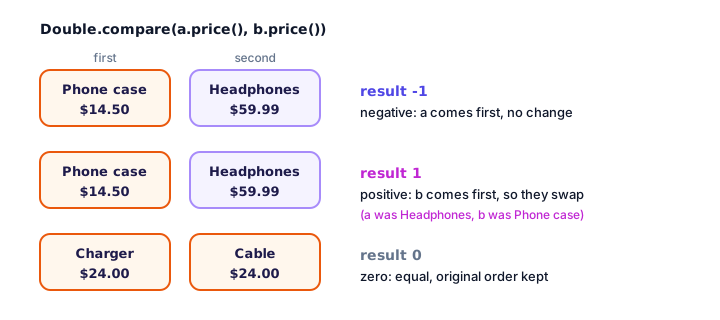
You almost never need to compute these numbers yourself. Use the built-in helpers Integer.compare(a, b), Double.compare(a, b) and a.compareTo(b) for Strings, which return exactly this kind of result.
Natural order with Comparable
Numbers and Strings already know how to sort because they implement the Comparable interface, which defines their natural order. Your own classes can do the same: implement Comparable<YourType> and write a compareTo method. Here, products naturally sort by price:
import java.util.ArrayList;
import java.util.Collections;
import java.util.List;

public class NaturalOrder {
    public static void main(String[] args) {
        List<Product> shelf = new ArrayList<>();
        shelf.add(new Product("Headphones", 59.99));
        shelf.add(new Product("Phone case", 14.50));
        shelf.add(new Product("Charger", 24.00));
        shelf.add(new Product("Smartwatch", 199.00));

        Collections.sort(shelf);   // uses Product.compareTo

        for (Product p : shelf) {
            System.out.printf("%-11s $%7.2f%n", p.name(), p.price());
        }
        System.out.println("Cheapest: " + Collections.min(shelf).name());
    }
}

record Product(String name, double price) implements Comparable<Product> {
    @Override
    public int compareTo(Product other) {
        return Double.compare(this.price, other.price);
    }
}
Phone case $ 14.50
Charger $ 24.00
Headphones $ 59.99
Smartwatch $ 199.00
Cheapest: Phone casethis is the first element and other the second, so Double.compare(this.price, other.price) means "cheaper first". Because Product is now Comparable, helpers like Collections.min, Collections.max and a TreeSet work on it too.
💡 Tip
Avoid writing return this.score - other.score; in compareTo. With very large or negative numbers the subtraction can overflow and give the wrong sign. Integer.compare is always safe.
Custom order with Comparator
A class can only have one natural order, but you often need several: by name, by score, by date. A Comparator is a separate object that holds one ordering rule, with a compare(a, b) method. Using the anonymous class syntax you already know:
import java.util.ArrayList;
import java.util.Comparator;
import java.util.List;

public class ComparatorAnon {
    public static void main(String[] args) {
        List<Student> students = new ArrayList<>(List.of(
                new Student("Noah", 88),
                new Student("Amara", 95),
                new Student("Lucas", 72)));

        Comparator<Student> byName = new Comparator<Student>() {
            @Override
            public int compare(Student a, Student b) {
                return a.name().compareTo(b.name());
            }
        };

        students.sort(byName);
        System.out.println("By name:  " + students);

        students.sort(byName.reversed());
        System.out.println("Reversed: " + students);
    }
}

record Student(String name, int score) {
}
By name: [Student[name=Amara, score=95], Student[name=Lucas, score=72], Student[name=Noah, score=88]]
Reversed: [Student[name=Noah, score=88], Student[name=Lucas, score=72], Student[name=Amara, score=95]]The records print with their automatic toString(). Every comparator also has a reversed() method that returns the opposite order, so you never have to write a second comparator by hand.
Comparator.comparing with method references
Writing an anonymous class for each order is long. Java has factory methods that build a comparator from a sort key, the value you want to sort by:
Comparator.comparing(Hotel::name): sort by a field that'sComparable, like a String.Comparator.comparingInt(Hotel::stars)andcomparingDouble(...): sort by a number, without boxing..reversed(): flip the order..thenComparing(...): a tie-breaker used only when the first key is equal.
import java.util.ArrayList;
import java.util.Comparator;
import java.util.List;

public class ComparingRefs {
    public static void main(String[] args) {
        List<Hotel> hotels = new ArrayList<>(List.of(
                new Hotel("Sea Breeze", 4, 180),
                new Hotel("City Nest", 3, 95),
                new Hotel("Grand Palm", 5, 320),
                new Hotel("Harbor Inn", 4, 140),
                new Hotel("Budget Stay", 3, 70)));

        hotels.sort(Comparator.comparing(Hotel::name));
        print("By name", hotels);

        hotels.sort(Comparator.comparingInt(Hotel::pricePerNight));
        print("Cheapest first", hotels);

        hotels.sort(Comparator.comparingInt(Hotel::stars).reversed()
                .thenComparingInt(Hotel::pricePerNight));
        print("Most stars, then cheapest", hotels);
    }

    static void print(String title, List<Hotel> hotels) {
        System.out.println(title + ":");
        for (Hotel h : hotels) {
            System.out.printf("  %-12s %d stars  $%d%n", h.name(), h.stars(), h.pricePerNight());
        }
    }
}

record Hotel(String name, int stars, int pricePerNight) {
}
By name:
Budget Stay 3 stars $70
City Nest 3 stars $95
Grand Palm 5 stars $320
Harbor Inn 4 stars $140
Sea Breeze 4 stars $180
Cheapest first:
Budget Stay 3 stars $70
City Nest 3 stars $95
Harbor Inn 4 stars $140
Sea Breeze 4 stars $180
Grand Palm 5 stars $320
Most stars, then cheapest:
Grand Palm 5 stars $320
Harbor Inn 4 stars $140
Sea Breeze 4 stars $180
Budget Stay 3 stars $70
City Nest 3 stars $95Hotel::name is a method reference: shorthand for "call name() on each hotel to get its sort key". You'll learn it fully, along with the related lambda syntax, in Java lambda expressions. In the last sort, Harbor Inn and Sea Breeze both have 4 stars, so thenComparingInt(Hotel::pricePerNight) breaks the tie by price.
Comparable vs Comparator
Comparable | Comparator | |
|---|---|---|
| Package | java.lang | java.util |
| Method | compareTo(T other) | compare(T a, T b) |
| Where it lives | Inside the class being sorted | A separate object |
| How many orders | One (the natural order) | As many as you like |
| Used by | Collections.sort(list), TreeSet, TreeMap | list.sort(c), new TreeSet<>(c) |
| Use it when | There's one obvious order (price, date, ID) | Users can pick the order, or you can't edit the class |
How do you sort a map by value?
Maps don't have a sort method. A TreeMap sorts by key, but to sort by value you copy the entries into a list and sort that list. Map.Entry.comparingByValue() gives you a ready-made comparator:
import java.util.ArrayList;
import java.util.Comparator;
import java.util.HashMap;
import java.util.List;
import java.util.Map;

public class SortMapByValue {
    public static void main(String[] args) {
        Map<String, Integer> plays = new HashMap<>();
        plays.put("Night Drive", 340);
        plays.put("Blue Skies", 512);
        plays.put("Ocean Eyes", 128);
        plays.put("Sunrise", 275);

        List<Map.Entry<String, Integer>> chart = new ArrayList<>(plays.entrySet());
        chart.sort(Map.Entry.comparingByValue());
        System.out.println("Least played: " + chart.get(0).getKey());

        chart.sort(Map.Entry.comparingByValue(Comparator.reverseOrder()));
        System.out.println("Top chart:");
        int rank = 1;
        for (Map.Entry<String, Integer> entry : chart) {
            System.out.println("  " + rank + ". " + entry.getKey() + " (" + entry.getValue() + " plays)");
            rank++;
        }
    }
}
Least played: Ocean Eyes
Top chart:
1. Blue Skies (512 plays)
2. Night Drive (340 plays)
3. Sunrise (275 plays)
4. Ocean Eyes (128 plays)Passing Comparator.reverseOrder() to comparingByValue puts the highest play counts first. The original HashMap is unchanged; only the list of entries is sorted.
Is Java's sort stable?
Yes. Collections.sort and List.sort are stable: elements that compare as equal keep their original relative order. That matters when you sort by one field and want an earlier order preserved within each group. These delivery orders were already in time order; after grouping by shipping type, each group is still in time order:
import java.util.ArrayList;
import java.util.Comparator;
import java.util.List;

public class StableSort {
    public static void main(String[] args) {
        List<Order> orders = new ArrayList<>(List.of(
                new Order("#101", "Standard"),
                new Order("#102", "Express"),
                new Order("#103", "Standard"),
                new Order("#104", "Express"),
                new Order("#105", "Standard")));

        // Orders are already in time order. Group them by shipping type:
        orders.sort(Comparator.comparing(Order::shipping));

        for (Order o : orders) {
            System.out.println(o.shipping() + " " + o.id());
        }
    }
}

record Order(String id, String shipping) {
}
Express #102
Express #104
Standard #101
Standard #103
Standard #105Within "Standard", #101 still comes before #103 and #105. You can rely on this behavior, which is why sorting by a secondary key first and then by the primary key also works.
Common mistakes when sorting collections
1. Sorting a class that isn't Comparable
Collections.sort(list) on objects without a natural order fails to compile (or throws ClassCastException with raw types). Implement Comparable or pass a Comparator.
2. Sorting an immutable list
Lists from List.of can't be sorted in place. Copy into an ArrayList first.
3. Subtracting in compareTo
a - b can overflow. Use Integer.compare(a, b) or Comparator.comparingInt.
4. Expecting uppercase and lowercase to mix
Natural String order puts "Zebra" before "apple". Use String.CASE_INSENSITIVE_ORDER when case shouldn't matter.
5. Calling reversed() in the wrong place
comparing(A).thenComparing(B).reversed() reverses both keys. To reverse only the first, put reversed() right after it: comparingInt(Hotel::stars).reversed().thenComparingInt(...).
Practice exercise
🏋️ Try it yourself
Create a record Book(String title, int year) and a list with "Ocean Tales" (2019), "Brave Steps" (2021), "Autumn Road" (2019) and "City Lights" (2015). Sort the books by year, oldest first, breaking ties by title, and print them. Then sort newest first and print the newest title.
Show solution
import java.util.ArrayList;
import java.util.Comparator;
import java.util.List;

public class BookShelf {
    public static void main(String[] args) {
        List<Book> books = new ArrayList<>(List.of(
                new Book("Ocean Tales", 2019),
                new Book("Brave Steps", 2021),
                new Book("Autumn Road", 2019),
                new Book("City Lights", 2015)));

        books.sort(Comparator.comparingInt(Book::year).thenComparing(Book::title));
        for (Book b : books) {
            System.out.println(b.year() + "  " + b.title());
        }

        books.sort(Comparator.comparingInt(Book::year).reversed());
        System.out.println("Newest: " + books.get(0).title());
    }
}

record Book(String title, int year) {
}
2015 City Lights
2019 Autumn Road
2019 Ocean Tales
2021 Brave Steps
Newest: Brave Steps"Autumn Road" and "Ocean Tales" share 2019, so thenComparing(Book::title) puts them in alphabetical order.
What's next?
Congratulations, you've finished the Collections and Generics chapter! You've already met method references like Hotel::name and the tiny functions inside removeIf. Next, learn the feature behind them, which makes Java code shorter and more expressive: Java lambda expressions.
Key takeaways
- Sort a list in place with Collections.sort(list) or list.sort(comparator).
- A comparison returns a negative number, zero or a positive number to mean before, equal or after.
- Implement Comparable and compareTo to give a class one natural order.
- Use a Comparator for any other order; reversed() flips it and thenComparing adds tie-breakers.
- Comparator.comparing(Type::field) and comparingInt build comparators from a sort key in one line.
- Sort a map by value by copying entrySet() into a list and sorting with Map.Entry.comparingByValue().
- Java's list sort is stable: equal elements keep their original relative order.
Frequently asked questions
How do I sort an ArrayList in Java?
Call Collections.sort(list) for natural order, or list.sort(comparator) for a custom order. For descending order use list.sort(Comparator.reverseOrder()). Both sort the list in place.
What is the difference between Comparable and Comparator?
Comparable is implemented by the class itself and defines one natural order through compareTo. Comparator is a separate object with a compare method, so you can create as many different orders as you need without changing the class.
How do I sort a list of objects by a field in Java?
Use Comparator.comparing with a method reference, for example people.sort(Comparator.comparing(Person::name)). For number fields, comparingInt or comparingDouble avoids boxing.
How do I sort in descending order in Java?
Use Comparator.reverseOrder() for natural order, or call reversed() on any comparator, for example Comparator.comparingInt(Hotel::stars).reversed().
How do I sort a HashMap by value?
Copy the entries into a list with new ArrayList<>(map.entrySet()) and sort it with Map.Entry.comparingByValue(), or comparingByValue(Comparator.reverseOrder()) for largest first.
Is Collections.sort stable?
Yes. Collections.sort and List.sort are stable, so elements that compare as equal stay in the same relative order they had before sorting.