Introduction to Java
Updated 8 min read Aimerscrew
What is Java? Java is a general-purpose programming language that lets you write a program once and run it on almost any computer. It has been one of the most widely used languages in the world for more than 25 years, and it quietly runs a huge part of the software you use every day. In this lesson, you'll learn what Java is, where it's used, what makes it special, and what you'll be able to build by the end of this course.
🌍 Real-life example
Think of a universal travel adapter. Your laptop charger has one plug, but with the adapter it works in the US, the UK, Japan or Australia. Java works like that adapter for programs: you write your code once, and a piece of software called the Java Virtual Machine makes it fit whichever computer it lands on.
What is Java?
Java is a high-level, object-oriented programming language that compiles your code into bytecode, which then runs on the Java Virtual Machine (JVM) on any operating system. Let's unpack those words:
- High-level means you write code with English-like words such as
class,ifandreturn, instead of the 1s and 0s a processor understands. - Object-oriented means programs are built from "objects" that bundle data and behavior together, like a
BankAccountthat has a balance and can accept deposits. You'll learn this in Java Classes and Objects. - Bytecode is a compact, in-between form of your program. It isn't tied to Windows, macOS or Linux.
- The JVM is a program installed on each computer that reads bytecode and runs it.
Java was created by James Gosling and his team at Sun Microsystems and released in 1995. Oracle bought Sun in 2010 and now leads Java's development, together with a large open-source community. A new version comes out every six months, and some versions are marked LTS (long-term support), which companies rely on for years.
A first look at Java code
Here's a tiny but complete Java program. It prints a short food-delivery receipt. Don't worry about understanding every word yet; you'll write this kind of program yourself in Java Hello World.
public class DeliveryReceipt {
    public static void main(String[] args) {
        System.out.println("Order #5821");
        System.out.println("1 x Margherita pizza");
        System.out.println("1 x Garlic bread");
        System.out.println("Your food is on the way!");
    }
}
Order #5821
1 x Margherita pizza
1 x Garlic bread
Your food is on the way!Every line inside the curly braces { } that starts with System.out.println prints one line of text. Java runs them from top to bottom, in order.
What is Java used for?
Java is everywhere, even if you never see it. Here are some places it shows up:
- Android apps. Android was built around Java, and millions of apps are written in it. (Kotlin is now Google's preferred Android language, but it runs on the same platform and works side by side with Java code.)
- Banking and finance. Many banks, payment companies and stock exchanges use Java for their back ends: the servers that move money, check balances and record transactions. Java is trusted because it's stable, fast and secure.
- Big websites and online services. Large online stores, streaming services and social networks run Java on their servers to handle millions of requests. Popular frameworks such as Spring Boot make this easier.
- Games. The original version of Minecraft, now called Minecraft: Java Edition, is written in Java, and players write their own mods in Java too.
- Big data and tools. Data-processing systems such as Apache Hadoop, Apache Kafka and Elasticsearch are written in Java, and so are developer tools like IntelliJ IDEA.
- Smart devices. Java runs on smart cards, TV set-top boxes and other embedded devices.
What does "write once, run anywhere" mean?
"Write once, run anywhere" (often shortened to WORA) is Java's famous promise. It means a compiled Java program runs on any computer that has a JVM, without changing or recompiling the code.
In many languages, such as C, the compiler turns your code straight into machine code for one kind of computer. A program compiled for Windows won't run on a Mac. Java adds a middle step: the Java compiler turns your code into bytecode, and each operating system has its own JVM that understands that same bytecode.
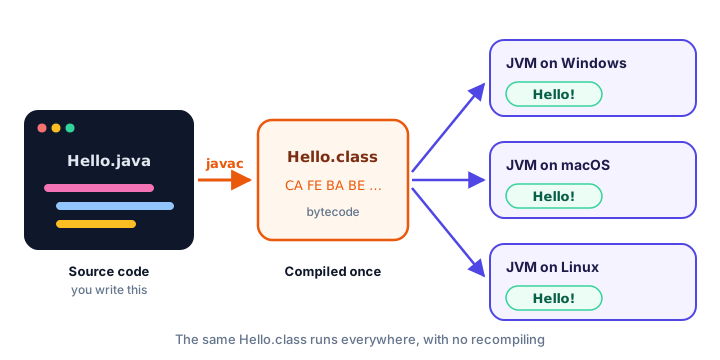
You'll follow this journey step by step in How Java Works.
Why learn Java?
- Jobs. Java is one of the most requested skills in software job listings, especially at large companies, banks and enterprise software firms.
- It teaches good habits. Java asks you to say what type each value is and to organize code into classes. This feels strict at first, but it helps you write clear programs and catch mistakes early.
- Helpful errors before you run. The compiler checks your code and points out many mistakes, like a typo in a name, before the program even starts.
- Huge community. Decades of libraries, books, videos and answered questions mean help is always a search away.
- It's a gateway. Once you know Java, languages like C#, Kotlin and C++ feel familiar because they share much of the same syntax.
📝 Note
Java and JavaScript are completely different languages. The similar name came from a marketing decision in the 1990s. JavaScript mainly runs in web browsers; Java runs on the JVM. Knowing one doesn't mean you know the other.
Java vs Python vs C: a quick comparison
If you've seen other languages, this table shows where Java fits. Each one is a great choice for different jobs.
| Feature | Java | Python | C |
|---|---|---|---|
| How it runs | Compiled to bytecode, run by the JVM | Run by the Python interpreter | Compiled to machine code |
| Types | Static: you declare types, checked before running | Dynamic: checked while running | Static |
| Code blocks | Curly braces { } | Indentation | Curly braces { } |
| Statement endings | Semicolon ; | New line | Semicolon ; |
| Memory management | Automatic (garbage collector) | Automatic | Manual (malloc / free) |
| Speed | Fast | Slower | Very fast |
| Object-oriented | Yes, built around classes | Yes, but optional | No |
| Typical uses | Android, back ends, enterprise apps | Data science, AI, scripting | Operating systems, embedded devices |
Here's the same "print a greeting" task in all three languages, so you can see the style difference. First Python:
print("Welcome to the library!")Then C:
#include <stdio.h>

int main(void) {
    printf("Welcome to the library!\n");
    return 0;
}
And Java:
public class Library {
    public static void main(String[] args) {
        System.out.println("Welcome to the library!");
    }
}
Welcome to the library!Java needs a few more lines than Python for a tiny program. That's the cost of its structure, and it pays off once programs grow to thousands of lines. If you're curious about the others, see the introduction to Python or the introduction to C.
Is Java hard to learn?
Java is a very reasonable first language. You'll type a bit more than in Python, and you'll see words like public and static before they're fully explained. That's normal. This course explains every new term the first time it appears, and each lesson builds on the one before it. Most beginners write useful little programs within their first week.
💡 Tip
Type the examples yourself instead of copying them. Your fingers learn the patterns (braces, semicolons, quotes) much faster than your eyes do, and fixing your own typos is great practice.
What you'll learn in this Java course
This tutorial takes you from zero to writing real programs, one small step at a time:
- Getting started: install Java, write your first program, and understand how Java runs it.
- The basics: variables, data types, operators, strings and user input.
- Control flow: making decisions with
ifandswitch, and repeating work with loops. - Arrays and methods: storing lists of values and organizing code into reusable pieces.
- Object-oriented programming: classes, objects, inheritance, interfaces, enums and records.
- Exceptions: handling errors without crashing.
- Collections and modern Java:
ArrayList,HashMap, generics, lambdas and streams. - Files and threads: reading and writing files, and doing several things at once.
- Projects and practice: build a calculator, a bank account system, a tic-tac-toe game and more, then prepare for interviews.
Common mistakes beginners make about Java
1. Mixing up Java and JavaScript
They're different languages with different rules. Make sure tutorials and answers you find online are about Java.
2. Installing only a JRE
To write Java programs you need the JDK (Java Development Kit), which includes the compiler. A JRE alone can only run programs. The next lesson shows you exactly what to install.
3. Trying to memorize everything at once
Words like public static void main look scary on day one. You don't need to understand them yet. Use them as a pattern for now; each word gets its own lesson later.
Practice exercise
🏋️ Try it yourself
Look at the DeliveryReceipt program above. Change it so it prints a movie ticket instead: the cinema name, the movie title, and a seat number, each on its own line. (You can try this right after the next two lessons, once Java is installed.)
Show solution
public class MovieTicket {
    public static void main(String[] args) {
        System.out.println("Starlight Cinema");
        System.out.println("Movie: The Last Orbit");
        System.out.println("Seat: F7");
    }
}
Starlight Cinema
Movie: The Last Orbit
Seat: F7Each System.out.println(...) line prints one line. The text you want to show goes inside double quotes.
What's next?
Now you know what Java is and why it's worth learning. Next, get it running on your own computer: How to Install Java walks you through installing the JDK on Windows, macOS and Linux.
Key takeaways
- Java is a high-level, object-oriented programming language released in 1995 and now led by Oracle and the open-source community.
- Java code is compiled into bytecode, which runs on the Java Virtual Machine (JVM).
- "Write once, run anywhere" means the same compiled program runs on any system that has a JVM.
- Java powers Android apps, banking back ends, large websites, big data tools and Minecraft: Java Edition.
- Java is statically typed, uses curly braces and semicolons, and manages memory automatically.
- Java and JavaScript are completely different languages.
Frequently asked questions
What is Java in simple words?
Java is a programming language for writing apps and programs. You write the code once, Java turns it into bytecode, and the Java Virtual Machine runs it on Windows, macOS, Linux and many other devices.
What is Java mainly used for?
Java is mainly used for Android apps, server back ends for banks and large websites, enterprise business software, big data tools and games such as Minecraft: Java Edition.
Is Java good for beginners?
Yes. Java is a little more verbose than Python, but its clear structure and helpful compiler errors teach good programming habits, and its syntax carries over to C#, Kotlin and C++.
Is Java the same as JavaScript?
No. They are different languages that only share part of a name. Java runs on the JVM and is used for apps and servers, while JavaScript mainly runs in web browsers.
Is Java free to use?
Yes. You can download free, open-source builds of the JDK, such as Eclipse Temurin or OpenJDK, and use them for learning and for commercial work.