Java Methods
Updated 8 min read Aimerscrew
So far, every program you've written has lived inside one big main method. That works for small examples, but real programs quickly become long, repetitive and hard to read. Java methods fix this by letting you give a block of code a name and run it whenever you need it. In this lesson, you'll learn what a method is, how to define and call one, and why methods are the first big step toward writing clean code.
🌍 Real-life example
A method is like a recipe card. You write the steps for "make pancakes" once. Every Sunday you don't reinvent pancakes; you just say "make pancakes" and follow the card. In Java, you write the steps once (define the method) and then use its name to run them as often as you like (call the method).
What is a method in Java?
A method is a named block of code that does one job. The code inside it does not run on its own; it runs only when another part of the program calls it by name. You've already used methods without knowing it: System.out.println() is a method, and so is main, which Java calls for you when the program starts.
Here's a program with a method of our own called printBanner:
public class CoffeeShop {
    public static void main(String[] args) {
        printBanner();
        System.out.println("Your latte is ready.");
        printBanner();
    }

    public static void printBanner() {
        System.out.println("==========================");
        System.out.println("   Bean There Coffee Co.  ");
        System.out.println("==========================");
    }
}
==========================
Bean There Coffee Co.
==========================
Your latte is ready.
==========================
Bean There Coffee Co.
==========================The three banner lines are written once, but they print twice, because main calls printBanner() twice.
How do you define a method in Java?
Defining a method means writing it: giving it a name and a body. A method definition has a header (the first line) and a body (the code between the curly braces).
public static void greet(String name) {
    System.out.println("Hi, " + name + "!");
}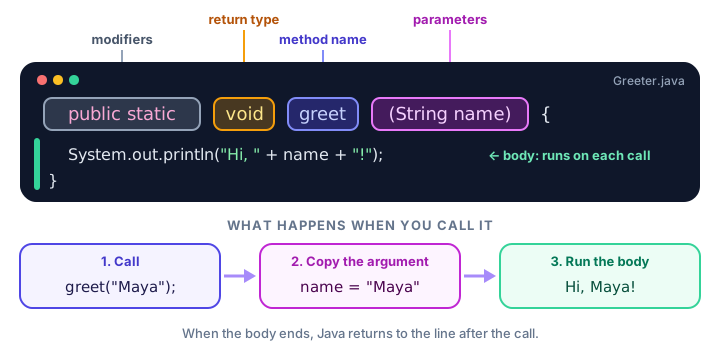
Here's what each part means:
| Part | In the example | What it means |
|---|---|---|
| Modifiers | public static | Who can use the method, and that it belongs to the class itself. You'll use both for now. |
| Return type | void | What kind of value the method gives back. void means "nothing". |
| Name | greet | The name you use to call it. |
| Parameters | (String name) | Values the method needs to do its job. Empty () if it needs none. |
| Body | { ... } | The statements that run each time the method is called. |
📝 Note
For now, write public static in front of every method you put next to main. The word static lets main call the method directly, without creating an object first. You'll learn exactly what it means in Java static, after you meet classes and objects.
How do you call a method?
Calling (or invoking) a method means asking it to run. Write its name followed by parentheses and a semicolon. When Java reaches a call, it jumps into the method, runs its body from top to bottom, then comes back and continues right after the call.
public class CallOrder {
    public static void main(String[] args) {
        System.out.println("1. Boarding starts");
        checkTicket();
        System.out.println("4. Take your seat");
    }

    public static void checkTicket() {
        System.out.println("2. Scanning boarding pass...");
        System.out.println("3. Ticket OK");
    }
}
1. Boarding starts
2. Scanning boarding pass...
3. Ticket OK
4. Take your seatThe numbers show the order in which lines run. Java left main, ran both lines of checkTicket, and returned to finish main.
What is a void method?
A void method does a job but doesn't hand any value back to the caller. Printing a message, drawing a line or updating the screen are typical void jobs. The keyword void sits where the return type goes.
Most methods also take parameters, which are inputs that change what the method does. Here, the same method prints a different line each time:
public class Receipt {
    public static void main(String[] args) {
        printLine(20);
        System.out.println("Pizza Margherita  $12");
        System.out.println("Garlic bread       $4");
        printLine(20);
        System.out.println("Total             $16");
        printLine(20);
    }

    public static void printLine(int length) {
        for (int i = 0; i < length; i++) {
            System.out.print("-");
        }
        System.out.println();
    }
}
--------------------
Pizza Margherita $12
Garlic bread $4
--------------------
Total $16
--------------------The value 20 in the call is copied into the variable length inside the method. You'll explore this fully in Java method parameters. Methods that hand back a value instead of printing it are covered in Java return values.
Why use methods? The DRY principle
Programmers follow a rule called DRY: Don't Repeat Yourself. If the same few lines appear in several places, put them in a method and call it instead. Look at this repetitive program for a game's score screen:
System.out.println("*** Level complete! ***");
System.out.println("Saving progress...");
System.out.println("*** Level complete! ***");
System.out.println("Saving progress...");
If you wanted to change "Saving progress..." to "Progress saved", you'd have to find and edit every copy, and it's easy to miss one. With a method, there's exactly one place to change:
public class GameLevels {
    public static void main(String[] args) {
        for (int level = 1; level <= 3; level++) {
            System.out.println("Playing level " + level);
            finishLevel();
        }
    }

    public static void finishLevel() {
        System.out.println("*** Level complete! ***");
        System.out.println("Saving progress...");
    }
}
Playing level 1
*** Level complete! ***
Saving progress...
Playing level 2
*** Level complete! ***
Saving progress...
Playing level 3
*** Level complete! ***
Saving progress...Methods give you several benefits at once:
- Reuse: write the code once, call it anywhere.
- Readability: a call like
finishLevel()says what happens, so readers don't have to decode every line. - Easier fixes: a bug in a method is fixed in one place.
- Smaller pieces: you can test and think about one small task at a time.
Can a method call another method?
Yes. Any method can call any other method, and that's how big programs are built from small pieces. Here, orderMeal calls two smaller methods:
public class FoodDelivery {
    public static void main(String[] args) {
        orderMeal();
    }

    public static void orderMeal() {
        System.out.println("Order placed: veggie burger");
        cookFood();
        deliverFood();
        System.out.println("Enjoy your meal!");
    }

    public static void cookFood() {
        System.out.println("Kitchen: cooking...");
    }

    public static void deliverFood() {
        System.out.println("Rider: on the way...");
    }
}
Order placed: veggie burger
Kitchen: cooking...
Rider: on the way...
Enjoy your meal!Notice that cookFood and deliverFood are written below the method that uses them. In Java, the order of methods inside a class doesn't matter; Java finds them all before running anything.
Where do methods go in a Java program?
Methods live inside a class, side by side with main. They can't be placed inside another method. A typical layout looks like this:
public class MyProgram {

    public static void main(String[] args) {
        // calls go here
    }

    public static void firstHelper() {
        // ...
    }

    public static void secondHelper() {
        // ...
    }
}
How should you name methods in Java?
Method names follow the same camelCase style as variables: start with a lowercase letter and capitalize each new word. Because a method does something, start its name with a verb.
| Good name | Poor name | Why |
|---|---|---|
printReceipt | receipt | A verb says what the method does. |
calculateTotal | CalculateTotal | Methods start with a lowercase letter; capitals are for class names. |
sendReminder | doStuff | The name should describe the task clearly. |
isValidPin | check | Methods that answer yes/no often start with is, has or can. |
💡 Tip
Keep each method focused on one task. If you struggle to name a method without using "and" (like loadAndPrintAndSave), it's probably doing too much. Split it into smaller methods.
Common mistakes with methods
1. Defining a method inside main
public static void main(String[] args) {
    public static void sayHi() {   // not allowed here
        System.out.println("Hi");
    }
}
The compiler stops with error: illegal start of expression. Move the method out of main so the two sit next to each other inside the class.
2. Forgetting static
If you leave out static and call the method from main, you'll see:
error: non-static method sayHi() cannot be referenced from a static contextFor now, add static to every method you call from main.
3. Forgetting the parentheses
Writing sayHi; instead of sayHi(); gives error: not a statement. The parentheses are what tell Java "run this method", even when there's nothing inside them.
4. Defining a method but never calling it
A method body only runs when it's called. If you write a method and nothing happens, check that main (or another method that runs) actually calls it.
Practice exercise
🏋️ Try it yourself
Write a program for a parking garage. Create a void method printWelcome() that prints Welcome to City Parking and a void method printRules() that prints two rules: - Max speed 5 mph and - Pay before you leave. Call printWelcome(), then printRules(), then print Gate opening... from main.
Show solution
public class CityParking {
    public static void main(String[] args) {
        printWelcome();
        printRules();
        System.out.println("Gate opening...");
    }

    public static void printWelcome() {
        System.out.println("Welcome to City Parking");
    }

    public static void printRules() {
        System.out.println("- Max speed 5 mph");
        System.out.println("- Pay before you leave");
    }
}
Welcome to City Parking
- Max speed 5 mph
- Pay before you leave
Gate opening...What's next?
You can now define and call your own methods. Next, make them far more flexible by passing in values with Java method parameters, and learn how Java copies those values into the method.
Key takeaways
- A method is a named block of code that runs only when it is called.
- Define a method inside a class, next to main, never inside another method.
- Call a method by writing its name followed by parentheses, like printBanner().
- A void method does a job but does not give a value back.
- Methods follow the DRY principle: write code once, reuse it everywhere.
- Name methods in camelCase starting with a verb, such as calculateTotal.
- For now, mark methods you call from main as public static; static is explained later.
Frequently asked questions
What is a method in Java?
A method is a named block of code inside a class that performs one task. Its code runs only when the method is called, and it can be called as many times as needed.
What is the difference between defining and calling a method?
Defining a method means writing its header and body once. Calling it means running it by writing its name and parentheses, for example greet(). You define once and can call many times.
What does void mean in Java?
void is the return type for a method that does not give any value back to the code that called it. Such a method usually prints something or changes some state.
Does the order of methods in a Java class matter?
No. A method can call another method that is written above or below it in the same class. Java knows about all methods in the class before the program runs.
Why do my methods need the static keyword?
main is static, and a static method can call other static methods directly without creating an object. Static methods are explained in detail in the Java static lesson after classes and objects.