Java Packages
Updated 9 min read Aimerscrew
Java comes with thousands of ready-made classes, and real projects add hundreds more. Without some organization, finding anything would be a nightmare, and two classes named Order would clash. Java packages solve both problems by grouping related classes under a name, much like folders on your computer. In this lesson, you'll use import, explore a few built-in packages, and build a small multi-file program with your own packages from the command line.
🌍 Real-life example
A supermarket groups products into aisles: dairy, bakery, cleaning. "Milk" alone could mean anything, but "dairy aisle, milk" is clear. Two different stores can both sell a product called "Classic" without confusion, because each has its own brand name in front. A package is the aisle sign (and the brand) for your classes.
What is a package in Java?
A package is a named group of related classes. Every class belongs to exactly one package, and its full name (also called its fully qualified name) is the package name plus the class name. For example, the Scanner class you used in Java user input is really java.util.Scanner: the class Scanner in the package java.util.
Packages do three jobs:
- Organize classes into meaningful groups (
java.timefor dates,java.iofor files). - Prevent name clashes:
com.shop.Orderandcom.kitchen.Ordercan both exist. - Control access: package-private members are visible only inside their package, as you saw in Java access modifiers.
How do you import a class in Java?
To use a class from another package by its short name, add an import statement at the top of the file, before the class:
import java.time.LocalDate;
import java.util.Arrays;

public class TripPlanner {
    public static void main(String[] args) {
        String[] cities = {"Rome", "Lisbon", "Berlin", "Dublin"};
        Arrays.sort(cities);
        System.out.println("Route: " + Arrays.toString(cities));

        LocalDate departure = LocalDate.of(2026, 7, 14);
        LocalDate returnDay = departure.plusDays(10);
        System.out.println("Leave " + departure + ", back " + returnDay);
    }
}
Route: [Berlin, Dublin, Lisbon, Rome]
Leave 2026-07-14, back 2026-07-24import doesn't copy any code into your file. It just tells the compiler, "when I write Arrays, I mean java.util.Arrays". You'll learn more about dates in Java date and time.
You can also skip the import and write the full name every time. It works, but it's wordy, so it's mostly used when two classes with the same short name meet in one file:
public class FullName {
    public static void main(String[] args) {
        int[] scores = {72, 95, 88};
        java.util.Arrays.sort(scores);   // full name, no import needed
        System.out.println(java.util.Arrays.toString(scores));
    }
}
[72, 88, 95]Importing a whole package with *
A wildcard import such as import java.util.*; makes every class in java.util available by its short name:
import java.util.*;

public class Wildcard {
    public static void main(String[] args) {
        int[] lapTimes = {61, 58, 64, 57};
        Arrays.sort(lapTimes);
        System.out.println("Fastest lap: " + lapTimes[0] + " s");

        Random dice = new Random(7);   // fixed seed, same numbers every run
        System.out.println("Dice roll: " + (dice.nextInt(6) + 1));
    }
}
Fastest lap: 57 s
Dice roll: 5Here both Arrays and Random come from java.util. Because the Random object is created with the fixed seed 7, it produces the same "random" roll on every run. Note that * imports only the classes in that exact package, not packages inside it: java.util.* does not include java.util.function.
💡 Tip
Many teams prefer one import per class: it shows exactly where each class comes from. Code editors such as IntelliJ IDEA and VS Code add and organize imports for you automatically.
Why don't String and Math need an import?
Classes in the java.lang package are imported automatically into every Java file. That package holds the most basic classes: String, Math, System, Integer and more. That's why you've been using them since your first program without a single import:
public class LangDemo {
    public static void main(String[] args) {
        String city = "Toronto";                     // java.lang.String
        int biggest = Math.max(4, 9);                // java.lang.Math
        int parsed = Integer.parseInt("42");         // java.lang.Integer
        System.out.println(city + " " + biggest + " " + parsed);
    }
}
Toronto 9 42Useful built-in Java packages
| Package | What's inside | Example classes |
|---|---|---|
java.lang | Core classes, imported automatically | String, Math, System, Integer |
java.util | Utilities and collections | Scanner, Arrays, Random, ArrayList |
java.time | Dates and times | LocalDate, LocalTime, Duration |
java.io / java.nio.file | Reading and writing files | File, Files, Path |
java.math | Exact, very large numbers | BigDecimal, BigInteger |
You'll meet ArrayList in Java ArrayList and the file classes in Java file handling.
Static imports
A static import brings in a class's static members, so you can use them without the class name:
import static java.lang.Math.PI;
import static java.lang.Math.sqrt;

public class CircleArea {
    public static void main(String[] args) {
        double radius = 3.0;
        double area = PI * radius * radius;   // no "Math." needed

        System.out.printf("Area: %.2f%n", area);
        System.out.println("Side of a square with the same area: " + Math.round(sqrt(area) * 100) / 100.0);
    }
}
Area: 28.27
Side of a square with the same area: 5.32Use static imports sparingly. Math.sqrt(area) tells the reader where sqrt comes from; a bare sqrt(area) doesn't.
How do you create your own package?
Creating a package takes two steps:
- Put a
packageline as the very first statement of the file, before any imports. - Save the file in a folder path that matches the package name, with each dot becoming a folder.
Let's build a tiny store app with two packages: com.example.store for the shop's classes and com.example.app for the class with main. Here's the folder layout:
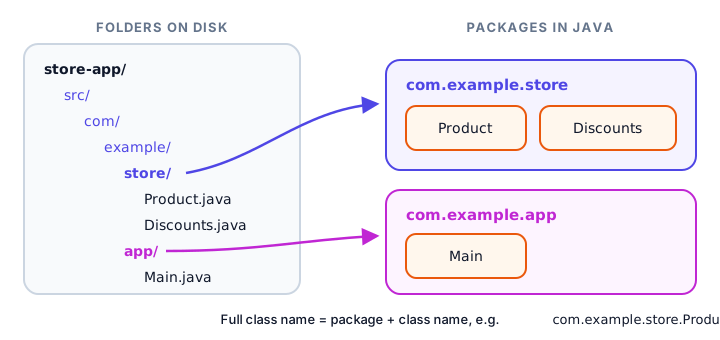
The first file, src/com/example/store/Product.java, is a normal encapsulated class with a package line on top. It's public, because code in another package needs to use it:
package com.example.store;

public class Product {
    private final String name;
    private final double price;

    public Product(String name, double price) {
        this.name = name;
        this.price = price;
    }

    public String getName() {
        return name;
    }

    public double getPrice() {
        return price;
    }
}
The second file, src/com/example/store/Discounts.java, holds a static utility method:
package com.example.store;

public class Discounts {
    public static double applyPercent(double price, int percent) {
        return price * (100 - percent) / 100;
    }
}
Finally, src/com/example/app/Main.java lives in a different package, so it imports the two classes:
package com.example.app;

import com.example.store.Discounts;
import com.example.store.Product;

public class Main {
    public static void main(String[] args) {
        Product backpack = new Product("Backpack", 50.0);
        double salePrice = Discounts.applyPercent(backpack.getPrice(), 20);

        System.out.println(backpack.getName() + " costs $" + backpack.getPrice());
        System.out.println("With 20% off: $" + salePrice);
    }
}
📝 Note
These three files are one program spread across folders, so you can't run them with java Main.java like earlier examples. You compile them together first, as shown next. (Single-file examples in this course have no package line, which puts them in the unnamed "default package".)
Compiling and running a program with packages
Open a terminal in the store-app folder. First, compile all three files. The -d out option tells javac to put the compiled .class files into a folder named out, creating the matching package folders for you:
javac -d out src/com/example/store/Product.java src/com/example/store/Discounts.java src/com/example/app/Main.javaIf nothing is printed, it worked. The out folder now mirrors the packages: out/com/example/store/Product.class, out/com/example/store/Discounts.class and out/com/example/app/Main.class.
Next, run the program. -cp out (short for class path) tells Java where to look for classes, and you give the full name of the class with main, using dots, not slashes:
$ java -cp out com.example.app.Main
Backpack costs $50.0
With 20% off: $40.0
If you forget -cp out or use the short name Main, Java can't find the class and prints Error: Could not find or load main class. These commands work the same on Windows, macOS and Linux.
What happens across package boundaries?
If Main.java left out import com.example.store.Product;, compiling would fail with error: cannot find symbol ... class Product, because Product lives in a different package. And if Product's getPrice() method had no public modifier (package-private), the compiler would say:
error: getPrice() is not public in Product; cannot be accessed from outside packageThat's the package-private access level doing its job. Classes inside com.example.store could still call it; com.example.app can't.
Package naming conventions
- All lowercase:
com.example.store, nevercom.example.Store. - Reverse domain name: companies start packages with their internet domain backwards. A company owning
acmeflights.comwould usecom.acmeflights.booking. Domains are unique, so package names are too. (example.comis reserved for examples, which is why we used it.) - Folders match: the package
com.acmeflights.bookinglives incom/acmeflights/booking/. - Don't use
javaorjavaxas the start of your own package names; they're reserved for Java itself.
Python has a very similar idea; compare with Python packages.
Common mistakes with packages
1. Package line doesn't match the folder
A file declaring package com.example.store; must sit in com/example/store/. Otherwise, Java can't find the class when it runs.
2. Putting import before package
The order is fixed: package first, then import lines, then the class.
3. Running with the short class name
Write java -cp out com.example.app.Main, not java -cp out Main or java out/com/example/app/Main.
4. Forgetting public on classes used from other packages
A class without public is invisible outside its package, and so are its package-private methods.
5. Thinking import loads code
import is only a naming shortcut. It doesn't slow your program down, and unused imports do nothing (though they're clutter, so remove them).
Practice exercise
🏋️ Try it yourself
Write a single-file program ExamResults that imports java.util.Arrays and uses a static import for Math.round. Sort the scores {67, 92, 81, 74, 88}, print them, then print the average rounded to the nearest whole number. Bonus: recreate the store app above on your computer and add a third class to com.example.store.
Show solution
import java.util.Arrays;

import static java.lang.Math.round;

public class ExamResults {
    public static void main(String[] args) {
        int[] scores = {67, 92, 81, 74, 88};
        Arrays.sort(scores);
        System.out.println("Sorted: " + Arrays.toString(scores));

        int total = 0;
        for (int score : scores) {
            total += score;
        }
        double average = (double) total / scores.length;
        System.out.println("Average: " + round(average));
    }
}
Sorted: [67, 74, 81, 88, 92]
Average: 80The exact average is 80.4, and round turns it into 80.
What's next?
Congratulations on finishing the classes and objects chapter! You can now design classes, protect their data and organize them into packages. Next, learn Java inheritance, where one class builds on another and the protected modifier finally comes into play.
Key takeaways
- A package is a named group of related classes, stored in a matching folder.
- A class's full name is its package plus its name, such as java.util.Scanner.
- import lets you use a class by its short name; java.lang is imported automatically.
- import java.util.*; imports every class in that package, but not sub-packages.
- Create a package with a package line as the first statement and a matching folder path.
- Compile with javac -d out and run with java -cp out followed by the full class name.
- Package names are lowercase and usually start with a reversed domain name.
Frequently asked questions
What is a package in Java?
A package is a named group of related classes, such as java.util. It organizes code, prevents name clashes between classes with the same name and controls package-private access.
Which package is imported by default in Java?
java.lang is imported automatically into every Java file. That is why String, Math, System and Integer can be used without an import statement.
What is the difference between import and static import?
A normal import lets you use a class by its short name, like Arrays. A static import lets you use a class's static members without the class name, like PI instead of Math.PI.
Does import java.util.* slow down a program?
No. import only tells the compiler how to resolve short names. It does not load or copy any code, so wildcard and single-class imports run equally fast.
How do you compile and run Java classes in packages?
Compile from the project folder with javac -d out followed by the source files, then run with java -cp out followed by the full class name, such as com.example.app.Main.
Why do Java package names look like com.company.project?
By convention, organizations start package names with their internet domain reversed. Because domains are unique, this keeps package names from different companies from clashing.