Java HashMap
Updated 10 min read Aimerscrew
Lists are great when you think in positions: first song, second song. But often you think in names: "What's Mom's number?" or "How many hoodies are in stock?" A Java HashMap answers questions like these instantly. It stores key-value pairs and finds any value by its key, whether the map holds ten entries or ten million. In this lesson, you'll learn the essential HashMap methods, how to loop over a map, how hashing works under the hood, and when to choose LinkedHashMap or TreeMap instead.
🌍 Real-life example
Your phone's contacts app is a map. The key is a name ("Mom", "Dentist") and the value is a phone number. You never scroll through numbers to find Mom; you look her up by name. Each name appears once, and if Mom gets a new number, you update the existing entry rather than adding a second "Mom".
What is a HashMap in Java?
A HashMap is a class in java.util that implements the Map interface. It stores entries, and each entry is a pair: a key and the value it maps to. The rules are simple:
- Keys are unique. Putting a key that already exists replaces its old value.
- Values can repeat. Two products can both have a stock of 8.
- There is no index and no guaranteed order. You reach values by key only.
You give a map two types in angle brackets: Map<KeyType, ValueType>. For example, Map<String, Integer> maps text keys to whole-number values.
Adding and reading entries: put, get, containsKey and remove
import java.util.HashMap;
import java.util.Map;

public class PhoneContacts {
    public static void main(String[] args) {
        Map<String, String> contacts = new HashMap<>();

        contacts.put("Mom", "+1 555 0100");
        contacts.put("Dentist", "+44 20 7946 0018");
        contacts.put("Pizza place", "+1 555 0199");

        System.out.println("Call Mom: " + contacts.get("Mom"));
        System.out.println("Contacts saved: " + contacts.size());

        String old = contacts.put("Mom", "+1 555 0123");   // same key: replaces the value
        System.out.println("Mom's old number: " + old);
        System.out.println("Mom's new number: " + contacts.get("Mom"));
        System.out.println("Contacts saved: " + contacts.size());

        System.out.println("Have the dentist? " + contacts.containsKey("Dentist"));
        contacts.remove("Dentist");
        System.out.println("After removing: " + contacts.containsKey("Dentist"));
        System.out.println("Look up Grandpa: " + contacts.get("Grandpa"));
    }
}
Call Mom: +1 555 0100
Contacts saved: 3
Mom's old number: +1 555 0100
Mom's new number: +1 555 0123
Contacts saved: 3
Have the dentist? true
After removing: false
Look up Grandpa: nullA few things to notice:
put(key, value)adds an entry. When the key already exists, it replaces the value and returns the old one, and the size stays the same.get(key)returns the value, ornullif the key isn't in the map.containsKey(key)asks "is this key here?" andremove(key)deletes the entry.
⚠️ Watch out
Since get returns null for missing keys, code like int n = stock.get("Scarf"); crashes with a NullPointerException when there's no "Scarf". Java can't turn null into an int. Use getOrDefault, shown next.
getOrDefault and putIfAbsent
Two methods make missing keys easy to handle. getOrDefault(key, fallback) returns the fallback instead of null. putIfAbsent(key, value) adds the entry only if the key isn't there yet. Here's a clothing store's inventory:
import java.util.HashMap;
import java.util.Map;

public class Inventory {
    public static void main(String[] args) {
        Map<String, Integer> stock = new HashMap<>();
        stock.put("T-shirt", 25);
        stock.put("Hoodie", 8);

        // getOrDefault: a fallback when the key is missing
        System.out.println("Hoodies: " + stock.getOrDefault("Hoodie", 0));
        System.out.println("Scarves: " + stock.getOrDefault("Scarf", 0));

        // putIfAbsent: only adds when the key is new
        stock.putIfAbsent("Hoodie", 100);   // ignored, Hoodie already exists
        stock.putIfAbsent("Beanie", 15);    // added
        System.out.println("Hoodies: " + stock.get("Hoodie") + ", Beanies: " + stock.get("Beanie"));

        // Sell 3 T-shirts: read, change, put back
        stock.put("T-shirt", stock.get("T-shirt") - 3);
        System.out.println("T-shirts left: " + stock.get("T-shirt"));
    }
}
Hoodies: 8
Scarves: 0
Hoodies: 8, Beanies: 15
T-shirts left: 22The line stock.put("T-shirt", stock.get("T-shirt") - 3) is the standard "read, change, write back" pattern for updating a value.
How do you count things with a HashMap?
Counting is one of the most common jobs for a map: words in a text, votes in a poll, visits per page. The trick is getOrDefault(word, 0) + 1: if the word is new, start from 0.
import java.util.HashMap;
import java.util.Map;
import java.util.TreeMap;

public class WordCount {
    public static void main(String[] args) {
        String review = "great food great service slow delivery great price slow";

        Map<String, Integer> counts = new HashMap<>();
        for (String word : review.split(" ")) {
            counts.put(word, counts.getOrDefault(word, 0) + 1);
        }

        // Copy into a TreeMap just to print the words in alphabetical order
        System.out.println(new TreeMap<>(counts));
        System.out.println("\"great\" appears " + counts.get("great") + " times");
    }
}
{delivery=1, food=1, great=3, price=1, service=1, slow=2}
"great" appears 3 timesA plain HashMap prints its entries in an order that depends on hashing, which looks random and isn't guaranteed. Copying it into a TreeMap (more on that below) gives a tidy alphabetical printout.
The shortcut: merge
merge(key, 1, Integer::sum) does the same thing in one call: if the key is missing, store 1; otherwise add 1 to the existing value.
import java.util.HashMap;
import java.util.Map;
import java.util.TreeMap;

public class WordCountMerge {
    public static void main(String[] args) {
        String[] votes = {"pizza", "tacos", "pizza", "sushi", "pizza", "tacos"};

        Map<String, Integer> tally = new HashMap<>();
        for (String vote : votes) {
            tally.merge(vote, 1, Integer::sum);
        }

        System.out.println(new TreeMap<>(tally));
    }
}
{pizza=3, sushi=1, tacos=2}Integer::sum is a method reference: it tells merge to combine the old and new values with Integer.sum(a, b). You'll learn more about this syntax in Java lambda expressions. The getOrDefault version is perfectly fine if you prefer it.
How do you loop through a HashMap?
A map isn't a Collection, so you can't loop over it directly. Instead, ask it for one of three views:
keySet(): all the keys, as aSet.values(): all the values, as aCollection.entrySet(): all the entries. Each one is aMap.EntrywithgetKey()andgetValue().
When you need both the key and the value, loop over entrySet(). It's faster than looping over keys and calling get for each one. This café menu uses a LinkedHashMap so the output order is predictable; the same loop works on any map:
import java.util.LinkedHashMap;
import java.util.Map;

public class MenuPrices {
    public static void main(String[] args) {
        Map<String, Double> menu = new LinkedHashMap<>();
        menu.put("Espresso", 2.20);
        menu.put("Latte", 3.80);
        menu.put("Croissant", 2.95);

        System.out.println("Keys:   " + menu.keySet());
        System.out.println("Values: " + menu.values());

        double total = 0;
        for (Map.Entry<String, Double> entry : menu.entrySet()) {
            System.out.printf("%-10s $%.2f%n", entry.getKey(), entry.getValue());
            total += entry.getValue();
        }
        System.out.printf("One of everything: $%.2f%n", total);
    }
}
Keys: [Espresso, Latte, Croissant]
Values: [2.2, 3.8, 2.95]
Espresso $2.20
Latte $3.80
Croissant $2.95
One of everything: $8.95How does a HashMap work inside?
A HashMap keeps an array of buckets. When you call put("kiwi", 7), Java:
- Calls the key's
hashCode()method, which turns the key into a number (the hash). - Uses that number to pick a bucket, roughly
hash % numberOfBuckets. - Stores the entry in that bucket.
Later, get("kiwi") repeats the same calculation, jumps straight to the right bucket and checks only the few entries there with equals(). That's why lookups stay fast no matter how big the map grows.
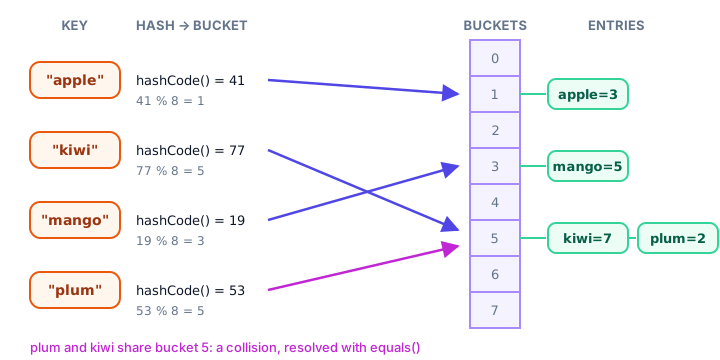
When two different keys land in the same bucket, that's called a collision. It's normal: the bucket simply holds both entries. When the map gets about 75% full, it doubles its bucket array and spreads the entries out again, so buckets stay short. This also explains why a HashMap has no meaningful order: entries sit wherever their hash puts them.
📝 Note
Because HashMap relies on hashCode() and equals(), any class you use as a key must implement both consistently. String, Integer and records already do. For your own classes, see Java Object class.
LinkedHashMap and TreeMap: maps with order
Need order? Swap the class and keep the same methods:
LinkedHashMapremembers the order you inserted keys.TreeMapkeeps keys sorted (alphabetically for Strings, smallest first for numbers).
import java.util.LinkedHashMap;
import java.util.Map;
import java.util.TreeMap;

public class MapOrder {
    public static void main(String[] args) {
        Map<String, Integer> arrivals = new LinkedHashMap<>();
        Map<String, Integer> sorted = new TreeMap<>();

        String[] cities = {"Tokyo", "Cairo", "Oslo", "Austin", "Lima"};
        int[] flights = {12, 4, 7, 9, 3};

        for (int i = 0; i < cities.length; i++) {
            arrivals.put(cities[i], flights[i]);
            sorted.put(cities[i], flights[i]);
        }

        System.out.println("LinkedHashMap: " + arrivals);
        System.out.println("TreeMap:       " + sorted);
    }
}
LinkedHashMap: {Tokyo=12, Cairo=4, Oslo=7, Austin=9, Lima=3}
TreeMap: {Austin=9, Cairo=4, Lima=3, Oslo=7, Tokyo=12}A plain HashMap with the same five cities would print them in a jumbled order that you shouldn't rely on; it can even change between Java versions.
| HashMap | LinkedHashMap | TreeMap | |
|---|---|---|---|
| Order of keys | None guaranteed | Insertion order | Sorted by key |
| Speed of get/put | Fastest | Almost as fast | A bit slower (grows with log of size) |
null key allowed? | Yes, one | Yes, one | No |
| Extra features | None | Predictable iteration | firstKey(), lastKey(), ranges |
| Use it for | Pure lookups | Lookups shown in input order | Sorted reports, leaderboards, dates |
Common mistakes with HashMap
1. Expecting insertion order
Printing or looping a HashMap gives no reliable order. Use LinkedHashMap or TreeMap when order matters.
2. Unboxing a missing value
int count = map.get("missing"); throws NullPointerException. Use getOrDefault(key, 0) or check containsKey first.
3. Thinking put adds a second entry for the same key
Keys are unique. A second put with the same key replaces the value. To store several values per key, use a map of lists, such as Map<String, List<String>>.
4. Using get(index) like a list
map.get(0) looks for the key 0, not the first entry. Maps have no positions.
5. Changing a key object after putting it
If a key's fields change, its hash changes and the map can't find it in its bucket anymore. Use unchanging keys such as Strings, numbers or records.
Practice exercise
🏋️ Try it yourself
A class is voting on a field trip. The votes are {"Zoo", "Museum", "Beach", "Zoo", "Beach", "Zoo", "Museum"}. Count the votes in a map, print each place with its count in alphabetical order, then print the winner.
Show solution
import java.util.Map;
import java.util.TreeMap;

public class ClassVotes {
    public static void main(String[] args) {
        String[] votes = {"Zoo", "Museum", "Beach", "Zoo", "Beach", "Zoo", "Museum"};

        Map<String, Integer> tally = new TreeMap<>();
        for (String vote : votes) {
            tally.put(vote, tally.getOrDefault(vote, 0) + 1);
        }

        String winner = "";
        int most = 0;
        for (Map.Entry<String, Integer> entry : tally.entrySet()) {
            System.out.println(entry.getKey() + ": " + entry.getValue());
            if (entry.getValue() > most) {
                most = entry.getValue();
                winner = entry.getKey();
            }
        }
        System.out.println("Field trip to the " + winner + "!");
    }
}
Beach: 2
Museum: 2
Zoo: 3
Field trip to the Zoo!Using a TreeMap gives the alphabetical printout for free, and the loop over entrySet() tracks the highest count as it goes.
What's next?
A map's keys are unique, and sometimes uniqueness is all you need: a guest list, a set of visited pages, the distinct tags on a post. Next, learn the collection built for exactly that: Java HashSet.
Key takeaways
- A HashMap stores key-value pairs and finds a value by its key very quickly.
- Keys are unique: put with an existing key replaces the value and returns the old one.
- get returns null for a missing key; getOrDefault returns a fallback instead.
- Count things with map.put(key, map.getOrDefault(key, 0) + 1) or map.merge(key, 1, Integer::sum).
- Loop over entrySet() to get both keys and values; keySet() and values() give one side.
- HashMap uses hashCode() to pick a bucket and equals() to find the exact key, so it has no guaranteed order.
- Use LinkedHashMap for insertion order and TreeMap for sorted keys.
Frequently asked questions
What is a HashMap in Java?
A HashMap is a class in java.util that stores key-value pairs. You add entries with put(key, value) and read them with get(key). Keys are unique, and lookups are fast because the key's hash code points straight to a bucket.
Does HashMap maintain insertion order?
No. HashMap does not guarantee any order, and the order can change as the map grows. Use LinkedHashMap to keep insertion order or TreeMap to keep keys sorted.
What happens if you put a duplicate key in a HashMap?
The new value replaces the old one, and put returns the old value. The map still contains only one entry for that key.
How do I iterate over a HashMap in Java?
Use a for-each loop over map.entrySet() and call getKey() and getValue() on each Map.Entry. Use keySet() if you only need keys or values() if you only need values.
What is the difference between HashMap and TreeMap?
HashMap is the fastest and has no order. TreeMap keeps its keys sorted, which makes printing and range queries easy, but each operation is a little slower and it does not allow null keys.
Can a HashMap have null keys or values?
Yes. A HashMap allows one null key and any number of null values. Because get also returns null for missing keys, use containsKey to tell the two cases apart.