Java Project: Tic-Tac-Toe Game
Updated 13 min read Aimerscrew
Building tic tac toe in Java is a fun way to put 2D arrays to work. The board is a 3 by 3 grid of characters, two players take turns placing X and O, and after every move the program checks whether someone has three in a row or the board is full. You'll also handle bad input, keep score across games and let the players go again. It's the final project of the chapter, so it brings many earlier lessons together.
🌍 Real-life example
Picture a cinema seat map on a booking website. The seats form a grid of rows and columns, each seat is either free or taken, and the site won't let you pick a seat someone else already booked. A tic-tac-toe board is the same idea in miniature: a grid of cells, each free or taken, with rules about which moves are allowed.
What you'll build
The finished game:
- draws the board with the number of each free cell, so players know what to type,
- lets two players take turns on the same keyboard, X first,
- refuses text, numbers outside 1 to 9 and cells that are already taken,
- detects a win on any row, column or diagonal, and detects a draw,
- keeps a running score and asks to play again.
Concepts used in this project
| Concept | Where it's used | Lesson |
|---|---|---|
| 2D arrays | The char[3][3] board and the LINES table | multidimensional arrays |
| Nested loops | Printing the board row by row | nested loops |
| Integer division and remainder | Turning cell 1–9 into a row and column | arithmetic operators |
Arrays.fill() | Clearing the board | Arrays class |
StringBuilder | Building each printed row | StringBuilder |
| Ternary operator | Switching players | ternary operator |
continue in a loop | Asking again after bad input | break and continue |
How do cell numbers map to the 2D array?
Players think in cells 1 to 9, but the array uses a row and a column from 0 to 2. Two small formulas convert between them: the row is (cell - 1) / 3 and the column is (cell - 1) % 3. The diagram also shows the 8 ways to win: 3 rows, 3 columns and 2 diagonals.
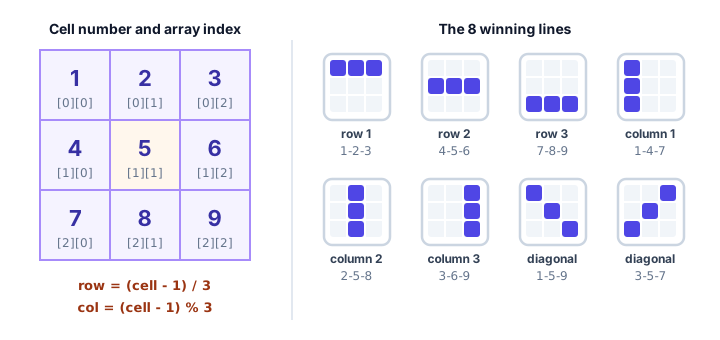
Step 1: From cell number to row and column
Let's test the formulas before building anything else. This program fills a char[3][3] array with the digits 1 to 9, using the formulas to find each cell's position:
public class CellMapping {
    public static void main(String[] args) {
        char[][] cells = new char[3][3];

        for (int cell = 1; cell <= 9; cell++) {
            int row = (cell - 1) / 3;
            int col = (cell - 1) % 3;
            cells[row][col] = (char) ('0' + cell);
            System.out.println("Cell " + cell + " -> cells[" + row + "][" + col + "]");
        }

        System.out.println();
        for (char[] row : cells) {
            System.out.println(row[0] + " " + row[1] + " " + row[2]);
        }
    }
}
Cell 1 -> cells[0][0]
Cell 2 -> cells[0][1]
Cell 3 -> cells[0][2]
Cell 4 -> cells[1][0]
Cell 5 -> cells[1][1]
Cell 6 -> cells[1][2]
Cell 7 -> cells[2][0]
Cell 8 -> cells[2][1]
Cell 9 -> cells[2][2]
1 2 3
4 5 6
7 8 9Why does it work? Subtracting 1 turns cells 1–9 into 0–8. Dividing by 3 (integer division drops the remainder) gives 0 for 0–2, 1 for 3–5 and 2 for 6–8: the row. The remainder % 3 cycles 0, 1, 2, 0, 1, 2...: the column. The expression (char) ('0' + cell) turns the number 5 into the character '5', because digit characters sit next to each other in the character table.
Step 2: A Board class
The board gets its own class, so the game logic never touches the array directly. It offers a few clear methods: place(), isFree(), hasWon(), isFull(), clear() and print(). This test fills two boards by hand: one where X wins on the top row, and one that ends in a draw:
import java.util.Arrays;

public class BoardTest {
    public static void main(String[] args) {
        Board board = new Board();
        board.place(1, 'X');
        board.place(5, 'O');
        board.place(2, 'X');
        board.place(9, 'O');
        board.place(3, 'X');
        board.print();
        System.out.println("X wins? " + board.hasWon('X'));
        System.out.println("Cell 4 free? " + board.isFree(4));

        board.clear();
        String moves = "XOXXOOOXX";
        for (int cell = 1; cell <= 9; cell++) {
            board.place(cell, moves.charAt(cell - 1));
        }
        System.out.println();
        board.print();
        System.out.println("X wins? " + board.hasWon('X') + ", O wins? " + board.hasWon('O'));
        System.out.println("Board full? " + board.isFull());
    }
}

class Board {
    /** Every way to win, as cell numbers 1-9: 3 rows, 3 columns, 2 diagonals. */
    private static final int[][] LINES = {
        {1, 2, 3}, {4, 5, 6}, {7, 8, 9},
        {1, 4, 7}, {2, 5, 8}, {3, 6, 9},
        {1, 5, 9}, {3, 5, 7}
    };

    private final char[][] cells = new char[3][3];

    Board() {
        clear();
    }

    void clear() {
        for (char[] row : cells) {
            Arrays.fill(row, ' ');
        }
    }

    /** Cell 1 is [0][0], cell 5 is [1][1], cell 9 is [2][2]. */
    char get(int cell) {
        return cells[(cell - 1) / 3][(cell - 1) % 3];
    }

    boolean isFree(int cell) {
        return get(cell) == ' ';
    }

    void place(int cell, char mark) {
        cells[(cell - 1) / 3][(cell - 1) % 3] = mark;
    }

    boolean hasWon(char mark) {
        for (int[] line : LINES) {
            if (get(line[0]) == mark && get(line[1]) == mark && get(line[2]) == mark) {
                return true;
            }
        }
        return false;
    }

    boolean isFull() {
        for (int cell = 1; cell <= 9; cell++) {
            if (isFree(cell)) {
                return false;
            }
        }
        return true;
    }

    /** Prints the board, showing the cell number in every empty cell. */
    void print() {
        for (int row = 0; row < 3; row++) {
            StringBuilder line = new StringBuilder();
            for (int col = 0; col < 3; col++) {
                char mark = cells[row][col];
                int cellNumber = row * 3 + col + 1;
                line.append(' ').append(mark == ' ' ? (char) ('0' + cellNumber) : mark);
                if (col < 2) {
                    line.append(" |");
                }
            }
            System.out.println(line);
            if (row < 2) {
                System.out.println("---+---+---");
            }
        }
    }
}
X | X | X
---+---+---
4 | O | 6
---+---+---
7 | 8 | O
X wins? true
Cell 4 free? true
X | O | X
---+---+---
X | O | O
---+---+---
O | X | X
X wins? false, O wins? false
Board full? trueHere's how the key methods work:
hasWon()doesn't write eight separateifstatements. Instead, theLINEStable (a 2Dintarray) lists the three cells of every winning line, and one loop checks them all. Adding a new rule, like a bigger board, means changing data rather than code.isFull()returnsfalseas soon as it finds a free cell. A draw is simply "the board is full and nobody has won".print()uses nested loops: the outer loop goes through rows, the inner loop builds one row in aStringBuilder. Free cells show their number, which doubles as instructions for the players.clear()usesArrays.fill(row, ' ')on each row. A newchararray is filled with'\u0000', not spaces, so the constructor callsclear()too.
💡 Tip: only check the player who just moved
After X moves, O can't suddenly have won, so the game only calls hasWon(player) for the current player. It's a small saving here, but this kind of thinking matters in bigger games.
Step 3: Read a valid move
A move must pass three checks: it's a number, it's from 1 to 9, and the cell is free. readMove() loops until all three pass, printing a specific message for each problem:
int cell;
try {
    cell = Integer.parseInt(text);
} catch (NumberFormatException e) {
    System.out.println("Please type a number from 1 to 9.");
    continue;
}
if (cell < 1 || cell > 9) {
    System.out.println("Cell " + cell + " doesn't exist. Use 1 to 9.");
} else if (!board.isFree(cell)) {
    System.out.println("Cell " + cell + " is already taken. Pick another.");
} else {
    return cell;
}
The order matters: the range check comes before isFree(), because calling isFree(10) would use row 3, which doesn't exist, and throw an ArrayIndexOutOfBoundsException. Thanks to || and else if, isFree() only runs for valid cell numbers. continue jumps back to the top of the while loop to ask again.
Step 4: Turns, results and the score
playGame() is the heart of the game. It loops forever, and each pass is one turn: print the board, read a move, place it, then check for a win or a draw. If neither happened, the ternary operator swaps players:
player = (player == 'X') ? 'O' : 'X';The method returns a char describing the result: 'X' or 'O' for the winner, 'D' for a draw, or 'E' if the input ran out. main() uses a switch to update the score, prints it, and asks whether to play again. The same Board object is reused, so main() calls board.clear() before every game.
The complete tic tac toe game in Java
Save this as TicTacToe.java and run it with java TicTacToe.java:
import java.util.Arrays;
import java.util.Scanner;

public class TicTacToe {
    static final Scanner input = new Scanner(System.in);
    static final char INPUT_ENDED = 'E';

    public static void main(String[] args) {
        Board board = new Board();
        int xWins = 0;
        int oWins = 0;
        int draws = 0;

        System.out.println("=== Tic-Tac-Toe ===");
        System.out.println("Two players take turns. Type a cell number to place your mark.");
        while (true) {
            board.clear();
            char result = playGame(board);
            if (result == INPUT_ENDED) {
                break;
            }
            switch (result) {
                case 'X' -> xWins++;
                case 'O' -> oWins++;
                default -> draws++;
            }
            System.out.println("Score: X " + xWins + ", O " + oWins + ", draws " + draws);
            if (!askToPlayAgain()) {
                break;
            }
        }
        System.out.println("Thanks for playing!");
    }

    /** Plays one game. Returns 'X' or 'O' for the winner, 'D' for a draw, or INPUT_ENDED. */
    static char playGame(Board board) {
        char player = 'X';
        while (true) {
            System.out.println();
            board.print();
            int cell = readMove(board, player);
            if (cell == -1) {
                return INPUT_ENDED;
            }
            board.place(cell, player);

            if (board.hasWon(player)) {
                System.out.println();
                board.print();
                System.out.println("Player " + player + " wins!");
                return player;
            }
            if (board.isFull()) {
                System.out.println();
                board.print();
                System.out.println("It's a draw!");
                return 'D';
            }
            player = (player == 'X') ? 'O' : 'X';
        }
    }

    /** Asks until the player picks a free cell from 1 to 9. Returns -1 if input ends. */
    static int readMove(Board board, char player) {
        while (true) {
            System.out.print("Player " + player + ", choose a cell (1-9): ");
            if (!input.hasNextLine()) {
                System.out.println();
                return -1;
            }
            String text = input.nextLine().trim();
            int cell;
            try {
                cell = Integer.parseInt(text);
            } catch (NumberFormatException e) {
                System.out.println("Please type a number from 1 to 9.");
                continue;
            }
            if (cell < 1 || cell > 9) {
                System.out.println("Cell " + cell + " doesn't exist. Use 1 to 9.");
            } else if (!board.isFree(cell)) {
                System.out.println("Cell " + cell + " is already taken. Pick another.");
            } else {
                return cell;
            }
        }
    }

    static boolean askToPlayAgain() {
        while (true) {
            System.out.print("Play again? (y/n): ");
            if (!input.hasNextLine()) {
                System.out.println();
                return false;
            }
            String answer = input.nextLine().trim().toLowerCase();
            if (answer.equals("y") || answer.equals("yes")) {
                return true;
            }
            if (answer.equals("n") || answer.equals("no")) {
                return false;
            }
            System.out.println("Please type y or n.");
        }
    }
}

class Board {
    /** Every way to win, as cell numbers 1-9: 3 rows, 3 columns, 2 diagonals. */
    private static final int[][] LINES = {
        {1, 2, 3}, {4, 5, 6}, {7, 8, 9},
        {1, 4, 7}, {2, 5, 8}, {3, 6, 9},
        {1, 5, 9}, {3, 5, 7}
    };

    private final char[][] cells = new char[3][3];

    Board() {
        clear();
    }

    void clear() {
        for (char[] row : cells) {
            Arrays.fill(row, ' ');
        }
    }

    /** Cell 1 is [0][0], cell 5 is [1][1], cell 9 is [2][2]. */
    char get(int cell) {
        return cells[(cell - 1) / 3][(cell - 1) % 3];
    }

    boolean isFree(int cell) {
        return get(cell) == ' ';
    }

    void place(int cell, char mark) {
        cells[(cell - 1) / 3][(cell - 1) % 3] = mark;
    }

    boolean hasWon(char mark) {
        for (int[] line : LINES) {
            if (get(line[0]) == mark && get(line[1]) == mark && get(line[2]) == mark) {
                return true;
            }
        }
        return false;
    }

    boolean isFull() {
        for (int cell = 1; cell <= 9; cell++) {
            if (isFree(cell)) {
                return false;
            }
        }
        return true;
    }

    /** Prints the board, showing the cell number in every empty cell. */
    void print() {
        for (int row = 0; row < 3; row++) {
            StringBuilder line = new StringBuilder();
            for (int col = 0; col < 3; col++) {
                char mark = cells[row][col];
                int cellNumber = row * 3 + col + 1;
                line.append(' ').append(mark == ' ' ? (char) ('0' + cellNumber) : mark);
                if (col < 2) {
                    line.append(" |");
                }
            }
            System.out.println(line);
            if (row < 2) {
                System.out.println("---+---+---");
            }
        }
    }
}
Sample run
Here's a sample run (the user's typing follows each prompt). Player X tries a taken cell, player O types a word, and X finally wins down the middle column:
=== Tic-Tac-Toe ===
Two players take turns. Type a cell number to place your mark.

 1 | 2 | 3
---+---+---
 4 | 5 | 6
---+---+---
 7 | 8 | 9
Player X, choose a cell (1-9): 5

 1 | 2 | 3
---+---+---
 4 | X | 6
---+---+---
 7 | 8 | 9
Player O, choose a cell (1-9): 1

 O | 2 | 3
---+---+---
 4 | X | 6
---+---+---
 7 | 8 | 9
Player X, choose a cell (1-9): 5
Cell 5 is already taken. Pick another.
Player X, choose a cell (1-9): 9

 O | 2 | 3
---+---+---
 4 | X | 6
---+---+---
 7 | 8 | X
Player O, choose a cell (1-9): ten
Please type a number from 1 to 9.
Player O, choose a cell (1-9): 3

 O | 2 | O
---+---+---
 4 | X | 6
---+---+---
 7 | 8 | X
Player X, choose a cell (1-9): 2

 O | X | O
---+---+---
 4 | X | 6
---+---+---
 7 | 8 | X
Player O, choose a cell (1-9): 7

 O | X | O
---+---+---
 4 | X | 6
---+---+---
 O | 8 | X
Player X, choose a cell (1-9): 8

 O | X | O
---+---+---
 4 | X | 6
---+---+---
 O | X | X
Player X wins!
Score: X 1, O 0, draws 0
Play again? (y/n): n
Thanks for playing!
X won with cells 2, 5 and 8, one of the three column lines in the LINES table. If the players had answered y, the board would be cleared and a new game would start with the score kept.
Common mistakes in this project
1. Mixing up rows and columns
cells[row][col] is row first. Writing cells[col][row] flips the board along its diagonal, so pressing 2 puts the mark in cell 4. Testing with a program like Step 1 catches this quickly.
2. Forgetting to clear the board
A new char[3][3] is filled with the null character '\u0000', not spaces. If isFree() compares with ' ', every cell looks taken. Fill the array with spaces first, and clear it again before each new game.
3. Checking for a draw before a win
If the last move both fills the board and completes a line, checking isFull() first announces a draw when it was really a win. Always check hasWon() first.
4. Checking the range after using the cell
Calling board.isFree(cell) before checking that cell is from 1 to 9 crashes the game when someone types 10 or 0. Validate the range first.
Level up: challenges
🏋️ Challenges
- Player names. Ask for both players' names at the start and print "Sofia (X) wins!" instead of "Player X wins!".
- Take turns starting. Let O start the second game, X the third, and so on.
- Computer opponent. Add a one-player mode where O picks a random free cell using
java.util.Random, as in the number guessing game. - Smarter computer. Make the computer win if it can, otherwise block X's winning move, otherwise take the center, otherwise play randomly.
- Bigger board. Support a 4 by 4 board where you need 4 in a row. Generate the winning lines with loops instead of writing them by hand.
Show a hint for challenge 3
static int computerMove(Board board, Random random) {
    while (true) {
        int cell = random.nextInt(9) + 1;
        if (board.isFree(cell)) {
            return cell;
        }
    }
}
This loop always ends, because playGame() only asks for a move when the board isn't full.
Show a hint for challenge 4
For each free cell, place O temporarily, check hasWon('O'), then set the cell back to ' '. If it wins, play there. Repeat the same test with X to find a cell you must block.
What's next?
Congratulations, you've finished all five Java projects! You've built a calculator, a guessing game, a library system, a bank and now a game with a 2D board. Time to sharpen your skills with short problems: head to the Java exercises. Curious how the same game looks in another language? Compare it with tic-tac-toe in C.
Key takeaways
- Tic tac toe in Java stores the board in a char[3][3] array, where each cell holds X, O or a space.
- Convert a cell number from 1 to 9 into an array position with row = (cell - 1) / 3 and col = (cell - 1) % 3.
- A table of the 8 winning lines (3 rows, 3 columns, 2 diagonals) lets one loop check every way to win.
- Check for a win before checking for a full board, because the final move can do both.
- Validate a move in order: is it a number, is it from 1 to 9, and is the cell free.
- Keeping the board in its own class with clear methods makes the game loop short and easy to read.
Frequently asked questions
How do you make tic tac toe in Java?
Store the board in a char[3][3] array filled with spaces, print it, and loop over turns. Each turn reads a cell number, checks it is valid and free, places X or O, then checks for a win or a full board before switching players.
How do you check for a winner in tic tac toe in Java?
There are 8 winning lines: 3 rows, 3 columns and 2 diagonals. Keep them in a table such as int[][] LINES and loop over it, returning true when all three cells of a line hold the current player's mark.
How do you detect a draw in tic tac toe?
A game is a draw when the board is full and nobody has won. After checking for a win, loop over all cells; if none of them is free, announce a draw.
Why use a 2D array for the tic tac toe board?
A 2D array matches the grid shape of the board, so cells[row][col] reads naturally and nested loops print it row by row. A one-dimensional array of 9 cells also works and avoids the row and column conversion.
What is a good next step after building tic tac toe in Java?
Add a computer opponent: start with random moves, then teach it to win or block when possible. Advanced learners can implement the minimax algorithm, which makes the computer play perfectly.