Java throw and throws
Updated 9 min read Aimerscrew
So far, Java has been the one throwing exceptions: dividing by zero, parsing bad text, using a wrong index. But your own code can spot problems too, like a withdrawal bigger than the balance or a negative age. Java throw and throws are the two keywords that let your methods raise the alarm themselves. In this lesson you'll learn how to throw an exception, how to declare one with throws, how exceptions travel up the chain of method calls, and when throwing is the right choice.
🌍 Real-life example
A barista takes your order for a "large hot chocolate with no milk, no water". That's impossible to make, so instead of handing you an empty cup, the barista stops and says "Sorry, I can't make that". They don't try to fix it themselves; they hand the problem back to you, the customer, to decide what to order instead. Throwing an exception is your method saying "I can't do this, and here's why" and handing the problem back to whoever called it.
What is the difference between throw and throws in Java?
The two keywords look almost the same, but they do different jobs:
throw | throws | |
|---|---|---|
| What it does | Actually throws an exception, right now | Warns that a method might throw an exception |
| Where it goes | Inside a method body, as a statement | In the method signature, after the parentheses |
| Followed by | One exception object: throw new ...(...) | One or more exception class names |
| Example | throw new IllegalArgumentException("Too big"); | void load() throws IOException |
A simple way to remember: throw is the action, throws is the warning label.
How to throw an exception in Java
To throw an exception, you create an exception object with new and hand it to throw. The text you pass becomes the exception's message:
throw new IllegalArgumentException("Amount must be positive");As soon as Java reaches a throw, the method stops right there, just like with a return. No more lines of that method run.
IllegalArgumentException is the standard unchecked exception for "the value you gave me is not allowed". It's the one you'll throw most often. Here's a bank account that refuses bad withdrawals:
public class AtmDemo {
    public static void main(String[] args) {
        BankAccount account = new BankAccount("Maya", 100);

        try {
            account.withdraw(30);
            account.withdraw(500);
            account.withdraw(10);
        } catch (IllegalArgumentException e) {
            System.out.println("Withdrawal refused: " + e.getMessage());
        }

        System.out.println("Balance: $" + account.getBalance());
    }
}

class BankAccount {
    private final String owner;
    private int balance;

    BankAccount(String owner, int balance) {
        this.owner = owner;
        this.balance = balance;
    }

    void withdraw(int amount) {
        if (amount <= 0) {
            throw new IllegalArgumentException("Amount must be positive");
        }
        if (amount > balance) {
            throw new IllegalArgumentException(
                "Balance is $" + balance + ", can't withdraw $" + amount);
        }
        balance -= amount;
        System.out.println(owner + " withdrew $" + amount);
    }

    int getBalance() {
        return balance;
    }
}
Maya withdrew $30
Withdrawal refused: Balance is $70, can't withdraw $500
Balance: $70The second withdrawal throws, so balance -= amount never runs and the money stays safe. The third withdrawal is skipped too, because the exception jumped straight to the catch block in main.
Validating values with throw
Throwing in a constructor or setter is a great way to make sure an object can never hold nonsense. This is a key part of encapsulation: the class protects its own data.
public class GymSignup {
    public static void main(String[] args) {
        int[] ages = {29, -4, 16};

        for (int age : ages) {
            try {
                Member member = new Member("Guest", age);
                System.out.println("Welcome! Age on file: " + member.getAge());
            } catch (IllegalArgumentException e) {
                System.out.println("Signup failed: " + e.getMessage());
            }
        }
    }
}

class Member {
    private final String name;
    private final int age;

    Member(String name, int age) {
        if (age < 0) {
            throw new IllegalArgumentException("age can't be negative: " + age);
        }
        this.name = name;
        this.age = age;
    }

    String getName() {
        return name;
    }

    int getAge() {
        return age;
    }
}
Welcome! Age on file: 29
Signup failed: age can't be negative: -4
Welcome! Age on file: 16Because the constructor throws before any object is created, there is no way to end up with a Member whose age is -4.
💡 Tip
Write messages that help whoever reads them: say what was wrong and include the bad value, like "age can't be negative: -4". A message like "error" helps nobody.
The throws keyword and checked exceptions
Remember from Java exceptions that checked exceptions (like IOException) must be caught or declared. throws is how you declare them. It tells the compiler and every caller: "calling me might throw this, so be ready".
import java.io.IOException;

public class WeatherApp {
    public static void main(String[] args) {
        String[] cities = {"Oslo", "Atlantis"};

        for (String city : cities) {
            try {
                System.out.println(city + ": " + fetchForecast(city));
            } catch (IOException e) {
                System.out.println("Could not load forecast: " + e.getMessage());
            }
        }
    }

    static String fetchForecast(String city) throws IOException {
        if (city.equals("Atlantis")) {
            throw new IOException("weather server has no data for " + city);
        }
        return "cloudy, 12 degrees";
    }
}
Oslo: cloudy, 12 degrees
Could not load forecast: weather server has no data for AtlantisIn a real app, fetchForecast would talk to a server over the network, which can fail at any time. That's exactly the kind of problem checked exceptions are for. If you delete throws IOException from the method, the code no longer compiles. The key error points at the throw line:
WeatherApp.java:18: error: unreported exception IOException; must be caught or declared to be thrownA method can declare several exceptions, separated by commas: void sync() throws IOException, InterruptedException. You don't need throws for unchecked exceptions like IllegalArgumentException, although you may list them as documentation.
How exceptions propagate up the call stack
When a method throws and doesn't catch, the exception doesn't just disappear. It propagates: it leaves the method and goes back to whoever called it. If that method doesn't catch it either, it keeps going, all the way back to main. The list of methods waiting on each other is called the call stack.
public class FoodDelivery {
    public static void main(String[] args) {
        System.out.println("main: start");
        try {
            placeOrder(-2);
        } catch (IllegalArgumentException e) {
            System.out.println("main: caught -> " + e.getMessage());
        }
        System.out.println("main: end");
    }

    static void placeOrder(int items) {
        System.out.println("placeOrder: start");
        chargeCard(items * 15);
        System.out.println("placeOrder: end");
    }

    static void chargeCard(int amount) {
        System.out.println("chargeCard: start");
        if (amount <= 0) {
            throw new IllegalArgumentException("invalid amount $" + amount);
        }
        System.out.println("chargeCard: charged $" + amount);
    }
}
main: start
placeOrder: start
chargeCard: start
main: caught -> invalid amount $-30
main: endLook at which lines are missing: chargeCard: charged and placeOrder: end. Both methods were exited early, because the exception passed straight through them on its way to the catch in main.
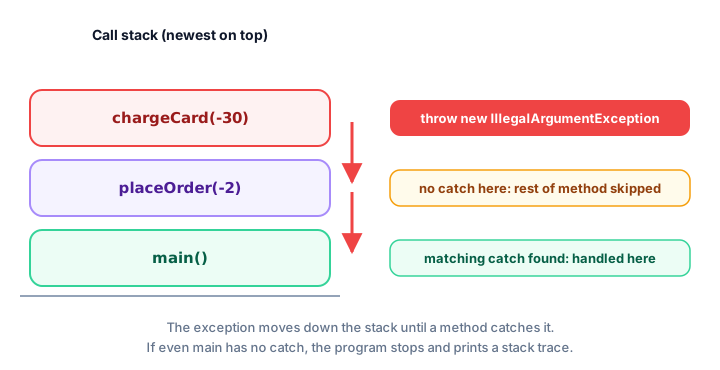
This is useful: the method that finds a problem (chargeCard) isn't always the best place to handle it. main knows about the user and the screen, so it's the right place to show a message.
Rethrowing an exception
Sometimes a method wants to react to an exception (for example, write a log line) but still let the caller deal with it. It can catch the exception and rethrow it with throw e;:
public class SeatBooking {
    public static void main(String[] args) {
        String[] seats = new String[4];
        try {
            bookSeat(seats, 2);
            bookSeat(seats, 9);
        } catch (ArrayIndexOutOfBoundsException e) {
            System.out.println("Sorry, that seat doesn't exist.");
        }
    }

    static void bookSeat(String[] seats, int number) {
        try {
            seats[number] = "TAKEN";
            System.out.println("Seat " + number + " booked");
        } catch (ArrayIndexOutOfBoundsException e) {
            System.out.println("[log] booking failed for seat " + number);
            throw e;
        }
    }
}
Seat 2 booked
[log] booking failed for seat 9
Sorry, that seat doesn't exist.You can also catch one exception and throw a different, more meaningful one, passing the original along as the "cause". You'll see how in custom exceptions.
When should you throw an exception vs return a value?
Not every "no" deserves an exception. Use this rule of thumb:
| Situation | Better choice | Example |
|---|---|---|
| The result is a normal, expected answer | Return a value | Searching a playlist for a song that isn't there: return -1 or false |
| The caller broke the rules | Throw an unchecked exception | withdraw(-50) or an age of -4 |
| Something outside your control failed | Throw (or declare) a checked exception | A file is missing, a server doesn't answer |
For example, String.indexOf("z") returns -1 when the letter isn't found, because "not found" is a normal answer. But Integer.parseInt("abc") throws, because there is no sensible number to give back.
Common mistakes with throw and throws
1. Forgetting new
throw IllegalArgumentException("Too big");You must create the object: throw new IllegalArgumentException("Too big");.
2. Mixing up throw and throws
throws goes in the method header; throw goes in the body. Writing throws new ... inside a method is a compile error.
3. Writing code after throw
Any statement directly after throw in the same block can never run, and Java reports it as an "unreachable statement" error.
4. Declaring throws Exception everywhere
void save() throws Exception forces every caller to deal with any possible problem. Declare the specific exceptions the method really throws, like throws IOException.
Practice exercise
🏋️ Try it yourself
Write a method setTemperature(int celsius) for a thermostat that throws an IllegalArgumentException if the value is below 10 or above 30, and otherwise prints Thermostat set to 22 (with the real value). In main, try the values 22, 35 and 18, catching the exception for each one and printing its message.
Show solution
public class Thermostat {
    public static void main(String[] args) {
        int[] requests = {22, 35, 18};

        for (int request : requests) {
            try {
                setTemperature(request);
            } catch (IllegalArgumentException e) {
                System.out.println("Error: " + e.getMessage());
            }
        }
    }

    static void setTemperature(int celsius) {
        if (celsius < 10 || celsius > 30) {
            throw new IllegalArgumentException(
                celsius + " is outside the range 10-30");
        }
        System.out.println("Thermostat set to " + celsius);
    }
}
Thermostat set to 22
Error: 35 is outside the range 10-30
Thermostat set to 18What's next?
Built-in exceptions like IllegalArgumentException are general. Next, learn to create exceptions that describe your program's problems, such as InsufficientFundsException, in Java custom exceptions.
Key takeaways
- throw actually throws an exception: throw new IllegalArgumentException("message");
- throws goes in a method signature and declares checked exceptions the method might throw.
- A throw ends the method immediately, like return; the lines after it do not run.
- IllegalArgumentException is the standard unchecked exception for rejecting bad argument values.
- An uncaught exception propagates back through the calling methods until one catches it, or the program stops.
- You can catch an exception, react to it, and rethrow it with throw e;
- Return a value for normal "not found" answers; throw when the caller broke the rules or something outside failed.
Frequently asked questions
What is the difference between throw and throws in Java?
throw is a statement inside a method that actually throws one exception object, for example throw new IllegalArgumentException("bad value"). throws is part of a method signature that declares which checked exceptions the method might throw, for example void load() throws IOException.
Do I need throws for unchecked exceptions?
No. The compiler only requires throws for checked exceptions. You can still list unchecked exceptions such as IllegalArgumentException in a throws clause as documentation, but it is optional.
What happens after a throw statement?
The current method stops immediately. Java looks for a matching catch block, first in the current method, then in each calling method in turn. If none is found, the program ends and prints a stack trace.
Which exception should I throw for an invalid argument?
Use IllegalArgumentException when a method receives a value it cannot accept, such as a negative amount. Use IllegalStateException when the object is in the wrong state for the call, such as withdrawing from a closed account.
Can a method throw more than one exception?
Yes. It can contain several throw statements for different problems, and it can declare several checked exceptions separated by commas, for example void sync() throws IOException, InterruptedException.