Java Data Types
Updated 9 min read Aimerscrew
In the last lesson you created variables like int score and String name. The word in front of the name is the variable's data type, and Java data types decide what a variable can hold, how much memory it uses and what you can do with it. In this lesson you'll learn all eight primitive types, see how String is different, and learn to write number and character values the way Java expects.
🌍 Real-life example
A parking garage has spots of different sizes: small ones for motorcycles, regular ones for cars and long bays for buses. You wouldn't waste a bus bay on a scooter, and a bus simply won't fit in a motorcycle spot. Java data types work like those spots: each one is sized for a certain kind of value, and Java checks that every value fits the spot you chose.
What are data types in Java?
A data type is a category of values plus the rules for using them. Java sorts its types into two families:
- Primitive types: eight built-in types for simple values such as numbers, single characters and true/false. The variable holds the value itself.
- Reference types: everything else, including
String, arrays and the classes you'll write later. The variable holds a reference (a pointer) to an object stored somewhere else in memory.
Every primitive type name is written in lowercase (int, double). Reference types usually start with a capital letter (String).
The 8 primitive data types in Java
Here's the full list. Sizes are fixed on every computer, which is one reason Java programs behave the same everywhere.
| Type | Size | Holds | Range or precision | Example |
|---|---|---|---|---|
byte | 8 bits | tiny whole numbers | -128 to 127 | byte floor = 12; |
short | 16 bits | small whole numbers | -32,768 to 32,767 | short year = 2026; |
int | 32 bits | whole numbers (the default) | about ±2.1 billion | int likes = 48210; |
long | 64 bits | very large whole numbers | about ±9.2 quintillion | long views = 9_000_000_000L; |
float | 32 bits | decimal numbers | about 6–7 significant digits | float speed = 3.5f; |
double | 64 bits | decimal numbers (the default) | about 15–16 significant digits | double price = 19.99; |
char | 16 bits | one character | Unicode values 0 to 65,535 | char grade = 'A'; |
boolean | not specified | true or false | true, false | boolean isOpen = true; |
A bit is a single 0 or 1. More bits means more possible values, so a 64-bit long can count far higher than an 8-bit byte.
public class PrimitiveTour {
    public static void main(String[] args) {
        byte floor = 12;
        short year = 2026;
        int likes = 48210;
        long views = 9_000_000_000L;
        float speed = 3.5f;
        double price = 19.99;
        char grade = 'A';
        boolean isOpen = true;

        System.out.println("floor = " + floor);
        System.out.println("year = " + year);
        System.out.println("likes = " + likes);
        System.out.println("views = " + views);
        System.out.println("speed = " + speed);
        System.out.println("price = " + price);
        System.out.println("grade = " + grade);
        System.out.println("isOpen = " + isOpen);
    }
}
floor = 12
year = 2026
likes = 48210
views = 9000000000
speed = 3.5
price = 19.99
grade = A
isOpen = trueJava even stores the exact limits as built-in constants, so you never have to memorize them:
public class TypeLimits {
    public static void main(String[] args) {
        System.out.println("byte:  " + Byte.MIN_VALUE + " to " + Byte.MAX_VALUE);
        System.out.println("short: " + Short.MIN_VALUE + " to " + Short.MAX_VALUE);
        System.out.println("int:   " + Integer.MIN_VALUE + " to " + Integer.MAX_VALUE);
        System.out.println("long:  " + Long.MIN_VALUE + " to " + Long.MAX_VALUE);
    }
}
byte: -128 to 127
short: -32768 to 32767
int: -2147483648 to 2147483647
long: -9223372036854775808 to 9223372036854775807Byte, Integer and friends are wrapper classes, which you'll study properly in Java wrapper classes.
Which number type should I use?
For everyday code, the answer is short: use int for whole numbers and double for decimals. Reach for the others only when you have a reason.
longwhen values can pass about 2.1 billion: world population, file sizes in bytes, milliseconds since 1970.byteandshortmostly to save memory in huge collections of small numbers, or when working with raw file data.floatmainly in graphics and games, where memory matters more than precision.
⚠️ Decimals are not exact
float and double store numbers in binary, and some decimals (like 0.1) can't be stored exactly. Tiny rounding errors appear, as the next example shows. That's fine for distances or temperatures, but banks use a class called BigDecimal for money in serious applications.
public class DecimalPrecision {
    public static void main(String[] args) {
        double sum = 0.1 + 0.2;
        System.out.println("0.1 + 0.2 = " + sum);

        double third = 10.0 / 3;
        float thirdFloat = 10.0f / 3;
        System.out.println("double: " + third);
        System.out.println("float:  " + thirdFloat);
    }
}
0.1 + 0.2 = 0.30000000000000004
double: 3.3333333333333335
float: 3.3333333Notice how double keeps about twice as many correct digits as float. That's why double is the default choice.
char and boolean
A char holds exactly one character in single quotes: a letter, a digit, a symbol or even a space. Behind the scenes it's stored as a number (its Unicode code), which you'll use in Java type casting.
A boolean holds only true or false, perfect for yes/no facts. It powers every decision your program makes, as you'll see in Java if-else.
public class LibraryBook {
    public static void main(String[] args) {
        char shelf = 'C';
        char sizeCode = '7';
        boolean isAvailable = false;
        boolean isReserved = true;

        System.out.println("Shelf " + shelf + ", size code " + sizeCode);
        System.out.println("Available: " + isAvailable);
        System.out.println("Reserved: " + isReserved);
    }
}
Shelf C, size code 7
Available: false
Reserved: true'7' in single quotes is the character seven, not the number 7. You can't do math with it the way you'd expect.
Java literals: writing values in code
A literal is a value typed directly into your code, like 42 or "Hello". Java decides a literal's type from how you write it:
| Literal | Type | Rule |
|---|---|---|
42 | int | a whole number is an int by default |
42L | long | add L for a long (use capital L; lowercase l looks like 1) |
3.14 | double | a number with a decimal point is a double by default |
3.14f | float | add f or F for a float |
1_000_000 | int | underscores between digits are ignored; they just help you read |
'A' | char | one character in single quotes |
"A" | String | text in double quotes, even a single letter |
true | boolean | only true or false |
public class Literals {
    public static void main(String[] args) {
        int stadiumSeats = 90_000;
        long worldPopulation = 8_100_000_000L;
        float discount = 0.15f;
        char currency = '$';

        System.out.println(stadiumSeats);
        System.out.println(worldPopulation);
        System.out.println(discount);
        System.out.println(currency);
    }
}
90000
8100000000
0.15
$The underscores disappear when the number is printed. They exist only to make big numbers easier for humans to read.
String: a reference type
String holds text of any length, from "" (empty) to a whole book. It is not one of the eight primitives; it's a class that comes with Java. That's why it starts with a capital S, and why a String has handy built-in actions, called methods, that a primitive doesn't:
public class FlightInfo {
    public static void main(String[] args) {
        String airline = "SkyJet";
        int seats = 180;

        System.out.println(airline + " has " + airline.length() + " letters");
        System.out.println(airline.toUpperCase());
        System.out.println("Seats: " + seats);
    }
}
SkyJet has 6 letters
SKYJET
Seats: 180Try seats.length() and the compiler stops you with error: int cannot be dereferenced: a primitive is just a value, with no methods attached. You'll explore many more String methods in Java strings.
Primitive vs reference types: what's the difference?
Here's the key idea. Java keeps each method's local variables in an area of memory called the stack. Objects, such as strings, live in a larger area called the heap.
- A primitive variable stores its value right there on the stack.
int seats = 180;puts 180 in the box. - A reference variable stores only a reference, like a home address, to an object on the heap.
String airline = "SkyJet";puts an arrow in the box, and the text itself sits on the heap.
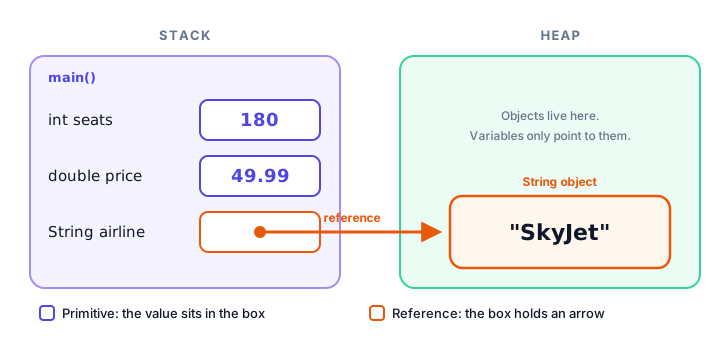
| Primitive types | Reference types | |
|---|---|---|
| Examples | int, double, char, boolean | String, arrays, your own classes |
| Variable holds | the value itself | a reference to an object |
| Name style | lowercase | usually Capitalized |
| Has methods? | No | Yes, like length() |
Can be null? | No | Yes (null means "points to nothing") |
This difference matters more and more once you build your own objects in Java classes and objects.
Common mistakes with Java data types
1. Forgetting L on a big number
long population = 8100000000; fails with error: integer number too large. Without L, Java reads the literal as an int first, and it doesn't fit. Write 8_100_000_000L.
2. Forgetting f on a float
float temperature = 21.5;error: incompatible types: possible lossy conversion from double to float21.5 is a double, which is bigger than a float. Write 21.5f, or simply use double.
3. Mixing up single and double quotes
char grade = "A"; gives error: incompatible types: String cannot be converted to char. Characters use single quotes ('A'); strings use double quotes ("A").
4. Writing string with a lowercase s
string city = "Oslo"; gives error: cannot find symbol. The class is String, with a capital S.
5. Going past a type's limit
Whole number types silently "wrap around" when you go past their maximum. This is called overflow:
public class Overflow {
    public static void main(String[] args) {
        int max = Integer.MAX_VALUE;
        int tooBig = max + 1;
        System.out.println(max);
        System.out.println(tooBig);
    }
}
2147483647
-2147483648No error, just a wrong answer. If a count might grow past two billion, use long.
Practice exercise
🏋️ Try it yourself
Create a profile for a smart thermostat. Choose the best type for each value and print them all: the room name (Living room), the current temperature (21.5), the target temperature (22), the mode letter (H for heating), whether it is switched on (true), and the total seconds it has run (3_500_000_000).
Show solution
public class Thermostat {
    public static void main(String[] args) {
        String room = "Living room";
        double currentTemp = 21.5;
        int targetTemp = 22;
        char mode = 'H';
        boolean isOn = true;
        long secondsRunning = 3_500_000_000L;

        System.out.println("Room: " + room);
        System.out.println("Now: " + currentTemp + ", target: " + targetTemp);
        System.out.println("Mode: " + mode + ", on: " + isOn);
        System.out.println("Seconds running: " + secondsRunning);
    }
}
Room: Living room
Now: 21.5, target: 22
Mode: H, on: true
Seconds running: 3500000000The run time needs long because 3.5 billion is bigger than the largest int.
What's next?
Now you know which types exist. But what happens when you need to turn a double into an int, or text like "42" into a number? That's the job of Java type casting, coming up next.
Key takeaways
- Java has eight primitive data types: byte, short, int, long, float, double, char and boolean.
- Use int for whole numbers and double for decimals by default; use long when values can exceed about 2.1 billion.
- Add L for long literals (8_100_000_000L) and f for float literals (2.5f); underscores in numbers only help readability.
- A char holds one character in single quotes; a String holds text in double quotes.
- String is a reference type: the variable holds a reference to an object on the heap, and it has methods like length().
- Primitive variables hold their value directly; reference variables hold an arrow to an object.
- Whole numbers overflow silently when they pass their maximum, so choose a type that is big enough.
Frequently asked questions
How many data types are there in Java?
Java has eight primitive data types (byte, short, int, long, float, double, char and boolean) and an unlimited number of reference types, including String, arrays and every class you write.
Is String a primitive data type in Java?
No. String is a class, so it is a reference type. A String variable holds a reference to a String object, which is why String starts with a capital letter and has methods such as length().
What is the difference between float and double in Java?
Both store decimal numbers, but double uses 64 bits and keeps about 15 to 16 significant digits, while float uses 32 bits and keeps about 6 to 7. Decimal literals are double by default; add f to make a float.
Why do I need to add L to a long number?
Whole number literals are int by default. A value larger than about 2.1 billion does not fit in an int, so the compiler reports integer number too large unless you add L to mark it as a long.
What is the size of a boolean in Java?
The Java specification does not fix it. A boolean only represents true or false, and how many bits the virtual machine uses to store it depends on the implementation.