Java Wrapper Classes
Updated 9 min read Aimerscrew
All through this chapter you've written List<Integer> instead of List<int>. That's because collections only hold objects, and int isn't an object. Java wrapper classes solve this: each primitive type has a matching class that "wraps" the value inside an object. In this lesson, you'll learn the eight wrapper classes, how Java converts between primitives and wrappers automatically, how to turn text into numbers, and the == trap that surprises even experienced developers.
🌍 Real-life example
Think of shipping a phone. The phone itself works fine on its own, but the courier only accepts boxes. So you put the phone in a box with a label, ship it, and the receiver unboxes it to use the phone. A wrapper class is that box: collections only accept boxed values, so Java boxes your int into an Integer on the way in and unboxes it on the way out.
What are wrapper classes in Java?
A wrapper class is a class whose object holds a single primitive value. Java has one for each of the eight primitive data types, all in the java.lang package, so you never need to import them:
| Primitive | Wrapper class | Example |
|---|---|---|
byte | Byte | Byte level = 3; |
short | Short | Short year = 2026; |
int | Integer | Integer score = 95; |
long | Long | Long views = 3_000_000_000L; |
float | Float | Float rating = 4.5f; |
double | Double | Double price = 19.99; |
char | Character | Character grade = 'A'; |
boolean | Boolean | Boolean isOpen = true; |
Most names are just the primitive with a capital letter. The two odd ones out are int → Integer and char → Character.
Primitives vs wrapper objects
Primitive (int) | Wrapper (Integer) | |
|---|---|---|
| What it is | A raw value | An object containing a value |
Can be null? | No | Yes |
| Allowed in collections and generics? | No | Yes |
| Has methods? | No | Yes (equals, compareTo, and static helpers) |
| Speed and memory | Fastest, smallest | Slower, uses more memory |
| Compare with | == | equals() |
The rule of thumb: use primitives for everyday variables and calculations, and wrappers when you need an object, such as in a collection or when a value might be "missing" (null).
What is autoboxing and unboxing?
Autoboxing is Java automatically converting a primitive into its wrapper object, such as int → Integer. Unboxing is the reverse, Integer → int. It happens whenever you assign one to the other, add a primitive to a collection, or do arithmetic with a wrapper:
import java.util.ArrayList;
import java.util.List;

public class StepCounter {
    public static void main(String[] args) {
        int today = 8_450;
        Integer boxed = today;          // autoboxing: int -> Integer
        int back = boxed;               // unboxing: Integer -> int
        System.out.println(boxed + " and " + back);

        List<Integer> weekSteps = new ArrayList<>();
        weekSteps.add(6_200);           // autoboxed as it goes into the list
        weekSteps.add(today);
        weekSteps.add(11_030);

        int total = 0;
        for (int steps : weekSteps) {   // unboxed as it comes out
            total += steps;
        }
        System.out.println("Week so far: " + weekSteps);
        System.out.println("Total steps: " + total);

        Integer goal = 10_000;
        System.out.println("Beat the goal on day 3? " + (weekSteps.get(2) > goal));
    }
}
8450 and 8450
Week so far: [6200, 8450, 11030]
Total steps: 25680
Beat the goal on day 3? trueWithout autoboxing (it was added in Java 5), you'd have to write Integer.valueOf(6200) to put a number in a list and boxed.intValue() to get it back. Java now writes those calls for you.
Converting text to numbers: parseInt and valueOf
Data from users, files and web forms usually arrives as text. Each wrapper class has static methods to convert it:
Integer.parseInt("42")returns a primitiveint. LikewiseDouble.parseDouble,Long.parseLong,Boolean.parseBoolean.Integer.valueOf("42")returns anIntegerobject.Integer.toString(42)orString.valueOf(42)go the other way, number to text.
public class ParseForm {
    public static void main(String[] args) {
        // Values typed into a web form always arrive as text
        String ageText = "34";
        String heightText = "1.72";
        String newsletterText = "true";

        int age = Integer.parseInt(ageText);
        double height = Double.parseDouble(heightText);
        boolean newsletter = Boolean.parseBoolean(newsletterText);
        Integer zipCode = Integer.valueOf("90210");

        System.out.println("Next year you'll be " + (age + 1));
        System.out.println("Height in cm: " + height * 100);
        System.out.println("Newsletter? " + newsletter);
        System.out.println("Zip code: " + zipCode);

        String backToText = Integer.toString(age) + "/" + String.valueOf(height);
        System.out.println("As text: " + backToText);

        try {
            int broken = Integer.parseInt("thirty");
            System.out.println(broken);
        } catch (NumberFormatException e) {
            System.out.println("Not a number: " + e.getMessage());
        }
    }
}
Next year you'll be 35
Height in cm: 172.0
Newsletter? true
Zip code: 90210
As text: 34/1.72
Not a number: For input string: "thirty"If the text isn't a valid number, parseInt throws a NumberFormatException, so catch it whenever the input comes from a person. (Review Java try-catch if you need to.) Note that Boolean.parseBoolean never throws: anything other than "true" (in any letter case) simply becomes false.
The Integer == trap: why 127 == 127 but 128 != 128
This is the most famous wrapper gotcha. For objects, == checks whether two variables point to the same object, not whether the values are equal. And to save memory, Java keeps a cache of Integer objects for the values -128 to 127. Autoboxing a number in that range reuses the cached object; outside it, you get a brand-new object each time.
public class IntegerCache {
    public static void main(String[] args) {
        Integer a = 127;
        Integer b = 127;
        System.out.println("127 == 127:      " + (a == b));
        System.out.println("127 equals 127:  " + a.equals(b));

        Integer c = 128;
        Integer d = 128;
        System.out.println("128 == 128:      " + (c == d));
        System.out.println("128 equals 128:  " + c.equals(d));

        int plain = 128;
        System.out.println("Integer == int:  " + (c == plain));
    }
}
127 == 127: true
127 equals 127: true
128 == 128: false
128 equals 128: true
Integer == int: true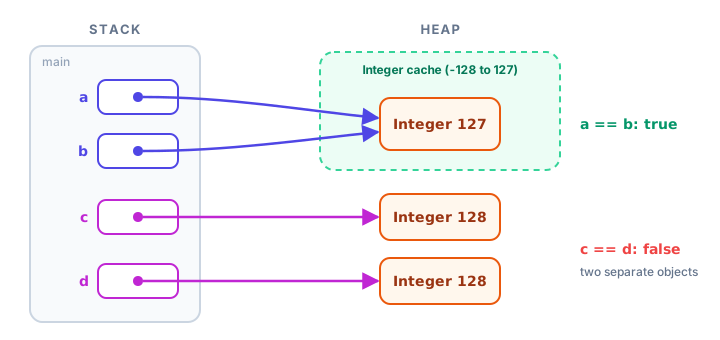
The last line of the output is true because comparing an Integer with an int unboxes the wrapper and compares plain numbers. It's the same idea as comparing Strings, covered in Java string comparison: always use equals() to compare wrapper values.
⚠️ This bug hides in tests
Code that compares Integers with == often works with small test values like 5 or 42, then fails in production when an order ID or price goes above 127. Use a.equals(b), or unbox first: a.intValue() == b.intValue().
Unboxing null causes a NullPointerException
A wrapper variable can be null, but a primitive can't. If Java tries to unbox null, there's no number to take out, so it throws a NullPointerException. This most often happens with maps:
Map<String, Integer> stock = new HashMap<>();
int scarves = stock.get("Scarf");   // get returns null -> NullPointerException
The line looks harmless, but get returns null for a missing key and the assignment to int unboxes it. The fix is stock.getOrDefault("Scarf", 0), as you saw in Java HashMap, or keeping the result in an Integer and checking for null first.
MIN_VALUE and MAX_VALUE
Each numeric wrapper class has constants for the smallest and largest value its primitive can hold. They're handy as starting points when searching for a minimum or maximum, and for checking ranges:
public class Limits {
    public static void main(String[] args) {
        System.out.println("byte:  " + Byte.MIN_VALUE + " to " + Byte.MAX_VALUE);
        System.out.println("short: " + Short.MIN_VALUE + " to " + Short.MAX_VALUE);
        System.out.println("int:   " + Integer.MIN_VALUE + " to " + Integer.MAX_VALUE);
        System.out.println("long:  " + Long.MIN_VALUE + " to " + Long.MAX_VALUE);
        System.out.println("double max: " + Double.MAX_VALUE);

        int views = Integer.MAX_VALUE;
        views = views + 1;
        System.out.println("MAX_VALUE + 1 = " + views);
    }
}
byte: -128 to 127
short: -32768 to 32767
int: -2147483648 to 2147483647
long: -9223372036854775808 to 9223372036854775807
double max: 1.7976931348623157E308
MAX_VALUE + 1 = -2147483648The last line shows overflow: adding 1 to the biggest int wraps around to the smallest. If a counter might grow past about 2.1 billion, such as video views, use long instead.
Other handy wrapper methods
Wrapper classes are also home to many useful static methods. Character is especially helpful for checking text one letter at a time:
public class HandyMethods {
    public static void main(String[] args) {
        String code = "B7x";
        for (char ch : code.toCharArray()) {
            System.out.println(ch + ": letter=" + Character.isLetter(ch)
                    + ", digit=" + Character.isDigit(ch)
                    + ", upper=" + Character.toUpperCase(ch));
        }

        System.out.println("Bigger of 40 and 55: " + Integer.max(40, 55));
        System.out.println("Compare 3 to 9: " + Integer.compare(3, 9));
        System.out.println("13 in binary: " + Integer.toBinaryString(13));
        System.out.println("Sum: " + Integer.sum(19, 23));
    }
}
B: letter=true, digit=false, upper=B
7: letter=false, digit=true, upper=7
x: letter=true, digit=false, upper=X
Bigger of 40 and 55: 55
Compare 3 to 9: -1
13 in binary: 1101
Sum: 42Integer.compare(a, b) returns a negative number, zero or a positive number depending on whether a is smaller, equal or bigger. You'll use exactly this idea for sorting in Java sorting collections.
💡 Tip
Avoid wrappers in heavy number crunching. A loop that adds a billion numbers into a Long total boxes a new object on almost every step and runs much slower than the same loop with a primitive long total.
Common mistakes with wrapper classes
1. Comparing wrappers with ==
It works by accident for -128 to 127 and fails above. Use equals().
2. Unboxing a null
int n = map.get(key); crashes when the key is missing. Use getOrDefault or check for null.
3. Parsing text without catching errors
Integer.parseInt("12abc") or parseInt("") throws NumberFormatException. Wrap user input in try-catch.
4. Writing new Integer(5)
The wrapper constructors are deprecated and produce compiler warnings. Use autoboxing (Integer x = 5;) or Integer.valueOf(5).
5. Using List<int>
Generics need classes. Write List<Integer>, Map<String, Double>, and so on.
Practice exercise
🏋️ Try it yourself
A quiz form sent back these score entries as text: {"88", "92", "n/a", "75", "", "100"}. Parse each one into an ArrayList<Integer>, printing a "Skipping" message for anything that isn't a number. Then print the valid scores and their average.
Show solution
import java.util.ArrayList;
import java.util.List;

public class ScoreForm {
    public static void main(String[] args) {
        String[] entries = {"88", "92", "n/a", "75", "", "100"};
        List<Integer> scores = new ArrayList<>();

        for (String entry : entries) {
            try {
                scores.add(Integer.parseInt(entry));
            } catch (NumberFormatException e) {
                System.out.println("Skipping \"" + entry + "\"");
            }
        }

        int total = 0;
        for (int score : scores) {
            total += score;
        }
        System.out.println("Valid scores: " + scores);
        System.out.println("Average: " + (double) total / scores.size());
    }
}
Skipping "n/a"
Skipping ""
Valid scores: [88, 92, 75, 100]
Average: 88.75parseInt returns an int, which is autoboxed as it goes into the list, and unboxed again in the for-each loop that adds up the total.
What's next?
You've seen <Integer> and <String, Double> everywhere in this chapter. Next, learn how those angle brackets work, why they make your code safer, and how to write your own type-safe classes and methods: Java generics.
Key takeaways
- Each primitive has a wrapper class: Byte, Short, Integer, Long, Float, Double, Character and Boolean.
- Collections and generics only accept objects, so they use wrappers such as List<Integer>.
- Autoboxing converts a primitive to its wrapper automatically; unboxing converts it back.
- Integer.parseInt turns text into an int and throws NumberFormatException for invalid text; valueOf returns an Integer object.
- Compare wrappers with equals(): == compares references, and Integer caches only -128 to 127, so 127 == 127 is true but 128 == 128 is false.
- Unboxing null throws NullPointerException, a common bug with map.get().
- MIN_VALUE and MAX_VALUE give the range of each numeric type; going past MAX_VALUE overflows.
Frequently asked questions
What are wrapper classes in Java?
Wrapper classes are object versions of the eight primitive types: Byte, Short, Integer, Long, Float, Double, Character and Boolean. They let primitive values be stored in collections, be null, and use helpful methods.
What is autoboxing in Java?
Autoboxing is the automatic conversion of a primitive into its wrapper object, for example int to Integer when you call list.add(5). The reverse, Integer to int, is called unboxing.
Why does Integer 128 == 128 return false?
For objects, == checks whether both variables refer to the same object. Java caches Integer objects only from -128 to 127, so two boxed 128 values are different objects. Use equals() to compare the values.
What is the difference between parseInt and valueOf?
Integer.parseInt("42") returns a primitive int, while Integer.valueOf("42") returns an Integer object, reusing a cached one for small values. Both throw NumberFormatException for invalid text.
Why can't I use int in an ArrayList?
Generic types such as ArrayList<T> only work with classes, not primitives. Use ArrayList<Integer>; Java autoboxes each int as you add it and unboxes it when you read it.