Java Do-While Loop
Updated 6 min read Aimerscrew
A while loop checks its condition first, so it might never run. But some tasks must happen at least once before you can even decide whether to repeat: showing a menu, asking for a PIN, taking a first guess. The Java do while loop is built for this. In this lesson, you'll learn how the do while loop works, how it differs from while, and two patterns you'll use constantly: menus and input validation.
🌍 Real-life example
At a restaurant, the waiter always brings the menu first, and only after you order do they ask, "Anything else?" If you say yes, you order again; if not, you're done. You never answer "anything else?" before your first order. That's do while: act first, then decide whether to repeat.
What is a do while loop in Java?
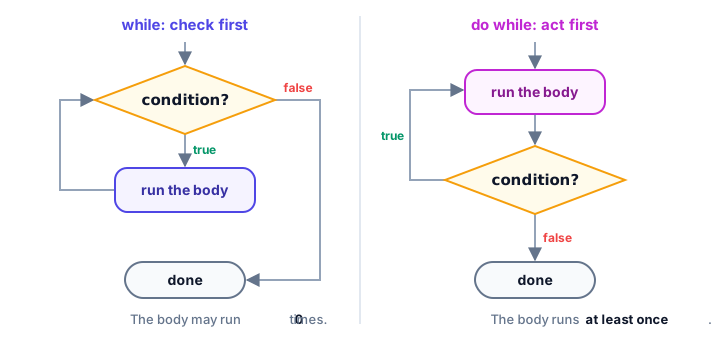
A do while loop runs its body, then checks the condition. If the condition is true, it goes back and runs the body again. Because the check comes at the end, the body is guaranteed to run at least once.
do {
    // body: always runs at least once
} while (condition);   // note the semicolon
public class ConnectRetry {
public static void main(String[] args) {
int attempt = 0;
do {
attempt++;
System.out.println("Connecting to server... attempt " + attempt);
} while (attempt < 3);
System.out.println("Gave up after " + attempt + " attempts.");
}
}Connecting to server... attempt 1
Connecting to server... attempt 2
Connecting to server... attempt 3
Gave up after 3 attempts.What is the difference between while and do while?
The only difference is when the condition is checked. A while loop checks before the body; a do while loop checks after it. You can see it most clearly when the condition is false from the very start:
public class WhileVsDoWhile {
    public static void main(String[] args) {
        int tickets = 0;

        while (tickets > 0) {
            System.out.println("while: selling a ticket");
        }

        do {
            System.out.println("do while: checking for tickets once");
        } while (tickets > 0);
    }
}
do while: checking for tickets onceThe while loop printed nothing. The do while loop ran its body once, then saw that tickets > 0 was false and stopped.
| while | do while | |
|---|---|---|
| Condition checked | Before each iteration | After each iteration |
| Minimum number of runs | 0 | 1 |
| Semicolon after the condition | No | Yes: while (x); |
| Typical use | Repeat while something is true | Menus, input validation, "try at least once" |
When does "at least once" matter?
Remember the digit counter from the while loop lesson? It has a hidden bug: for the number 0 it reports 0 digits, because 0 > 0 is false and the body never runs. A do while loop fixes it naturally, since every number has at least one digit:
public class DigitCountFixed {
    public static void main(String[] args) {
        int number = 0;
        int digits = 0;
        int remaining = number;

        do {
            remaining = remaining / 10;
            digits++;
        } while (remaining > 0);

        System.out.println(number + " has " + digits + " digit(s)");
    }
}
0 has 1 digit(s)Building a menu with do while and Scanner
Menus are the classic do while job. The program must show the menu at least once, and it keeps showing it until the user picks "Exit". This mini banking app combines a do while loop, Scanner from Java user input and an arrow switch:
import java.util.Scanner;

public class BankMenu {
    public static void main(String[] args) {
        Scanner input = new Scanner(System.in);
        int balance = 100;
        int choice;

        do {
            System.out.println("1) Balance  2) Deposit $50  3) Withdraw $20  0) Exit");
            System.out.print("Choose an option: ");
            choice = input.nextInt();

            switch (choice) {
                case 1 -> System.out.println("Your balance is $" + balance);
                case 2 -> {
                    balance += 50;
                    System.out.println("Deposited $50.");
                }
                case 3 -> {
                    if (balance >= 20) {
                        balance -= 20;
                        System.out.println("Withdrew $20.");
                    } else {
                        System.out.println("Not enough money.");
                    }
                }
                case 0 -> System.out.println("Goodbye!");
                default -> System.out.println("Unknown option, try again.");
            }
        } while (choice != 0);
    }
}
Here's a sample run (the user typed 2, then 3, then 1, then 0):
1) Balance  2) Deposit $50  3) Withdraw $20  0) Exit
Choose an option: 2
Deposited $50.
1) Balance  2) Deposit $50  3) Withdraw $20  0) Exit
Choose an option: 3
Withdrew $20.
1) Balance  2) Deposit $50  3) Withdraw $20  0) Exit
Choose an option: 1
Your balance is $130
1) Balance  2) Deposit $50  3) Withdraw $20  0) Exit
Choose an option: 0
Goodbye!
Notice that choice is declared before the do. That's required, as you'll see in the common mistakes below.
How do you validate input with a do while loop?
Input validation means checking that the user typed something sensible and asking again if not. The do while shape fits perfectly: ask once, and repeat while the answer is invalid.
import java.util.Scanner;

public class DeliveryRating {
    public static void main(String[] args) {
        Scanner input = new Scanner(System.in);
        int stars;

        do {
            System.out.print("Rate your delivery (1-5): ");
            stars = input.nextInt();
            if (stars < 1 || stars > 5) {
                System.out.println("Please enter a number from 1 to 5.");
            }
        } while (stars < 1 || stars > 5);

        System.out.println("Thanks! You gave us " + stars + " stars.");
    }
}
Here's a sample run (the user typed 7, then 0, then 4):
Rate your delivery (1-5): 7
Please enter a number from 1 to 5.
Rate your delivery (1-5): 0
Please enter a number from 1 to 5.
Rate your delivery (1-5): 4
Thanks! You gave us 4 stars.
Without do while, you'd have to write the prompt and nextInt() twice: once before a while loop and again inside it. The do while version keeps it in one place.
💡 Tip
If the user types a word instead of a number, nextInt() throws an InputMismatchException and the program stops. You'll learn to handle that gracefully in Java try-catch.
Common mistakes with the Java do while loop
1. Forgetting the semicolon
Unlike a while loop, a do while loop must end with while (condition);. Leave out the semicolon and the compiler reports ';' expected.
2. Declaring the condition variable inside the body
do {
    int choice = input.nextInt();
} while (choice != 0);   // error: cannot find symbol
A variable declared inside the braces disappears at the closing }, before the condition is checked. Declare it before do, as in the menu example.
3. Using do while when zero runs is valid
If "do nothing" is a correct outcome, such as processing an empty shopping cart, a plain while loop is safer. Do while would process one item that doesn't exist.
4. A condition that never becomes false
Just like while, the body must change something the condition depends on. In a menu, that's reading a new choice each time.
Practice exercise
🏋️ Try it yourself
Write a PIN check for an ATM. The correct PIN is 2468. Use a do while loop to ask Enter PIN: until the user types the correct PIN, counting the attempts. Then print Access granted after N attempt(s).
Show solution
import java.util.Scanner;

public class AtmPin {
    public static void main(String[] args) {
        Scanner input = new Scanner(System.in);
        int correctPin = 2468;
        int pin;
        int attempts = 0;

        do {
            System.out.print("Enter PIN: ");
            pin = input.nextInt();
            attempts++;
        } while (pin != correctPin);

        System.out.println("Access granted after " + attempts + " attempt(s).");
    }
}
Here's a sample run (the user typed 1234, then 2468):
Enter PIN: 1234
Enter PIN: 2468
Access granted after 2 attempt(s).
What's next?
Sometimes you need to leave a loop early or skip one round. Next, learn Java break and continue to take finer control of any loop.
Key takeaways
- A do while loop runs its body first and checks the condition afterwards, so the body always runs at least once.
- The syntax is do { ... } while (condition); and the final semicolon is required.
- Use while when zero runs is valid and do while when the action must happen at least once.
- Menus are a natural fit: show the menu, read a choice, and repeat while the choice is not Exit.
- For input validation, ask inside the loop and repeat while the input is invalid.
- Declare variables used in the condition before the do keyword, not inside the body.
Frequently asked questions
What is the syntax of a do while loop in Java?
do { body } while (condition); The body runs first, then the condition is checked, and the loop repeats while it is true. The semicolon after the condition is required.
How many times does a do while loop run at minimum?
At least once, because the condition is checked only after the body has run.
When should I use do while instead of while in Java?
Use do while when the body must run before the condition makes sense, such as showing a menu or asking for input that you then validate.
Why can't my do while condition see a variable from the loop body?
Variables declared inside the braces only exist inside them. Declare the variable before the do keyword so the condition can use it.
Can I use break inside a do while loop?
Yes. break works in every loop type and ends the loop immediately, skipping the condition check.