Java Arrays Class
Updated 11 min read Aimerscrew
In the last few lessons you wrote loops to print, copy, search and compare arrays. Those loops are worth understanding, but you don't have to write them every time. The Java Arrays class gives you tested, one-line methods for all of these jobs. In this lesson, you'll learn the methods you'll use most: toString, deepToString, sort, binarySearch, fill, copyOf, copyOfRange, equals and asList.
🌍 Real-life example
You could build a bookshelf with a hand saw, or you could use a power drill and a ready-cut kit. The result is the same, but the tools save time and avoid mistakes. The Arrays class is that toolkit for arrays: the same jobs you did with loops, done faster and more safely.
What is the Arrays class in Java?
Arrays is a class in the java.util package that contains static methods for working with arrays. "Static" means you call them on the class name itself, like Arrays.sort(numbers), without creating anything first. (You'll learn exactly what static means in Java static.)
To use it, add an import line at the very top of your file, just like you did for Scanner in Java user input:
import java.util.Arrays;Don't confuse Arrays (the class, with an s) with an array (your data). The class works on your arrays.
How do you print an array in Java?
As you saw in Java arrays, System.out.println(array) prints something unhelpful like [I@1b6d3586. Arrays.toString() turns the array into readable text with square brackets and commas:
import java.util.Arrays;

public class PrintArrays {
    public static void main(String[] args) {
        int[] lapTimes = {58, 61, 57, 60};
        String[] toppings = {"cheese", "olives", "basil"};
        double[] prices = {4.99, 12.5, 0.99};

        System.out.println(Arrays.toString(lapTimes));
        System.out.println(Arrays.toString(toppings));
        System.out.println("Prices: " + Arrays.toString(prices));
    }
}
[58, 61, 57, 60]
[cheese, olives, basil]
Prices: [4.99, 12.5, 0.99]For a 2D array, toString would print the references to each row instead of their contents. Use Arrays.deepToString(), which goes "deep" into every row:
import java.util.Arrays;

public class TicTacToeBoard {
    public static void main(String[] args) {
        char[][] board = {
            {'X', 'O', 'X'},
            {' ', 'X', 'O'},
            {'O', ' ', 'X'}
        };

        System.out.println(Arrays.toString(board[0]));
        System.out.println(Arrays.deepToString(board));
    }
}
[X, O, X]
[[X, O, X], [ , X, O], [O, , X]]board[0] is a normal 1D row, so toString works on it. The whole board needs deepToString.
How do you sort an array in Java?
Arrays.sort() rearranges the elements in place into ascending order: smallest to largest for numbers, alphabetical for Strings. It doesn't return a new array; it changes the one you pass in.
import java.util.Arrays;

public class SortExamples {
    public static void main(String[] args) {
        int[] ages = {34, 19, 52, 27, 41, 19};
        Arrays.sort(ages);
        System.out.println(Arrays.toString(ages));

        double[] temps = {21.5, -3.0, 15.25, 0.0};
        Arrays.sort(temps);
        System.out.println(Arrays.toString(temps));

        String[] cities = {"Paris", "Austin", "Lagos", "Berlin", "Oslo"};
        Arrays.sort(cities);
        System.out.println(Arrays.toString(cities));

        String[] fruits = {"kiwi", "Mango", "apple", "Banana"};
        Arrays.sort(fruits);
        System.out.println(Arrays.toString(fruits));
    }
}
[19, 19, 27, 34, 41, 52]
[-3.0, 0.0, 15.25, 21.5]
[Austin, Berlin, Lagos, Oslo, Paris]
[Banana, Mango, apple, kiwi]Look at the last line. Strings are sorted by character code, and every uppercase letter comes before every lowercase letter. That's why Mango lands before apple. This is the same rule compareTo() follows in Java string comparison.
📝 Note
Arrays.sort on a primitive array like int[] always sorts ascending. To sort from largest to smallest you can sort and then read the array backwards (as in the leaderboard below), or use a custom ordering with object arrays, which you'll learn in Java sorting collections.
Sorting only part of an array
Pass a start index (included) and an end index (not included) to sort just a range. This message board keeps its pinned welcome post at index 0 and sorts the rest:
import java.util.Arrays;

public class PinnedPost {
    public static void main(String[] args) {
        String[] posts = {"Welcome!", "Zoo trip", "Bake sale", "Movie night", "Art show"};

        Arrays.sort(posts, 1, posts.length);   // leave index 0 where it is

        System.out.println(Arrays.toString(posts));
    }
}
[Welcome!, Art show, Bake sale, Movie night, Zoo trip]The pattern "from included, to excluded" appears all over Java, from substring() to copyOfRange() later in this lesson.
How does Arrays.binarySearch work?
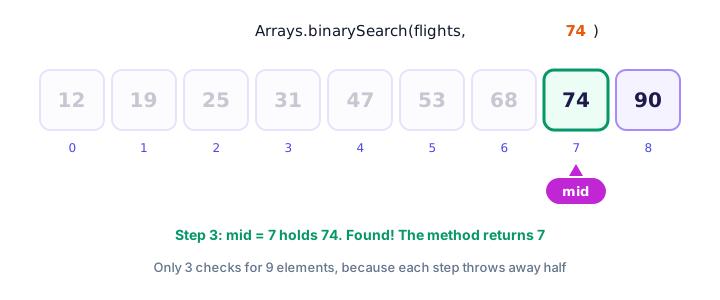
Arrays.binarySearch(array, value) finds a value much faster than the linear search you wrote by hand. Instead of checking every element, it checks the middle one, throws away the half that can't contain the value, and repeats. There's one strict rule: the array must already be sorted.
import java.util.Arrays;

public class FlightLookup {
    public static void main(String[] args) {
        int[] flights = {90, 25, 74, 12, 53, 31, 68, 47, 19};

        Arrays.sort(flights);
        System.out.println("Sorted: " + Arrays.toString(flights));

        int found = Arrays.binarySearch(flights, 74);
        System.out.println("Flight 74 is at index " + found);

        int missing = Arrays.binarySearch(flights, 50);
        System.out.println("Searching for 50 returned " + missing);
        if (missing < 0) {
            System.out.println("No flight 50 today.");
        }
    }
}
Sorted: [12, 19, 25, 31, 47, 53, 68, 74, 90]
Flight 74 is at index 7
Searching for 50 returned -6
No flight 50 today.When the value is found, you get its index. When it isn't, you get a negative number. So the simple test is: a result of 0 or more means "found", and a negative result means "not found". (The exact negative number encodes where the value would go: 50 belongs at index 5, and Java returns -(5) - 1, which is -6.)
⚠️ Sort first!
On an unsorted array, binarySearch doesn't throw an error. It quietly gives a wrong answer, often a negative number for a value that's right there. Always call Arrays.sort first, or be sure the data is already sorted.
Filling an array with Arrays.fill
Arrays.fill(array, value) sets every element to the same value. Like sort, it also has a version that takes a range:
import java.util.Arrays;

public class FillExamples {
    public static void main(String[] args) {
        int[] highScores = new int[5];
        Arrays.fill(highScores, -1);                // -1 means "no score yet"
        System.out.println(Arrays.toString(highScores));

        char[] seatRow = {'X', 'X', 'O', 'X', 'O', 'X'};
        Arrays.fill(seatRow, 'O');                  // show is over: free every seat
        System.out.println(Arrays.toString(seatRow));

        String[] lights = new String[6];
        Arrays.fill(lights, "off");
        Arrays.fill(lights, 2, 4, "on");            // only indexes 2 and 3
        System.out.println(Arrays.toString(lights));
    }
}
[-1, -1, -1, -1, -1]
[O, O, O, O, O, O]
[off, off, on, on, off, off]For a 2D array, fill works one row at a time, so loop over the rows: for (int[] row : grid) { Arrays.fill(row, 0); }.
How do you copy an array in Java?
Remember that = only copies the reference. Arrays.copyOf(array, newLength) creates a brand-new array and copies the elements into it. If the new length is bigger, the extra slots get default values; if it's smaller, the end is cut off. Arrays.copyOfRange(array, from, to) copies just a slice, again with from included and to excluded.
import java.util.Arrays;

public class CopyExamples {
    public static void main(String[] args) {
        String[] playlist = {"Intro", "Sunrise", "Drive", "Echoes"};

        String[] bigger = Arrays.copyOf(playlist, 6);
        System.out.println("Bigger:  " + Arrays.toString(bigger));

        String[] shorter = Arrays.copyOf(playlist, 2);
        System.out.println("Shorter: " + Arrays.toString(shorter));

        String[] middle = Arrays.copyOfRange(playlist, 1, 3);
        System.out.println("Middle:  " + Arrays.toString(middle));

        bigger[0] = "Overture";
        System.out.println("Original is unchanged: " + Arrays.toString(playlist));
    }
}
Bigger: [Intro, Sunrise, Drive, Echoes, null, null]
Shorter: [Intro, Sunrise]
Middle: [Sunrise, Drive]
Original is unchanged: [Intro, Sunrise, Drive, Echoes]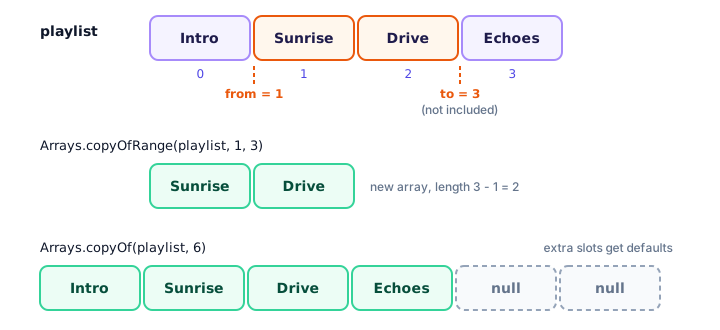
copyOf is also how you "grow" an array: you can't resize the original, but you can make a bigger copy and use that instead. That's essentially what an ArrayList does for you automatically behind the scenes.
Comparing arrays with Arrays.equals
The == operator checks whether two variables point to the same array. To check whether two arrays hold the same values in the same order, use Arrays.equals(). For 2D arrays, use Arrays.deepEquals().
import java.util.Arrays;

public class CompareArrays {
    public static void main(String[] args) {
        int[] myTicket = {7, 14, 22, 35, 41};
        int[] winningNumbers = {7, 14, 22, 35, 41};

        System.out.println("== says: " + (myTicket == winningNumbers));
        System.out.println("Arrays.equals says: " + Arrays.equals(myTicket, winningNumbers));

        int[][] boardA = {{1, 2}, {3, 4}};
        int[][] boardB = {{1, 2}, {3, 4}};
        System.out.println("equals on 2D: " + Arrays.equals(boardA, boardB));
        System.out.println("deepEquals on 2D: " + Arrays.deepEquals(boardA, boardB));
    }
}
== says: false
Arrays.equals says: true
equals on 2D: false
deepEquals on 2D: trueGood news for this lottery player: the numbers match, even though the two arrays are separate objects. It's the same idea as == versus equals() for Strings.
Turning an array into a list with Arrays.asList
Arrays.asList() gives you a List view of an array. A List is a more flexible container from the collections framework, and it comes with handy methods such as contains() and size(), and it prints nicely without toString. The <String> part says "a list of Strings"; you'll learn this syntax in Java generics.
import java.util.Arrays;
import java.util.List;

public class GuestList {
    public static void main(String[] args) {
        String[] guests = {"Olivia", "Noah", "Amara", "Kenji"};

        List<String> guestList = Arrays.asList(guests);
        System.out.println(guestList);
        System.out.println("Size: " + guestList.size());
        System.out.println("Is Amara invited? " + guestList.contains("Amara"));

        guestList.set(1, "Lucas");                  // Noah can't come, Lucas takes his place
        System.out.println(guestList);
        System.out.println("The array changed too: " + guests[1]);
    }
}
[Olivia, Noah, Amara, Kenji]
Size: 4
Is Amara invited? true
[Olivia, Lucas, Amara, Kenji]
The array changed too: LucasThe list is a window onto the same array, so set() changes the array too. Because an array can't grow, this list can't either: calling guestList.add("Zoe") fails with an error that starts like this:
Exception in thread "main" java.lang.UnsupportedOperationExceptionFor a list that can grow and shrink, you'll use an ArrayList in the collections chapter.
Real-world example: a game leaderboard
Let's combine several methods. The game keeps scores in the order they were played. To show a podium without messing up that history, the program sorts a copy, takes the last three elements with copyOfRange, and prints them from highest to lowest:
import java.util.Arrays;

public class Leaderboard {
    public static void main(String[] args) {
        int[] scores = {1840, 2310, 1275, 2990, 2105, 1560, 2730};

        int[] ranked = Arrays.copyOf(scores, scores.length);
        Arrays.sort(ranked);

        int[] topThree = Arrays.copyOfRange(ranked, ranked.length - 3, ranked.length);

        System.out.println("All scores (as entered): " + Arrays.toString(scores));
        System.out.println("Sorted low to high: " + Arrays.toString(ranked));
        System.out.println("Podium:");
        for (int i = topThree.length - 1; i >= 0; i--) {
            System.out.println("  #" + (topThree.length - i) + " " + topThree[i]);
        }
    }
}
All scores (as entered): [1840, 2310, 1275, 2990, 2105, 1560, 2730]
Sorted low to high: [1275, 1560, 1840, 2105, 2310, 2730, 2990]
Podium:
#1 2990
#2 2730
#3 2310Quick reference: common Arrays methods
| Method | What it does | Returns |
|---|---|---|
Arrays.toString(a) | Text like [1, 2, 3] | String |
Arrays.deepToString(grid) | Text for 2D (or deeper) arrays | String |
Arrays.sort(a) / sort(a, from, to) | Sorts ascending, in place | nothing |
Arrays.binarySearch(a, key) | Finds key in a sorted array | index, or negative if missing |
Arrays.fill(a, value) | Sets every element (or a range) | nothing |
Arrays.copyOf(a, length) | New array, padded or cut to length | new array |
Arrays.copyOfRange(a, from, to) | New array with a slice | new array |
Arrays.equals(a, b) / deepEquals | Same values in the same order? | boolean |
Arrays.asList(a) | Fixed-size List view of the array | List |
Common mistakes with the Arrays class
1. Forgetting the import
Without import java.util.Arrays; the compiler reports "cannot find symbol" for Arrays.
2. Expecting sort to return a sorted array
int[] sorted = Arrays.sort(prices); doesn't compile, because sort returns nothing. It changes prices itself. If you need to keep the original order, sort a copy made with copyOf.
3. Using binarySearch on unsorted data
The result is unreliable. Sort first.
4. Using toString or equals on a 2D array
For arrays of arrays, use deepToString and deepEquals.
5. Adding to a list from asList
The list has a fixed size, so add() and remove() throw UnsupportedOperationException.
Practice exercise
🏋️ Try it yourself
A travel site lists these fares: 329, 189, 245, 410, 199, 275 and 159 dollars. Without changing the original array, print the original fares, a sorted copy, and the cheapest three fares. Then use binarySearch to check whether a $199 fare exists.
Show solution
import java.util.Arrays;

public class FlightDeals {
    public static void main(String[] args) {
        int[] prices = {329, 189, 245, 410, 199, 275, 159};

        int[] sorted = Arrays.copyOf(prices, prices.length);
        Arrays.sort(sorted);

        System.out.println("Original: " + Arrays.toString(prices));
        System.out.println("Sorted:   " + Arrays.toString(sorted));
        System.out.println("Cheapest three: " + Arrays.toString(Arrays.copyOfRange(sorted, 0, 3)));

        int position = Arrays.binarySearch(sorted, 199);
        if (position >= 0) {
            System.out.println("A $199 fare exists (index " + position + " in sorted).");
        } else {
            System.out.println("No $199 fare.");
        }
    }
}
Original: [329, 189, 245, 410, 199, 275, 159]
Sorted: [159, 189, 199, 245, 275, 329, 410]
Cheapest three: [159, 189, 199]
A $199 fare exists (index 2 in sorted).The search runs on sorted, not prices, because binary search needs sorted data.
What's next?
Congratulations, you've finished the arrays chapter! All your code so far has lived inside main, and programs are starting to get long. Next, learn how to split code into reusable, named blocks with Java methods.
Key takeaways
- The Java Arrays class in java.util offers static helper methods; import it with import java.util.Arrays;
- Arrays.toString prints a 1D array; Arrays.deepToString prints 2D arrays.
- Arrays.sort sorts in place in ascending order and can sort a range from (included) to (excluded).
- Arrays.binarySearch is fast but only works on sorted arrays; a negative result means not found.
- Arrays.fill sets every element, or a range, to one value.
- Arrays.copyOf and copyOfRange create new, independent arrays; = only copies the reference.
- Arrays.equals compares contents; Arrays.asList gives a fixed-size List view of an array.
Frequently asked questions
How do you print an array in Java?
Import java.util.Arrays and call System.out.println(Arrays.toString(myArray)). For a 2D array use Arrays.deepToString(grid). Printing the array directly shows only a type code and an internal number.
How do you sort an array in Java?
Call Arrays.sort(myArray). It sorts the array in place in ascending order and returns nothing. To keep the original, sort a copy made with Arrays.copyOf.
Why does Arrays.binarySearch return a negative number?
A negative result means the value is not in the array. The number is -(insertion point) - 1, where the insertion point is the index where the value would go. Remember the array must be sorted first.
What is the difference between Arrays.copyOf and copyOfRange?
copyOf(array, length) copies from the start into a new array of the given length, padding with default values if it is longer. copyOfRange(array, from, to) copies a slice, including from and excluding to.
How do you compare two arrays in Java?
Use Arrays.equals(a, b) to check that both arrays have the same values in the same order. The == operator only checks whether both variables point to the same array. For 2D arrays use Arrays.deepEquals.
Can you add elements to a list from Arrays.asList?
No. The list is backed by the array and has a fixed size, so add and remove throw UnsupportedOperationException. You can still change elements with set. For a growable list, use an ArrayList.