Java Concurrency
Updated 13 min read Aimerscrew
In the Java threads lesson you created threads by hand and fixed a race condition with synchronized. Real applications rarely manage threads one by one, though. Java concurrency gives you higher-level tools in the java.util.concurrent package: thread pools that reuse threads, Future objects that hand back results, atomic counters, thread-safe maps and chains of asynchronous steps. In this lesson you'll learn each of them with small, practical examples, plus the pitfalls to avoid, including the dreaded deadlock.
🌍 Real-life example
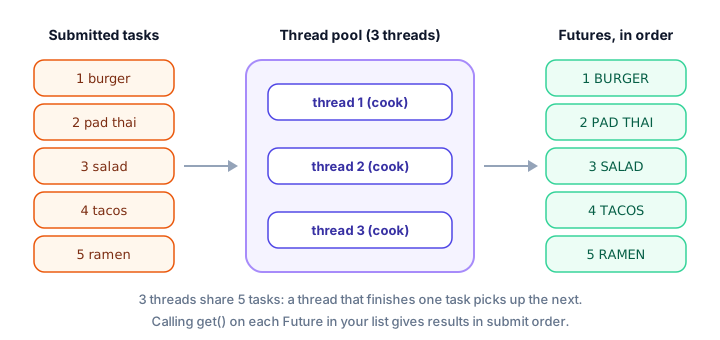
A busy food delivery kitchen doesn't hire a new cook for every order and fire them when the dish is done. It keeps a fixed team of cooks. Orders go onto a ticket rail, any free cook takes the next ticket, and each ticket gets a number so the waiter can collect the right dish later. That's exactly how an ExecutorService works: a fixed team of threads, a queue of tasks, and a Future (the ticket) for every result.
What is concurrency in Java?
Concurrency means a program is working on several tasks during the same period of time, for example handling many website visitors at once. On a computer with several processor cores, some of those tasks truly run at the same instant, which is called parallelism.
Concurrent code has two jobs: get the work done faster, and keep shared data correct. The second one is called thread safety: code is thread-safe if it behaves correctly even when many threads use it at once.
Protecting shared data with synchronized
Synchronized methods
As you saw in the threads lesson, marking a method synchronized means only one thread at a time can run it on the same object. Here four family members deposit money into one shared wallet at the same time:
import java.util.ArrayList;
import java.util.List;

public class SharedWallet {
    public static void main(String[] args) throws InterruptedException {
        Wallet wallet = new Wallet();
        List<Thread> family = new ArrayList<>();

        for (int person = 1; person <= 4; person++) {
            Thread t = new Thread(() -> {
                for (int i = 0; i < 1000; i++) {
                    wallet.deposit(1);
                }
            });
            family.add(t);
            t.start();
        }
        for (Thread t : family) {
            t.join();
        }

        System.out.println("4 people x 1000 deposits of $1");
        System.out.println("Balance: $" + wallet.getBalance());
    }
}

class Wallet {
    private int balance = 0;

    synchronized void deposit(int amount) {
        balance += amount;
    }

    synchronized int getBalance() {
        return balance;
    }
}
4 people x 1000 deposits of $1
Balance: $4000Without synchronized, some deposits would get lost and the balance would usually come out below $4000. Notice that getBalance() is synchronized too. That guarantees a reader always sees the latest value written by other threads.
Synchronized blocks
Sometimes only part of a method needs protecting. A synchronized block locks just the lines inside it, using any object you choose as the lock. It's especially important for check-then-act code, where you check a condition and then act on it. Both steps must happen as one unit, or another thread could sneak in between them.
Here three travel agents try to book 30 seats on a flight that only has 20:
import java.util.ArrayList;
import java.util.List;

public class FlightBooking {
    public static void main(String[] args) throws InterruptedException {
        Flight flight = new Flight(20);
        List<Thread> agents = new ArrayList<>();

        // 3 travel agents each try to book 10 seats: 30 requests for 20 seats
        for (int a = 0; a < 3; a++) {
            Thread agent = new Thread(() -> {
                for (int i = 0; i < 10; i++) {
                    flight.tryBook();
                }
            });
            agents.add(agent);
            agent.start();
        }
        for (Thread agent : agents) {
            agent.join();
        }

        System.out.println("Seats booked: " + flight.getBooked());
        System.out.println("Requests refused: " + flight.getRefused());
    }
}

class Flight {
    private final int capacity;
    private int booked = 0;
    private int refused = 0;
    private final Object lock = new Object();

    Flight(int capacity) {
        this.capacity = capacity;
    }

    void tryBook() {
        synchronized (lock) {           // check and book as one step
            if (booked < capacity) {
                booked++;
            } else {
                refused++;
            }
        }
    }

    int getBooked() {
        synchronized (lock) {
            return booked;
        }
    }

    int getRefused() {
        synchronized (lock) {
            return refused;
        }
    }
}
Seats booked: 20
Requests refused: 10Which agent gets which seats changes from run to run, but the flight is never overbooked. Without the lock, two threads could both see booked as 19, both pass the check, and sell seat 21.
💡 Tip
Keep synchronized sections as short as possible. While one thread holds the lock, every other thread that needs it has to wait, so long locked sections make your program slow.
AtomicInteger: a thread-safe counter
For a simple counter, a lock is more machinery than you need. AtomicInteger (in java.util.concurrent.atomic) is an int wrapper whose operations are atomic: each one happens as a single, indivisible step that no other thread can interrupt halfway.
import java.util.concurrent.atomic.AtomicInteger;

public class PageViews {
    public static void main(String[] args) throws InterruptedException {
        AtomicInteger views = new AtomicInteger(0);

        Runnable visitors = () -> {
            for (int i = 0; i < 10_000; i++) {
                views.incrementAndGet();
            }
        };

        Thread phone = new Thread(visitors);
        Thread laptop = new Thread(visitors);
        Thread tablet = new Thread(visitors);
        phone.start();
        laptop.start();
        tablet.start();
        phone.join();
        laptop.join();
        tablet.join();

        System.out.println("Total page views: " + views.get());
        System.out.println("Add 5 more: " + views.addAndGet(5));
    }
}
Total page views: 30000
Add 5 more: 30005Useful methods: incrementAndGet() (add 1), addAndGet(n) (add n), get() and set(value). There's also AtomicLong for bigger numbers and AtomicBoolean for flags.
ExecutorService and thread pools
Creating a new thread is fairly expensive, and creating thousands of them can overwhelm your computer. A thread pool keeps a fixed number of threads alive and reuses them for task after task. In Java, you use a pool through the ExecutorService interface:
Executors.newFixedThreadPool(3)creates a pool with 3 threads.submit(task)puts a task in the queue and immediately returns aFuture: a placeholder for a result that will be ready later.future.get()waits until that task is done and returns its result.shutdown()tells the pool to accept no new tasks and to stop its threads once the queued tasks are finished.
import java.util.ArrayList;
import java.util.List;
import java.util.concurrent.ExecutionException;
import java.util.concurrent.ExecutorService;
import java.util.concurrent.Executors;
import java.util.concurrent.Future;

public class DeliveryKitchen {
    public static void main(String[] args) throws InterruptedException, ExecutionException {
        ExecutorService kitchen = Executors.newFixedThreadPool(3);   // 3 cooks
        String[] orders = {"burger", "pad thai", "salad", "tacos", "ramen"};

        List<Future<String>> tickets = new ArrayList<>();
        for (String order : orders) {
            Future<String> ticket = kitchen.submit(() -> order.toUpperCase() + " is ready");
            tickets.add(ticket);
        }

        for (Future<String> ticket : tickets) {
            System.out.println(ticket.get());   // waits for that dish if needed
        }

        kitchen.shutdown();   // no new orders; threads stop when done
    }
}
BURGER is ready
PAD THAI is ready
SALAD is ready
TACOS is ready
RAMEN is readyThree threads shared five orders, and the dishes may have finished in any order. But we kept the Future objects in a list in the order we submitted them, and called get() on each in turn, so the results always print in order.
⚠️ Be careful
If you forget shutdown(), the pool's threads keep waiting for new tasks forever, and your program never exits even though main has finished.
Callable vs Runnable
A Runnable's run() method returns nothing and can't throw checked exceptions. When a task must return a result, use Callable<T> instead. Its call() method returns a value of type T and may throw any exception. In DeliveryKitchen, the lambda returned a String, so Java treated it as a Callable<String>. Here's a Callable written as a full class:
import java.util.concurrent.Callable;
import java.util.concurrent.ExecutionException;
import java.util.concurrent.ExecutorService;
import java.util.concurrent.Executors;
import java.util.concurrent.Future;

public class PriceCheck {
    public static void main(String[] args) throws InterruptedException, ExecutionException {
        ExecutorService pool = Executors.newFixedThreadPool(2);

        Callable<Double> shippingQuote = new ShippingQuote(3.2);
        Future<Double> future = pool.submit(shippingQuote);

        System.out.println("Quote requested, doing other work...");
        double cost = future.get();
        System.out.printf("Shipping for 3.2 kg: $%.2f%n", cost);

        pool.shutdown();
    }
}

class ShippingQuote implements Callable<Double> {
    private final double kilos;

    ShippingQuote(double kilos) {
        this.kilos = kilos;
    }

    @Override
    public Double call() throws InterruptedException {
        Thread.sleep(300);              // pretend to ask a courier's server
        return 4.99 + kilos * 1.50;
    }
}
Quote requested, doing other work...
Shipping for 3.2 kg: $9.79Right after submit, the main thread was free to do other work while the quote was being calculated. get() then waited for the answer. If call() throws an exception, get() throws an ExecutionException that wraps it, which is why main declares it.
Runnable | Callable<T> | |
|---|---|---|
| Method | void run() | T call() |
| Returns a result | No | Yes |
| Can throw checked exceptions | No | Yes |
| Works with | new Thread(...) and executors | Executors only |
Running many tasks with invokeAll
When you have a whole list of tasks, invokeAll submits them all, waits until every one has finished, and returns a list of futures in the same order as your tasks. Here a chain of stores adds up each branch's sales in parallel:
import java.util.ArrayList;
import java.util.List;
import java.util.concurrent.Callable;
import java.util.concurrent.ExecutionException;
import java.util.concurrent.ExecutorService;
import java.util.concurrent.Executors;
import java.util.concurrent.Future;

public class StoreTotals {
    public static void main(String[] args) throws InterruptedException, ExecutionException {
        String[] stores = {"London", "Toronto", "Sydney", "Berlin"};
        int[][] sales = {
            {320, 410, 290},
            {150, 220, 180},
            {500, 470, 530},
            {260, 300, 240}
        };

        List<Callable<Integer>> jobs = new ArrayList<>();
        for (int[] storeSales : sales) {
            jobs.add(() -> {
                int sum = 0;
                for (int amount : storeSales) {
                    sum += amount;
                }
                return sum;
            });
        }

        ExecutorService pool = Executors.newFixedThreadPool(4);
        List<Future<Integer>> results = pool.invokeAll(jobs);   // waits for all
        pool.shutdown();

        for (int i = 0; i < stores.length; i++) {
            System.out.println(stores[i] + ": $" + results.get(i).get());
        }
    }
}
London: $1020
Toronto: $550
Sydney: $1500
Berlin: $800Since invokeAll already waited for everything, every get() call returns straight away.
ConcurrentHashMap: a thread-safe map
A normal HashMap can be corrupted if several threads change it at once. ConcurrentHashMap is built for exactly that: many threads can read and update it safely, and methods like merge update a value in one atomic step. Three helpers count votes from three ballot boxes into one shared map:
import java.util.List;
import java.util.Map;
import java.util.TreeMap;
import java.util.concurrent.ConcurrentHashMap;
import java.util.concurrent.ExecutorService;
import java.util.concurrent.Executors;
import java.util.concurrent.TimeUnit;

public class VoteCounter {
    public static void main(String[] args) throws InterruptedException {
        List<List<String>> ballotBoxes = List.of(
                List.of("pizza", "sushi", "pizza", "tacos"),
                List.of("sushi", "sushi", "pizza"),
                List.of("tacos", "pizza", "sushi", "pizza"));

        Map<String, Integer> votes = new ConcurrentHashMap<>();
        ExecutorService counters = Executors.newFixedThreadPool(3);

        for (List<String> box : ballotBoxes) {
            counters.submit(() -> {
                for (String choice : box) {
                    votes.merge(choice, 1, Integer::sum);   // safe from many threads
                }
            });
        }

        counters.shutdown();
        counters.awaitTermination(5, TimeUnit.SECONDS);   // wait for all tasks

        System.out.println("Results: " + new TreeMap<>(votes));   // sorted by key
    }
}
Results: {pizza=5, sushi=4, tacos=2}merge(choice, 1, Integer::sum) means "put 1 if the key is new, otherwise add 1 to the current count". awaitTermination waits (up to 5 seconds) for all tasks to finish after shutdown(). We copied the map into a TreeMap only to print the keys in alphabetical order.
CompletableFuture: chaining steps
CompletableFuture lets you describe a sequence of steps that run in the background, one after another, like an assembly line. supplyAsync starts the first step on a background thread, each thenApply transforms the previous result, and join() waits for the final value:
import java.util.concurrent.CompletableFuture;

public class CheckoutChain {
    public static void main(String[] args) {
        String message = CompletableFuture
                .supplyAsync(() -> 80.00)                  // load the cart total
                .thenApply(total -> total * 0.90)          // apply a 10% coupon
                .thenApply(total -> total + 5.00)          // add delivery
                .thenApply(total -> String.format("Please pay $%.2f", total))
                .join();                                   // wait for the result

        System.out.println(message);
    }
}
Please pay $77.0080.00 × 0.90 = 72.00, plus 5.00 delivery = 77.00. join() works like get() but throws an unchecked exception if something fails, so you don't need a throws clause. By default, supplyAsync uses a shared built-in pool, so there's nothing to shut down.
What is a deadlock in Java?
A deadlock happens when two or more threads each hold a lock and wait for a lock that another one holds. None of them can continue, so they all wait forever. The program doesn't crash; it just freezes.
Imagine a money transfer app. Thread 1 moves money from account A to B, so it locks A, then tries to lock B. At the same moment, Thread 2 moves money from B to A, so it locks B, then tries to lock A:
// Thread 1                         // Thread 2
synchronized (accountA) {           synchronized (accountB) {
    synchronized (accountB) {           synchronized (accountA) {
        // move money A to B                // move money B to A
    }                                   }
}                                   }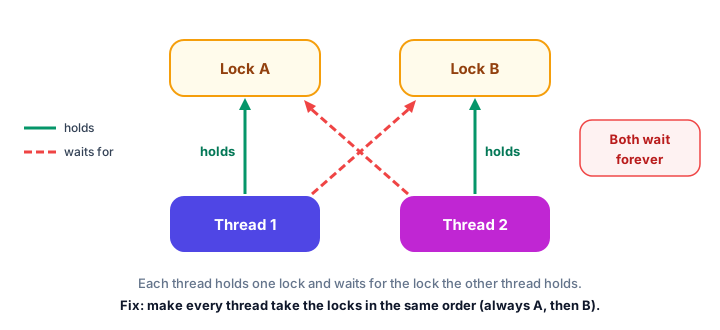
Thread 1 waits for B, which Thread 2 holds. Thread 2 waits for A, which Thread 1 holds. Neither will ever let go. The classic fix is to always take locks in the same order. If every thread locks the account with the smaller ID first, a cycle can't form. Even better, avoid holding more than one lock at a time whenever you can.
Common concurrency pitfalls
1. Forgetting to shut down an executor
The program hangs after main ends. Call shutdown() when you've submitted all tasks.
2. Calling get() too early
Calling future.get() right after each submit makes the main thread wait for every task before submitting the next, so nothing runs in parallel. Submit everything first, then collect the results.
3. Check-then-act without a lock
Code like if (seats > 0) { seats--; } is unsafe if several threads run it at once, even if each line looks harmless. Put the check and the action in the same synchronized block.
4. Using HashMap or ArrayList from many threads
Ordinary collections aren't thread-safe. Use ConcurrentHashMap, or give each thread its own collection and merge them at the end.
5. Taking locks in different orders
That's the recipe for a deadlock. Pick one order and stick to it everywhere.
Practice exercise
🏋️ Try it yourself
A parking lot has three entry gates. Using a fixed thread pool of 3 threads, submit one task per gate. Gate 1 lets in 120 cars, gate 2 lets in 85 and gate 3 lets in 140. Each task should add its cars to a shared AtomicInteger one car at a time and return a report like Gate 1 let in 120 cars. Print the reports in gate order, shut down the pool, and print the total number of cars in the lot.
Show solution
import java.util.ArrayList;
import java.util.List;
import java.util.concurrent.ExecutionException;
import java.util.concurrent.ExecutorService;
import java.util.concurrent.Executors;
import java.util.concurrent.Future;
import java.util.concurrent.atomic.AtomicInteger;

public class ParkingLot {
    public static void main(String[] args) throws InterruptedException, ExecutionException {
        AtomicInteger carsIn = new AtomicInteger(0);
        ExecutorService gates = Executors.newFixedThreadPool(3);
        int[] carsPerGate = {120, 85, 140};

        List<Future<String>> reports = new ArrayList<>();
        for (int g = 0; g < carsPerGate.length; g++) {
            int gate = g + 1;
            int cars = carsPerGate[g];
            reports.add(gates.submit(() -> {
                for (int i = 0; i < cars; i++) {
                    carsIn.incrementAndGet();
                }
                return "Gate " + gate + " let in " + cars + " cars";
            }));
        }

        for (Future<String> report : reports) {
            System.out.println(report.get());
        }
        gates.shutdown();
        System.out.println("Cars in the lot: " + carsIn.get());
    }
}
Gate 1 let in 120 cars
Gate 2 let in 85 cars
Gate 3 let in 140 cars
Cars in the lot: 345Calling get() on every future before reading the counter guarantees all cars have been counted.
What's next?
Congratulations, you've finished the Files and Threads chapter, and with it the core of the Java language! Now it's time to put everything together. Start with your first complete program in the Java calculator project.
Key takeaways
- Java concurrency tools live in java.util.concurrent and help you run tasks at the same time safely.
- synchronized methods and blocks let only one thread at a time run protected code; use them for check-then-act logic.
- AtomicInteger provides thread-safe counters with methods like incrementAndGet, without explicit locks.
- An ExecutorService thread pool reuses a fixed number of threads; submit returns a Future, get waits for its result, and shutdown lets the program exit.
- Callable returns a value and can throw checked exceptions; invokeAll runs a list of tasks and returns futures in the same order.
- ConcurrentHashMap is a thread-safe map, and CompletableFuture chains background steps with supplyAsync, thenApply and join.
- A deadlock happens when threads wait for each other's locks; avoid it by always taking locks in the same order.
Frequently asked questions
What is the difference between concurrency and parallelism?
Concurrency means a program makes progress on several tasks during the same period of time. Parallelism means tasks literally run at the same instant on different processor cores. Concurrent Java code runs in parallel when the computer has more than one core.
What is an ExecutorService in Java?
An ExecutorService manages a pool of threads for you. You submit tasks, it runs them on its threads and returns a Future for each result. Create one with Executors.newFixedThreadPool(n) and call shutdown() when you have submitted all tasks.
What is the difference between Runnable and Callable?
Runnable has a void run() method that cannot return a value or throw checked exceptions. Callable has a call() method that returns a result and can throw exceptions. Use Callable with an ExecutorService when you need a result back.
When should I use AtomicInteger instead of synchronized?
Use AtomicInteger for a single shared number, such as a counter, because it is simple and fast. Use synchronized when several variables or steps must change together as one unit, such as checking and booking a seat.
How do I avoid a deadlock in Java?
Make every thread take locks in the same fixed order, hold as few locks as possible at once, and keep locked sections short. Higher-level tools such as ConcurrentHashMap and atomic classes also reduce the need for locks.