Python Packages
Updated 6 min read Aimerscrew
A single module works well for a few functions, but real projects have dozens of files. Python packages solve this by grouping related modules into folders, the same way you'd group documents into folders on your computer. In this lesson, you'll build a small online store project as a package, learn what __init__.py does, and see the difference between absolute and relative imports.
🌍 Real-life example
Think of a department store. It's one building, but it's split into departments: clothing, kitchen, checkout. Each department has its own shelves. A Python package is the building, its sub-packages are the departments, and the modules are the shelves of products inside them.
What is a package in Python?
A package is a folder that contains Python modules (and possibly other packages). You mark a folder as a regular package by putting a file called __init__.py in it. Then you import modules from it using dots: package.module.
| Term | What it is | Example |
|---|---|---|
| Module | One .py file | cart.py |
| Package | A folder of modules with __init__.py | store/ |
| Sub-package | A package inside another package | store/payments/ |
| Library | Informal word for a package (or set of packages) you install and reuse | requests, pandas |
Python package structure: an online store
Here's the project you'll build. main.py is the program you run; everything inside store/ is the package.
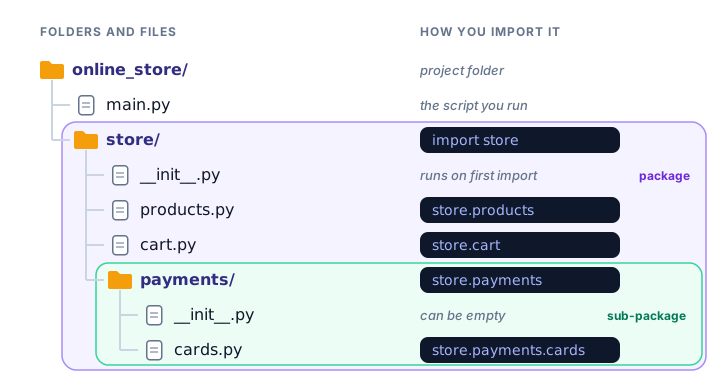
As plain text, the layout looks like this:
online_store/
├── main.py
└── store/
    ├── __init__.py
    ├── products.py
    ├── cart.py
    └── payments/
        ├── __init__.py
        └── cards.py
How do you create a package in Python?
Create the folders, then add the files one at a time. First, the product catalog:
# store/products.py
CATALOG = {"T-shirt": 18.00, "Mug": 9.50, "Cap": 14.00}


def get_price(name):
    return CATALOG[name]
Next, the cart. It needs get_price from its neighbor products.py:
# store/cart.py
from .products import get_price


def cart_total(items):
    total = 0
    for item in items:
        total += get_price(item)
    return total
The dot in from .products means "the products module in this same package". That's a relative import, explained below.
Then a sub-package for payments. Its store/payments/__init__.py can be completely empty. The module inside it looks like this:
# store/payments/cards.py
from ..products import CATALOG


def mask_card(number):
    return "**** **** **** " + number[-4:]


def items_for_sale():
    return len(CATALOG)
Two dots (..) mean "go up one package", from payments to store.
What does __init__.py do?
__init__.py tells Python "this folder is a package". It runs automatically the first time anything in the package is imported, so it's a good place for package-wide setup or shared values. Here's ours:
# store/__init__.py
"""The store package: products, cart and payments."""
print("Setting up the store package...")

VERSION = "1.0"
Anything defined in __init__.py can be imported straight from the package name, like from store import VERSION.
📝 Note
Since Python 3.3, a folder without __init__.py can still be imported as a "namespace package". It's a special feature for splitting one package across several locations. For your own projects, always add __init__.py, even an empty one; it makes your intent clear and avoids surprises.
Importing from a package
Now main.py, which sits next to the store/ folder, can use everything:
# main.py
import store.products
from store.cart import cart_total
from store.payments.cards import mask_card
from store import VERSION

print("Store version:", VERSION)
print("Mug costs:", store.products.get_price("Mug"))
print("Cart total:", cart_total(["T-shirt", "Cap", "Mug"]))
print("Paid with:", mask_card("4111222233334444"))
Run main.py from the online_store folder and you'll see:
Setting up the store package...
Store version: 1.0
Mug costs: 9.5
Cart total: 41.5
Paid with: **** **** **** 4444
The setup message prints only once, even though main.py imports from the package four times. Just like modules, a package is loaded once and then reused.
Absolute vs relative imports
There are two ways to point to a module inside your package:
- An absolute import spells out the full path from the top of the project:
from store.products import get_price. - A relative import starts with dots and is measured from the current file's package:
from .products import get_price.
Written in store/payments/cards.py | Means |
|---|---|
from store.products import CATALOG | Absolute: start at the project's store package |
from . import something | Relative: this package (store.payments) |
from ..products import CATALOG | Relative: one level up (store), then products |
💡 Which one should you use?
Absolute imports are clearer and work everywhere, so they're the safe default (Python's official style guide prefers them). Relative imports are handy inside a package because they keep working if you rename the top-level folder. Either is fine; just be consistent. In main.py, which is not inside a package, you can only use absolute imports.
Importing a sub-package module
You can also import a module from a sub-package and keep its name as a short prefix:
# main.py
from store.payments import cards

print(cards.items_for_sale())
Output:
Setting up the store package...
3
Notice the setup message again: importing store.payments first imports its parent package store, which runs store/__init__.py.
Common mistakes with packages
1. Running a module inside the package directly
If you open store/cart.py and run it on its own, the relative import fails:
ImportError: attempted relative import with no known parent packageA file run directly has no package around it, so .products means nothing. Run your program from the project folder (python main.py), or run the module as part of its package with the -m flag from the online_store folder: python -m store.cart.
2. Running main.py from the wrong folder
Python looks for store next to the script you run. If main.py and store/ are in different places, you get ModuleNotFoundError: No module named 'store'.
3. Using slashes instead of dots
import store/cart is a syntax error. Import paths always use dots: import store.cart.
4. Expecting import store to load every module
import store runs only store/__init__.py. It does not automatically load store.cart. Import the modules you need by name, or import them inside __init__.py.
Practice exercise
🏋️ Try it yourself
Build a tiny music package for a playlist app. It needs a module music/playlist.py with a function total_minutes(songs) that adds up song lengths given in minutes. In app.py (next to the music folder), import the function and print the total for [3.5, 4.0, 2.5].
Show solution
playlist_app/
├── app.py
└── music/
    ├── __init__.py    # empty
    └── playlist.py
# music/playlist.py
def total_minutes(songs):
total = 0
for length in songs:
total += length
return total# app.py
from music.playlist import total_minutes
print("Playlist length:", total_minutes([3.5, 4.0, 2.5]), "minutes")Running app.py prints:
Playlist length: 10.0 minutesWhat's next?
Your own packages live in your project folder. But thousands of packages written by other developers are a single command away. Next, learn to install them safely with pip and virtual environments.
Key takeaways
- A package is a folder of related modules, marked with an __init__.py file.
- Import from packages with dots, for example from store.cart import cart_total.
- __init__.py runs once, the first time anything in the package is imported.
- Absolute imports spell out the full path; relative imports use . (this package) and .. (one level up).
- Relative imports only work inside a package, not in a file you run directly.
- Run your program from the project root, or use python -m package.module.
Frequently asked questions
What is the difference between a module and a package in Python?
A module is a single .py file. A package is a folder that groups several modules, usually with an __init__.py file, and you import its modules with dots like package.module.
Is __init__.py still required in Python 3?
Not strictly. Since Python 3.3 a folder without it can be imported as a namespace package. It is still best practice to include __init__.py, even empty, in your own packages.
What should I put in __init__.py?
It can be empty. You can also put package-wide constants there or import the most useful functions so users can write from mypackage import function.
Should I use relative or absolute imports in Python?
Absolute imports are clearer and are the safe default. Relative imports like from .products import get_price are fine inside a package. Pick one style and stay consistent.
How do I fix "attempted relative import with no known parent package"?
You ran a file that uses relative imports directly. Run your main script from the project folder instead, or run the module with python -m package.module from the folder that contains the package.