Python Encapsulation
Updated 7 min read Aimerscrew
Python encapsulation is about protecting an object's data so it can only be changed in safe, controlled ways. Instead of letting any code reach in and set account.balance = -500, you give the object methods that check the change first. In this lesson, you'll learn Python's three levels of attribute access, how name mangling works, and how to use @property to validate data without changing how your class is used.
🌍 Real-life example
A thermostat has a dial or two buttons, not a pile of exposed wires. You can raise or lower the temperature, but only within the range it allows, say 10 to 30 °C. The wiring is hidden, and the buttons are the safe way in. Encapsulation gives your objects the same design: hidden internals, plus a small set of safe controls.
What is encapsulation in Python?
Encapsulation means bundling data and the methods that work on that data inside one class, and limiting direct access to the data. It has two goals:
- Protection: stop invalid values, like a negative bank balance, from sneaking in.
- Freedom to change: you can rewrite how a class works inside without breaking the code that uses it.
Here's the problem encapsulation solves. With a plain attribute, nothing stops bad data:
class BankAccount:
    def __init__(self, owner, balance):
        self.owner = owner
        self.balance = balance

account = BankAccount("Maya", 100)
account.balance = -5000   # nothing stops this!
print(account.balance)-5000Public, protected and private attributes
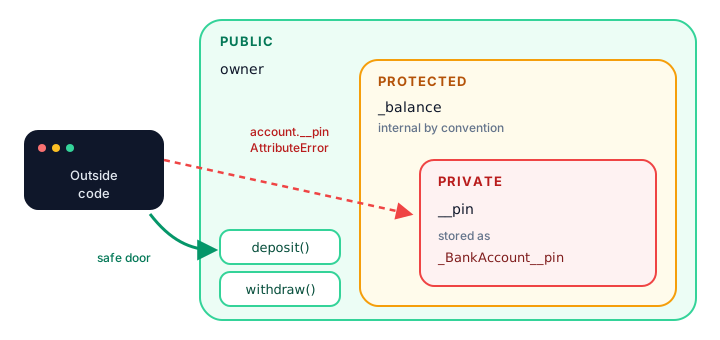
Many languages have keywords like private that the compiler enforces. Python doesn't. Instead, it uses naming conventions that every Python programmer understands:
| Style | Example | Meaning | Can outside code access it? |
|---|---|---|---|
| Public | self.owner | Part of the class's normal use | Yes, freely |
| Protected | self._balance | "Internal, please don't touch" | Yes, but by convention you shouldn't |
| Private | self.__pin | Strongly internal; name is mangled | Not by its plain name |
The single underscore: protected by convention
A name that starts with one underscore, like _balance, is a polite signal: "this is for the class's own use". Python doesn't block access, but other programmers (and code editors) treat it as internal.
class BankAccount:
    def __init__(self, owner, balance):
        self.owner = owner
        self._balance = balance

    def deposit(self, amount):
        if amount <= 0:
            raise ValueError("Deposit must be positive")
        self._balance += amount

    def get_balance(self):
        return self._balance

account = BankAccount("Maya", 100)
account.deposit(50)
print(account.get_balance())150Now code that uses the class is expected to go through deposit(), which checks the amount before changing anything.
The double underscore: private names and name mangling
A name that starts with two underscores (and doesn't end with two), like __pin, triggers name mangling. Python secretly renames it to _ClassName__pin, so it can't be reached by its plain name from outside the class:
class BankAccount:
    def __init__(self, owner, pin):
        self.owner = owner
        self.__pin = pin

    def check_pin(self, attempt):
        return attempt == self.__pin

account = BankAccount("Maya", "4831")
print(account.check_pin("0000"))
print(account.check_pin("4831"))
print(account.__pin)
False
True
AttributeError: 'BankAccount' object has no attribute '__pin'Inside the class, self.__pin works normally. Outside, it seems to be missing. The value is still there under its mangled name:
class BankAccount:
    def __init__(self, pin):
        self.__pin = pin

account = BankAccount("4831")
print(account._BankAccount__pin)4831⚠️ Be careful
Name mangling is not security. Anyone can still reach the value with the mangled name. Its real purpose is to stop a child class from accidentally overwriting a parent's attribute with the same name. Never rely on it to hide passwords or secrets.
How do you use @property for getters and setters?
Methods like get_balance() work, but they're clunky. Python's @property lets you write a method that is used like a plain attribute. You read account.balance with no parentheses, and Python quietly runs your method.
📝 Note
The @ line above a method is a decorator, like @classmethod from the class and static methods lesson. You'll learn how decorators work inside in Python decorators; for now, just use them as shown.
class Thermostat:
    def __init__(self, celsius):
        self.celsius = celsius        # goes through the setter below

    @property
    def celsius(self):
        """Getter: runs when you read thermostat.celsius"""
        return self._celsius

    @celsius.setter
    def celsius(self, value):
        """Setter: runs when you assign thermostat.celsius = ..."""
        if not 10 <= value <= 30:
            raise ValueError("Temperature must be between 10 and 30")
        self._celsius = value

home = Thermostat(21)
print(home.celsius)

home.celsius = 24
print(home.celsius)

home.celsius = 45
21
24
ValueError: Temperature must be between 10 and 30Three things happen here:
@propertyturnscelsius()into a getter, a method that runs when you read the value.@celsius.settermarks the setter, a method that runs when you assign a value.- The real data lives in
self._celsius(with an underscore), so the property and the stored value don't share a name.
Even __init__ goes through the setter, so you can't create a thermostat with a bad temperature either.
Read-only properties
If you write a getter but no setter, the attribute becomes read-only. This is perfect for values that are calculated from other data:
class Rectangle:
    def __init__(self, width, height):
        self.width = width
        self.height = height

    @property
    def area(self):
        return self.width * self.height

room = Rectangle(4, 3)
print(room.area)
room.width = 5
print(room.area)
room.area = 100
12
15
AttributeError: property 'area' of 'Rectangle' object has no setterReal-world example: a bank account that can't go negative
Let's put it all together. The balance can be read like an attribute, but it can only change through deposit() and withdraw(), and both check their input.
class BankAccount:
    def __init__(self, owner, opening_balance=0):
        self.owner = owner
        self._balance = 0
        if opening_balance > 0:
            self.deposit(opening_balance)

    @property
    def balance(self):
        return self._balance

    def deposit(self, amount):
        if amount <= 0:
            raise ValueError("Deposit must be positive")
        self._balance += amount

    def withdraw(self, amount):
        if amount > self._balance:
            print(f"Declined: only ${self._balance} available")
            return
        self._balance -= amount

account = BankAccount("Maya", 100)
account.withdraw(30)
account.withdraw(500)
print(f"{account.owner} has ${account.balance}")
Declined: only $70 available
Maya has $70When should you use encapsulation?
- Use a plain public attribute when any value is fine (like a name or a note). This is the default in Python; don't add getters "just in case".
- Use a property with a setter when a value has rules (age can't be negative, a quantity must be a whole number).
- Use a read-only property for values calculated from others (area, total price, full name).
- Use _single_underscore for helper attributes and methods that outside code shouldn't depend on.
💡 Tip
A big advantage of properties: you can start with a plain attribute and switch to a property later. Code that reads obj.price keeps working unchanged, because reading a property looks exactly like reading an attribute.
Common mistakes with encapsulation
1. Using the same name for the property and the stored value
If the setter does self.celsius = value instead of self._celsius = value, the setter calls itself again and again until Python gives up with RecursionError: maximum recursion depth exceeded. Store the data under the underscore name.
2. Calling a property with parentheses
class Rectangle:
    def __init__(self, width, height):
        self.width = width
        self.height = height

    @property
    def area(self):
        return self.width * self.height

print(Rectangle(4, 3).area())
TypeError: 'int' object is not callableroom.area already returns the number 12, so () tries to call the number. Read properties without parentheses.
3. Thinking double underscores make data secret
They don't. Name mangling only changes the name. Treat it as a guard against accidents, not against people.
Practice exercise
🏋️ Try it yourself
Create a Product class with a name and a price. Make price a property whose setter raises a ValueError if the price is negative. Also add a read-only property price_with_tax that adds 8% tax, rounded to 2 decimals. Test it with a $25 mug.
Show solution
class Product:
    def __init__(self, name, price):
        self.name = name
        self.price = price

    @property
    def price(self):
        return self._price

    @price.setter
    def price(self, value):
        if value < 0:
            raise ValueError("Price cannot be negative")
        self._price = value

    @property
    def price_with_tax(self):
        return round(self._price * 1.08, 2)

mug = Product("Mug", 25)
print(mug.price)
print(mug.price_with_tax)
mug.price = -3
25
27.0
ValueError: Price cannot be negativeWhat's next?
You can now protect your objects' data. Next, discover the special methods that let your objects work with print(), len(), == and + in Python magic (dunder) methods.
Key takeaways
- Encapsulation bundles data with the methods that change it and controls access to that data.
- Python has no private keyword; it uses naming conventions instead.
- A single underscore (_balance) means "internal, please don't touch from outside".
- A double underscore (__pin) triggers name mangling to _ClassName__pin; it prevents accidents, not access.
- @property lets a method be read like an attribute, and @name.setter adds validation on assignment.
- A property with no setter is read-only, which suits calculated values like area or total.
Frequently asked questions
Does Python have private variables?
Not truly private ones. A double underscore prefix like __pin makes Python rename the attribute to _ClassName__pin, which hides it from casual access, but it can still be reached. Python relies on convention and trust rather than strict rules.
What is the difference between _ and __ in Python attributes?
A single underscore is only a convention that marks an attribute as internal. A double underscore also triggers name mangling, so the attribute cannot be accessed by its plain name from outside the class or easily overwritten by a child class.
What is name mangling in Python?
Name mangling is when Python renames an attribute that starts with two underscores, such as __balance in class Account, to _Account__balance. It mainly prevents name clashes between a parent class and its child classes.
Why use @property instead of getter and setter methods?
@property lets you add validation or calculations while keeping simple attribute syntax like obj.price and obj.price = 10. You can also turn a plain attribute into a property later without changing any code that uses the class.
Is encapsulation the same as data hiding?
Data hiding is one part of encapsulation. Encapsulation is the bigger idea of grouping data and behavior together in a class and exposing only a safe interface, such as methods and properties, to the outside world.