Dynamic Memory with malloc() and free() in C
Updated 7 min read Aimerscrew
Until now, every array you've written had a size fixed in the code. Real programs rarely know in advance how much data they'll get. malloc and free in C solve that: malloc() asks for memory while the program runs, and free() gives it back. In this lesson, you'll learn the safe way to allocate memory, use it, and release it, plus the mistakes that trip up almost every beginner.
🌍 Real-life example
Renting a storage unit works a lot like malloc(). You tell the front desk how much space you need, and they hand you a key with the unit number on it (the pointer). The unit is yours until you return the key (free()). If you lose the key, the unit sits there, paid for and unusable. If you keep using the unit after you've returned the key, you might be rummaging through someone else's stuff.
What is dynamic memory allocation?
Dynamic memory allocation means requesting memory from the heap while the program is running, instead of fixing the size when you write the code. As you saw in stack vs heap, heap memory is large and stays valid until you release it, even after the function that requested it returns.
The functions for this live in the <stdlib.h> header, so every program in this lesson includes it.
How does malloc() work?
malloc() (short for "memory allocate") takes one argument: the number of bytes you want. It returns a pointer to the first byte of a fresh block, or NULL if there isn't enough memory.
void *malloc(size_t size);The return type void * is a "generic pointer" that can be stored in any pointer type without a cast. Here's the pattern you'll use almost every time:
int *scores = malloc(count * sizeof *scores);Read it as "room for count items, each the size of whatever scores points to". sizeof *scores is the size of one int (4 bytes on most systems), so 5 scores need 20 bytes. Writing sizeof *scores instead of sizeof(int) means that if you later change the type to double, the size updates automatically. See the sizeof operator for a refresher.
Always check for NULL
If the system can't give you the memory, malloc() returns NULL. Using a NULL pointer crashes your program, so check right away:
#include <stdio.h>
#include <stdlib.h>

int main(void) {
    int count = 4;
    int *scores = malloc(count * sizeof *scores);
    if (scores == NULL) {
        printf("Not enough memory\n");
        return 1;
    }

    scores[0] = 88;
    scores[1] = 92;
    scores[2] = 79;
    scores[3] = 95;

    int total = 0;
    for (int i = 0; i < count; i++) {
        printf("Player %d: %d\n", i + 1, scores[i]);
        total += scores[i];
    }
    printf("Average: %.2f\n", (double)total / count);

    free(scores);
    scores = NULL;
    return 0;
}
Player 1: 88
Player 2: 92
Player 3: 79
Player 4: 95
Average: 88.50Notice that once you have the pointer, you use scores[i] exactly like a normal array. That works because, as you learned in pointers and arrays, scores[i] is just *(scores + i).
⚠️ Be careful
Memory from malloc() is not set to zero. Until you store something, each element holds whatever leftover bytes were there. Always assign values before reading them, or use calloc(), which zeroes the block for you.
Releasing memory with free()
free() takes a pointer you got from malloc() and returns that block to the system so it can be reused. You don't pass the size; the system remembers it.
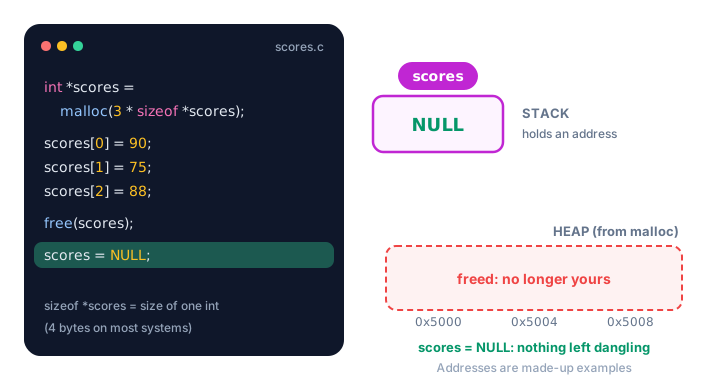
free(), the pointer still holds the old address. Setting it to NULL removes the danger. (Addresses are made-up examples.)Why set a pointer to NULL after free()?
free() releases the memory, but it can't change your variable. The pointer still holds the old address, now called a dangling pointer: it points at memory you no longer own. Setting it to NULL right after freeing makes any accidental later use easy to spot, and calling free(NULL) is always safe and does nothing.
free(scores);
scores = NULL;   /* no dangling pointer left behind */
Letting the user choose the size
This is where malloc() really shines. The program below asks how many scores to store and allocates exactly that many:
#include <stdio.h>
#include <stdlib.h>

int main(void) {
    int count = 0;
    printf("How many scores? ");
    if (scanf("%d", &count) != 1 || count <= 0) {
        printf("Please enter a positive number.\n");
        return 1;
    }

    int *scores = malloc(count * sizeof *scores);
    if (scores == NULL) {
        printf("Not enough memory.\n");
        return 1;
    }

    for (int i = 0; i < count; i++) {
        printf("Score %d: ", i + 1);
        if (scanf("%d", &scores[i]) != 1) {
            free(scores);
            return 1;
        }
    }

    int best = scores[0];
    for (int i = 1; i < count; i++) {
        if (scores[i] > best) {
            best = scores[i];
        }
    }
    printf("Highest score: %d\n", best);

    free(scores);
    scores = NULL;
    return 0;
}
Here's a sample run. The user typed 3, then 72, 95 and 81, each after its prompt:
How many scores? 3
Score 1: 72
Score 2: 95
Score 3: 81
Highest score: 95
Notice the early return 1; inside the loop frees the memory first. Every way out of the program should release what it allocated.
Returning heap memory from a function
A function can't safely return the address of its own local array, because that array lives in a stack frame that disappears when the function returns (see common pointer mistakes). Heap memory has no such problem: it lives until someone frees it.
#include <stdio.h>
#include <stdlib.h>

/* Returns a new seat map on the heap. The caller must free() it. */
int *make_seat_map(int seats) {
    int *map = malloc(seats * sizeof *map);
    if (map == NULL) {
        return NULL;
    }
    for (int i = 0; i < seats; i++) {
        map[i] = 0;   /* 0 = free seat */
    }
    return map;
}

int main(void) {
    int *row = make_seat_map(6);
    if (row == NULL) {
        return 1;
    }

    row[2] = 1;   /* book seat 3 */
    row[3] = 1;   /* book seat 4 */

    printf("Row A: ");
    for (int i = 0; i < 6; i++) {
        printf("%c", row[i] ? 'X' : '.');
    }
    printf("\n");

    free(row);
    row = NULL;
    return 0;
}
Row A: ..XX..The function allocates; the caller uses the memory and frees it. Writing "the caller must free() it" in a comment above such functions is a good habit.
malloc() and free() at a glance
| Step | Code | Why |
|---|---|---|
| Include the header | #include <stdlib.h> | Declares malloc and free |
| Allocate | p = malloc(n * sizeof *p); | Room for n items of the right size |
| Check | if (p == NULL) { ... } | Allocation can fail |
| Use | p[i] = ...; | Works just like an array |
| Release | free(p); | Give the memory back |
| Clear | p = NULL; | No dangling pointer |
Common mistakes with malloc and free
1. Forgetting sizeof
int *ages = malloc(10); /* 10 bytes, NOT 10 ints */malloc() counts bytes. This reserves room for only 2 ints on most systems, and writing ages[5] goes past the end, which can silently corrupt other data or crash. Write malloc(10 * sizeof *ages).
2. Not checking for NULL
Skipping the check works on your laptop, then crashes on a machine with less memory. Always test the result before using it.
3. Using memory after free()
Reading or writing through a pointer after freeing it is called use-after-free. It may print old values, garbage, or crash, and the behavior can change from run to run. Set the pointer to NULL after freeing.
4. Freeing memory that didn't come from malloc()
int totals[5];
free(totals);   /* wrong: totals lives on the stack */
Only pass free() a pointer returned by malloc(), calloc() or realloc(). GCC often warns here, and if the code runs it usually crashes.
5. Forgetting to free
Memory you never free stays reserved until the program exits. That's a memory leak, and it gets its own lesson in this chapter.
Practice exercise
🏋️ Try it yourself
You're tracking fuel prices for 5 days. Allocate room for 5 double values with malloc(), check for NULL, store 3.10, 3.25, 3.05, 3.40 and 3.20, print each day as Day 1: $3.10, then print the average with two decimals. Free the memory at the end.
Show solution
#include <stdio.h>
#include <stdlib.h>

int main(void) {
    int days = 5;
    double *prices = malloc(days * sizeof *prices);
    if (prices == NULL) {
        printf("Not enough memory\n");
        return 1;
    }

    prices[0] = 3.10;
    prices[1] = 3.25;
    prices[2] = 3.05;
    prices[3] = 3.40;
    prices[4] = 3.20;

    double sum = 0.0;
    for (int i = 0; i < days; i++) {
        printf("Day %d: $%.2f\n", i + 1, prices[i]);
        sum += prices[i];
    }
    printf("Average: $%.2f\n", sum / days);

    free(prices);
    prices = NULL;
    return 0;
}
Day 1: $3.10
Day 2: $3.25
Day 3: $3.05
Day 4: $3.40
Day 5: $3.20
Average: $3.20What's next?
malloc() gives you a block of a fixed size. Next, learn calloc() and realloc() in C to get zero-filled memory and to grow or shrink a block while your program runs.
Key takeaways
- malloc() reserves a block of heap memory at run time and returns a pointer to it, or NULL on failure.
- Use the pattern p = malloc(n * sizeof *p) so the size is always correct for the pointer type.
- Always check the result for NULL before using the memory.
- Memory from malloc() is not initialized; store values before reading them.
- free(p) returns the block; afterwards set p = NULL to avoid a dangling pointer.
- A function can safely return heap memory, and the caller then becomes responsible for freeing it.
Frequently asked questions
What is the difference between malloc and free in C?
malloc() requests a block of memory from the heap and returns a pointer to it. free() gives a block obtained from malloc(), calloc() or realloc() back to the system so it can be reused. Every successful malloc() should eventually be matched by one free().
Do I need to cast the result of malloc in C?
No. malloc() returns void *, which C converts to any object pointer type automatically. A cast is only needed if the same code must also compile as C++.
What happens if malloc fails?
It returns NULL. If you use that pointer without checking, the program will most likely crash, so always compare the result with NULL first.
Does free() set the pointer to NULL?
No. free() releases the memory but your pointer variable still holds the old address. Set it to NULL yourself right after calling free().
Is it safe to call free(NULL)?
Yes. The C standard says free(NULL) does nothing, so you can free a pointer that might be NULL without checking it first.