How to Write and Append to Files in Python
Updated 7 min read Aimerscrew
Reading data is useful, but most programs also need to save something: a diary entry, a high score, a list of orders. In this lesson, you'll learn how to write to a file in Python, how to add to a file without destroying what's already there, and the small details (like newlines) that trip up almost every beginner.
🌍 Real-life example
Picture a whiteboard and a notebook. When you write on the whiteboard for a new meeting, you wipe it clean first. When you write in your notebook, you just add a new line under yesterday's notes. Python's "w" mode is the whiteboard (wipe, then write) and "a" mode is the notebook (add to the end).
How do you write to a file in Python?
Writing uses the same open() function you met in How to Read Files in Python, but with a writing mode as the second argument. Then you call the file object's write() method with a string:
file = open("diary.txt", "w", encoding="utf-8")
file.write("Dear diary,\n")
file.write("Today I learned how to write files in Python.\n")
file.close()

file = open("diary.txt", encoding="utf-8")
print(file.read())
file.close()
Dear diary,
Today I learned how to write files in Python.If diary.txt doesn't exist yet, mode "w" creates it. After the program runs, you can open the file in any text editor and see the two lines.
The write() method also returns the number of characters it wrote. You usually ignore it, but it's handy to know:
file = open("greeting.txt", "w", encoding="utf-8")
count = file.write("Hello, world!\n")
file.close()

print(count)14Writing modes at a glance
| Mode | File exists | File doesn't exist | Use it for |
|---|---|---|---|
"w" | Erases everything, then writes | Creates it | Saving a fresh copy (settings, reports) |
"a" | Keeps content, writes at the end | Creates it | Logs, diaries, order history |
"x" | Raises FileExistsError | Creates it | Never overwriting by accident |
Mode "w" overwrites the whole file
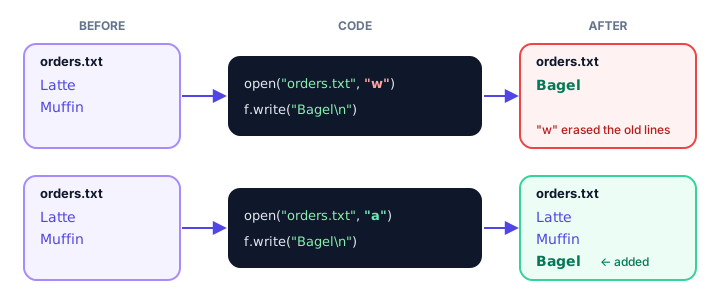
This is the most important rule in this lesson. Opening a file with "w" empties it immediately, even before you write anything. Run this after the diary example above:
file = open("diary.txt", "w", encoding="utf-8")
file.write("Oops, the old entry is gone.\n")
file.close()

file = open("diary.txt", encoding="utf-8")
print(file.read())
file.close()
Oops, the old entry is gone.⚠️ Be careful
There's no undo and no recycle bin. If you open an important file with "w" by mistake, its contents are lost for good. When you want to keep what's there, use "a".
How do you append to a file in Python?
Mode "a" (append) keeps the existing content and adds new text at the end. Here a coffee shop records orders as they come in:
file = open("orders.txt", "a", encoding="utf-8")
file.write("Latte, $4.25\n")
file.close()

file = open("orders.txt", "a", encoding="utf-8")
file.write("Croissant, $3.10\n")
file.close()

file = open("orders.txt", encoding="utf-8")
print(file.read())
file.close()
Latte, $4.25
Croissant, $3.10Run the program a second time and you'll see four lines, because each run appends two more. That's exactly what you want for a log or a history.
Why doesn't write() add a new line?
Unlike print(), write() writes exactly the characters you give it. If you forget \n, everything ends up on one line:
file = open("todo.txt", "w", encoding="utf-8")
file.write("Buy milk")
file.write("Call mom")
file.close()

file = open("todo.txt", encoding="utf-8")
print(file.read())
file.close()
Buy milkCall momAdd \n to the end of each line ("Buy milk\n") and the lines stay separate. You learned about \n in escape characters.
💡 Tip
print() can write to a file too: print("Buy milk", file=f). It adds the newline for you and converts numbers to text automatically, which is convenient for quick reports.
write() vs writelines()
writelines() takes a list (or any sequence) of strings and writes them one after another. Despite its name, it does not add newlines either:
playlist = ["Morning Coffee", "Road Trip", "Rainy Day"]

file = open("playlist.txt", "w", encoding="utf-8")
file.writelines(playlist)
file.close()

file = open("playlist.txt", encoding="utf-8")
print(file.read())
file.close()
Morning CoffeeRoad TripRainy DayAdd the newlines with a list comprehension first:
playlist = ["Morning Coffee", "Road Trip", "Rainy Day"]

file = open("playlist.txt", "w", encoding="utf-8")
file.writelines([song + "\n" for song in playlist])
file.close()

file = open("playlist.txt", encoding="utf-8")
print(file.read())
file.close()
Morning Coffee
Road Trip
Rainy Day| Method | Takes | Adds newlines? |
|---|---|---|
write(text) | One string | No |
writelines(items) | A list or other sequence of strings | No |
print(text, file=f) | Any values | Yes |
Mode "x": create a file only if it's new
Mode "x" is a safety net. It creates a new file, but refuses to touch one that already exists:
file = open("report.txt", "x", encoding="utf-8")
file.write("Monthly report\n")
file.close()

file = open("report.txt", "x", encoding="utf-8")
FileExistsError: [Errno 17] File exists: 'report.txt'The first open() works; the second raises FileExistsError instead of wiping the report. You can catch it with try and except and ask the user for a different name.
How do you write numbers to a file?
write() only accepts strings. Passing a number is an error:
file = open("score.txt", "w", encoding="utf-8")
file.write(42)
TypeError: write() argument must be str, not intConvert it first with str(42), or use an f-string such as f"{score}\n". When you read it back later, remember to turn it into a number again with int().
Real-world example: logging orders
An online store wants a permanent record of every order. A small function appends one line per order, and a second part of the program reads the log to calculate the day's sales:
def log_order(item, price):
    file = open("order_log.txt", "a", encoding="utf-8")
    file.write(f"{item},{price:.2f}\n")
    file.close()

log_order("Cappuccino", 3.8)
log_order("Blueberry muffin", 2.95)
log_order("Iced tea", 3.25)

total = 0
file = open("order_log.txt", encoding="utf-8")
for line in file:
    item, price = line.strip().split(",")
    print(f"{item:<18} ${price}")
    total += float(price)
file.close()

print(f"{'Total':<18} ${total:.2f}")
Cappuccino $3.80
Blueberry muffin $2.95
Iced tea $3.25
Total $10.00Because the log uses "a", orders from yesterday stay in the file and new orders are simply added below them.
Common mistakes when writing files
1. Using "w" when you meant "a"
Your log only ever contains the last entry. Every open(..., "w") wiped the previous one. Use "a" for anything that should grow over time.
2. Forgetting \n
All your lines run together. Remember that neither write() nor writelines() adds line breaks.
3. Forgetting to close the file
Python collects written text in memory and saves it to disk in batches. If you never call close(), some of your text may not reach the file yet. The next lesson shows how the with statement closes files for you.
4. Writing numbers or lists directly
write() needs a string. Convert values with str() or an f-string first. For whole lists and dictionaries, formats like JSON are a better fit.
Practice exercise
🏋️ Try it yourself
Write a program that saves the shopping list ["Eggs", "Bread", "Apples"] to shopping.txt, one item per line. Then open the file again in append mode, add Milk, and finally print the whole file with numbered lines like 1. Eggs.
Show solution
items = ["Eggs", "Bread", "Apples"]

file = open("shopping.txt", "w", encoding="utf-8")
for item in items:
    file.write(item + "\n")
file.close()

file = open("shopping.txt", "a", encoding="utf-8")
file.write("Milk\n")
file.close()

file = open("shopping.txt", encoding="utf-8")
number = 1
for line in file:
    print(f"{number}. {line.strip()}")
    number += 1
file.close()
1. Eggs
2. Bread
3. Apples
4. MilkWhat's next?
Every example so far had to remember close(). Next, learn the cleaner, safer way to open files that closes them automatically: the Python with statement.
Key takeaways
- Open a file for writing with open("name.txt", "w", encoding="utf-8") and save text with write().
- Mode "w" erases the file as soon as it opens; mode "a" keeps the content and adds to the end.
- Mode "x" creates a new file and raises FileExistsError if the file already exists.
- write() and writelines() never add newlines, so put \n at the end of each line yourself.
- write() only accepts strings; convert numbers with str() or an f-string.
- Close the file (or use the with statement) so all written text is saved to disk.
Frequently asked questions
How do I write to a text file in Python?
Use file = open("notes.txt", "w", encoding="utf-8"), then file.write("Your text\n"), then file.close(). If the file does not exist, Python creates it.
How do I append to a file instead of overwriting it?
Open the file with mode "a" instead of "w": open("log.txt", "a", encoding="utf-8"). New text is added to the end and the existing content is kept.
Why is everything written on one line?
write() and writelines() write exactly what you pass them and never add line breaks. Add "\n" to the end of each string, or use print(text, file=f), which adds the newline for you.
What is the difference between write() and writelines()?
write() takes a single string. writelines() takes a list or other sequence of strings and writes them one after another. Neither adds newlines automatically.
Does open() with "w" create a new file?
Yes. If the file does not exist, "w" creates it. If it does exist, "w" empties it first, so any old content is lost.