Python Comparison Operators
Updated 6 min read Aimerscrew
Is the user old enough to sign up? Is the cart total over the free-shipping limit? Did the player beat the high score? Every one of these questions is a comparison, and Python comparison operators answer them with True or False. In this lesson, you'll learn all six operators, how to chain them, how Python compares text, and the one trap to avoid with decimal numbers.
🌍 Real-life example
At an airport check-in desk, the agent weighs your suitcase. If it's more than 23 kg, you pay an extra fee. If it's 23 kg or less, you're fine. The agent is doing a comparison, weight > 23, and the answer is a simple yes or no. Programs make decisions exactly the same way.
What are comparison operators in Python?
A comparison operator compares the values on its left and right and gives back a boolean: True if the comparison holds, False if it doesn't. Comparison operators are also called relational operators.
| Operator | Meaning | Example | Result |
|---|---|---|---|
== | Equal to | 5 == 5 | True |
!= | Not equal to | 5 != 3 | True |
> | Greater than | 5 > 8 | False |
< | Less than | 5 < 8 | True |
>= | Greater than or equal to | 5 >= 5 | True |
<= | Less than or equal to | 8 <= 5 | False |
suitcase_kg = 24.5
limit_kg = 23

print(suitcase_kg > limit_kg)
print(suitcase_kg <= limit_kg)
print(suitcase_kg == limit_kg)
print(suitcase_kg != limit_kg)
True
False
False
TrueWhat is the difference between = and == in Python?
This is the number one beginner mix-up. A single = assigns a value (you met it in assignment operators). A double == asks a question: "are these two values equal?"
pin = 4321          # store 4321 in pin
print(pin == 4321)  # is pin equal to 4321?
print(pin == 1234)
True
FalseHow do you store the result of a comparison?
Because a comparison produces a value, you can store it in a variable, just like a number or string. Name these variables like yes/no questions:
cart_total = 62.40
free_shipping_minimum = 50

gets_free_shipping = cart_total >= free_shipping_minimum
print(gets_free_shipping)
print(type(gets_free_shipping))
True
<class 'bool'>In real programs, comparisons usually go inside an if statement to choose what happens next. You'll learn that in if...else.
How do chained comparisons work?
Python lets you chain comparisons, just like in math class. 1 < x < 10 means "x is greater than 1 and less than 10". Most other languages make you write two separate checks; Python reads it the natural way.
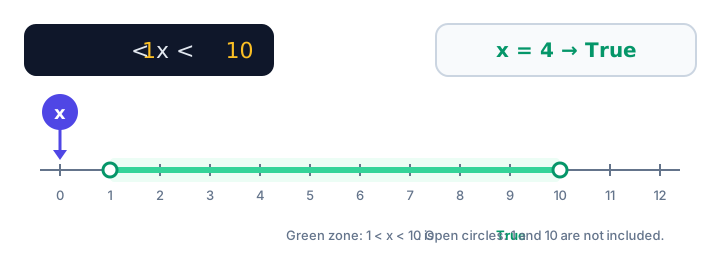
1 < x < 10 is True only between the two limits.temperature = 22
print(18 <= temperature <= 25) # comfortable room temperature?
temperature = 30
print(18 <= temperature <= 25)True
FalseBehind the scenes, 18 <= temperature <= 25 is the same as 18 <= temperature and temperature <= 25. (You'll meet and properly in logical operators.)
Can you compare different types?
Ints and floats compare by their value, so 5 == 5.0 is True. Text and numbers are never equal, though, even if they look the same:
print(5 == 5.0)
print("5" == 5)
print(True == 1)
True
False
TrueOrdering operators like < and > are stricter. Comparing a string with a number raises an error:
age = "17"
print(age < 18)
TypeError: '<' not supported between instances of 'str' and 'int'This often happens with values from input(), which are always strings. Convert them with int() first, as covered in type conversion.
How does Python compare strings?
== and != on strings check whether the text is exactly the same, character by character. The ordering operators compare strings alphabetically, like words in a dictionary:
print("apple" < "banana")
print("apple" < "apricot")   # first difference: p vs r
print("cat" < "catalog")     # a shorter prefix comes first
True
True
TrueThere's a catch: Python actually compares each character's code number (its Unicode value), and all uppercase letters come before all lowercase letters. So comparisons are case-sensitive:
print("Paris" == "paris")
print("Zebra" < "apple")
print(ord("Z"), ord("a"))
False
True
90 97The built-in ord() function shows a character's code number. "Z" is 90 and "a" is 97, so "Zebra" sorts before "apple".
💡 Tip
To compare text without caring about capital letters, turn both sides into lowercase first: city.lower() == "paris". You'll learn lower() and friends in string methods.
⚠️ Be careful
Numbers stored as text compare alphabetically, not by size. "10" < "9" is True, because the character "1" comes before "9". Convert to int before comparing amounts.
Why should you be careful comparing floats?
As you saw in Python numbers, floats are stored with tiny rounding errors. That makes == unreliable for decimal results:
import math

total = 0.1 + 0.2
print(total == 0.3)
print(math.isclose(total, 0.3))
print(round(total, 2) == 0.3)
False
True
TrueUse math.isclose() or round both sides before comparing decimals. Comparisons with < and > are usually fine, because a tiny error rarely changes which number is bigger.
Is == the same as is?
No. == checks whether two values are equal. The is operator checks whether two names point to the very same object in memory. Two different objects can hold equal values. For now, use == to compare values; you'll learn when is is the right choice in identity and membership operators.
Real-world example: checking a game high score
high_score = 8450
player_score = 9120
lives_left = 0

new_record = player_score > high_score
game_over = lives_left == 0
bonus_zone = 9000 <= player_score < 10000

print("New record:", new_record)
print("Game over:", game_over)
print("Bonus zone:", bonus_zone)
New record: True
Game over: True
Bonus zone: TrueCommon mistakes with comparison operators
1. Using = when you mean ==
score = 100
print(score = 100)
TypeError: 'score' is an invalid keyword argument for print()Inside print(), a single = is read as a named argument (like sep=), so Python complains. Use == to compare.
2. Writing =< or =>
The equals sign always comes second: <= and >=. Writing =< or => is a SyntaxError. A simple way to remember: say it out loud, "less than or equal", in that order.
3. Comparing numbers stored as text
"100" > "20" is False, because the comparison is alphabetical. Convert with int() or float() first.
4. Using == with float results
0.1 + 0.2 == 0.3 is False. Use math.isclose() or round().
Practice exercise
🏋️ Try it yourself
A movie ticket website gives a child price to anyone aged 3 to 12 (inclusive). Store an age of 9, then print whether the person gets the child price, whether they are exactly 12, and whether they are an adult (18 or over).
Show solution
age = 9

print("Child price:", 3 <= age <= 12)
print("Exactly 12:", age == 12)
print("Adult:", age >= 18)
Child price: True
Exactly 12: False
Adult: FalseWhat's next?
Single comparisons are great, but real rules often combine several conditions, like "logged in and has paid". Next, learn how to combine them with Python logical operators: and, or, not.
Key takeaways
- Python has six comparison operators: ==, !=, >, <, >= and <=. Each returns True or False.
- A single = assigns a value; a double == compares two values.
- Chained comparisons like 1 < x < 10 check a range in one readable expression.
- Strings compare alphabetically by character code, so uppercase letters sort before lowercase ones.
- A string never equals a number, and ordering a string against a number raises a TypeError.
- Avoid == on float results; use math.isclose() or round() instead.
Frequently asked questions
What does == mean in Python?
The == operator checks whether two values are equal and returns True or False. For example, 5 == 5 is True and "a" == "b" is False.
How do you write not equal in Python?
Use !=. For example, 4 != 5 is True. Older Python 2 code sometimes used <>, but that no longer works in Python 3.
Can you chain comparison operators in Python?
Yes. An expression like 1 < x < 10 works the same as 1 < x and x < 10, so it checks whether x is inside a range.
How does Python compare two strings?
Python compares strings character by character using each character's Unicode code number. This gives alphabetical order for same-case text, but every uppercase letter comes before every lowercase letter.
Why is 0.1 + 0.2 == 0.3 False in Python?
Floats are stored in binary with tiny rounding errors, so 0.1 + 0.2 is actually 0.30000000000000004. Use math.isclose(a, b) or round both values before comparing.