Python Assignment Operators
Updated 5 min read Aimerscrew
Programs constantly update values: a game adds points, a bank account loses money when you pay, a fitness tracker counts every step. Python assignment operators are the tools for storing and updating values like these. In this lesson, you'll learn the plain =, the handy shortcut operators like += and -=, and the newer "walrus" operator :=.
🌍 Real-life example
Your bank app doesn't rewrite your balance from scratch every time you buy a coffee. It takes the current balance and subtracts the price: "balance minus 4.50". That "take the current value and change it" idea is exactly what balance -= 4.50 does in Python.
What is an assignment operator in Python?
An assignment operator puts a value into a variable. The simplest one is =, which you've used since Python variables. Python first works out everything on the right side, then stores the result in the name on the left.
price = 20
quantity = 3
total = price * quantity   # right side first: 20 * 3, then store 60
print(total)60Very often, though, the new value depends on the old one. You could write the variable name twice:
score = 0
score = score + 10
score = score + 25
print(score)35This works, but Python gives you a shorter way.
What does += mean in Python?
+= means "add to the current value and store the result back". So score += 10 does exactly the same as score = score + 10. Operators like this are called compound assignment operators, because they combine a math operation with an assignment.
score = 0
score += 10   # collected a coin
score += 25   # beat a level
print(score)35Every arithmetic operator has a matching compound version:
| Operator | Example | Same as | If x starts at 10, x becomes |
|---|---|---|---|
= | x = 10 | x = 10 | 10 |
+= | x += 3 | x = x + 3 | 13 |
-= | x -= 3 | x = x - 3 | 7 |
*= | x *= 3 | x = x * 3 | 30 |
/= | x /= 4 | x = x / 4 | 2.5 |
//= | x //= 4 | x = x // 4 | 2 |
%= | x %= 4 | x = x % 4 | 2 |
**= | x **= 2 | x = x ** 2 | 100 |
How compound assignment works step by step
Let's follow a bank balance through a few transactions. Each line reads the current value, does the math, and stores the new value under the same name:
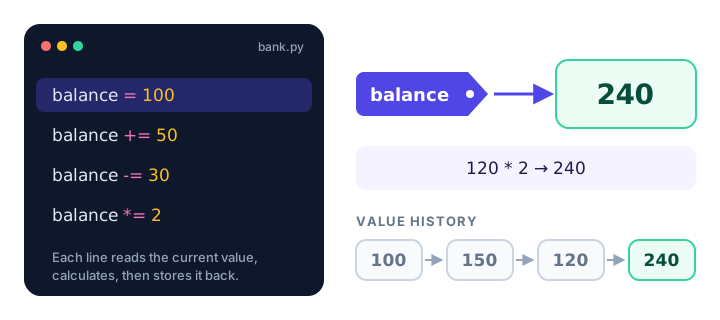
balance = 100
balance += 50    # payday bonus
print(balance)

balance -= 30    # groceries
print(balance)

balance *= 2     # a generous relative doubles it
print(balance)
150
120
240Using -=, *= and /= in real programs
Here's a shopping cart where the subtotal grows, a discount is applied, and the result is shared between two people:
cart_total = 0
cart_total += 35    # running shoes
cart_total += 15    # socks
cart_total *= 0.9   # 10% off
print(cart_total)

cart_total /= 2     # split with a friend
print(cart_total)
45.0
22.5Notice that cart_total became a float after *= 0.9. Compound operators follow the same type rules as the normal arithmetic operators, so /= always turns the variable into a float, even if it was an int.
pizzas = 8
pizzas /= 2
print(pizzas)

slices = 8
slices //= 2
print(slices)
4.0
4Using //=, %= and **=
These three are less common, but each has its moment. %= is great for wrap-around values, like a playlist that goes back to the first song after the last one:
song_count = 5
current_song = 4      # the last song (songs are numbered 0 to 4)

current_song += 1
current_song %= song_count
print(current_song)0And **= is useful for anything that grows by multiplying, like a social post being shared:
viewers = 3
viewers **= 2    # each viewer shares it with 3 more people
print(viewers)

seconds = 200
seconds //= 60   # whole minutes only
print(seconds)
9
3Do compound operators work with strings?
Yes. += joins text onto the end of a string, and *= repeats it. This is handy for building a message bit by bit:
order = "Latte"
order += ", oat milk"
order += ", extra shot"
print(order)

cheer = "Go! "
cheer *= 3
print(cheer)
Latte, oat milk, extra shot
Go! Go! Go! 📝 Note
Python has no ++ or -- operators, unlike JavaScript, Java or C. To add one to a counter, write steps += 1.
What is the walrus operator (:=) in Python?
The walrus operator := (named because := looks like a walrus's eyes and tusks) assigns a value and gives that value back in the same step. That lets you assign inside a bigger expression, such as a condition. It was added in Python 3.8. Here's a preview using an if statement, which you'll learn in if...else:
budget = 50
price = 38

if (change := budget - price) >= 10:
    print("You have", change, "left. Grab a dessert!")
You have 12 left. Grab a dessert!Without the walrus, you'd calculate change on one line and check it on the next. As a beginner, you rarely need :=; the regular = is clearer. Just recognize it when you see it.
Real-world example: a step counter
daily_goal = 10000
steps = 0

steps += 3200   # walk to work
steps += 1850   # lunch break
steps += 4100   # evening jog

remaining = daily_goal
remaining -= steps
print("Steps today:", steps)
print("Steps to goal:", remaining)
Steps today: 9150
Steps to goal: 850Common mistakes with assignment operators
1. Updating a variable that doesn't exist yet
steps += 100NameError: name 'steps' is not definedsteps += 100 needs a current value to add to. Create the variable first, for example steps = 0.
2. Writing =+ instead of +=
lives = 3
lives =+ 1
print(lives)1No error, but the wrong answer! Python reads lives =+ 1 as lives = +1, which simply stores positive one. The math symbol always comes before the equals sign.
3. Trying to use ++
count = 0
count++
SyntaxError: invalid syntaxUse count += 1 instead.
4. Confusing = with ==
= stores a value. == asks "are these equal?" and gives True or False. You'll learn == in the next lesson.
Practice exercise
🏋️ Try it yourself
A video game player starts with coins = 50. Using only compound assignment operators, update the coins: they find a chest worth 30 coins, buy a sword for 45, then a power-up doubles their coins. Print the final number of coins.
Show solution
coins = 50
coins += 30   # treasure chest
coins -= 45   # sword
coins *= 2    # power-up
print("Coins:", coins)
Coins: 70What's next?
You can now store and update values. Next, learn how to compare values and get True or False answers with Python comparison operators.
Key takeaways
- The = operator evaluates the right side first, then stores the result in the variable on the left.
- Compound operators like +=, -=, *= and /= update a variable using its current value: x += 3 is x = x + 3.
- Compound operators follow normal type rules, so /= always makes the variable a float.
- += and *= also work with strings, to join text or repeat it.
- Python has no ++ or --; write count += 1 instead.
- The walrus operator := assigns a value and returns it in the same expression (Python 3.8+).
Frequently asked questions
What does += mean in Python?
It adds a value to a variable and stores the result back in the same variable. total += 5 is a shorter way to write total = total + 5.
Does Python have ++ for incrementing?
No. Writing count++ is a SyntaxError in Python. Use count += 1 to add one, and count -= 1 to subtract one.
What is the difference between = and += in Python?
The = operator replaces the value of a variable with a new one. The += operator adds to the existing value, so the variable must already exist before you use it.
What is the walrus operator in Python?
The walrus operator := assigns a value to a variable as part of a larger expression and returns that value. It was added in Python 3.8 and is often used inside if conditions and while loops.
Why does x =+ 1 not add one in Python?
Python reads x =+ 1 as x = +1, which assigns positive one to x. To add one, the plus sign must come first: x += 1.