How Python Runs Your Code
Updated 8 min read Aimerscrew
You've written print("Hello, World!") and watched it appear on the screen. But what actually happens in between? Knowing how Python works behind the scenes helps you read error messages, predict what your code will do and fix bugs faster. In this lesson, you'll follow your code from the file you type all the way to the output, in plain English.
What is an interpreter, and what is a compiler?
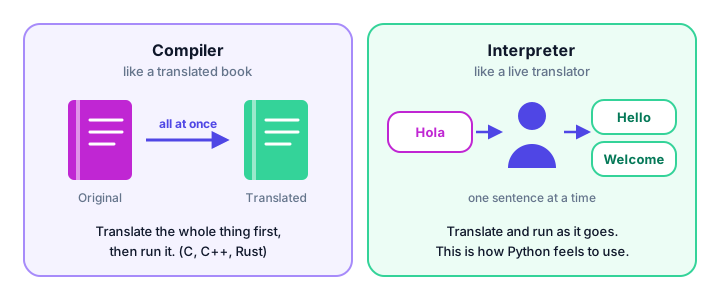
Computers don't understand Python directly. Deep down, a processor only understands machine code: long sequences of very basic instructions. So something has to translate your code. There are two main approaches:
- A compiler translates your whole program ahead of time into a separate file the computer can run. Languages like C, C++ and Rust work this way.
- An interpreter reads your program and carries out the instructions straight away, piece by piece. You run your code directly, with no separate build step.
🌍 Real-life example
Imagine a Spanish novel you want to read in English. A compiler is like a publisher who translates the entire book first; weeks later, you get a finished English edition and can read it as often as you like. An interpreter is like a live translator at an international meeting: as each sentence is spoken, they translate it on the spot, so the audience follows along immediately.
Is Python compiled or interpreted?
The honest answer is: a bit of both. Python is called an interpreted language because you run your code directly with the python command. But behind the scenes, the standard Python program (called CPython) works in two quick steps:
- Compile to bytecode. Python checks your whole file for grammar mistakes and translates it into bytecode.
- Run on the Python Virtual Machine. The PVM reads the bytecode and carries out each instruction, one after another.
Both steps happen automatically, in a fraction of a second, every time you type python app.py. You never have to run a separate build command.
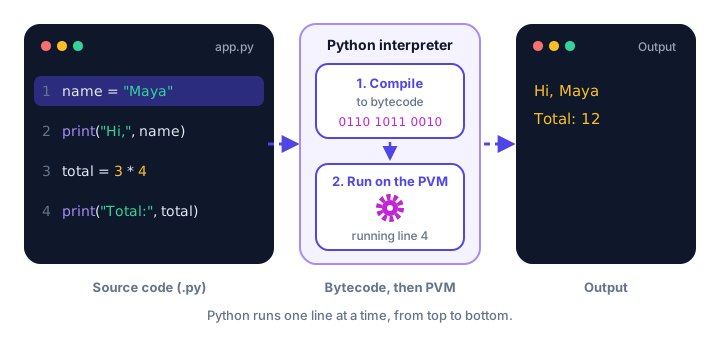
print() lines produce output.What is bytecode?
Bytecode is a simplified, low-level version of your program. It's not machine code for your specific processor, and it's not meant for humans to read. Think of it as a set of small, precise steps like "get the value of price", "get the value of quantity", "multiply them", "store the result as total".
Because bytecode isn't tied to one type of processor, the same Python program runs on Windows, macOS and Linux without changes. Each computer just needs its own Python installed.
What is the Python Virtual Machine (PVM)?
The Python Virtual Machine is the part of Python that actually runs the bytecode. "Virtual machine" here doesn't mean a separate computer; it's simply a loop inside Python that takes the next bytecode instruction, performs it, and moves on to the next one, until the program ends or hits an error.
| Stage | What it is | Who handles it |
|---|---|---|
| Source code | The .py file you write | You |
| Bytecode | Simple instructions made from your code | Python's compiler |
| Execution | Each instruction is carried out | The Python Virtual Machine |
| Output | Text on screen, files saved, and so on | The result you see |
How does Python run code line by line?
Python runs your statements in order, from top to bottom. It finishes one line before starting the next. That's why the order of your lines matters so much. Follow this bank account as it changes:
balance = 100
print("Starting balance:", balance)

balance = balance - 30
print("After buying shoes:", balance)

balance = balance + 50
print("After payday:", balance)
Starting balance: 100
After buying shoes: 70
After payday: 120Each print() shows the balance at that moment. If you moved the last print() to the top, Python would complain, because balance wouldn't exist yet.
Why do lines before an error still run?
Some errors only show up while the program is running. These are called runtime errors. Since the PVM works through your code one step at a time, everything before the broken line has already happened. Here's a recipe with a typo on line 5:
print("Step 1: Preheat the oven")
print("Step 2: Mix the batter")
print("Step 3: Pour it into the pan")
print("Step 4: Bake for 30 minutes")
prnt("Step 5: Enjoy your cake!")
Step 1: Preheat the oven
Step 2: Mix the batter
Step 3: Pour it into the pan
Step 4: Bake for 30 minutes
Traceback (most recent call last):
File "/Users/sam/recipe.py", line 5, in <module>
prnt("Step 5: Enjoy your cake!")
^^^^
NameError: name 'prnt' is not defined. Did you mean: 'print'?Lines 1 to 4 ran perfectly. Python only discovered the problem when it reached line 5 and tried to find something called prnt. The message that starts with Traceback tells you the file, the line number and what went wrong. (The file path will match your own computer.)
Why does a syntax error stop everything?
Now look what happens when line 5 has a syntax error (a grammar mistake) instead:
print("Step 1: Preheat the oven")
print("Step 2: Mix the batter")
print("Step 3: Pour it into the pan")
print("Step 4: Bake for 30 minutes")
print("Step 5: Enjoy your cake!"
File "/Users/sam/recipe.py", line 5
print("Step 5: Enjoy your cake!"
^
SyntaxError: '(' was never closedThis time, nothing is printed, not even step 1. Remember the first step: Python compiles the whole file to bytecode before running anything. If the grammar is broken anywhere, it can't build the bytecode, so the program never starts.
💡 Tip
Use this to diagnose problems quickly. If some output appeared before the error, it's a runtime error on the line shown. If no output appeared at all and you see SyntaxError, check your spelling, quotes and brackets near the line shown.
What are .pyc files and __pycache__?
Compiling to bytecode is fast, but Python can skip it entirely when nothing has changed. When one file imports another (you'll learn about imports later), Python saves the compiled bytecode in a folder called __pycache__, in files ending with .pyc (Python compiled), such as helpers.cpython-312.pyc. The 312 part means Python 3.12 made it.
Next time, if the source file hasn't changed, Python loads the saved bytecode instead of compiling again. The main file you run directly isn't cached this way, so for small single-file programs you may never see the folder.
📝 Note
It's always safe to delete a __pycache__ folder. Python simply recreates it when needed. Don't edit .pyc files, and don't share them instead of your .py files.
What is the difference between the REPL and a script?
Both use the same interpreter, but they behave a little differently:
| REPL (interactive shell) | Script (.py file) | |
|---|---|---|
| How code runs | One line as soon as you press Enter | The whole file, top to bottom |
| Shows values automatically | Yes | No, you need print() |
| Saved for later | No | Yes |
| Best for | Quick tests and experiments | Real programs |
In the REPL, typing a calculation shows its result immediately:
19 + 23>>> 19 + 23
42Put the same line in a file and run it, and you'll see nothing, because scripts only display what you explicitly print:
19 + 23
print(19 + 23)42The first line is still calculated; the result is just thrown away. Only the print() line produces output.
Common mistakes
1. Using something before it exists
print(score)
score = 10
NameError: name 'score' is not definedPython runs top to bottom, so score must be created on an earlier line than the one that uses it.
2. Expecting a script to behave like the REPL
A line like 2 * 8 in a file prints nothing. Wrap it in print() when you want to see the result.
3. Thinking Python checks every mistake before running
Python only catches syntax errors before the program starts. Mistakes such as misspelled names are found only when that line actually runs, so test every part of your program.
Practice exercise
🏋️ Try it yourself
Without running it, predict exactly what this script prints. Then run it to check your answer.
print("Kickoff!")
home = 2
print("Home team:", home)
print("Away team:", away)
print("Final whistle")
Show solution
Kickoff!
Home team: 2
Traceback (most recent call last):
  File "/Users/sam/match.py", line 4, in <module>
    print("Away team:", away)
                        ^^^^
NameError: name 'away' is not defined
Lines 1 to 3 run normally. Line 4 uses away, which was never created, so Python stops with a runtime error and "Final whistle" is never printed. It's not a syntax error, because the grammar of every line is fine.
What's next?
Now you know how Python reads and runs your code. Next, learn the grammar rules it expects, such as indentation and line structure, in Python Syntax.
Key takeaways
- A compiler translates a whole program first; an interpreter translates and runs it as it goes.
- Python first compiles your code to bytecode, then the Python Virtual Machine (PVM) runs it.
- Python runs statements one at a time, from top to bottom, so order matters.
- Runtime errors stop the program at the broken line, but earlier lines have already run.
- A SyntaxError stops the program before any line runs.
- Imported modules are cached as .pyc files in __pycache__, which is safe to delete.
- The REPL shows values automatically; scripts only show what you print().
Frequently asked questions
Is Python a compiled or interpreted language?
Python is usually called interpreted, but the standard implementation first compiles source code into bytecode and then the Python Virtual Machine interprets that bytecode. Both steps happen automatically.
What is the Python Virtual Machine?
The PVM is the part of Python that executes bytecode. It is a loop inside the Python program that carries out one bytecode instruction after another.
What is a .pyc file in Python?
A .pyc file holds compiled bytecode for an imported module. Python stores it in the __pycache__ folder so it can skip compiling again next time if the source has not changed.
Can I delete the __pycache__ folder?
Yes. Deleting __pycache__ is always safe. Python recreates the cached bytecode the next time it needs it.
Does Python run code line by line?
Yes. After compiling the file, Python executes statements one at a time from top to bottom, which is why a runtime error lets the earlier lines run first.
Why is nothing printed when I get a SyntaxError?
Python compiles the whole file before running it. A syntax error means the file cannot be compiled, so not a single line runs.