How to Create Your Own Python Module
Updated 7 min read Aimerscrew
Once your programs grow past a few dozen lines, keeping everything in one file gets messy. The fix is simple: create a module in Python by moving related functions into their own .py file, then import that file wherever you need it. In this lesson, you'll build a real module step by step, learn what if __name__ == "__main__": actually means, and see how Python finds the modules you import.
🌍 Real-life example
Imagine you run a small online shop. Your product page, your cart and your invoice emails all need to add sales tax and show prices like $1,234.50. Instead of copying the same price code into three files (and fixing bugs in three places), you write it once in pricing.py and every other file imports it.
What is a custom module?
There's nothing special about a module file. Any .py file is a module. The file name, without .py, becomes the module name. So pricing.py is imported with import pricing, exactly like the built-in modules you used in Python Modules and import.
How do you create a module in Python?
Step 1: Write the module file
Create a file called pricing.py and put your reusable code in it. Notice it only defines things; it doesn't print anything.
# pricing.py
"""Helper functions for prices in an online shop."""

TAX_RATE = 0.08


def add_tax(price):
    """Return the price with sales tax added."""
    return round(price * (1 + TAX_RATE), 2)


def apply_discount(price, percent):
    """Return the price after a percentage discount."""
    return round(price * (1 - percent / 100), 2)


def format_price(amount):
    """Turn a number into a price label like $1,234.50."""
    return f"${amount:,.2f}"
The text in triple quotes at the top of the file and inside each function is a docstring: a short description that tools like help(pricing) display.
Step 2: Import it from another file
Create shop.py in the same folder and import your module:
# shop.py
import pricing

jacket = 89.99
sale_price = pricing.apply_discount(jacket, 25)
final_price = pricing.add_tax(sale_price)

print("Sale price:", pricing.format_price(sale_price))
print("With tax:", pricing.format_price(final_price))
print("Tax rate used:", pricing.TAX_RATE)
Run shop.py (not pricing.py) and you get:
Sale price: $67.49
With tax: $72.89
Tax rate used: 0.08
Your folder now looks like this:
my_shop/
├── pricing.py    # the module
└── shop.py       # the program you run
Step 3: Import only what you need
Everything you learned about importing works with your own modules too, including from ... import and as:
# checkout.py
from pricing import add_tax, format_price

cart = [19.99, 5.50, 32.00]
subtotal = sum(cart)
print("Total:", format_price(add_tax(subtotal)))
Running checkout.py prints:
Total: $62.09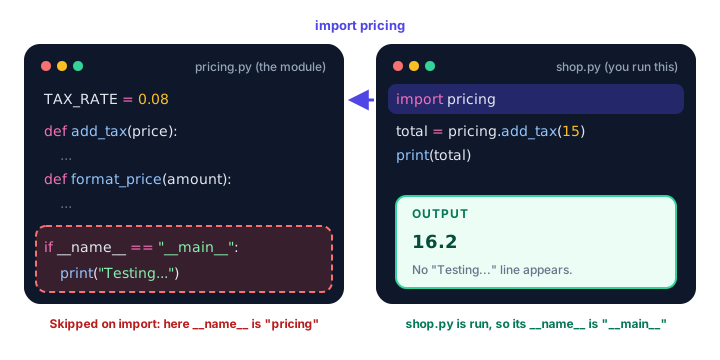
What does if __name__ == "__main__" mean?
Every module has a built-in variable called __name__ (two underscores on each side). Python sets it automatically:
| How the file is used | Value of __name__ |
|---|---|
You run the file directly (python greetings.py) | "__main__" |
Another file imports it (import greetings) | The module name, "greetings" |
You can see this yourself. Make a file that prints its own __name__:
# greetings.py
print("greetings.py is running. __name__ is", __name__)


def welcome(name):
    return f"Welcome aboard, {name}!"
Run greetings.py directly:
greetings.py is running. __name__ is __main__Now import it from another file in the same folder:
# app.py
import greetings
import greetings

print(greetings.welcome("Priya"))
Running app.py prints:
greetings.py is running. __name__ is greetings
Welcome aboard, Priya!
Two things to notice. First, __name__ is now greetings. Second, the message printed only once, even though we imported twice. Python runs a module the first time it's imported, then reuses the same module object for every later import.
Why you'd use the check
It's handy to put a few quick tests at the bottom of a module, but you don't want them printing every time another file imports it. Wrap them in the check:
# pricing.py
TAX_RATE = 0.08


def add_tax(price):
    return round(price * (1 + TAX_RATE), 2)


def format_price(amount):
    return f"${amount:,.2f}"


if __name__ == "__main__":
    # Quick checks that run only when this file is run directly
    print("Testing pricing.py...")
    print(add_tax(100))
    print(format_price(1234.5))
Testing pricing.py...
108.0
$1,234.50That's the output when you run pricing.py itself. But when shop.py imports it, the test block is skipped:
# shop.py
import pricing

print("Phone case:", pricing.format_price(pricing.add_tax(15)))
Running shop.py prints only:
Phone case: $16.20💡 Tip
Read if __name__ == "__main__": as "if this file is the one being run". You'll see it at the bottom of most Python scripts, often calling a main() function that starts the program.
How does Python find your module?
When you write import pricing, Python searches a list of folders, in order, and uses the first pricing.py it finds. That list is called the module search path, and it lives in sys.path:
- The folder of the script you ran (that's why
shop.pyfindspricing.pynext to it). - Folders listed in the
PYTHONPATHenvironment variable, if you set one. - The standard library folders.
- The
site-packagesfolder, wherepipinstalls third-party packages.
import sys

for folder in sys.path:
    print(folder)
The output lists folders on your computer, so it will differ for everyone. The first line is usually your script's own folder.
📝 Note
Because your script's folder comes first, a file named random.py next to your script hides the real random module. Always give your modules unique names.
Tips for writing good modules
- One topic per module:
pricing.pyfor prices,emails.pyfor emails. If you can't name it clearly, it's doing too much. - Use lowercase names with underscores:
shipping_rates.py, neverShipping Rates.py. - Define, don't do: a module should mostly define functions and constants. Put anything that "does" something under
if __name__ == "__main__":. - Add docstrings so
help(your_module)explains it.
Common mistakes when creating modules
1. The files are in different folders
If shop.py and pricing.py aren't side by side, Python can't find the module and you'll see ModuleNotFoundError: No module named 'pricing'. Keep them in the same folder (or use a package, coming up next).
2. Using a dash or space in the file name
A file called price-tools.py can't be imported, because import price-tools looks like a subtraction to Python:
import price-toolsSyntaxError: invalid syntaxRename it price_tools.py.
3. Typing .py in the import
import pricing.py fails with ModuleNotFoundError: No module named 'pricing.py'; 'pricing' is not a package. Use the name only: import pricing.
4. Leaving test code outside the main check
Loose print() calls in a module run every time it's imported, cluttering the output of every program that uses it. Move them under if __name__ == "__main__":.
Practice exercise
🏋️ Try it yourself
Create a module called temperature.py with two functions: c_to_f(celsius) and f_to_c(fahrenheit), both rounding to 1 decimal place. Add a test under if __name__ == "__main__":. Then create weather.py that imports the module and prints a forecast for 22°C in Fahrenheit.
Show solution
# temperature.py
def c_to_f(celsius):
    return round(celsius * 9 / 5 + 32, 1)


def f_to_c(fahrenheit):
    return round((fahrenheit - 32) * 5 / 9, 1)


if __name__ == "__main__":
    print(c_to_f(100))
    print(f_to_c(98.6))
# weather.py
import temperature
today_c = 22
today_f = temperature.c_to_f(today_c)
print(f"Today: {today_c}°C ({today_f}°F)")Running weather.py prints:
Today: 22°C (71.6°F)Running temperature.py directly prints its tests instead: 212.0 and 37.0.
What's next?
A single module is great for a handful of functions. When you have many modules, you group them into folders called packages. Learn how in Python Packages.
Key takeaways
- Any .py file is a module; its file name without .py is the module name.
- Import your module from another file in the same folder with import pricing.
- A module runs only once, the first time it is imported; later imports reuse it.
- __name__ is "__main__" when a file is run directly and the module name when it is imported.
- Put test or start-up code under if __name__ == "__main__": so it does not run on import.
- Python searches sys.path for modules, starting with the folder of the script you ran.
- Use lowercase file names with underscores, never dashes or spaces.
Frequently asked questions
How do I create my own module in Python?
Save your functions in a .py file, for example pricing.py. In another file in the same folder, write import pricing and call the functions as pricing.function_name().
What does if __name__ == "__main__" do in Python?
It checks whether the file is being run directly. Code inside that block runs when you run the file itself, but is skipped when another file imports it.
Why is my Python module not found?
Python only looks in the folders listed in sys.path, which starts with the folder of the script you ran. Make sure the module file is in that folder and the name is spelled exactly the same.
Can a Python module name have a dash in it?
No. import price-tools is read as subtraction and causes a SyntaxError. Use underscores instead, such as price_tools.py.
Does Python run a module every time it is imported?
No. Python runs a module only the first time it is imported in a program. Later imports reuse the module that is already loaded.