Python Type Conversion (Casting)
Updated 6 min read Aimerscrew
Data doesn't always arrive in the type you need. A price typed into a web form comes in as text, but you need a number to do math with it. Python type conversion is how you change a value from one type to another, for example turning the text "19" into the number 19. In this lesson, you'll learn which conversions Python does by itself, how to convert values yourself, and how to avoid the errors that trip up nearly every beginner.
🌍 Real-life example
When you fill in "Age: 29" on a sign-up form, the website receives the characters "2" and "9", not the number twenty-nine. Before it can check whether you're over 18, the code has to convert that text into a real number. That's type conversion.
What is type conversion in Python?
Type conversion means taking a value of one type (like str) and producing a value of another type (like int). It's also called casting. There are two kinds:
- Implicit conversion: Python converts automatically, behind the scenes.
- Explicit conversion: you ask for it, using a function like
int()orstr().
If you need a refresher on the types themselves, see Python data types.
Implicit type conversion: what Python does for you
When you mix an int and a float in a calculation, Python quietly converts the int to a float so no precision is lost. The result is always a float.
items = 3
price = 2.5

total = items * price
print(total)
print(type(total))
7.5
<class 'float'>Booleans join in too, since True counts as 1 and False as 0 (you saw this in Python booleans):
print(True + 2)
print(4 + 0.5)
3
4.5Python only does this for types where the meaning is obvious. It will never silently turn text into a number or a number into text. You have to do that yourself.
Explicit type conversion: int(), float(), str() and bool()
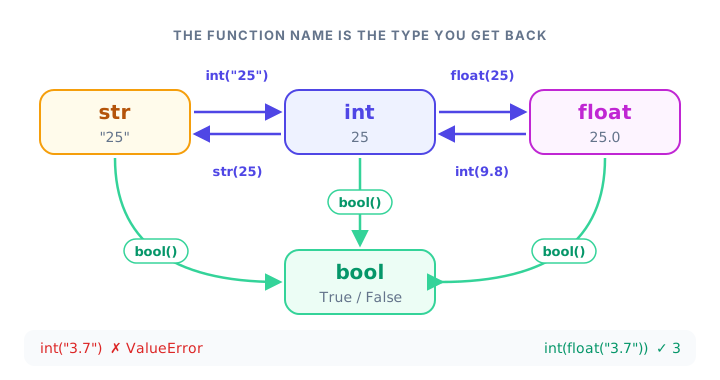
Python gives each basic type a function with the same name. Pass in a value, and you get back a new value of that type. The original value doesn't change.
int(): convert to a whole number
print(int("42"))    # text to int
print(int(9.99))    # float to int
print(int(True))    # bool to int
42
9
1Notice that int(9.99) gives 9, not 10. int() doesn't round; it simply chops off everything after the decimal point.
float(): convert to a decimal number
print(float(5))
print(float("3.14"))
print(float("  2.5  "))
5.0
3.14
2.5int() and float() both ignore spaces at the start and end of a string, which is handy for messy input.
str(): convert to text
bottles = 99
label = str(bottles) + " bottles"
print(label)
99 bottlesbool(): convert to True or False
print(bool(1))
print(bool(0))
print(bool("no"))
True
False
TrueRemember: bool() gives False only for zero, empty values and None. Even the text "no" is True.
list(): turn something into a list
Other types have conversion functions too. For example, list() splits a string into its individual characters:
print(list("cab"))['c', 'a', 'b']Python type conversion table
| Code | Result | What happened |
|---|---|---|
int("25") | 25 | Text of a whole number becomes an int |
int(7.9) | 7 | Decimal part is cut off, not rounded |
int(-7.9) | -7 | Cut toward zero |
float("0.5") | 0.5 | Text of a decimal becomes a float |
float(3) | 3.0 | Int gains a decimal point |
str(3.5) | '3.5' | Number becomes text |
bool("") | False | Empty text is falsy |
int("3.7") | ValueError | Text must look like a whole number |
int("abc") | ValueError | Text isn't a number at all |
Why does int("3.7") give a ValueError?
This one surprises almost everyone. int(3.7) works fine, but int("3.7") fails:
print(int("3.7"))ValueError: invalid literal for int() with base 10: '3.7'When int() receives a string, the string must look exactly like a whole number. A decimal point isn't allowed. The fix is to convert in two steps: first to a float, then to an int.
print(int(float("3.7")))
print(round(float("3.7")))
3
4Use int() if you want to drop the decimals, or round() if you want the nearest whole number.
Does int() round or truncate?
int() truncates toward zero, which means it removes the decimal part and moves closer to zero. For positive numbers that looks like rounding down, but for negative numbers it rounds up:
print(int(3.7))
print(int(-3.7))
3
-3If you need true "round down" behavior for negative numbers, use math.floor(-3.7), which gives -4.
How do you fix "can only concatenate str (not int) to str"?
This is probably the most common error in beginner Python. It happens when you try to join text and a number with +:
age = 25
print("Age: " + age)
TypeError: can only concatenate str (not "int") to strWith strings, + means "glue together", but Python can't glue a number to text without knowing what you want. Here are three fixes:
age = 25

print("Age: " + str(age))   # 1. convert the number to text
print("Age:", age)          # 2. let print() separate the values
print(f"Age: {age}")        # 3. use an f-string
Age: 25
Age: 25
Age: 25An f-string is a string with an f before the quotes; anything inside {} is replaced by its value. You'll learn more about them in the print() lesson.
💡 Tip
The error message tells you which way round the problem is. "Age: " + 25 says "can only concatenate str", while 25 + " years" gives TypeError: unsupported operand type(s) for +: 'int' and 'str'. Same cause, same fixes.
Real-world example: values from a web form
Online forms send every field as text. Here, an order form has sent a price and a quantity, and we want the total plus a converted amount in another currency.
price_text = "12.50"     # from the form
quantity_text = "3"      # from the form
exchange_rate = 0.92     # 1 dollar in euros

price = float(price_text)
quantity = int(quantity_text)

total = price * quantity
in_euros = round(total * exchange_rate, 2)

print("Total in dollars:", total)
print("Total in euros:", in_euros)
Total in dollars: 37.5
Total in euros: 34.5Without the conversions, price_text * quantity_text would fail, because you can't multiply two strings together.
Common mistakes with type conversion
1. Expecting int() to round
int(4.9) is 4. Use round(4.9) if you want 5.
2. Converting text that isn't a number
print(float("ten"))ValueError: could not convert string to float: 'ten'The text must contain digits Python can read. Words like "ten" or symbols like "$10" won't work.
3. Forgetting to store the converted value
score = "80"
int(score)
print(score + 5)
TypeError: can only concatenate str (not "int") to strint(score) creates a new value but doesn't change score. Save it: score = int(score).
4. Adding numbers that are still strings
print("5" + "3")53No error, but the wrong answer: the two strings were glued together. Convert first: int("5") + int("3") gives 8.
Practice exercise
🏋️ Try it yourself
A fitness app stores your weekly running distances as text: "5.2", "3.8" and "6". Convert them, add them up, and print Total: 15 km using int() to show only the whole kilometers. Make sure your message joins text and a number without a TypeError.
Show solution
monday = "5.2"
wednesday = "3.8"
saturday = "6"

total = float(monday) + float(wednesday) + float(saturday)
print("Total: " + str(int(total)) + " km")
Total: 15 kmWhat's next?
Now you can convert between types, which is exactly what you need when your program asks the user a question. Next, learn how to read what people type with Python user input.
Key takeaways
- Type conversion (casting) changes a value from one type to another.
- Python converts implicitly only when it is safe, for example int + float gives a float.
- Convert explicitly with int(), float(), str(), bool() and list(); the function name is the type you get.
- int() truncates toward zero: int(3.7) is 3 and int(-3.7) is -3.
- int("3.7") raises a ValueError; use int(float("3.7")) or round(float("3.7")) instead.
- Fix "can only concatenate str" by using str(), commas in print(), or an f-string.
Frequently asked questions
How do I convert a string to an int in Python?
Use int(), for example int("42") returns 42. The string must look like a whole number, so convert decimals with float() first.
What is the difference between implicit and explicit type conversion?
Implicit conversion happens automatically, like Python turning 3 into 3.0 when you add it to a float. Explicit conversion is when you call a function such as int() or str() yourself.
Does int() round numbers in Python?
No. int() removes the decimal part and moves toward zero, so int(9.99) is 9 and int(-9.99) is -9. Use round() to get the nearest whole number.
How do I convert a number to a string in Python?
Use str(), for example str(25) returns "25". You can also put the number inside an f-string, like f"Age: {age}".
Why do I get ValueError: invalid literal for int() with base 10?
The string you passed to int() is not a valid whole number, for example "3.7", "abc" or an empty string. Check the input, or convert decimals with float() first.