Python Return Statement
Updated 7 min read Aimerscrew
So far, most of the functions you've written print their results. That's fine for showing a message, but what if you need the result for something else, like adding it to a total or comparing it with another number? That's what the Python return statement is for. In this lesson, you'll learn how return sends a value back to the caller, how it differs from print(), what happens when a function returns nothing, and how to return several values at once.
🌍 Real-life example
Imagine asking a friend at the store to check the price of olive oil. If they just say it out loud in the aisle, the information is gone the moment they finish talking. If they text it back to you, you now have the number and can add it to your budget, compare it with another brand, or save it for later. print() says it out loud. return hands the value back to you.
What does return do in Python?
The return statement does two things:
- It sends a value back to the place where the function was called.
- It ends the function immediately. Any code after it in the function is skipped.
def add_tax(price):
    return price * 1.08

total = add_tax(100)
print(total)108.0When Python runs add_tax(100), the whole call is replaced by the returned value, 108.0. So the line effectively becomes total = 108.0.
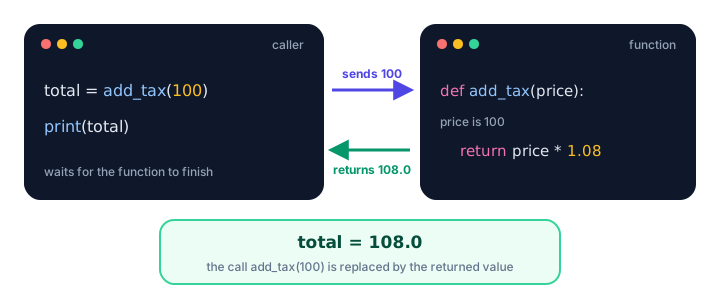
return sends a value back out, and the call is replaced by that value.What is the difference between return and print?
This is one of the most common points of confusion for beginners, so let's compare them side by side:
def area_print(width, height):
    print(width * height)

def area_return(width, height):
    return width * height

a = area_print(3, 4)
b = area_return(3, 4)

print("a is", a)
print("b is", b)
12
a is None
b is 12area_print() shows 12 on the screen, but the value then disappears, so a ends up as None. area_return() shows nothing on its own, but hands 12 back, so b holds it.
print() | return | |
|---|---|---|
| What it does | Shows text on the screen | Sends a value back to the caller |
| Can you store the result? | No | Yes, in a variable |
| Ends the function? | No | Yes |
| Best for | Messages for the user | Results the program needs |
💡 Tip
A good rule of thumb: let functions return results, and do the printing in the code that calls them. That way, the same function can be used to show a value, save it, or feed it into another calculation.
What does a function return if there is no return statement?
Every Python function returns something. If it never reaches a return, or uses return with no value, it returns None, Python's special "nothing here" value.
def say_hi():
    print("Hi!")

def stop_early():
    return

result1 = say_hi()
result2 = stop_early()
print(result1, result2)
Hi!
None NoneThis is why print(say_hi()) prints Hi! followed by None: the inner call prints the greeting, and the outer print() prints the returned value.
Using returned values in expressions
Because a call to a returning function becomes its value, you can use it anywhere a value fits: in math, in conditions, in f-strings, or as an argument to another function.
def add_tax(price, rate=0.08):
    return round(price * (1 + rate), 2)

cart = [19.99, 5.49, 42.00]

subtotal = 0
for price in cart:
    subtotal += add_tax(price)

print(f"Total with tax: ${subtotal:.2f}")
print(add_tax(50) > 50)
print(add_tax(add_tax(10)))
Total with tax: $72.88
True
11.66The last line passes one call's result straight into another call. Python works from the inside out: add_tax(10) returns 10.8, then add_tax(10.8) returns 11.66.
Early return: leaving a function sooner
Since return ends a function right away, you can use it to exit early when there's nothing more to do. This often makes code flatter and easier to read than deeply nested if statements.
def shipping_cost(order_total, country):
    if order_total >= 50:
        return 0
    if country == "US":
        return 5.99
    return 14.99

print(shipping_cost(75, "UK"))
print(shipping_cost(20, "US"))
print(shipping_cost(20, "Japan"))
0
5.99
14.99For a $75 order, the first return runs and the function stops; the country checks never happen. Early returns are perfect for "guard" checks, such as rejecting bad input before doing the real work:
def average(scores):
    if not scores:
        return 0
    return sum(scores) / len(scores)

print(average([80, 90, 100]))
print(average([]))
90.0
0How do you return multiple values in Python?
Write several values after return, separated by commas. Python packs them into a single tuple:
def min_max(temperatures):
    return min(temperatures), max(temperatures)

week = [18, 22, 15, 25, 20, 17, 23]
result = min_max(week)
print(result)
print(type(result))
(15, 25)
<class 'tuple'>Usually you'll unpack the tuple straight into separate variables, the same way you assign several variables at once:
def min_max(temperatures):
    return min(temperatures), max(temperatures)

coldest, warmest = min_max([18, 22, 15, 25, 20, 17, 23])
print(f"Coldest: {coldest}°C, warmest: {warmest}°C")
Coldest: 15°C, warmest: 25°CReal-world example: a tax calculator
Here's a function that returns three related numbers. The calling code decides how to display them:
def calculate_bill(amount, tax_rate=0.08, tip_rate=0.15):
    """Return the tax, tip and total for a restaurant bill."""
    tax = round(amount * tax_rate, 2)
    tip = round(amount * tip_rate, 2)
    total = round(amount + tax + tip, 2)
    return tax, tip, total

tax, tip, total = calculate_bill(60)
print(f"Food:  ${60:.2f}")
print(f"Tax:   ${tax:.2f}")
print(f"Tip:   ${tip:.2f}")
print(f"Total: ${total:.2f}")

_, _, big_total = calculate_bill(200, tip_rate=0.20)
print(f"Party of eight pays ${big_total:.2f}")
Food: $60.00
Tax: $4.80
Tip: $9.00
Total: $73.80
Party of eight pays $256.00The underscore _ is a common name for "a value I don't need". It lets you unpack only the total.
Common mistakes with return
1. Printing instead of returning
def double(n):
    print(n * 2)

result = double(5) + 1
10
TypeError: unsupported operand type(s) for +: 'NoneType' and 'int'double() printed 10 but returned None, and you can't add 1 to None. Change print(n * 2) to return n * 2.
2. Writing code after return
def greet(name):
    return f"Hello, {name}!"
    print("This line never runs")

print(greet("Zoe"))
Hello, Zoe!Anything after return in the same block is unreachable. Move it above the return or delete it.
3. Returning inside a loop too early
def has_negative(numbers):
    for n in numbers:
        if n < 0:
            return True
        else:
            return False

print(has_negative([3, 8, -2]))FalseThe function returns after checking only the first number. Return False after the loop, once every number has been checked:
def has_negative(numbers):
    for n in numbers:
        if n < 0:
            return True
    return False

print(has_negative([3, 8, -2]))True4. Forgetting that some paths return None
If only some branches of an if have a return, the others quietly return None. Make sure every path returns a value.
Practice exercise
🏋️ Try it yourself
Write a function grade_stats(scores) that returns three values: the lowest score, the highest score and the average rounded to 1 decimal place. If the list is empty, return None, None, None early. Test it with [72, 95, 88, 61, 79] and with an empty list.
Show solution
def grade_stats(scores):
    if not scores:
        return None, None, None
    average = round(sum(scores) / len(scores), 1)
    return min(scores), max(scores), average

low, high, avg = grade_stats([72, 95, 88, 61, 79])
print(f"Low: {low}, High: {high}, Average: {avg}")
print(grade_stats([]))
Low: 61, High: 95, Average: 79.0
(None, None, None)What's next?
You now know how to get values out of a function. But what about the variables you create inside one? Can the rest of your program see them? Find out in Python variable scope.
Key takeaways
- The return statement sends a value back to the caller and ends the function immediately.
- print() only shows a value on screen; return lets you store and reuse the value.
- A function with no return statement, or a bare return, returns None.
- A call to a returning function can be used anywhere a value fits: math, conditions, f-strings or other calls.
- Early return lets you exit a function as soon as the answer is known, keeping code flat.
- return a, b returns a tuple, which you can unpack with x, y = my_function().
Frequently asked questions
What is the difference between return and print in Python?
print() displays a value on the screen but gives nothing back to your program. return sends the value back to the caller so it can be stored in a variable, used in a calculation or passed to another function.
What does a Python function return by default?
If a function ends without a return statement, or uses return with no value, it returns None.
Can a Python function return multiple values?
Yes. Write the values separated by commas, like return low, high. Python returns them as a tuple, which you can unpack into separate variables: low, high = min_max(data).
Does return stop a function in Python?
Yes. As soon as Python runs a return statement, the function ends and any remaining code in it is skipped, even inside a loop.
Can you have more than one return statement in a function?
Yes. A function can have several return statements in different branches, but only the first one that runs takes effect. This is common for early returns and guard checks.