Python math and random Modules
Updated 7 min read Aimerscrew
Two of the most useful tools in the standard library are the Python math and random modules. math handles calculations that go beyond +, -, * and /, like square roots and rounding up. random brings chance into your programs: rolling dice, shuffling playlists, drawing raffle winners. Both come with Python, so you only need an import to start.
🌍 Real-life example
A bakery packs cupcakes in boxes of 12. An order for 50 cupcakes needs 5 boxes, not 4.17, so you always round up: that's math.ceil(). On Friday, the bakery draws a random customer to win a free cake: that's random.choice(). Everyday problems like these are exactly what the two modules are for.
The Python math module
Import the module once, then call its functions with the math. prefix:
import math

print(math.sqrt(144))       # square root
print(math.pi)              # the constant pi
print(math.pow(2, 10))      # 2 to the power of 10
print(math.factorial(5))    # 5 x 4 x 3 x 2 x 1
print(math.gcd(24, 36))     # greatest common divisor
12.0
3.141592653589793
1024.0
120
12Notice that math.sqrt() and math.pow() always return a float, while factorial() and gcd() return whole numbers (ints). If you want an int power, use the ** operator instead: 2 ** 10 gives 1024.
Commonly used math functions
| Function | What it does | Example → result |
|---|---|---|
math.sqrt(x) | Square root | math.sqrt(81) → 9.0 |
math.pi | The constant π (not a function, no brackets) | 3.141592653589793 |
math.ceil(x) | Round up to a whole number | math.ceil(4.1) → 5 |
math.floor(x) | Round down to a whole number | math.floor(4.9) → 4 |
math.pow(x, y) | x to the power y, as a float | math.pow(3, 2) → 9.0 |
math.factorial(n) | n × (n−1) × … × 1 | math.factorial(4) → 24 |
math.gcd(a, b) | Largest number that divides both | math.gcd(12, 18) → 6 |
math.isclose(a, b) | Are two floats (almost) equal? | math.isclose(0.1 + 0.2, 0.3) → True |
How do you round up and down in Python?
The built-in round() goes to the nearest number. When you need a specific direction, use math.ceil() (think "ceiling", up) or math.floor() (think "floor", down):
import math

price = 4.25
print(round(price))
print(math.ceil(price))
print(math.floor(price))

print(math.floor(-2.5))
print(int(-2.5))
4
5
4
-3
-2Look at the last two lines. For negative numbers, floor() goes down to -3, while int() just chops off the decimals and gives -2. They only agree for positive numbers.
Real-world example: rounding prices up
Three friends split a $100 dinner bill. $100 / 3 is $33.333..., and if everyone pays $33.33, the restaurant is a cent short. Rounding each share up to the next cent fixes it:
import math

bill = 100
friends = 3

share = math.ceil(bill / friends * 100) / 100
print("Each person pays:", share)

cupcakes = 50
boxes = math.ceil(cupcakes / 12)
print("Boxes needed:", boxes)
Each person pays: 33.34
Boxes needed: 5The trick of multiplying by 100, rounding up, then dividing by 100 works for rounding up to any number of cents.
Real-world example: equal gift bags with gcd
You have 24 chocolates and 36 candies and want to make identical gift bags with nothing left over. The greatest common divisor tells you the most bags you can make:
import math

chocolates = 24
candies = 36

bags = math.gcd(chocolates, candies)
print("Bags:", bags)
print("Each bag gets", chocolates // bags, "chocolates and", candies // bags, "candies")
Bags: 12
Each bag gets 2 chocolates and 3 candiesThe Python random module
The random module picks values by chance. Here are the functions you'll use most:
| Function | What it does |
|---|---|
random.random() | A float from 0.0 up to (but not including) 1.0 |
random.randint(a, b) | A whole number from a to b, including both ends |
random.uniform(a, b) | A float between a and b |
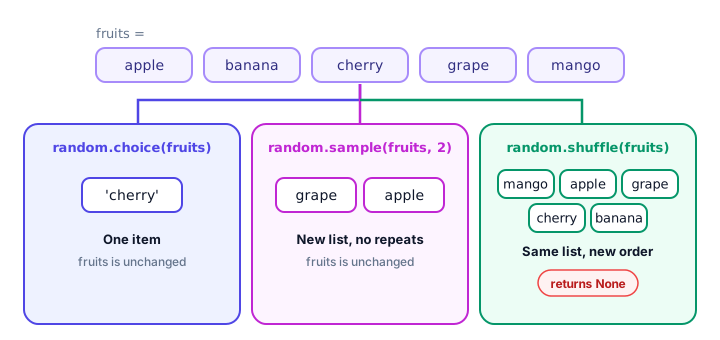
random.choice(seq) | One random item from a list, tuple or string |
random.shuffle(lst) | Mixes a list in place and returns None |
random.sample(seq, k) | A new list of k different items |
random.seed(n) | Makes the random results repeatable |
What does random.seed() do?
Computers can't flip real coins. The random module uses a formula that produces numbers that look random, starting from a value called the seed. Normally the seed comes from the current time, so you get different results each run. If you set the seed yourself, you get the same sequence every time:
import random

random.seed(42)
print(random.random(), random.randint(1, 6), random.randint(1, 6))

random.seed(42)
print(random.random(), random.randint(1, 6), random.randint(1, 6))
0.6394267984578837 1 6
0.6394267984578837 1 6Same seed, same results. That's very useful for testing and for tutorials like this one: every example below sets a seed, so if you copy it exactly, you'll see exactly the output shown. Remove the random.seed() line and your results will change each time you run the program.
⚠️ Not for passwords
The random module is predictable by design, so never use it for passwords, security tokens or anything secret. Python has a separate secrets module for that, which you'll use in the password generator project.
Random numbers: randint() and random()
Real-world example: a dice game
Two players each roll two dice. The higher total wins. randint(1, 6) includes both 1 and 6, just like a real die:
import random

random.seed(12)

for player in ["Mia", "Leo"]:
    die1 = random.randint(1, 6)
    die2 = random.randint(1, 6)
    print(f"{player} rolled {die1} and {die2}: total {die1 + die2}")
Mia rolled 4 and 3: total 7
Leo rolled 6 and 5: total 11For random decimal numbers, use random.random() (0 to 1) or random.uniform() (any range):
import random

random.seed(3)
print(random.random())
print(round(random.uniform(10, 20), 2))
0.23796462709189137
15.44Picking from a list: choice(), shuffle() and sample()
choice(): one random item
Can't decide what to have for dinner? Let Python pick:
import random

random.seed(8)
menu = ["pizza", "tacos", "sushi", "pasta", "curry"]
print("Tonight we're having", random.choice(menu))
Tonight we're having tacosshuffle(): mix a list in place
shuffle() changes the original list and returns None, just like the list method sort():
import random

random.seed(4)
playlist = ["Song A", "Song B", "Song C", "Song D", "Song E"]
result = random.shuffle(playlist)

print(playlist)
print(result)
['Song D', 'Song E', 'Song A', 'Song C', 'Song B']
Nonesample(): several items, no repeats
Real-world example: drawing raffle winners
A charity raffle needs 3 different winners. sample() never picks the same entry twice, and it leaves the original list unchanged:
import random

random.seed(21)
entries = ["Ava", "Ben", "Chen", "Dana", "Eli", "Fatima", "Gus", "Hana"]

winners = random.sample(entries, 3)
print("Winners:", winners)
print("Entries left as they were:", len(entries))
Winners: ['Chen', 'Dana', 'Fatima']
Entries left as they were: 8It works with a range too. Here's a lottery ticket with 6 different numbers from 1 to 49, sorted:
import random

random.seed(99)
ticket = sorted(random.sample(range(1, 50), 6))
print(ticket)
[12, 13, 15, 25, 26, 39]Common mistakes with math and random
1. Assigning the result of shuffle()
import random

cards = ["A", "K", "Q"]
cards = random.shuffle(cards)
print(cards)Noneshuffle() works in place and returns None. Call it on its own line: random.shuffle(cards).
2. Forgetting randint() includes the top number
Unlike range(1, 6), which stops at 5, random.randint(1, 6) can return 6. For a die, that's what you want; just don't write randint(1, 7).
3. Taking the square root of a negative number
import math

print(math.sqrt(-9))
ValueError: math domain error4. Asking sample() for more items than exist
import random

print(random.sample(["red", "blue"], 3))
ValueError: Sample larger than population or is negativePractice exercise
🏋️ Try it yourself
Write a "coin flip" game. Use random.seed(7), then flip a coin 5 times with random.choice(["Heads", "Tails"]), printing each result and counting the heads. Finally, for a pizza with a 14-inch diameter, print its area in square inches rounded down with math.floor().
Show solution
import math
import random

random.seed(7)
heads = 0
for flip in range(1, 6):
    side = random.choice(["Heads", "Tails"])
    print(f"Flip {flip}: {side}")
    if side == "Heads":
        heads += 1
print("Total heads:", heads)

radius = 14 / 2
area = math.pi * radius ** 2
print("Pizza area:", math.floor(area), "sq in")
Flip 1: Tails
Flip 2: Heads
Flip 3: Tails
Flip 4: Heads
Flip 5: Heads
Total heads: 3
Pizza area: 153 sq inWhat's next?
You can now calculate and randomize like a pro. Next, learn to work with calendars, clocks and countdowns in Python dates and times with datetime.
Key takeaways
- Import math for calculations: sqrt(), pi, pow(), factorial() and gcd().
- math.ceil() always rounds up and math.floor() always rounds down; round() goes to the nearest.
- random.randint(a, b) includes both a and b, so randint(1, 6) is a fair die.
- random.choice() picks one item, random.sample() picks several different items, random.shuffle() mixes a list in place.
- shuffle() returns None, so never write my_list = random.shuffle(my_list).
- random.seed(n) makes "random" results repeatable, which helps testing.
- Never use random for passwords or secrets; use the secrets module instead.
Frequently asked questions
How do I generate a random number in Python?
Import the random module and call random.randint(a, b) for a whole number from a to b inclusive, or random.random() for a float between 0.0 and 1.0.
How do you round up a number in Python?
Use math.ceil(), which always rounds up to the next whole number. For example, math.ceil(4.1) returns 5. Use math.floor() to always round down.
What is the difference between random.choice and random.sample?
random.choice() returns a single random item. random.sample(sequence, k) returns a new list of k different items, so nothing is picked twice.
What does random.seed() do in Python?
It sets the starting point of the random number generator. Using the same seed always produces the same sequence of results, which is useful for testing and reproducible examples.
Why does random.shuffle return None?
shuffle() changes the list in place instead of creating a new one, so it returns None. Call random.shuffle(my_list) on its own line, then use my_list.
Is math.pow the same as ** in Python?
Both raise a number to a power, but math.pow() always returns a float (math.pow(2, 3) is 8.0), while 2 ** 3 returns the int 8 when both numbers are ints.