Python Shallow Copy vs Deep Copy
Updated 6 min read Aimerscrew
In the previous lesson, you saw that b = a doesn't copy a list; it just gives the same list a second name. So how do you make a real copy? The answer depends on what's inside your data, and that's where Python shallow copy vs deep copy comes in. In this lesson, you'll learn the three levels of "copying", when each is enough, and how to avoid the famous nested list surprise.
🌍 Real-life example
Imagine a wedding planner with a seating chart: a list of tables, and each table is a list of guests. A shallow copy is like photocopying the cover page that says "Table 1, Table 2" while both versions still point at the same table cards. A deep copy is like duplicating every table card too, so you can rearrange the copy without touching the original plan.
Assignment vs copy: what's the difference?
There are three different things you can do:
| Operation | New outer object? | New inner objects? |
|---|---|---|
b = a (assignment) | No | No |
a.copy(), a[:], list(a), copy.copy(a) (shallow copy) | Yes | No |
copy.deepcopy(a) (deep copy) | Yes | Yes |
menu = ["soup", "salad", "pie"]

same = menu          # assignment: same list
clone = menu.copy()  # shallow copy: new list

menu.append("tea")

print(same)
print(clone)
['soup', 'salad', 'pie', 'tea']
['soup', 'salad', 'pie']same changed along with menu because it is menu. clone is a separate list, so it stayed the same.
What is a shallow copy in Python?
A shallow copy creates a new container and fills it with references to the same items the original holds. For a flat list of numbers or strings, that's all you need, because those items are immutable anyway.
Python gives you several ways to make one:
import copy

prices = [4.5, 3.0, 6.25]

a = prices.copy()       # list method
b = prices[:]           # slice of the whole list
c = list(prices)        # build a new list from it
d = copy.copy(prices)   # works for any object

print(a, b, c, d)
print(a is prices, b is prices, c is prices, d is prices)
[4.5, 3.0, 6.25] [4.5, 3.0, 6.25] [4.5, 3.0, 6.25] [4.5, 3.0, 6.25]
False False False FalseAll four are new lists with the same values. Dictionaries and sets have a .copy() method too, and copy.copy() from the copy module works on almost anything, including your own objects.
The nested list surprise
Things change when a list contains other mutable objects, like lists inside a list. A shallow copy only copies the outer list. The inner lists are shared:
seating = [["Ana", "Ben"], ["Cy", "Dee"]]
draft = seating.copy()

draft.append(["Eve"])        # change the outer list
draft[0].append("Finn")      # change an inner list

print(seating)
print(draft)
[['Ana', 'Ben', 'Finn'], ['Cy', 'Dee']]
[['Ana', 'Ben', 'Finn'], ['Cy', 'Dee'], ['Eve']]Adding a new table to draft didn't affect seating, because the outer lists are separate. But adding Finn to table 1 showed up in both, because draft[0] and seating[0] are the same inner list:
seating = [["Ana", "Ben"], ["Cy", "Dee"]]
draft = seating.copy()

print(draft is seating)
print(draft[0] is seating[0])
False
True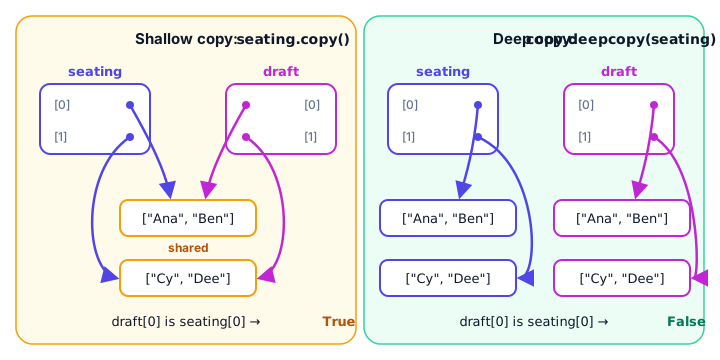
What is a deep copy in Python?
A deep copy copies the container and, recursively, every mutable object inside it. The result shares nothing changeable with the original. You make one with copy.deepcopy():
import copy

seating = [["Ana", "Ben"], ["Cy", "Dee"]]
draft = copy.deepcopy(seating)

draft[0].append("Finn")

print(seating)
print(draft)
print(draft[0] is seating[0])
[['Ana', 'Ben'], ['Cy', 'Dee']]
[['Ana', 'Ben', 'Finn'], ['Cy', 'Dee']]
FalseNow the original seating chart is untouched. You can rearrange draft as much as you like.
Copying dictionaries with nested data
The same rules apply to dictionaries. This is common with settings or templates, where values are often lists or other dictionaries:
import copy

template = {"title": "Invoice", "lines": ["Header", "Total"]}

shallow = template.copy()
deep = copy.deepcopy(template)

shallow["title"] = "Receipt"          # replaces a value: safe
shallow["lines"].append("Thank you")  # changes the shared list

print(template)
print(deep)
{'title': 'Invoice', 'lines': ['Header', 'Total', 'Thank you']}
{'title': 'Invoice', 'lines': ['Header', 'Total']}Replacing shallow["title"] only rebinds a key in the new dictionary, so the template keeps "Invoice". But append() changed the list that both dictionaries share. The deep copy was completely unaffected.
🌍 Real-life example: a document template
Think of a company letter template with a header, a body and a list of attachments. Each employee who starts a new letter should get a deep copy. With a shallow copy, the first person who adds an attachment would quietly add it to everyone's letter, including the master template.
Copying your own objects
copy.copy() and copy.deepcopy() also work on objects of your own classes:
import copy

class Playlist:
    def __init__(self, name, songs):
        self.name = name
        self.songs = songs

road_trip = Playlist("Road Trip", ["Highway", "Sunset"])

shallow = copy.copy(road_trip)
deep = copy.deepcopy(road_trip)

shallow.songs.append("Exit 9")

print(road_trip.songs)
print(deep.songs)
['Highway', 'Sunset', 'Exit 9']
['Highway', 'Sunset']When should you use a shallow or a deep copy?
- Shallow copy when your list or dict holds only immutable things (numbers, strings, tuples of numbers), or when you want the inner objects shared. It's fast and uses little memory.
- Deep copy when the data is nested and you plan to change the inner parts of the copy, like a game board, a seating chart or a configuration template.
- No copy (just assignment) when you only need another name for the same object.
💡 Tip
Deep copies are slower and use more memory, because every nested object is duplicated. For big data, only deep copy when you really need independence.
Common mistakes
1. Using * to build a grid
Multiplying a list of lists repeats the same inner list, so every row is an alias:
board = [["-"] * 3] * 3
board[0][0] = "X"
print(board)
[['X', '-', '-'], ['X', '-', '-'], ['X', '-', '-']]Build each row separately with a list comprehension instead:
board = [["-"] * 3 for _ in range(3)]
board[0][0] = "X"
print(board)
[['X', '-', '-'], ['-', '-', '-'], ['-', '-', '-']]2. Thinking slicing makes a deep copy
grid[:] is a shallow copy, exactly like grid.copy(). Nested lists are still shared.
3. Forgetting to import copy
backup = copy.deepcopy([1, [2, 3]])NameError: name 'copy' is not defined. Did you forget to import 'copy'?Add import copy at the top of your file.
Practice exercise
🏋️ Try it yourself
A weekly meal plan is stored as plan = {"Mon": ["eggs"], "Tue": ["oats"]}. Make a copy called next_week, add "fruit" to Monday in next_week, and make sure the original plan does not change. Print both.
Show solution
import copy

plan = {"Mon": ["eggs"], "Tue": ["oats"]}
next_week = copy.deepcopy(plan)

next_week["Mon"].append("fruit")

print(plan)
print(next_week)
{'Mon': ['eggs'], 'Tue': ['oats']}
{'Mon': ['eggs', 'fruit'], 'Tue': ['oats']}A shallow copy (plan.copy()) would not work here, because the Monday list would be shared.
What's next?
Now you can copy data safely. Next, discover how a for loop really walks through a list, step by step, in Python iterators.
Key takeaways
- Assignment (b = a) never copies; both names refer to the same object.
- A shallow copy makes a new outer container but shares the inner objects.
- Shallow copies: list.copy(), slicing with [:], list(a), dict.copy() and copy.copy().
- A deep copy, made with copy.deepcopy(), duplicates every nested object, so nothing is shared.
- For flat lists of numbers or strings, a shallow copy is enough.
- Use a deep copy for nested data you plan to change, like grids, seating charts or templates.
- Never build a grid with [[x] * n] * n; every row would be the same list.
Frequently asked questions
What is the difference between shallow copy and deep copy in Python?
A shallow copy creates a new container but reuses the same inner objects, so changes to nested lists show up in both. A deep copy creates a new container and new copies of everything inside it, so the two are completely independent.
Is list slicing a shallow or deep copy?
Slicing with a[:] makes a shallow copy. The outer list is new, but any inner lists or other mutable objects are shared with the original.
How do you deep copy a list in Python?
Import the copy module and call copy.deepcopy(your_list). It returns a new list where every nested list and object has been copied too.
Is dict.copy() a deep copy?
No. dict.copy() is a shallow copy. If a value is a list or another dictionary, both the original and the copy share it. Use copy.deepcopy() for nested dictionaries.
When should I use a shallow copy instead of a deep copy?
Use a shallow copy when the container only holds immutable values such as numbers and strings, or when you want inner objects to be shared. It is faster and uses less memory than a deep copy.