Python Project: Password Generator
Updated 11 min read Aimerscrew
A Python password generator is a short project with a big real-world payoff: you'll end up with a tool you can actually use to create strong passwords. Along the way, you'll learn the string module, the difference between random and secrets, and how to check how strong a password is. You'll build it in small steps, then combine everything into one program.
🌍 Real-life example
When you sign up for a new streaming service or online store, your browser or password manager (like 1Password, Bitwarden or the one built into your phone) often offers a password like vT8#qL2!mZ9x. Behind that button is exactly the kind of code you'll write in this lesson.
What you'll build
Your password generator will:
- ask for a length from 8 to 64 characters,
- let the user include or skip numbers and symbols,
- guarantee that every chosen character group appears at least once,
- use the secure
secretsmodule for all randomness, - offer three passwords and rate each one Weak, Medium or Strong.
Here's a sample run. The user typed 16, y and y. Passwords are random, so yours will differ:
=== Password Generator ===
Password length (8-64): 16
Include numbers? (y/n): y
Include symbols? (y/n): y

Here are 3 passwords to choose from:
  1. N7+cYGu_YRJ&9^th  (Strong)
  2. 0?4EG82Vo&67OdM*  (Strong)
  3. ^oB5^ZNhdrUaJfM9  (Strong)
Concepts used in this project
| Concept | Where it's used | Lesson |
|---|---|---|
| Modules and imports | string and secrets | modules |
| Strings and string methods | join(), isdigit(), isupper() | string methods |
| Lists and list comprehensions | Building the characters | list comprehension |
any() and generator expressions | The strength check | built-in functions, generators |
| Functions with default arguments | generate_password() | function arguments |
while loops and validation | Asking for options | while loop |
How the generator works
The plan has three stages. First, take one character from each group you want, so none is left out. Next, fill the rest of the length with characters from all groups. Finally, shuffle, so the guaranteed characters don't always sit at the start.
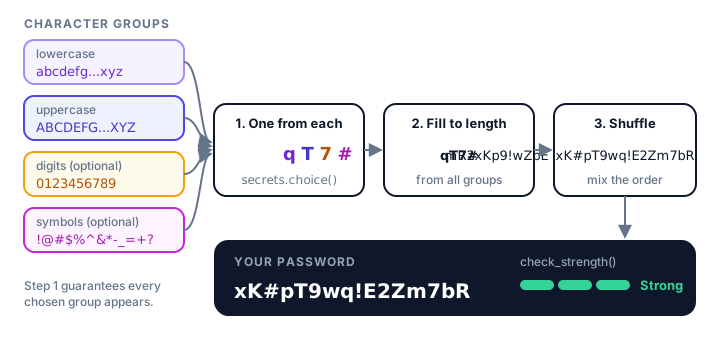
Step 1: Get the characters from the string module
You could type out the alphabet yourself, but it's easy to miss a letter. Python's built-in string module has ready-made constants:
import string

print(string.ascii_lowercase)
print(string.ascii_uppercase)
print(string.digits)
print(string.punctuation)
print(len(string.ascii_letters))
abcdefghijklmnopqrstuvwxyz
ABCDEFGHIJKLMNOPQRSTUVWXYZ
0123456789
!"#$%&'()*+,-./:;<=>?@[\]^_`{|}~
52string.ascii_letters is lowercase and uppercase together, 52 letters. string.punctuation has every symbol, but some of them (quotes, backslashes, brackets) are hard to type on phones or are rejected by some websites. Our generator will use a friendlier set of 13 symbols instead:
SYMBOLS = "!@#$%^&*-_=+?"Step 2: Why use secrets instead of random?
You already know the random module. It's great for games, but it's not safe for passwords. random is a pseudo-random generator: it produces numbers from a starting value called a seed, using a fixed formula. Anyone who learns or guesses the seed can reproduce every "random" value. Watch:
import random

characters = "abcdefghijklmnopqrstuvwxyz0123456789"

random.seed(2024)
first = "".join(random.choice(characters) for _ in range(10))

random.seed(2024)
second = "".join(random.choice(characters) for _ in range(10))

print(first)
print(second)
print(first == second)
4ltm0q8p5w
4ltm0q8p5w
TrueSame seed, same "random" password. The secrets module, added in Python 3.6, gets its randomness from your operating system's secure source, which is designed so the next value can't be predicted. Its secrets.choice() works just like random.choice():
import secrets
import string

alphabet = string.ascii_letters + string.digits
password = "".join(secrets.choice(alphabet) for _ in range(12))
print(password)
print(len(password))
Example output (yours will be different every time):
74B23XMHggZx
12
random | secrets | |
|---|---|---|
| Predictable? | Yes, if the seed is known | No |
| Can you set a seed? | Yes, with random.seed() | No |
| Good for | Games, simulations, shuffling a playlist | Passwords, tokens, reset links, PINs |
⚠️ Rule of thumb
If a value protects something (an account, a payment, a login link), generate it with secrets. Use random only when nobody gains anything by guessing the result.
The _ in for _ in range(12) is a common name for a loop variable you don't use: we just want to repeat 12 times.
Step 3: Make sure every group appears
Picking every character from one big alphabet has a flaw: by pure chance, a password might contain no digits at all, and many websites would reject it. The fix is the three-stage plan from the diagram:
import secrets
import string

SYMBOLS = "!@#$%^&*-_=+?"


def generate_password(length, use_digits=True, use_symbols=True):
    """Build a random password with at least one character from each group."""
    groups = [string.ascii_lowercase, string.ascii_uppercase]
    if use_digits:
        groups.append(string.digits)
    if use_symbols:
        groups.append(SYMBOLS)

    # One guaranteed character from every chosen group...
    characters = [secrets.choice(group) for group in groups]

    # ...then fill the rest from all groups combined.
    all_characters = "".join(groups)
    while len(characters) < length:
        characters.append(secrets.choice(all_characters))

    # Mix them so the guaranteed ones aren't always at the start.
    secrets.SystemRandom().shuffle(characters)
    return "".join(characters)


print(generate_password(12))
print(generate_password(10, use_digits=False, use_symbols=False))
Example output (yours will differ):
W67KlQe9P&jl
igKWKIOmCP
How it works:
groupsis a list of strings. Lowercase and uppercase letters are always included; digits and symbols are added only if requested.- The list comprehension picks one character from each group, so a 4-group password starts with 4 guaranteed characters.
"".join(groups)glues the groups into one long string to pick the remaining characters from.secrets.SystemRandom().shuffle()shuffles the list using the same secure source assecrets.choice(). (Plainrandom.shuffle()would bring back the predictability problem.)- Finally,
"".join(characters)turns the list back into a string.
📝 Note: why length beats complexity
With our 75 characters, a 16-character password has about 1030 possible combinations. An 8-character password of only lowercase letters has 268 = 208,827,064,576, which a modern computer can try in minutes. Every extra character multiplies the possibilities by 75, so length is the biggest strength boost.
Step 4: How do you check password strength in Python?
A simple strength checker gives a point for each good property: length of at least 12, length of at least 16, and each kind of character present. any() returns True if at least one item matches, so any(char.isdigit() for char in password) means "does the password contain at least one digit?"
def check_strength(password):
    """Return 'Weak', 'Medium' or 'Strong' based on length and variety."""
    score = 0
    if len(password) >= 12:
        score += 1
    if len(password) >= 16:
        score += 1
    if any(char.islower() for char in password):
        score += 1
    if any(char.isupper() for char in password):
        score += 1
    if any(char.isdigit() for char in password):
        score += 1
    if any(not char.isalnum() for char in password):
        score += 1

    if score <= 3:
        return "Weak"
    elif score <= 5:
        return "Medium"
    else:
        return "Strong"


for password in ["sunshine", "Sunshine2024", "correcthorsebattery", "T7#vq!Lm2@Rz9pXw"]:
    print(f"{password:<22}{check_strength(password)}")
sunshine Weak
Sunshine2024 Medium
correcthorsebattery Weak
T7#vq!Lm2@Rz9pXw Strongnot char.isalnum() is True for anything that is neither a letter nor a digit, which covers all symbols. The format spec :<22 pads each password to 22 characters so the ratings line up.
Look at correcthorsebattery: our checker calls it Weak, but a long phrase of random words is actually hard to crack. Real strength meters, like the open-source zxcvbn library, also look for dictionary words and patterns. Ours is a teaching version: good enough to catch short or one-type passwords.
Step 5: Ask the user for options
Two small helper functions keep asking until they get a sensible answer, using the while loop validation pattern:
def ask_yes_no(question):
    """Return True for yes, False for no."""
    while True:
        answer = input(f"{question} (y/n): ").strip().lower()
        if answer in ("y", "yes"):
            return True
        if answer in ("n", "no"):
            return False
        print("Please answer y or n.")


def ask_length():
    """Ask for a length between 8 and 64."""
    while True:
        text = input("Password length (8-64): ").strip()
        if text.isdigit() and 8 <= int(text) <= 64:
            return int(text)
        print("Please enter a whole number from 8 to 64.")
answer in ("y", "yes") uses the membership operator to accept either spelling. Because ask_yes_no() returns a boolean, you can pass its result straight into generate_password().
The complete Python password generator
Save this as password_generator.py and run it with python password_generator.py:
import secrets
import string

SYMBOLS = "!@#$%^&*-_=+?"


def generate_password(length, use_digits=True, use_symbols=True):
    """Build a random password with at least one character from each group."""
    groups = [string.ascii_lowercase, string.ascii_uppercase]
    if use_digits:
        groups.append(string.digits)
    if use_symbols:
        groups.append(SYMBOLS)

    # One guaranteed character from every chosen group...
    characters = [secrets.choice(group) for group in groups]

    # ...then fill the rest from all groups combined.
    all_characters = "".join(groups)
    while len(characters) < length:
        characters.append(secrets.choice(all_characters))

    # Mix them so the guaranteed ones aren't always at the start.
    secrets.SystemRandom().shuffle(characters)
    return "".join(characters)


def check_strength(password):
    """Return 'Weak', 'Medium' or 'Strong' based on length and variety."""
    score = 0
    if len(password) >= 12:
        score += 1
    if len(password) >= 16:
        score += 1
    if any(char.islower() for char in password):
        score += 1
    if any(char.isupper() for char in password):
        score += 1
    if any(char.isdigit() for char in password):
        score += 1
    if any(not char.isalnum() for char in password):
        score += 1

    if score <= 3:
        return "Weak"
    elif score <= 5:
        return "Medium"
    else:
        return "Strong"


def ask_yes_no(question):
    """Return True for yes, False for no."""
    while True:
        answer = input(f"{question} (y/n): ").strip().lower()
        if answer in ("y", "yes"):
            return True
        if answer in ("n", "no"):
            return False
        print("Please answer y or n.")


def ask_length():
    """Ask for a length between 8 and 64."""
    while True:
        text = input("Password length (8-64): ").strip()
        if text.isdigit() and 8 <= int(text) <= 64:
            return int(text)
        print("Please enter a whole number from 8 to 64.")


def main():
    print("=== Password Generator ===")
    length = ask_length()
    use_digits = ask_yes_no("Include numbers?")
    use_symbols = ask_yes_no("Include symbols?")

    print("\nHere are 3 passwords to choose from:")
    for number in range(1, 4):
        password = generate_password(length, use_digits, use_symbols)
        print(f"  {number}. {password}  ({check_strength(password)})")


main()
Sample runs
In this run, the user first typed 5 (too short), then 16, yes, an unclear maybe and finally y. Your passwords will be different:
=== Password Generator ===
Password length (8-64): 5
Please enter a whole number from 8 to 64.
Password length (8-64): 16
Include numbers? (y/n): yes
Include symbols? (y/n): maybe
Please answer y or n.
Include symbols? (y/n): y

Here are 3 passwords to choose from:
  1. N7+cYGu_YRJ&9^th  (Strong)
  2. 0?4EG82Vo&67OdM*  (Strong)
  3. ^oB5^ZNhdrUaJfM9  (Strong)
And a short, letters-only run (the user typed 10, n, n). The strength checker correctly flags these as weak:
=== Password Generator ===
Password length (8-64): 10
Include numbers? (y/n): n
Include symbols? (y/n): n

Here are 3 passwords to choose from:
  1. ZBhFeJsYHk  (Weak)
  2. hYzrPbHoWX  (Weak)
  3. FBOeenUlAW  (Weak)
Common mistakes in this project
1. Using random for passwords
random.choice() works and looks random, which is exactly why this mistake is so common. Always use secrets.choice() for anything security-related.
2. Shuffling a string
Strings are immutable, so they can't be shuffled in place:
import secrets

secrets.SystemRandom().shuffle("abc123")
TypeError: 'str' object does not support item assignmentThat's why the generator builds a list of characters, shuffles the list, and joins it into a string at the end.
3. Forgetting to join
Printing the list directly shows ['x', 'K', '#', ...] instead of a password. Use "".join(characters) to glue the characters together with nothing between them.
4. Allowing very short lengths
If the user asks for 2 characters with 4 groups, the "one from each group" step already produces 4. Setting a minimum length of 8 avoids that problem and keeps passwords reasonably safe.
Ideas to extend it
🏋️ Challenges
- No look-alike characters. Add an option to remove characters that are easy to confuse, like
0/Oand1/l/I, before picking. - Passphrase mode. Pick 4 random words from a list of at least 50 words with
secrets.choice()and join them with dashes, likemaple-rocket-lemon-harbor. - PIN generator. Generate a 6-digit PIN with
secrets.randbelow(10)for each digit. - Smarter strength check. Lower the score if the password contains a common word like
password,qwertyor123456(compare in lowercase). - Copy-friendly output. Number the passwords and let the user pick one, then print only that password on its own line.
Show a hint for challenge 1
import string

LOOK_ALIKES = "0O1lI"
letters = string.ascii_letters + string.digits
clear = "".join(char for char in letters if char not in LOOK_ALIKES)
print(len(letters), len(clear))
print("O" in clear, "o" in clear)
62 57
False TrueWhat's next?
You now know how to generate secure random values. Next, you'll work with real data in files: build an expense tracker that saves spending to a CSV file and summarizes it by category and month.
Key takeaways
- The string module provides ready-made character sets: ascii_lowercase, ascii_uppercase, digits and punctuation.
- Use secrets, not random, for passwords: random is predictable if the seed is known, secrets is not.
- Pick one character from each chosen group first, then fill to the length and shuffle, so every group always appears.
- Shuffle a list of characters with secrets.SystemRandom().shuffle(), then join it into a string.
- Length matters most: every extra character multiplies the number of possible passwords.
- A simple strength check scores length and character variety with any().
Frequently asked questions
How do you generate a random password in Python?
Import secrets and string, build an alphabet such as string.ascii_letters + string.digits, then join secrets.choice(alphabet) for as many characters as you need: "".join(secrets.choice(alphabet) for _ in range(16)).
Is Python random secure for passwords?
No. The random module is a pseudo-random generator meant for games and simulations, and its output can be reproduced if the seed is known. Use the secrets module for passwords, tokens and anything security-related.
What is the difference between secrets and random in Python?
secrets uses the operating system's secure randomness and cannot be seeded, so its values are unpredictable. random uses a fixed formula with a seed, which makes it repeatable and fast, but unsafe for security.
How long should a generated password be?
At least 12 characters, and 16 or more is better. Each extra character multiplies the number of possible passwords, so length adds more strength than any other single change.
How do I make sure my password has at least one number and symbol?
Pick one character from each required group first (for example secrets.choice(string.digits)), fill the rest from all groups, then shuffle the list so the guaranteed characters end up in random positions.