How to Raise Exceptions in Python
Updated 7 min read Aimerscrew
So far, Python has been the one raising errors: when you divide by zero or use a missing key. But your own functions often know about problems Python can't see, like a negative price or a withdrawal bigger than the account balance. In this lesson, you'll learn how to raise an exception in Python with the raise keyword, how to choose the right exception type, and how to re-raise errors you've caught.
🌍 Real-life example
When you ask an ATM for $500 but only have $120 in your account, the machine doesn't hand you $120 and stay quiet, and it doesn't give you $500 anyway. It stops and shows a clear message: "Insufficient funds." Raising an exception is your function doing the same thing: refusing to continue and explaining why.
What does raise do in Python?
The raise statement creates an exception on purpose. You write raise, then an exception type, then a message in brackets:
def set_age(age):
    if age < 0:
        raise ValueError("Age cannot be negative")
    return age

print(set_age(30))
print(set_age(-5))
30
ValueError: Age cannot be negativeAs soon as Python reaches raise, the function stops. The return line never runs. Since nobody catches the error here, the program ends with a traceback, and its last line shows your own message.
Why raise an exception instead of returning a value?
Beginners often return None or -1 when something is wrong. The problem is that the caller can easily forget to check, and the bad value travels on until it causes a confusing error somewhere else:
def average_rating(ratings):
    if not ratings:
        return None
    return sum(ratings) / len(ratings)

score = average_rating([])
print("Score:", score * 20)
TypeError: unsupported operand type(s) for *: 'NoneType' and 'int'The error mentions NoneType and *, which says nothing about the real cause: there were no ratings. Raising an exception right where the problem is found gives a much clearer message:
def average_rating(ratings):
    if not ratings:
        raise ValueError("Cannot average an empty list of ratings")
    return sum(ratings) / len(ratings)

score = average_rating([])
ValueError: Cannot average an empty list of ratingsThis idea is called failing fast: stop as soon as something is wrong, with a message that points straight at the cause.
Which exception type should you raise?
Pick the built-in exception whose meaning matches the problem. Other programmers (and your future self) will instantly understand it:
| Exception | Raise it when… | Example message |
|---|---|---|
ValueError | The type is right but the value is not allowed | "Quantity must be at least 1" |
TypeError | The value is the wrong type | "price must be a number, not str" |
KeyError | A requested key or ID doesn't exist | "Unknown product code: X99" |
IndexError | A position is out of range | "Seat 40 does not exist" |
RuntimeError | Something went wrong that fits no other type | "Payment service unavailable" |
NotImplementedError | A feature isn't written yet | "Refunds are coming soon" |
In practice, ValueError and TypeError cover most input checks. In the next lesson, you'll create your own exception types when none of these fit.
How to validate function inputs with raise
A common pattern is to check the inputs at the top of a function, a bit like a security guard at a door. Each check raises an error with a helpful message. Here's a sign-up function for a gym with an age limit:
def register_member(name, age):
    if not isinstance(age, int):
        raise TypeError(f"age must be an int, not {type(age).__name__}")
    if age < 16:
        raise ValueError(f"Members must be 16 or older (got {age})")
    if age > 120:
        raise ValueError(f"{age} is not a realistic age")
    return f"Welcome to the gym, {name}!"

print(register_member("Liam", 25))
print(register_member("Zoe", "25"))
Welcome to the gym, Liam!
TypeError: age must be an int, not strisinstance(age, int) is a built-in function that returns True if age is an integer. If all checks pass, the main code runs knowing the data is safe.
💡 Tip
Write messages that say what was expected and what was actually received, like "Members must be 16 or older (got 12)". A message like "Invalid input" forces the reader to go digging.
Raising and catching: a bank withdrawal
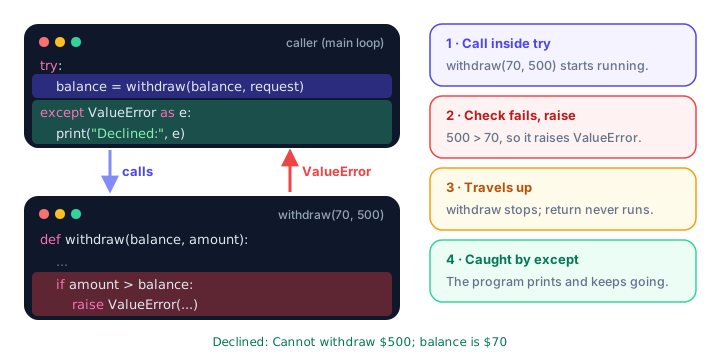
Raising and catching work as a team. The function that finds the problem raises; the code that knows what to do about it catches. Here, withdraw() only checks the rules, and the loop decides to show a "Declined" message and continue:
def withdraw(balance, amount):
    if amount <= 0:
        raise ValueError("Amount must be positive")
    if amount > balance:
        raise ValueError(f"Cannot withdraw ${amount}; balance is ${balance}")
    return balance - amount


balance = 120

for request in [50, 500, -10]:
    try:
        balance = withdraw(balance, request)
        print(f"Withdrew ${request}. Balance: ${balance}")
    except ValueError as e:
        print("Declined:", e)
Withdrew $50. Balance: $70
Declined: Cannot withdraw $500; balance is $70
Declined: Amount must be positiveWhen withdraw() raises, the exception travels back up to the line that called it. If that line is inside a try with a matching except, the error is handled there. If not, it keeps travelling up, and if nothing catches it at all, the program stops with a traceback.
except catches it.How do you re-raise an exception?
Sometimes you want to catch an error, do something (like write a log message), and then let it continue upward. Inside an except block, a plain raise with nothing after it re-raises the same exception:
def parse_quantity(text):
    try:
        return int(text)
    except ValueError:
        print(f"Log: bad quantity '{text}'")
        raise

print(parse_quantity("3"))
print(parse_quantity("three"))
3
Log: bad quantity 'three'
ValueError: invalid literal for int() with base 10: 'three'The function logged the problem, but it didn't pretend everything was fine. The original error, with its original message, still reaches the caller.
Using raise from to explain the cause
Sometimes a low-level error should become a more meaningful one. raise NewError(...) from e raises a new exception and links the original as its cause:
def load_discount(code_text):
    try:
        return int(code_text)
    except ValueError as e:
        raise RuntimeError("Discount code is broken") from e

load_discount("ten")
RuntimeError: Discount code is brokenThe full traceback shows both errors: first the original ValueError, then the line The above exception was the direct cause of the following exception:, and finally the new RuntimeError. You won't need this often as a beginner, but now you'll recognize it in tracebacks.
Common mistakes when raising exceptions
1. Raising a plain string
raise "Something broke"TypeError: exceptions must derive from BaseExceptionYou must raise an exception type, like raise ValueError("Something broke").
2. Leaving out the message
raise ValueError works, but the traceback just says ValueError with no explanation. Always add a short message.
3. Picking a misleading type
Raising TypeError for a negative number, or KeyError for a bad email address, sends the reader in the wrong direction. Match the type to the problem using the table above.
4. Catching your own error in the same function
Raising an error and catching it a few lines later in the same function is usually just a complicated if statement. Raise in the function that finds the problem and catch in the code that can handle it.
Practice exercise
🏋️ Try it yourself
Write a function rate_movie(title, stars) that returns a string like "Inception: ****". Raise a ValueError if stars is not between 1 and 5. Then call it inside a loop for the ratings 4, 7 and 1, catching the error and printing "Skipped: " plus the message.
Show solution
def rate_movie(title, stars):
    if stars < 1 or stars > 5:
        raise ValueError(f"stars must be 1 to 5, got {stars}")
    return f"{title}: " + "*" * stars

for stars in [4, 7, 1]:
    try:
        print(rate_movie("Inception", stars))
    except ValueError as e:
        print("Skipped:", e)
Inception: ****
Skipped: stars must be 1 to 5, got 7
Inception: *What's next?
You can now raise built-in exceptions with clear messages. Next, learn to create Python custom exceptions like InsufficientFundsError, so your errors describe your program's own rules.
Key takeaways
- Use raise followed by an exception type and message, like raise ValueError("Age cannot be negative").
- raise stops the function immediately and sends the exception up to the caller.
- Raising an error is better than returning None or -1, because the problem cannot be silently ignored.
- Choose a built-in type that matches the problem: ValueError for bad values, TypeError for wrong types.
- A plain raise inside an except block re-raises the same exception after you have logged or cleaned up.
- raise NewError(...) from e links a new, clearer exception to the original cause.
Frequently asked questions
How do you raise an exception in Python?
Write the raise keyword, an exception type and a message, for example raise ValueError("Quantity must be positive"). The function stops and the error goes to the caller.
What is the difference between raise and return?
return hands a normal result back to the caller. raise signals that something went wrong; the caller must catch it with try and except, or the program stops.
How do I re-raise an exception in Python?
Inside an except block, write raise on its own line. Python raises the same exception again, with its original message and traceback.
What does raise from do in Python?
raise NewError("message") from e raises a new exception and records the original exception e as its cause. The traceback then shows both errors, linked by the line "The above exception was the direct cause of the following exception".
Should I raise ValueError or TypeError?
Raise TypeError when a value is the wrong type, such as a string where a number is needed. Raise ValueError when the type is right but the value is not allowed, such as a negative age.