Python Iterators
Updated 7 min read Aimerscrew
You've used for loops on lists, strings and dictionaries since the for loop lesson. But how does Python actually step through them? The answer is Python iterators: small objects that remember where you are and give you the next value when you ask. In this lesson, you'll learn the difference between an iterable and an iterator, use iter() and next() by hand, see what a for loop does under the hood, and build your own iterator class.
🌍 Real-life example
Think of the "next song" button in a music app. The playlist is the full collection of songs (the iterable). The player keeps track of which song is playing and moves forward each time you tap "next" (the iterator). When the last song ends, there is nothing left to play.
What is an iterable in Python?
An iterable is any object you can loop over: lists, tuples, strings, sets, dictionaries, range() objects and files. Technically, an iterable is an object that can give you an iterator when you pass it to the built-in iter() function.
An iterable holds (or can produce) the data, but it doesn't keep track of a position. You can loop over the same list as many times as you like.
What is an iterator in Python?
An iterator is an object that produces values one at a time and remembers its position. You ask it for the next value with the built-in next() function. Every iterator has two special methods:
__iter__()returns the iterator itself.__next__()returns the next value, or raisesStopIterationwhen there are no values left.
| Iterable | Iterator | |
|---|---|---|
| Examples | list, str, tuple, dict, range | the object returned by iter(), file objects |
| Remembers a position? | No | Yes |
Works with next()? | No | Yes |
| Can be looped over again? | Yes, any number of times | No, it's used up after one pass |
How do you use iter() and next()?
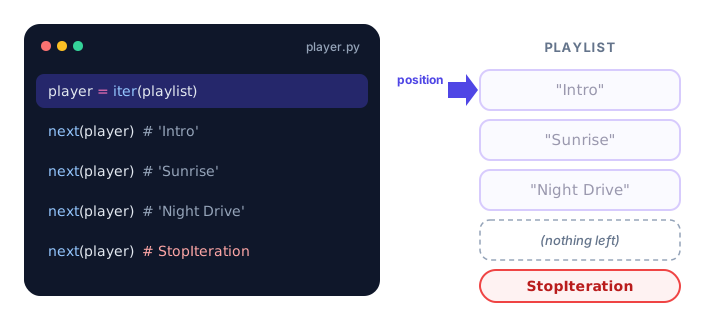
Call iter() on an iterable to get an iterator, then call next() to pull out values one by one:
playlist = ["Intro", "Sunrise", "Night Drive"]

player = iter(playlist)

print(next(player))
print(next(player))
print(next(player))
Intro
Sunrise
Night DriveEach call to next() moves the iterator one step forward. The list itself never changes; only the iterator's position does.
What is StopIteration?
When an iterator runs out of values, next() raises a StopIteration exception. It's Python's way of saying "that's everything":
player = iter(["Intro", "Sunrise"])

print(next(player))
print(next(player))
print(next(player))
Intro
Sunrise
StopIterationIf you'd rather not get an error, give next() a second argument. It's returned instead of raising StopIteration:
player = iter(["Intro"])

print(next(player, "End of playlist"))
print(next(player, "End of playlist"))
Intro
End of playlist📝 Note
An iterator is used up after one pass. Once it raises StopIteration, it stays empty. If you want to start again, call iter() on the original list to get a fresh iterator.
How does a for loop work under the hood?
A for loop is really a friendly shortcut for iter(), next() and StopIteration. This loop:
for song in ["Intro", "Sunrise", "Night Drive"]:
    print("Now playing:", song)
Now playing: Intro
Now playing: Sunrise
Now playing: Night Drivedoes the same thing as this longer version, which uses a while loop and try/except:
player = iter(["Intro", "Sunrise", "Night Drive"])

while True:
    try:
        song = next(player)
    except StopIteration:
        break
    print("Now playing:", song)
Now playing: Intro
Now playing: Sunrise
Now playing: Night DrivePython calls iter() once at the start, calls next() before each pass through the loop body, and quietly stops when StopIteration appears. That's why a for loop works on any iterable: lists, strings, files, and even objects you write yourself.
An iterator only goes forward, once
Because an iterator remembers its position, a second loop over the same iterator finds nothing left:
scores = iter([88, 92, 75])

for score in scores:
    print(score)

print("Second loop:")
for score in scores:
    print(score)
88
92
75
Second loop:A list, on the other hand, gives the loop a new iterator each time, so looping over a list twice works fine.
How do you create your own iterator class?
To make an iterator, write a class with the two magic methods __iter__() and __next__(). Here's a countdown for a rocket launch:
class Countdown:
    def __init__(self, start):
        self.current = start

    def __iter__(self):
        return self

    def __next__(self):
        if self.current < 1:
            raise StopIteration
        value = self.current
        self.current -= 1
        return value

for number in Countdown(3):
    print(number)
print("Liftoff!")
3
2
1
Liftoff!Step by step:
__init__()stores the starting position.__iter__()returnsself, because the object is its own iterator.__next__()returns the current number and moves one step down. When it goes below 1, it raisesStopIteration, which ends the loop.
Real-world example: a playlist with a "next song" button
This iterator class wraps a list of songs and loops back to the start when repeat is on, just like the repeat button in a music app:
class Playlist:
    def __init__(self, songs, repeat=False):
        self.songs = songs
        self.repeat = repeat
        self.position = 0

    def __iter__(self):
        return self

    def __next__(self):
        if self.position == len(self.songs):
            if not self.repeat:
                raise StopIteration
            self.position = 0
        song = self.songs[self.position]
        self.position += 1
        return song

player = Playlist(["Intro", "Sunrise"], repeat=True)

for tap in range(5):
    print("Next song:", next(player))
Next song: Intro
Next song: Sunrise
Next song: Intro
Next song: Sunrise
Next song: IntroWith repeat=True, the iterator never runs out, so we called next() a fixed number of times instead of using a for loop over it. A for song in player: loop would run forever.
💡 Tip
Writing a full class just to produce values is a lot of typing. In the next lesson, you'll learn generators, which create iterators with a simple function and the yield keyword.
Common mistakes
1. Calling next() on a list
songs = ["Intro", "Sunrise"]
print(next(songs))
TypeError: 'list' object is not an iteratorA list is iterable, not an iterator. Call iter(songs) first.
2. Expecting an iterator to restart
Once an iterator is used up, it stays empty. Create a new one with iter(), or keep your data in a list if you need to loop over it several times.
3. Forgetting to raise StopIteration
If __next__() never raises StopIteration, a for loop over the object never ends. Always include a clear stopping condition, unless the iterator is meant to be infinite and you control how many values you take.
4. Forgetting __iter__()
A class with only __next__() can't be used in a for loop. Python calls iter() first, so it needs __iter__() to return the iterator.
Practice exercise
🏋️ Try it yourself
Write an iterator class EvenNumbers that takes a limit and produces the even numbers from 2 up to and including limit. Loop over EvenNumbers(10) and print each number on one line, separated by spaces.
Show solution
class EvenNumbers:
    def __init__(self, limit):
        self.limit = limit
        self.current = 2

    def __iter__(self):
        return self

    def __next__(self):
        if self.current > self.limit:
            raise StopIteration
        value = self.current
        self.current += 2
        return value

for number in EvenNumbers(10):
    print(number, end=" ")
2 4 6 8 10What's next?
Iterator classes work, but they take a lot of code. Next, learn the much shorter way to build iterators with yield in Python generators.
Key takeaways
- An iterable (list, str, dict, range, file) is anything you can loop over and pass to iter().
- An iterator produces values one at a time with next() and remembers its position.
- When an iterator runs out, next() raises StopIteration; next(it, default) returns the default instead.
- A for loop calls iter() once, then next() on each pass, and stops quietly at StopIteration.
- Iterators only move forward and are used up after one pass.
- To write your own iterator, define __iter__() (return self) and __next__() (return a value or raise StopIteration).
Frequently asked questions
What is the difference between an iterable and an iterator in Python?
An iterable is an object you can loop over, such as a list or string. An iterator is the object that actually walks through it, returning one value per next() call and remembering its position. You get an iterator from an iterable by calling iter().
Is a list an iterator in Python?
No. A list is an iterable but not an iterator. Calling next() on a list raises TypeError. Call iter(my_list) to get an iterator over it.
What does StopIteration mean in Python?
StopIteration is the exception an iterator raises when it has no more values. A for loop catches it automatically and ends the loop, so you normally only see it when calling next() yourself.
How do you make a class iterable in Python?
Give it an __iter__() method that returns an iterator. The simplest way is to make the class its own iterator: __iter__() returns self and __next__() returns the next value or raises StopIteration.
Can you reset an iterator in Python?
Not directly. Once an iterator is exhausted, it stays empty. Call iter() on the original iterable again to get a new iterator that starts from the beginning.