Python Numbers: int, float and complex
Updated 6 min read Aimerscrew
Prices, scores, temperatures, distances: a huge part of programming is working with numbers. Python numbers come in three types, and knowing which one you have saves you from surprising results. In this lesson, you'll learn about int, float and complex, how arithmetic works with each, and a handful of functions that make everyday math easy.
🌍 Real-life example
Look at a receipt from a grocery store. "3 apples" is a count, and you can't buy 2.4 apples, so it's a whole number. "$1.29 each" has cents, so it needs a decimal point. Python makes the same distinction: whole numbers are int, numbers with a decimal point are float.
What are the number types in Python?
Python has three built-in number types. You've already met them briefly in Python data types:
| Type | What it stores | Examples |
|---|---|---|
int | Whole numbers, positive or negative | 7, -15, 2026 |
float | Numbers with a decimal point | 3.99, -0.5, 2.0 |
complex | Numbers with a real and an imaginary part | 3 + 4j |
You never have to announce the type. Python decides it from how you write the number: no decimal point means int, a decimal point means float.
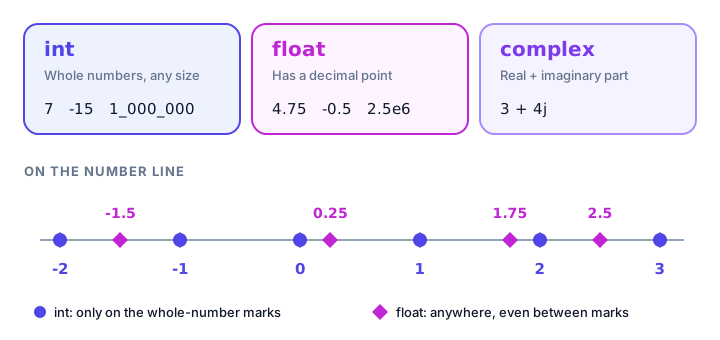
Integers (int): whole numbers with no size limit
An integer is a whole number with no fractional part. In many languages, integers have a maximum size. In Python they don't: an int can grow as large as your computer's memory allows.
steps_today = 8432
temperature = -4
print(type(steps_today))

print(2 ** 100)
<class 'int'>
1267650600228229401496703205376The ** operator means "to the power of", so 2 ** 100 is 2 multiplied by itself 100 times. Python handles the 31-digit answer without complaint.
Making big numbers readable with underscores
Is 1000000 a million or a hundred thousand? It's hard to tell at a glance. Python lets you put underscores between digits, just like you'd use commas on paper. The underscores are ignored when the number is stored.
subscribers = 1_000_000
print(subscribers)1000000Floats: numbers with a decimal point
A float (short for "floating-point number") is any number written with a decimal point. Even 2.0 is a float, because the point is there.
coffee_price = 4.75
body_temp = 98.6
whole_but_float = 2.0

print(type(coffee_price))
print(type(whole_but_float))
<class 'float'>
<class 'float'>Scientific notation
For very large or very small values, you can use scientific notation. The letter e means "times 10 to the power of". So 2.5e6 is 2.5 × 1,000,000.
stadium_budget = 2.5e6
dust_particle = 1.5e-5

print(stadium_budget)
print(dust_particle)
2500000.0
1.5e-05Numbers written with e are always floats, which is why the first result ends in .0.
Why does 0.1 + 0.2 not equal 0.3 in Python?
Try this, and you might think Python is broken:
print(0.1 + 0.2)
print(0.1 + 0.2 == 0.3)
0.30000000000000004
FalseComputers store floats in binary (ones and zeros). Some simple decimals, like 0.1, can't be written exactly in binary, just as 1/3 can't be written exactly in decimal (0.3333... goes on forever). Python stores the closest value it can, and those tiny gaps sometimes show up after a calculation. This happens in almost every programming language, not just Python.
The everyday fix is to round the result to the number of decimal places you care about:
total = 0.1 + 0.2
print(round(total, 2))0.3📝 Note
For money in serious applications (banking, accounting), programmers often use Python's decimal module or store amounts as whole cents in an int. For learning and everyday scripts, rounding is fine.
Complex numbers (briefly)
A complex number has a real part and an imaginary part. Python writes the imaginary part with a j. You'll only need these for engineering, physics or advanced math, so a quick look is enough:
signal = 3 + 4j
print(type(signal))
print(signal.real, signal.imag)
<class 'complex'>
3.0 4.0What result type does each math operator give?
You'll study operators properly in the next chapter, but here's a preview, because the type of the result matters:
print(7 + 2)    # addition
print(7 - 2)    # subtraction
print(7 * 2)    # multiplication
print(7 / 2)    # division
print(7 // 2)   # floor division (drops the remainder)
print(7 % 2)    # remainder (modulo)
print(7 ** 2)   # power
9
5
14
3.5
3
1
49Two rules to remember:
/always gives a float, even when the answer is whole.8 / 2is4.0, not4.- If either number is a float, the result is a float.
3 + 2.0is5.0.
print(8 / 2)
print(3 + 2.0)
print(8 // 2)
4.0
5.0
4💡 Tip
Need a whole-number answer from a division? Use //. For example, 17 // 5 tells you how many full boxes of 5 you can pack from 17 items: 3. And 17 % 5 tells you how many are left over: 2.
Useful built-in number functions
Python has several number functions ready to use, no setup needed:
print(abs(-12))          # distance from zero
print(round(3.14159, 2)) # round to 2 decimal places
print(round(4.6))        # round to the nearest whole number
print(pow(2, 5))         # same as 2 ** 5
print(min(18, 7, 25))    # smallest value
print(max(18, 7, 25))    # largest value
12
3.14
5
32
7
25⚠️ Be careful
round() rounds an exact half to the nearest even number. So round(2.5) gives 2, while round(3.5) gives 4. This is called "banker's rounding", and it avoids pushing totals upward when you round lots of values.
How do you use the math module?
For more advanced math, Python includes a module (a ready-made toolbox of code) called math. You load it with import math, then use its tools with math. in front:
import math

print(math.sqrt(81))   # square root
print(math.pi)         # the number pi
print(math.floor(4.7)) # round down
print(math.ceil(4.2))  # round up
9.0
3.141592653589793
4
5math.ceil() is handy in real life. If 10 friends want pizza and each pizza feeds 3 people, math.ceil(10 / 3) gives 4 pizzas, because ordering 3.33 pizzas isn't possible.
Real-world example: splitting a restaurant bill
Four friends finish dinner. The bill is $87.40 and they want to leave an 18% tip, then split everything evenly.
bill = 87.40
tip_percent = 18
people = 4

tip = bill * tip_percent / 100
total = bill + tip
each = total / people

print("Tip:", round(tip, 2))
print("Total:", round(total, 2))
print("Each person pays:", round(each, 2))
Tip: 15.73
Total: 103.13
Each person pays: 25.78Notice how people is an int (you can't have 4.5 friends), while the money values are floats. Without round(), the tip would print as 15.732000000000001, a perfect example of the float precision issue from earlier.
Common mistakes with Python numbers
1. Comparing floats with ==
print(1.1 + 2.2 == 3.3)FalseRound both sides first, for example round(1.1 + 2.2, 2) == 3.3, which gives True.
2. Expecting / to give an int
10 / 2 is 5.0. If you need 5, use 10 // 2.
3. Writing numbers with commas
population = 8,000,000
print(population)
(8, 0, 0)Python reads the commas as separators between three values, not as one big number. Use underscores instead: 8_000_000.
4. Forgetting to import math
print(math.sqrt(16))NameError: name 'math' is not defined. Did you forget to import 'math'?Add import math at the top of your file before using it.
Practice exercise
🏋️ Try it yourself
You're buying concert tickets. Each ticket costs $45.50, you need 3 tickets, and there's a $6 booking fee per order. Calculate the total, then work out how many full $20 gift cards you'd need to cover it (use math.ceil()).
Show solution
import math

ticket_price = 45.50
tickets = 3
booking_fee = 6

total = ticket_price * tickets + booking_fee
gift_cards = math.ceil(total / 20)

print("Total:", total)
print("Gift cards needed:", gift_cards)
Total: 142.5
Gift cards needed: 8What's next?
You now know how Python handles whole numbers, decimals and the math between them. Next, meet the simplest type of all: Python booleans, the True and False values that let programs make decisions.
Key takeaways
- Python has three number types: int (whole numbers), float (decimals) and complex (imaginary numbers).
- Python ints have no size limit, and you can write 1_000_000 with underscores for readability.
- Any number with a decimal point or an e (like 2.5e6) is a float.
- Floats are stored in binary, so 0.1 + 0.2 gives 0.30000000000000004. Use round() to tidy results.
- The / operator always returns a float; use // for whole-number division and % for the remainder.
- Use abs(), round(), pow(), min() and max() directly, and import math for sqrt, pi, floor and ceil.
Frequently asked questions
What is the difference between int and float in Python?
An int is a whole number like 10, while a float has a decimal point like 10.0 or 9.99. Python decides the type from how you write the number.
Why is 0.1 + 0.2 not equal to 0.3 in Python?
Floats are stored in binary, and 0.1 and 0.2 cannot be represented exactly, so a tiny error appears in the result. Round the result, for example round(0.1 + 0.2, 2), before comparing or displaying it.
Is there a maximum integer size in Python?
No. Python ints can be as large as your computer memory allows, so even huge numbers like 2 ** 100 work without overflow.
Why does round(2.5) return 2 in Python?
Python rounds exact halves to the nearest even number, a method called banker's rounding. That is why round(2.5) is 2 and round(3.5) is 4.
How do I do square roots in Python?
Import the math module and call math.sqrt(), for example math.sqrt(81) returns 9.0. You can also use the power operator: 81 ** 0.5.