Python Nested if Statements
Updated 7 min read Aimerscrew
Some decisions only make sense after another decision has been made. You only ask for the 2FA code after the password is correct. A Python nested if statement handles exactly this: an if inside another if. In this lesson, you'll learn how nested if statements work, when you really need them, and how to keep them from turning into hard-to-read code.
🌍 Real-life example
At a theme park, the roller coaster attendant first checks your height. Only if you're tall enough do they check the next rule: riders under 12 need an adult with them. Nobody asks a 1-meter-tall child about their age, because the first check already said no. That's a nested decision.
What is a nested if statement in Python?
A nested if is an if statement written inside the block of another if, elif or else. The inner statement is indented one more level, and Python only reaches it when the outer condition is true.
height_cm = 135
age = 10
with_adult = True

if height_cm >= 120:
    print("Height check passed.")
    if age >= 12 or with_adult:
        print("Enjoy the ride!")
    else:
        print("Sorry, riders under 12 need an adult.")
else:
    print("Sorry, you must be at least 120 cm tall.")
Height check passed.
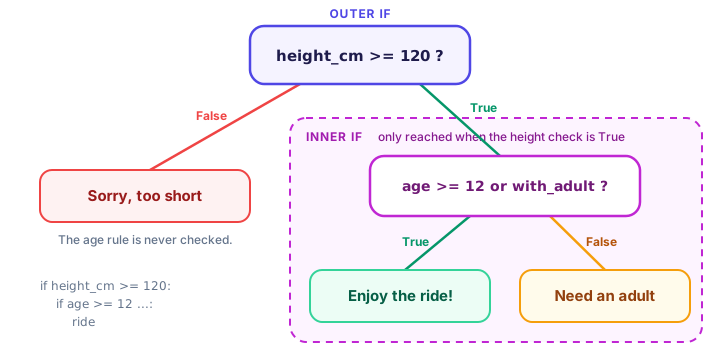
Enjoy the ride!Read it from the outside in. The outer if checks the height. The inner if (indented 8 spaces in total) checks the age rule, but only for people who passed the height check.
How does Python run a nested if?
Python follows the same top-to-bottom rule you learned in if, elif and else, one level at a time:
- Check the outer condition.
- If it's
False, jump to the outerelse(if there is one). The inner if is never looked at. - If it's
True, run the outer block line by line. When Python reaches the inner if, it checks that condition the same way.
Try changing height_cm to 110 in the example above. The output becomes just Sorry, you must be at least 120 cm tall. The age rule is skipped completely.
When do you need a nested if?
Nesting is the right tool when the inner check only makes sense after the outer one passes, or when each level needs its own else message. A login system is a classic case:
username = "maya"
password = "sunflower42"
has_2fa = True
code_entered = "381904"
code_sent = "381904"

if username == "maya" and password == "sunflower42":
    if has_2fa:
        if code_entered == code_sent:
            print("Logged in with 2FA.")
        else:
            print("Wrong verification code.")
    else:
        print("Logged in. Tip: turn on 2FA for extra safety.")
else:
    print("Wrong username or password.")
Logged in with 2FA.Each level has a different message for failure, so nesting makes the logic clear. Asking for a code before the password is right would make no sense, which is exactly what the structure prevents.
📝 Note
Real apps never store passwords as plain text like this. The example keeps them in variables only so you can focus on the if logic.
How do you avoid deeply nested if statements?
Each extra level pushes the code further right and makes it harder to follow. Programmers call deeply nested code the "arrow" shape. Here are three ways to flatten it.
1. Combine conditions with and
If the outer if has no else and contains nothing but the inner if, merge them with and:
temperature = 24
is_weekend = True

# Nested version
if is_weekend:
    if temperature > 20:
        print("Beach day!")

# Flat version: same result, one level
if is_weekend and temperature > 20:
    print("Beach day!")
Beach day!
Beach day!2. Use elif instead of else + if
An if sitting alone inside an else is usually an elif in disguise:
battery = 35

# Nested version
if battery > 80:
    print("Fully charged")
else:
    if battery > 20:
        print("Okay for now")
    else:
        print("Charge soon")

# Flat version with elif
if battery > 80:
    print("Fully charged")
elif battery > 20:
    print("Okay for now")
else:
    print("Charge soon")
Okay for now
Okay for now3. Handle the "no" cases first (guard clauses)
A guard clause checks for a problem first and deals with it right away, so the main path doesn't have to be nested inside a success check. Instead of "if everything is fine, then... then... then...", you write "if this is wrong, stop here". Here's an order checkout written that way with an elif chain:
cart_items = 3
in_stock = True
card_valid = False

if cart_items == 0:
    print("Your cart is empty.")
elif not in_stock:
    print("Sorry, an item is out of stock.")
elif not card_valid:
    print("Your card was declined.")
else:
    print("Order placed. Thank you!")
Your card was declined.Every problem is handled on its own line at the same level, and the happy path sits at the end. The nested version of this would need three levels of indentation. Guard clauses become even more useful inside functions, where you can return early; you'll see that in the Functions chapter.
| Situation | Best choice |
|---|---|
| Inner check only matters if outer passes, and each level needs its own message | Nested if |
| Outer if contains only the inner if, with no else | Combine with and |
else: followed only by another if | Use elif |
| Several things that can go wrong before the main action | Guard clauses (check problems first) |
💡 Tip
A good rule of thumb: if you're nesting more than two or three levels deep, stop and look for a way to flatten the code. Your future self (and your teammates) will thank you.
Real-world example: a flight check-in
This program nests where the logic needs it and stays flat everywhere else:
has_ticket = True
passport_valid = True
bags = 2
ticket_class = "economy"

if has_ticket and passport_valid:
    print("Check-in complete.")
    if bags > 1:
        if ticket_class == "business":
            print("Extra bag included in your ticket.")
        else:
            fee = (bags - 1) * 35
            print(f"Extra bag fee: ${fee}")
    print("Please go to gate B12.")
else:
    print("Please visit the help desk.")
Check-in complete.
Extra bag fee: $35
Please go to gate B12.Notice the last print("Please go to gate B12."). It's indented at the outer level, so it runs for every passenger who checked in, no matter how many bags they have.
Common mistakes with nested if
1. Indenting the inner block wrongly
age = 20
has_id = True
if age >= 18:
    if has_id:
    print("Welcome in")
IndentationError: expected an indented block after 'if' statement on line 4The inner block needs one more level: 8 spaces in total.
2. An else attached to the wrong if
is_member = False
points = 500

if is_member:
    if points >= 100:
        print("You earned a reward!")
    else:
        print("Join our club to earn rewards.")
This prints nothing. The else is indented under the inner if, so it belongs to points >= 100, and non-members never get there. To answer non-members, move else: back to line up with if is_member:. In Python, the indent decides which if an else belongs to.
3. Nesting when and would do
Three levels of nested ifs with no else blocks can almost always be written as one if with and. Flatten it.
Practice exercise
🏋️ Try it yourself
Write a weekend planner. If it's is_weekend, check the weather: if is_sunny, print Go for a hike, otherwise print Movie marathon. If it's not the weekend, print Work day. Test it with is_weekend = True and is_sunny = False.
Show solution
is_weekend = True
is_sunny = False

if is_weekend:
    if is_sunny:
        print("Go for a hike")
    else:
        print("Movie marathon")
else:
    print("Work day")
Movie marathonBonus: you could also write it flat with if is_weekend and is_sunny: / elif is_weekend: / else:. Both are correct; pick the one that reads better to you.
What's next?
When you need to compare one value against many possible options, a long elif chain can get repetitive. Next, learn a neat alternative: the Python match-case statement.
Key takeaways
- A nested if is an if statement inside the block of another if, elif or else.
- The inner condition is only checked when the outer condition is True.
- Indentation decides which if a block, and an else, belongs to.
- Use nesting when the inner check only makes sense after the outer one, or each level needs its own else.
- Flatten nested code with and, with elif, or by handling problem cases first (guard clauses).
- If you are more than two or three levels deep, look for a simpler structure.
Frequently asked questions
How many levels can you nest if statements in Python?
Python allows many levels, far more than you should ever use. In practice, more than two or three levels is a sign the code should be flattened with and, elif or guard clauses.
Is a nested if the same as using and?
They give the same result when the outer if has no else and contains only the inner if. If the outer level needs its own else message, a nested if is needed.
How does Python know which if an else belongs to?
By indentation. An else belongs to the if that sits at exactly the same indent level above it.
Can you put an if inside an else block?
Yes, but if the else contains nothing except that if, it is cleaner to write it as an elif.
What is a guard clause in Python?
A guard clause checks for a problem first and handles it immediately, so the main logic does not need to be nested inside success checks. It is common at the start of functions with an early return.