Python Polymorphism
Updated 7 min read Aimerscrew
Python polymorphism lets you call the same method on different kinds of objects and get behavior that fits each one. The word comes from Greek and means "many forms": one name, many forms. In this lesson, you'll see how polymorphism works with inheritance, with duck typing, and in Python's own built-in functions, and why it makes your code shorter and easier to extend.
🌍 Real-life example
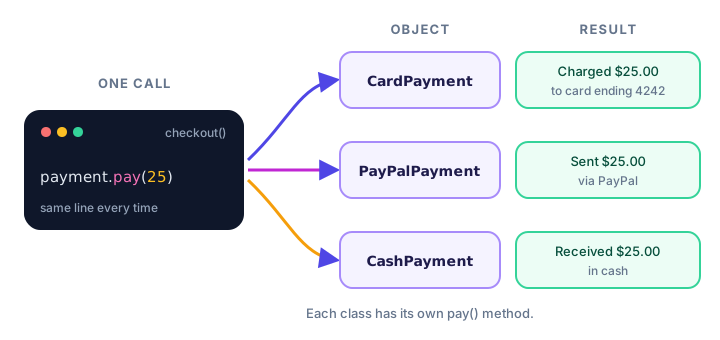
At a checkout counter, the cashier just says "please pay". You might tap a card, scan a phone wallet, or hand over cash. Each method works differently inside, but the cashier gives the same instruction to everyone. In code, that instruction is a method like pay(), and each payment type decides how to carry it out.
What is polymorphism in Python?
Polymorphism is the ability of different objects to respond to the same method call in their own way. The code that calls the method doesn't need to know the exact type of the object. It only needs to know that the object has that method.
class Dog:
    def speak(self):
        return "Woof!"

class Cat:
    def speak(self):
        return "Meow!"

class Cow:
    def speak(self):
        return "Moo!"

for animal in [Dog(), Cat(), Cow()]:
    print(animal.speak())
Woof!
Meow!
Moo!The loop runs the exact same line, animal.speak(), three times. Each object answers with its own sound. That is polymorphism in its simplest form.
Polymorphism with inheritance and method overriding
In the inheritance lesson, you saw that a child class can override a method from its parent, which means it defines a method with the same name to replace the parent's version. Overriding is the most common way to build polymorphism: the parent sets the shared method name, and each child fills in its own behavior.
class Shape:
    def __init__(self, name):
        self.name = name

    def area(self):
        return 0

    def describe(self):
        return f"{self.name} with area {self.area():.2f}"

class Rectangle(Shape):
    def __init__(self, width, height):
        super().__init__("Rectangle")
        self.width = width
        self.height = height

    def area(self):
        return self.width * self.height

class Circle(Shape):
    def __init__(self, radius):
        super().__init__("Circle")
        self.radius = radius

    def area(self):
        return 3.14159 * self.radius ** 2

shapes = [Rectangle(4, 5), Circle(3), Shape("Dot")]
for shape in shapes:
    print(shape.describe())
Rectangle with area 20.00
Circle with area 28.27
Dot with area 0.00Notice that describe() is written only once, in Shape. When it calls self.area(), Python looks up area on the actual object, so a rectangle uses the rectangle formula and a circle uses the circle formula.
pay().What is duck typing?
Python has a famous saying: "If it walks like a duck and quacks like a duck, it's a duck." Duck typing means Python cares about what an object can do, not what class it belongs to. If an object has the method you call, the call works, even if the classes are not related by inheritance at all.
class Robot:
    def speak(self):
        return "Beep boop."

class Parrot:
    def speak(self):
        return "Hello! Hello!"

def make_it_talk(thing):
    print(thing.speak())

make_it_talk(Robot())
make_it_talk(Parrot())
Beep boop.
Hello! Hello!Robot and Parrot share no parent class. The function make_it_talk() still works with both, because both have a speak() method. If you pass an object without one, you get an error:
def make_it_talk(thing):
    print(thing.speak())

make_it_talk(42)
AttributeError: 'int' object has no attribute 'speak'📝 Note
Languages like Java usually need a shared parent class or interface before two objects can be used the same way. Python doesn't. Inheritance is a tidy way to share code, but duck typing alone is enough for polymorphism.
Real-world example: different payment methods
Here's a checkout that accepts any payment object with a pay() method. Adding a new payment type later means writing one new class; the checkout() function never changes.
class CardPayment:
    def __init__(self, last_digits):
        self.last_digits = last_digits

    def pay(self, amount):
        return f"Charged ${amount:.2f} to card ending {self.last_digits}"

class PayPalPayment:
    def __init__(self, email):
        self.email = email

    def pay(self, amount):
        return f"Sent ${amount:.2f} via PayPal ({self.email})"

class CashPayment:
    def pay(self, amount):
        return f"Received ${amount:.2f} in cash"

def checkout(cart_total, payment):
    print(payment.pay(cart_total))

checkout(25, CardPayment("4242"))
checkout(25, PayPalPayment("sam@example.com"))
checkout(25, CashPayment())
Charged $25.00 to card ending 4242
Sent $25.00 via PayPal (sam@example.com)
Received $25.00 in cash💡 Tip
Polymorphism helps you avoid long if/elif chains like if kind == "card": ... elif kind == "paypal": .... Each class handles its own case, so the calling code stays short.
Built-in polymorphism: len(), + and more
You've been using polymorphism since the very first chapters. Many built-in functions and operators work on different types and do the right thing for each:
print(len("hello"))
print(len([10, 20, 30]))
print(len({"a": 1, "b": 2}))

print(3 + 4)
print("sun" + "flower")
print([1, 2] + [3])
5
3
2
7
sunflower
[1, 2, 3]len() counts characters in a string, items in a list and keys in a dictionary. The + operator adds numbers, joins strings and combines lists. One name, different behavior depending on the object: that's polymorphism. You'll learn how to make your own classes work with len() and + in Python magic methods.
| Kind of polymorphism | How it works | Example |
|---|---|---|
| Method overriding | Child classes replace a parent method with the same name | Circle.area() vs Rectangle.area() |
| Duck typing | Unrelated classes share a method name | Robot.speak() and Parrot.speak() |
| Built-in functions and operators | One function or operator works on many types | len(), +, print() |
Calling the parent version with super()
An overriding method doesn't have to throw away the parent's behavior. It can call it with super() and add to it:
class Notification:
    def send(self, message):
        return f"Sending: {message}"

class EmailNotification(Notification):
    def send(self, message):
        base = super().send(message)
        return base + " (by email)"

class SmsNotification(Notification):
    def send(self, message):
        short = message[:17] + "..."
        return super().send(short) + " (by SMS)"

for channel in [EmailNotification(), SmsNotification()]:
    print(channel.send("Your flight BA117 is now boarding"))
Sending: Your flight BA117 is now boarding (by email)
Sending: Your flight BA117... (by SMS)Common mistakes with polymorphism
1. Using different method names
Polymorphism only works if every class uses the exact same method name. If one class calls it speak() and another talk(), the shared loop breaks:
class Duck:
    def talk(self):
        return "Quack!"

for animal in [Duck()]:
    print(animal.speak())
AttributeError: 'Duck' object has no attribute 'speak'2. Different parameters for the same method
If one pay(amount) takes an amount and another pay() takes nothing, code that calls payment.pay(25) fails for the second one with a TypeError. Keep the same parameters across all versions of the method.
3. Checking types instead of trusting the method
Writing if type(shape) == Circle: ... elif type(shape) == Rectangle: ... defeats the purpose. Put the logic inside each class and just call shape.area().
Practice exercise
🏋️ Try it yourself
Create three classes, Car, Bike and Train, each with a travel_time(distance_km) method. Assume speeds of 60, 15 and 120 km per hour. Loop over one object of each class and print how many hours each takes for 120 km, like Car: 2.0 hours.
Show solution
class Car:
    def travel_time(self, distance_km):
        return distance_km / 60

class Bike:
    def travel_time(self, distance_km):
        return distance_km / 15

class Train:
    def travel_time(self, distance_km):
        return distance_km / 120

for vehicle in [Car(), Bike(), Train()]:
    name = type(vehicle).__name__
    print(f"{name}: {vehicle.travel_time(120)} hours")
Car: 2.0 hours
Bike: 8.0 hours
Train: 1.0 hoursWhat's next?
Polymorphism controls how objects respond. Next, you'll learn how to control who can change an object's data with Python encapsulation.
Key takeaways
- Polymorphism means different objects respond to the same method name in their own way.
- Method overriding in child classes is the most common way to build polymorphism.
- Duck typing: Python only cares that an object has the method you call, not which class it is.
- Built-in functions and operators like len() and + are polymorphic: they work on many types.
- Polymorphism replaces long if/elif type checks with a single method call.
- Every class must use the same method name and parameters for polymorphism to work.
Frequently asked questions
What is polymorphism in Python in simple words?
It means one method name can do different things depending on the object. For example, dog.speak() returns "Woof!" while cat.speak() returns "Meow!", and the code calling speak() does not need to know which animal it has.
What is the difference between polymorphism and inheritance?
Inheritance lets a class reuse code from a parent class. Polymorphism lets different objects be used through the same method name. Inheritance with method overriding is one way to get polymorphism, but duck typing gives polymorphism without inheritance.
What is duck typing in Python?
Duck typing means Python checks whether an object has the method or attribute you use, not what class it is. If two unrelated classes both have a speak() method, you can call speak() on either one.
Does Python support method overloading?
Not in the Java sense. If you define two methods with the same name in one class, the second replaces the first. Python uses default arguments, *args and **kwargs instead to let one method accept different inputs.
Is len() an example of polymorphism?
Yes. len() works on strings, lists, tuples, dictionaries and sets, and returns the right size for each type. The + operator is another built-in example, since it adds numbers but joins strings and lists.