How to Read Files in Python
Updated 8 min read Aimerscrew
So far, every value in your programs has disappeared the moment the program ended. Real programs need to load data that already exists: a guest list, a settings file, a log from a web server. In this lesson, you'll learn how to read files in Python using the built-in open() function, the three main reading methods, and the right way to deal with newlines, encodings and missing files.
🌍 Real-life example
Think of a party host at the front door holding a printed guest list. They don't memorize it; they look at the paper whenever someone arrives. A Python program does the same with a text file: the data lives on disk, and the program opens the file and reads it whenever it needs the information.
What does it mean to read a file in Python?
A text file is just characters saved on your disk, like a .txt, .log or .csv file. Reading a file means copying those characters into your program as a string, so you can print them, search them or do calculations with them.
Reading always takes three steps:
- Open the file with
open(). This gives you a file object, a connection between your program and the file on disk. - Read from the file object with a method such as
read(). - Close the file with
close()so the operating system can free it.
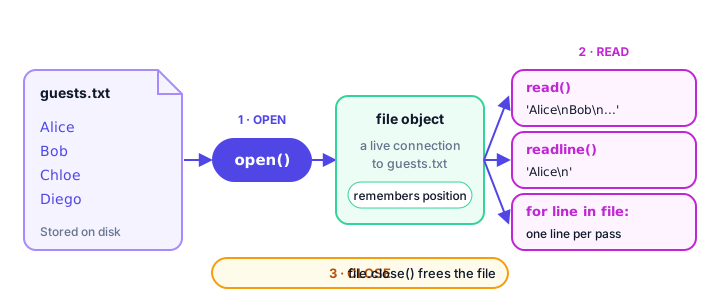
Our sample file
For the examples below, create a file named guests.txt in the same folder as your Python script, with these four lines:
Alice
Bob
Chloe
Diego
Python looks for the file in the current working directory, which is usually the folder you run your script from. If the file lives somewhere else, give the full path, such as "C:/Users/sam/party/guests.txt" or "/home/sam/party/guests.txt".
How do you open and read a whole file?
The simplest way is read(), which returns the entire file as one string:
file = open("guests.txt", encoding="utf-8")
content = file.read()
file.close()

print(content)
Alice
Bob
Chloe
DiegoThe first argument to open() is the file name. The encoding="utf-8" part tells Python how the characters are stored, which we'll come back to shortly.
You can also pass a number to read() to get only that many characters:
file = open("guests.txt", encoding="utf-8")
print(file.read(5))
file.close()Alice💡 Tip
Forgetting close() is very common, so Python has a safer way to open files that closes them for you automatically: the with statement. You'll learn it in Python with Statement, two lessons from now. In this lesson we close files by hand so you can see every step.
File modes: "r", "w", "a" and more
The optional second argument of open() is the mode. It tells Python what you plan to do with the file. If you leave it out, Python uses "r" (read), which is why the examples above didn't need it.
| Mode | Meaning | If the file doesn't exist |
|---|---|---|
"r" | Read text (the default) | Error: FileNotFoundError |
"w" | Write text, erasing old content | Creates it |
"a" | Append text to the end | Creates it |
"x" | Create a new file and write | Creates it (error if it already exists) |
"r+" | Read and write | Error: FileNotFoundError |
"rb" | Read bytes (images, PDFs, ZIP files) | Error: FileNotFoundError |
This lesson uses "r". The writing modes are covered in How to Write and Append to Files in Python.
How do you read a file line by line?
readline(): one line at a time
Each call to readline() returns the next line, including the newline character \n at the end. We print with repr() here so you can see that hidden character:
file = open("guests.txt", encoding="utf-8")
first = file.readline()
second = file.readline()
file.close()

print(repr(first))
print(repr(second))
'Alice\n'
'Bob\n'The file object remembers its position, like a bookmark. After reading Alice, the bookmark moves to the start of Bob's line. When the file is finished, readline() returns an empty string "".
readlines(): all lines in a list
file = open("guests.txt", encoding="utf-8")
lines = file.readlines()
file.close()

print(lines)
print(len(lines), "guests")
['Alice\n', 'Bob\n', 'Chloe\n', 'Diego\n']
4 guestsLooping over the file: the best way
A file object works directly in a for loop. Each pass gives you the next line. This is the most common way to read files in Python because it reads one line at a time, so it works even for files bigger than your computer's memory.
file = open("guests.txt", encoding="utf-8")
for line in file:
    print(line)
file.close()
Alice
Bob
Chloe
Diego
Notice the blank lines? Each line already ends with \n, and print() adds another one.
How do you remove the newline from each line?
Use the string method strip(), which removes spaces and newlines from both ends. (rstrip() removes them from the right end only.)
file = open("guests.txt", encoding="utf-8")
for line in file:
    name = line.strip()
    print("Welcome,", name)
file.close()
Welcome, Alice
Welcome, Bob
Welcome, Chloe
Welcome, DiegoAnother handy trick: read().splitlines() gives you a list of lines without the \n characters.
file = open("guests.txt", encoding="utf-8")
guests = file.read().splitlines()
file.close()

print(guests)
print("Chloe" in guests)
['Alice', 'Bob', 'Chloe', 'Diego']
TrueComparing read(), readline() and readlines()
| Method | Returns | Best for |
|---|---|---|
read() | The whole file as one string | Small files you want in one piece |
read(n) | The next n characters | Reading in fixed-size chunks |
readline() | The next line as a string | Reading just a header or first line |
readlines() | A list of all lines | When you need lines by index |
for line in file | One line per loop pass | Most cases, including huge files |
Why should you set encoding="utf-8"?
An encoding is the rule that turns bytes on the disk into characters like é, ü, ₹ or emoji. Almost every file today uses UTF-8. If you leave out encoding, Python uses your operating system's default, which on many Windows computers is not UTF-8. A menu that says "Café" can then come out as "Café", or the program can crash with a UnicodeDecodeError.
Writing encoding="utf-8" every time makes your program behave the same on Windows, macOS and Linux.
What happens if the file doesn't exist?
Opening a missing file in read mode raises a FileNotFoundError:
file = open("guest.txt", encoding="utf-8")FileNotFoundError: [Errno 2] No such file or directory: 'guest.txt'A typo in the name (guest.txt instead of guests.txt) or running the script from a different folder are the usual causes. You can catch the error with try and except and show a friendly message instead:
try:
    file = open("guest.txt", encoding="utf-8")
    print(file.read())
    file.close()
except FileNotFoundError:
    print("Sorry, the guest list is missing.")
Sorry, the guest list is missing.Real-world example: finding errors in a server log
Web servers write a line to a log file for everything that happens. Here's a small server.log:
2026-03-01 09:15:02 INFO Server started
2026-03-01 09:17:45 WARNING Disk space at 85%
2026-03-01 09:20:11 ERROR Database connection lost
2026-03-01 09:20:15 INFO Reconnected to database
2026-03-01 09:42:30 ERROR Payment service timeout
This program reads it line by line and reports only the errors:
error_count = 0

log = open("server.log", encoding="utf-8")
for line in log:
    if "ERROR" in line:
        error_count += 1
        time = line.split()[1]
        message = line.split("ERROR ")[1].strip()
        print(f"{time} -> {message}")
log.close()

print("Total errors:", error_count)
09:20:11 -> Database connection lost
09:42:30 -> Payment service timeout
Total errors: 2Because it loops line by line, the same code works on a log with ten lines or ten million.
Common mistakes when reading files
1. Reading the same file object twice
file = open("guests.txt", encoding="utf-8")
print(len(file.read()))
print(len(file.read()))
file.close()
22
0After the first read(), the bookmark sits at the end of the file, so the second call returns an empty string. Save the result in a variable and reuse it, or open the file again.
2. Forgetting that lines end with \n
Comparing line == "Bob" is always False, because the line is really "Bob\n". Call line.strip() first.
3. Forgetting that everything you read is a string
Even if a file contains numbers, read() gives you text. Convert with int() or float() before doing math, as you learned in type conversion.
4. Leaving out the encoding
Code that works on your Mac may break on a colleague's Windows laptop. Always pass encoding="utf-8" for text files.
Practice exercise
🏋️ Try it yourself
Create a file named scores.txt with one quiz score per line:
72
88
95
61
Write a program that reads the file, then prints the number of scores, the total and the average.
Show solution
scores = []

file = open("scores.txt", encoding="utf-8")
for line in file:
    scores.append(int(line.strip()))
file.close()

total = sum(scores)
print("Scores:", len(scores))
print("Total:", total)
print("Average:", total / len(scores))
Scores: 4
Total: 316
Average: 79.0What's next?
You can now load data from any text file. Next, learn to save data: How to Write and Append to Files in Python.
Key takeaways
- Open a file with open("name.txt", encoding="utf-8"); the default mode "r" means read.
- read() returns the whole file as one string, readline() returns the next line and readlines() returns a list of lines.
- Looping with for line in file reads one line at a time and works for files of any size.
- Every line keeps its newline character; remove it with line.strip().
- Always pass encoding="utf-8" so your program reads text the same way on every operating system.
- Opening a file that does not exist raises FileNotFoundError, which you can catch with try and except.
Frequently asked questions
How do I read a text file in Python?
Open it with file = open("notes.txt", encoding="utf-8"), read it with content = file.read(), then call file.close(). Better still, use the with statement so the file closes automatically.
How do I read a file line by line in Python?
Loop over the file object: for line in file: print(line.strip()). This reads one line at a time, so it is fast and memory-friendly even for very large files.
What is the difference between read(), readline() and readlines()?
read() returns the whole file as one string, readline() returns only the next line, and readlines() returns a list containing every line of the file.
How do I read a file without the newline characters?
Call strip() or rstrip() on each line, or use file.read().splitlines(), which returns a list of lines with the newline characters already removed.
Why do I get FileNotFoundError when the file exists?
Python looks for relative file names in the current working directory, which may not be the folder your script is in. Check the spelling, run the script from the file's folder, or use the full path.