Python Strings
Updated 7 min read Aimerscrew
Names, messages, passwords, product titles, tweets: most of the data people see on a screen is text. In Python, text is stored in strings. In this lesson, you'll learn how to create Python strings, combine and repeat them, measure their length, check what's inside them and compare them.
🌍 Real-life example
When you sign up for a game or a social app, the form checks your username: Is it too short? Too long? Does it contain a space? When you post on a site with a character limit, a counter shows how many characters you have left. Every one of those checks is a program working with a string.
What is a string in Python?
A string is a sequence of characters. A character is a single letter, digit, space, symbol or emoji. Python's type for strings is str.
greeting = "Hello, world!"
print(greeting)
print(type(greeting))
Hello, world!
<class 'str'>The quotes are not part of the string. They only tell Python where the text starts and ends.
How do you create a string in Python?
Put text inside quotes. Python accepts single quotes and double quotes, and they work exactly the same:
city = 'Toronto'
country = "Canada"
print(city, country)
Toronto CanadaHaving two kinds of quotes is handy when your text contains one of them. Wrap the text in the other kind:
review = "It's the best pizza in town!"
quote = 'She said "see you at eight" and left.'
print(review)
print(quote)
It's the best pizza in town!
She said "see you at eight" and left.💡 Tip
Pick one style and stick with it. Many Python teams use double quotes by default. You'll learn another way to put quotes inside strings, with backslashes, in Python escape characters.
Multi-line strings with triple quotes
Normal quotes must open and close on the same line. For text that spans several lines, use triple quotes: ''' or """. The line breaks are kept exactly as you type them.
order = """Order #1042
1 x Latte
1 x Blueberry muffin"""
print(order)
Order #1042
1 x Latte
1 x Blueberry muffinAn empty string is also a valid string: "". It has no characters at all, and it's useful as a starting value you fill in later.
How Python stores a string
Python keeps a string as a row of characters in a fixed order. Every character has a position number called an index, starting at 0. Spaces and punctuation count as characters too.
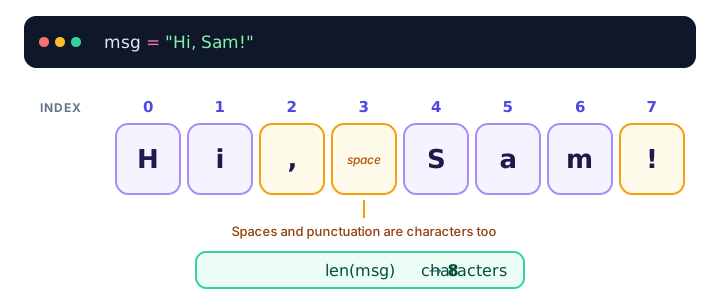
You'll use those index numbers to grab parts of a string in the next lesson, string indexing and slicing.
How do you find the length of a string?
The built-in len() function returns the number of characters in a string:
username = "pixel_panda"
print(len(username))
print(len("Hi, Sam!"))
print(len(""))
11
8
0This is exactly how a character counter works. Here's a check for a post with a 280-character limit:
post = "Just finished my first Python program. Feeling great!"
limit = 280

print("Characters used:", len(post))
print("Characters left:", limit - len(post))
print("Too long?", len(post) > limit)
Characters used: 53
Characters left: 227
Too long? FalseJoining strings with + (concatenation)
Joining strings end to end is called concatenation. Use the + operator:
first = "Maria"
last = "Lopez"
full_name = first + " " + last
print(full_name)
Maria LopezPython adds nothing between the pieces, so you add the space yourself. Also, + only joins a string to another string. To join a number, convert it first with str(), which you met in type conversion:
items = 3
message = "You have " + str(items) + " items in your cart"
print(message)
You have 3 items in your cartRepeating strings with *
Multiply a string by a whole number to repeat it:
print("ha" * 3)
print("-" * 20)
print("Go! " * 2 + "Team!")
hahaha
--------------------
Go! Go! Team!Repeating "-" or "=" is a quick way to draw a divider line in a text report.
Are Python strings immutable?
Yes. Immutable means "cannot be changed after it's created". You can't swap out one character inside an existing string:
word = "cat"
word[0] = "b"
TypeError: 'str' object does not support item assignmentInstead, you build a new string and store it in the variable. The old string is simply no longer used:
word = "cat"
word = "b" + "at"
print(word)batThis is why every string tool you'll learn, like +, slicing and string methods, gives you back a new string and leaves the original untouched.
Looping through the characters of a string
Because a string is a sequence, a for loop can visit its characters one by one. (You'll learn loops properly in the Python for loop; for now, just read it as "for each character in the word".)
for letter in "Wow!":
    print(letter)
W
o
w
!How do you check if a string contains something?
The in keyword, which you met with membership operators, checks whether some text appears inside a string. not in checks the opposite.
username = "night owl"
email = "ana@example.com"

print(" " in username)
print("@" in email)
print("admin" not in username)
True
True
TrueThe first line catches a common sign-up rule: usernames often can't contain spaces.
Comparing strings
Use == and != to check whether two strings are exactly the same. The comparison is case-sensitive, so uppercase and lowercase letters are different characters.
password = "Sunshine42"
print(password == "Sunshine42")
print(password == "sunshine42")
print("apple" < "banana")
print("Zebra" < "apple")
True
False
True
True< and > compare strings character by character, roughly in alphabetical order. The surprise in the last line happens because every uppercase letter comes before every lowercase letter in Python's character order. You'll see how to ignore case with .lower() in Python string methods.
Real-world example: a username checker
Let's combine what you've learned into a sign-up check that a game might run:
username = "star_gamer"

print("Username:", username)
print("Length:", len(username))
print("Long enough (5+)?", len(username) >= 5)
print("Short enough (15 max)?", len(username) <= 15)
print("No spaces?", " " not in username)
Username: star_gamer
Length: 10
Long enough (5+)? True
Short enough (15 max)? True
No spaces? TrueChange the username to "al" or "the best gamer ever" and run it again to see which checks fail. Later, with if statements, you'll print a friendly error message instead of True or False.
Common mistakes with strings
1. Mismatched quotes
name = "Alex'SyntaxError: unterminated string literal (detected at line 1)A string must close with the same kind of quote it opened with.
2. Adding a number to a string
age = 30
print("Age: " + age)
TypeError: can only concatenate str (not "int") to strConvert the number first: "Age: " + str(age). Or let print() do it with a comma: print("Age:", age).
3. Confusing "5" with 5
print("5" + "5")
print(5 + 5)
55
10Text that looks like a number is still text. This matters a lot with input(), which always returns a string.
4. Trying to change one character
As you saw above, word[0] = "b" fails because strings are immutable. Build a new string and assign it instead.
Practice exercise
🏋️ Try it yourself
Create variables first_name = "Lena" and city = "Berlin". Build a message Lena from Berlin using +, print it, print its length, then print a line of * characters exactly as long as the message.
Show solution
first_name = "Lena"
city = "Berlin"

message = first_name + " from " + city
print(message)
print(len(message))
print("*" * len(message))
Lena from Berlin
16
****************What's next?
You can now create, join and compare whole strings. Next, learn how to grab single characters and pieces of a string with Python string indexing and slicing.
Key takeaways
- A string is a sequence of characters, written inside single, double or triple quotes. Its type is str.
- Triple quotes (""" or ''') create multi-line strings that keep their line breaks.
- len() returns the number of characters, including spaces and punctuation.
- Use + to join strings and * to repeat them; convert numbers with str() before joining.
- Strings are immutable: you cannot change a character in place, you create a new string instead.
- Use in and not in to check for text, and == to compare strings exactly (case-sensitive).
Frequently asked questions
What is the difference between single and double quotes in Python?
There is no difference in the resulting string. Both create the same str value. Use whichever lets you include the other kind of quote inside the text without escaping it.
How do you get the length of a string in Python?
Use the built-in len() function, for example len("hello") returns 5. Spaces, punctuation and emoji each count as characters.
Why are strings immutable in Python?
Immutability makes strings safe to share and reuse: a string can never change unexpectedly behind your back. To "change" a string, you build a new one and assign it to the variable.
How do you join a string and a number in Python?
Convert the number with str() first, as in "Total: " + str(42). Alternatively, use print("Total:", 42) or an f-string like f"Total: {42}".
Is Python string comparison case-sensitive?
Yes. "Python" == "python" is False. To compare without caring about case, convert both strings with .lower() first.