Python Project: Expense Tracker (CSV)
Updated 15 min read Aimerscrew
Where did all your money go this month? A Python expense tracker answers that question, and building one teaches you how real programs store and summarize data. In this project, you'll record expenses, save them to a CSV file that opens in Excel or Google Sheets, total your spending by category, and print a monthly summary with simple text bars.
🌍 Real-life example
Budgeting apps like Mint, YNAB or your bank's spending tab sort every purchase into categories (groceries, transport, bills) and show where your money goes each month. Your tracker does the same with data you type in, and stores it in a plain CSV file you can open in any spreadsheet program.
What you'll build
Your expense tracker will have a menu with five options:
- Add an expense with a date, a category from a list, a description and an amount,
- View all expenses in a neat table with a total,
- show totals by category, largest first,
- print a monthly summary with percentages and bars,
- Quit, with every expense already saved in
expenses.csv.
Here's the monthly summary in action. The user typed 4 and then the month 2026-10:
[1] Add  [2] View all  [3] By category  [4] Monthly summary  [5] Quit
Choose an option (1-5): 4
Month (YYYY-MM): 2026-10

Summary for 2026-10  (6 expenses)
  Food       $   99.75   42%  ########
  Bills      $   71.35   30%  ######
  Transport  $   48.00   20%  ####
  Fun        $   18.50    8%  ##
  Total      $  237.60
Concepts used in this project
| Concept | Where it's used | Lesson |
|---|---|---|
csv.DictReader / csv.DictWriter | Loading and saving expenses | CSV files |
Dictionaries and get() | Totals per category | dictionary methods |
datetime.strptime() | Checking dates | datetime |
| f-string alignment | Tables and the summary | f-strings |
sorted() with lambda | Largest category first | lambda |
| List comprehensions | Filtering one month | list comprehension |
try/except ValueError | Validating dates and amounts | try-except |
match menu loop | Choosing an action | match-case |
How the data flows
Every expense becomes one row in expenses.csv. To build a report, the program reads all rows, keeps the ones it needs, and adds the amounts up per category in a dictionary.
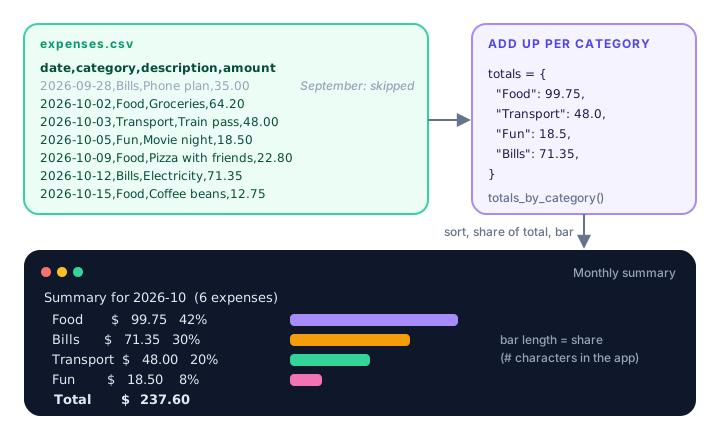
Step 1: Design the CSV file
A CSV (comma-separated values) file is a plain text table: the first line holds the column names, and each following line is one row. Ours has four columns:
date,category,description,amount
2026-09-28,Bills,Phone plan,35.00
2026-10-02,Food,Groceries,64.20
2026-10-03,Transport,Train pass,48.00
2026-10-05,Fun,Movie night,18.50
2026-10-09,Food,Pizza with friends,22.80
2026-10-12,Bills,Electricity,71.35
Dates use the YYYY-MM-DD format (an international standard called ISO 8601). It has two big advantages: it means the same thing in every country, and the first seven characters (2026-10) give you the month, which makes monthly summaries easy.
Save the text above as expenses.csv and read it with csv.DictReader, which turns each row into a dictionary using the header as keys:
import csv

with open("expenses.csv", newline="", encoding="utf-8") as file:
    expenses = list(csv.DictReader(file))

print(len(expenses), "expenses")
print(expenses[1])
6 expenses
{'date': '2026-10-02', 'category': 'Food', 'description': 'Groceries', 'amount': '64.20'}Notice that the amount is the string '64.20'. CSV files only store text, so the program must convert amounts with float() after loading. Here's the finished loading function:
def load_expenses():
    """Read every expense from the CSV file into a list of dictionaries."""
    if not DATA_FILE.exists():
        return []
    with open(DATA_FILE, newline="", encoding="utf-8") as file:
        expenses = list(csv.DictReader(file))
    for expense in expenses:
        expense["amount"] = float(expense["amount"])
    return expenses
Step 2: How do you total expenses by category?
To add up spending per category, loop over the expenses and keep a running total in a dictionary. totals.get(category, 0) returns the current total, or 0 the first time a category appears, so you never get a KeyError:
def totals_by_category(expenses):
    """Return a dictionary like {'Food': 54.3, 'Bills': 80.0}."""
    totals = {}
    for expense in expenses:
        category = expense["category"]
        totals[category] = totals.get(category, 0) + expense["amount"]
    return totals


expenses = [
    {"category": "Food", "amount": 64.20},
    {"category": "Transport", "amount": 48.00},
    {"category": "Food", "amount": 22.80},
]
print(totals_by_category(expenses))
{'Food': 87.0, 'Transport': 48.0}To show the biggest spending first, sort the dictionary's items by their amount. The lambda lambda item: item[1] tells sorted() to compare the second part of each (category, amount) pair:
totals = {"Food": 99.75, "Transport": 48.0, "Fun": 18.5, "Bills": 71.35}

for category, amount in sorted(totals.items(), key=lambda item: item[1], reverse=True):
    print(f"  {category:<10} ${amount:>8.2f}")
Food $ 99.75
Bills $ 71.35
Transport $ 48.00
Fun $ 18.50In the f-string, :<10 pads the category to 10 characters on the left, and :>8.2f right-aligns the amount in 8 characters with exactly 2 decimals. That's what makes the columns line up.
Step 3: Print a neat table
The same alignment trick builds the "View all" table. Slicing the description with [:19] stops a long description from pushing the amount column out of line:
expenses = [
    {"date": "2026-10-02", "category": "Food", "description": "Groceries", "amount": 64.2},
    {"date": "2026-10-03", "category": "Transport", "description": "Train pass", "amount": 48.0},
]

print(f"{'Date':<12}{'Category':<11}{'Description':<20}{'Amount':>9}")
for expense in expenses:
    print(f"{expense['date']:<12}{expense['category']:<11}"
          f"{expense['description'][:19]:<20}{expense['amount']:>9.2f}")
Date Category Description Amount
2026-10-02 Food Groceries 64.20
2026-10-03 Transport Train pass 48.00Two f-strings written next to each other inside parentheses are joined into one string. It's a handy way to split a long line.
Step 4: Validate the user's input
Bad data in the CSV file would break your reports later, so each piece of input gets its own helper that keeps asking until the answer is valid. Dates are checked with datetime.strptime(), which raises a ValueError for anything that isn't a real date in the given format:
from datetime import datetime

for text in ["2026-10-05", "2026-13-01", "05/10/2026"]:
    try:
        day = datetime.strptime(text, "%Y-%m-%d").date()
        print(text, "->", day.isoformat())
    except ValueError:
        print(text, "-> not a valid date")
2026-10-05 -> 2026-10-05
2026-13-01 -> not a valid date
05/10/2026 -> not a valid dateHere are the three input helpers. Pressing Enter on the date uses today's date, categories are picked by number so there are no spelling variations like "food" and "Food ", and amounts must be positive numbers:
def ask_date():
    """Ask for a date in YYYY-MM-DD format. Empty input means today."""
    while True:
        text = input("Date (YYYY-MM-DD, Enter for today): ").strip()
        if text == "":
            return date.today().isoformat()
        try:
            return datetime.strptime(text, "%Y-%m-%d").date().isoformat()
        except ValueError:
            print("Please use the format YYYY-MM-DD, like 2026-10-05.")


def ask_category():
    """Show the categories as a numbered list and return the chosen one."""
    for number, name in enumerate(CATEGORIES, start=1):
        print(f"  {number}. {name}")
    while True:
        text = input("Category number: ").strip()
        if text.isdigit() and 1 <= int(text) <= len(CATEGORIES):
            return CATEGORIES[int(text) - 1]
        print(f"Please pick a number from 1 to {len(CATEGORIES)}.")


def ask_amount():
    """Ask for a positive amount of money."""
    while True:
        text = input("Amount: $").strip()
        try:
            amount = float(text)
        except ValueError:
            print("Please type a number, like 12.50.")
            continue
        if amount <= 0:
            print("The amount must be more than zero.")
            continue
        return round(amount, 2)
Step 5: How do you append a row to a CSV file?
Opening a file in "a" (append) mode adds new lines to the end instead of replacing the file. csv.DictWriter writes a dictionary as a row in the right column order. The header should be written only once, when the file is new:
def save_expense(expense):
    """Append one expense to the CSV file, writing the header if needed."""
    is_new_file = not DATA_FILE.exists()
    with open(DATA_FILE, "a", newline="", encoding="utf-8") as file:
        writer = csv.DictWriter(file, fieldnames=FIELDS)
        if is_new_file:
            writer.writeheader()
        writer.writerow(expense)
We check whether the file exists before opening it, because opening in "a" mode creates the file. The newline="" argument stops blank lines from appearing between rows on Windows, as explained in the CSV lesson.
💡 Tip
Appending one row is safer than rewriting the whole file for every new expense: if something goes wrong mid-write, at worst you lose one row, not your entire history.
Step 6: Build the monthly summary
Because dates are stored as YYYY-MM-DD, finding one month's expenses is a simple startswith() check inside a list comprehension. Each category's share of the total becomes a percentage and a bar of up to 20 # characters:
expenses = [
    {"date": "2026-09-28", "category": "Bills", "amount": 35.00},
    {"date": "2026-10-02", "category": "Food", "amount": 64.20},
    {"date": "2026-10-12", "category": "Bills", "amount": 71.35},
]

month = "2026-10"
in_month = [e for e in expenses if e["date"].startswith(month + "-")]
print(len(in_month), "expenses in", month)

share = 64.20 / (64.20 + 71.35)
print(f"{share:.0%}", "#" * round(share * 20))
2 expenses in 2026-10
47% #########The format :.0% multiplies by 100 and adds a percent sign, so 0.4736 prints as 47%. We add "-" to the month in startswith() so that typing 2026-1 doesn't accidentally match October, November and December.
The complete Python expense tracker
Save this as expenses.py and run python expenses.py. It creates expenses.csv in the folder you run it from (or uses the one from Step 1 if it's already there).
import csv
from datetime import date, datetime
from pathlib import Path

DATA_FILE = Path("expenses.csv")
FIELDS = ["date", "category", "description", "amount"]
CATEGORIES = ["Food", "Transport", "Bills", "Shopping", "Fun", "Other"]
MENU = "\n[1] Add  [2] View all  [3] By category  [4] Monthly summary  [5] Quit"


def load_expenses():
    """Read every expense from the CSV file into a list of dictionaries."""
    if not DATA_FILE.exists():
        return []
    with open(DATA_FILE, newline="", encoding="utf-8") as file:
        expenses = list(csv.DictReader(file))
    for expense in expenses:
        expense["amount"] = float(expense["amount"])
    return expenses


def save_expense(expense):
    """Append one expense to the CSV file, writing the header if needed."""
    is_new_file = not DATA_FILE.exists()
    with open(DATA_FILE, "a", newline="", encoding="utf-8") as file:
        writer = csv.DictWriter(file, fieldnames=FIELDS)
        if is_new_file:
            writer.writeheader()
        writer.writerow(expense)


def ask_date():
    """Ask for a date in YYYY-MM-DD format. Empty input means today."""
    while True:
        text = input("Date (YYYY-MM-DD, Enter for today): ").strip()
        if text == "":
            return date.today().isoformat()
        try:
            return datetime.strptime(text, "%Y-%m-%d").date().isoformat()
        except ValueError:
            print("Please use the format YYYY-MM-DD, like 2026-10-05.")


def ask_category():
    """Show the categories as a numbered list and return the chosen one."""
    for number, name in enumerate(CATEGORIES, start=1):
        print(f"  {number}. {name}")
    while True:
        text = input("Category number: ").strip()
        if text.isdigit() and 1 <= int(text) <= len(CATEGORIES):
            return CATEGORIES[int(text) - 1]
        print(f"Please pick a number from 1 to {len(CATEGORIES)}.")


def ask_amount():
    """Ask for a positive amount of money."""
    while True:
        text = input("Amount: $").strip()
        try:
            amount = float(text)
        except ValueError:
            print("Please type a number, like 12.50.")
            continue
        if amount <= 0:
            print("The amount must be more than zero.")
            continue
        return round(amount, 2)


def add_expense(expenses):
    expense = {
        "date": ask_date(),
        "category": ask_category(),
        "description": input("Description: ").strip() or "-",
        "amount": ask_amount(),
    }
    expenses.append(expense)
    save_expense(expense)
    print(f"Saved: ${expense['amount']:.2f} on {expense['category']}.")


def show_expenses(expenses):
    if not expenses:
        print("No expenses yet.")
        return
    print(f"\n{'Date':<12}{'Category':<11}{'Description':<20}{'Amount':>9}")
    print("-" * 52)
    for expense in expenses:
        print(f"{expense['date']:<12}{expense['category']:<11}"
              f"{expense['description'][:19]:<20}{expense['amount']:>9.2f}")
    total = sum(expense["amount"] for expense in expenses)
    print("-" * 52)
    print(f"{'Total':<43}{total:>9.2f}")


def totals_by_category(expenses):
    """Return a dictionary like {'Food': 54.3, 'Bills': 80.0}."""
    totals = {}
    for expense in expenses:
        category = expense["category"]
        totals[category] = totals.get(category, 0) + expense["amount"]
    return totals


def show_category_totals(expenses):
    totals = totals_by_category(expenses)
    if not totals:
        print("No expenses yet.")
        return
    print("\nSpending by category:")
    for category, amount in sorted(totals.items(), key=lambda item: item[1], reverse=True):
        print(f"  {category:<10} ${amount:>8.2f}")


def monthly_summary(expenses):
    month = input("Month (YYYY-MM): ").strip()
    in_month = [e for e in expenses if e["date"].startswith(month + "-")]
    if not in_month:
        print(f"No expenses found for {month}.")
        return

    totals = totals_by_category(in_month)
    grand_total = sum(totals.values())
    print(f"\nSummary for {month}  ({len(in_month)} expenses)")
    for category, amount in sorted(totals.items(), key=lambda item: item[1], reverse=True):
        share = amount / grand_total
        bar = "#" * round(share * 20)
        print(f"  {category:<10} ${amount:>8.2f}  {share:>4.0%}  {bar}")
    print(f"  {'Total':<10} ${grand_total:>8.2f}")


def main():
    expenses = load_expenses()
    print("===== EXPENSE TRACKER =====")
    print(f"Loaded {len(expenses)} expense(s) from {DATA_FILE}.")

    while True:
        print(MENU)
        choice = input("Choose an option (1-5): ").strip()
        match choice:
            case "1":
                add_expense(expenses)
            case "2":
                show_expenses(expenses)
            case "3":
                show_category_totals(expenses)
            case "4":
                monthly_summary(expenses)
            case "5":
                print("Goodbye! Your expenses are saved in", DATA_FILE)
                break
            case _:
                print("Please type a number from 1 to 5.")


main()
The or "-" after the description input means "if the user typed nothing, use a dash instead", because an empty string is falsy.
Sample run
This run starts with the six expenses from Step 1. The user adds a coffee purchase, then views all expenses, the category totals and the October summary. Everything after a prompt's colon or $ was typed by the user.
===== EXPENSE TRACKER =====
Loaded 6 expense(s) from expenses.csv.

[1] Add  [2] View all  [3] By category  [4] Monthly summary  [5] Quit
Choose an option (1-5): 1
Date (YYYY-MM-DD, Enter for today): 2026-10-15
  1. Food
  2. Transport
  3. Bills
  4. Shopping
  5. Fun
  6. Other
Category number: 1
Description: Coffee beans
Amount: $12.75
Saved: $12.75 on Food.

[1] Add  [2] View all  [3] By category  [4] Monthly summary  [5] Quit
Choose an option (1-5): 2

Date        Category   Description            Amount
----------------------------------------------------
2026-09-28  Bills      Phone plan              35.00
2026-10-02  Food       Groceries               64.20
2026-10-03  Transport  Train pass              48.00
2026-10-05  Fun        Movie night             18.50
2026-10-09  Food       Pizza with friends      22.80
2026-10-12  Bills      Electricity             71.35
2026-10-15  Food       Coffee beans            12.75
----------------------------------------------------
Total                                         272.60

[1] Add  [2] View all  [3] By category  [4] Monthly summary  [5] Quit
Choose an option (1-5): 3

Spending by category:
  Bills      $  106.35
  Food       $   99.75
  Transport  $   48.00
  Fun        $   18.50

[1] Add  [2] View all  [3] By category  [4] Monthly summary  [5] Quit
Choose an option (1-5): 4
Month (YYYY-MM): 2026-10

Summary for 2026-10  (6 expenses)
  Food       $   99.75   42%  ########
  Bills      $   71.35   30%  ######
  Transport  $   48.00   20%  ####
  Fun        $   18.50    8%  ##
  Total      $  237.60

[1] Add  [2] View all  [3] By category  [4] Monthly summary  [5] Quit
Choose an option (1-5): 5
Goodbye! Your expenses are saved in expenses.csv
Notice the difference between options 3 and 4: "By category" counts all expenses, so Bills includes September's phone plan, while the October summary leaves it out. The new row is now the last line of expenses.csv:
2026-10-15,Food,Coffee beans,12.75And here's how the program handles mistakes. The user typed a date in the wrong format, an invalid category, no description, a word and a negative number as the amount, then asked for a month with no data:
===== EXPENSE TRACKER =====
Loaded 7 expense(s) from expenses.csv.

[1] Add  [2] View all  [3] By category  [4] Monthly summary  [5] Quit
Choose an option (1-5): 1
Date (YYYY-MM-DD, Enter for today): 15/10/2026
Please use the format YYYY-MM-DD, like 2026-10-05.
Date (YYYY-MM-DD, Enter for today): 2026-10-16
  1. Food
  2. Transport
  3. Bills
  4. Shopping
  5. Fun
  6. Other
Category number: 9
Please pick a number from 1 to 6.
Category number: 2
Description:
Amount: $abc
Please type a number, like 12.50.
Amount: $-3
The amount must be more than zero.
Amount: $9.40
Saved: $9.40 on Transport.

[1] Add  [2] View all  [3] By category  [4] Monthly summary  [5] Quit
Choose an option (1-5): 4
Month (YYYY-MM): 2025-01
No expenses found for 2025-01.

[1] Add  [2] View all  [3] By category  [4] Monthly summary  [5] Quit
Choose an option (1-5): 5
Goodbye! Your expenses are saved in expenses.csv
Common mistakes in this project
1. Forgetting to convert amounts after loading
Everything read from a CSV file is a string. Adding strings joins them instead of summing them, and mixing strings with numbers fails:
total = 0
total = total + "64.20"
TypeError: unsupported operand type(s) for +: 'int' and 'str'2. Writing the header every time
If writeheader() runs on every save, your file fills up with extra date,category,description,amount lines, and float("amount") crashes the next time you load it. Check whether the file is new first.
3. Using "w" instead of "a"
"w" mode erases the file each time it opens, so you'd only ever keep the latest expense. Use "a" to append.
4. Expecting exact money math from floats
Floats can't store most decimals exactly: 0.1 + 0.2 gives 0.30000000000000004. For a personal tracker, rounding to 2 decimals when printing (:.2f) is fine. Real banking software uses the decimal module or stores amounts in cents as integers. See Python numbers.
Ideas to extend it
🏋️ Challenges
- Monthly budget. Store a budget per category (for example, Food: $300) and show how much is left in the monthly summary, with a warning when a category goes over.
- Delete or edit an expense. Number the rows in "View all", let the user pick one, and rewrite the whole CSV file without it (or with the change) using
"w"mode andwriterows(). - Search. Add an option that lists every expense whose description contains a word, ignoring upper and lower case.
- Average per day. In the monthly summary, divide the total by the number of days in that month, using the
calendar.monthrange()function. - Use Decimal. Switch amounts from
floattodecimal.Decimalso totals are always exact.
Show a hint for challenge 1
budgets = {"Food": 300.0, "Fun": 15.0}
totals = {"Food": 99.75, "Fun": 18.5}

for category, budget in budgets.items():
    left = budget - totals.get(category, 0)
    status = "OVER BUDGET!" if left < 0 else f"${left:.2f} left"
    print(f"{category:<6} {status}")
Food $200.25 left
Fun OVER BUDGET!What's next?
Your tracker works with data stored on your own computer. Next, you'll fetch live data from the internet: build a weather app with a free API using urllib and JSON.
Key takeaways
- Store each expense as one CSV row with date, category, description and amount columns.
- csv.DictReader turns rows into dictionaries, but every value is a string, so convert amounts with float().
- Append new rows with open(file, "a") and csv.DictWriter, writing the header only when the file is new.
- Total spending per category with a dictionary and totals.get(category, 0) + amount.
- YYYY-MM-DD dates make monthly filtering as simple as date.startswith("2026-10-").
- Validate dates with datetime.strptime() and amounts with float() inside try/except so bad data never reaches the file.
Frequently asked questions
How do you make an expense tracker in Python?
Ask the user for a date, category, description and amount, store each expense as a dictionary, and append it to a CSV file with csv.DictWriter. Read the file back with csv.DictReader to show totals and summaries.
How do I add a row to an existing CSV file in Python?
Open the file in append mode with open("file.csv", "a", newline=""), create a csv.writer or csv.DictWriter, and call writerow(). Append mode adds to the end without erasing existing rows.
How do you sum values by category in Python?
Loop over your records and keep a dictionary of totals: totals[category] = totals.get(category, 0) + amount. The get() call returns 0 the first time a category appears.
Should I use CSV or JSON for an expense tracker?
CSV is a great fit because expenses are rows with the same columns, and the file opens directly in Excel or Google Sheets. JSON is better when records have nested or varying fields.
Why is my CSV file showing blank lines between rows?
On Windows, opening the file without newline="" makes Python write an extra line break after each row. Always pass newline="" when opening CSV files for reading or writing.
Is float accurate enough for money in Python?
For a personal tracker, yes, as long as you round when displaying. For exact financial calculations, use the decimal module or store amounts as whole cents in integers.