Python Dataclasses
Updated 7 min read Aimerscrew
Python dataclasses are a shortcut for writing classes whose main job is to hold data. In the magic methods lesson, you wrote __init__, __repr__ and __eq__ by hand. With the @dataclass decorator, you list your fields once and Python writes all three for you. In this lesson, you'll learn how to create dataclasses, set default values, make them read-only or sortable, and decide when to use one instead of a regular class or a dictionary.
🌍 Real-life example
Think of a product label in a store: name, price, quantity in stock. Every label has the same fields, and you mostly read and compare them. Writing a full class with an __init__ that copies each value, a __repr__ that prints each value and an __eq__ that compares each value is a lot of typing for a label. A dataclass gives you all of that from a three-line description.
What is a dataclass in Python?
A dataclass is a normal class with automatically generated special methods. You create one by importing dataclass from the built-in dataclasses module and putting @dataclass above your class. Inside, you list each field as name: type.
from dataclasses import dataclass

@dataclass
class Product:
    name: str
    price: float
    quantity: int

mug = Product("Mug", 12.5, 40)
print(mug)
print(mug.price)
Product(name='Mug', price=12.5, quantity=40)
12.5There's no __init__ in sight, yet Product("Mug", 12.5, 40) works, and printing the object shows every field. That's because @dataclass wrote __init__ and __repr__ behind the scenes.
📝 Note
The name: str part is a type hint, a label that says what kind of value a field should hold. Dataclasses need it to spot the fields. Python doesn't enforce the type, so Product("Mug", "cheap", 40) would still run. You'll learn more in Python type hints. @dataclass itself is a decorator, like @property.
How much code does a dataclass save?
Here's the same Product written as a regular class, with the methods a dataclass gives you for free:
class Product:
    def __init__(self, name, price, quantity):
        self.name = name
        self.price = price
        self.quantity = quantity

    def __repr__(self):
        return (f"Product(name={self.name!r}, price={self.price!r}, "
                f"quantity={self.quantity!r})")

    def __eq__(self, other):
        return (self.name, self.price, self.quantity) == (
            other.name, other.price, other.quantity)

print(Product("Mug", 12.5, 40))
Product(name='Mug', price=12.5, quantity=40)(The !r inside the f-string means "use repr()", which adds the quotes around strings.) Every new field means editing three methods. With a dataclass, you add one line.
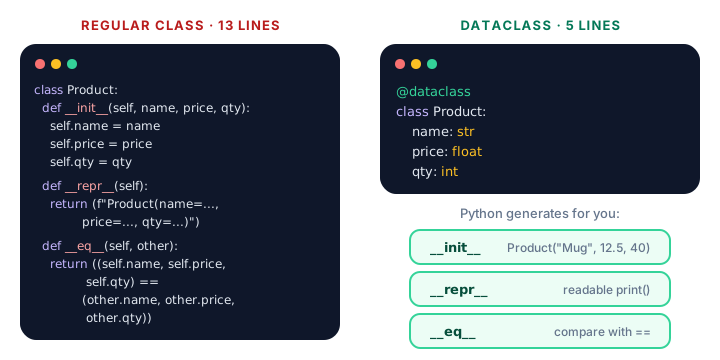
@dataclass generates __init__, __repr__ and __eq__ from your field list.Comparing dataclass objects with ==
Because __eq__ is generated, two dataclass objects are equal when all their fields are equal:
from dataclasses import dataclass

@dataclass
class Point:
    x: int
    y: int

print(Point(2, 3) == Point(2, 3))
print(Point(2, 3) == Point(3, 2))
True
FalseDefault values for fields
Give a field a default with =, just like a function parameter. Fields with defaults must come after fields without them.
from dataclasses import dataclass

@dataclass
class CoffeeOrder:
    drink: str
    size: str = "medium"
    extra_shot: bool = False

print(CoffeeOrder("latte"))
print(CoffeeOrder("mocha", "large", extra_shot=True))
CoffeeOrder(drink='latte', size='medium', extra_shot=False)
CoffeeOrder(drink='mocha', size='large', extra_shot=True)Lists as defaults: field(default_factory=list)
You can't write tags: list = [] in a dataclass. A single list would be shared by every object (the same trap as mutable default arguments in functions), so Python refuses:
from dataclasses import dataclass

@dataclass
class Playlist:
    name: str
    songs: list = []
ValueError: mutable default <class 'list'> for field songs is not allowed: use default_factoryUse field(default_factory=list) instead. A factory is a function Python calls to make a fresh value, so every object gets its own new list:
from dataclasses import dataclass, field

@dataclass
class Playlist:
    name: str
    songs: list = field(default_factory=list)

gym = Playlist("Gym")
chill = Playlist("Chill")
gym.songs.append("Eye of the Tiger")

print(gym)
print(chill)
Playlist(name='Gym', songs=['Eye of the Tiger'])
Playlist(name='Chill', songs=[])Read-only dataclasses with frozen=True
Pass frozen=True and the object can't be changed after it's created. This is great for values that should never change, like coordinates or settings.
from dataclasses import dataclass

@dataclass(frozen=True)
class Point:
    x: int
    y: int

home = Point(4, 7)
print(home.x)
home.x = 10
4
dataclasses.FrozenInstanceError: cannot assign to field 'x'💡 Tip
Frozen dataclasses can be used as dictionary keys and stored in sets, just like tuples. A normal dataclass can't, because its values might change.
Sortable dataclasses with order=True
With order=True, Python also generates <, <=, > and >=. Objects are compared field by field, in the order you listed the fields, like comparing tuples.
from dataclasses import dataclass

@dataclass(order=True)
class Score:
    points: int
    player: str

board = [Score(870, "Ana"), Score(1200, "Ben"), Score(870, "Abe")]
for score in sorted(board, reverse=True):
    print(score)
Score(points=1200, player='Ben')
Score(points=870, player='Ana')
Score(points=870, player='Abe')Because points is listed first, it decides the order. When points tie, player breaks the tie.
Adding your own methods
A dataclass is still a class, so you can add methods and properties as usual:
from dataclasses import dataclass

@dataclass
class InventoryItem:
    name: str
    unit_price: float
    quantity: int = 0

    def total_value(self):
        return self.unit_price * self.quantity

    def restock(self, amount):
        self.quantity += amount

headphones = InventoryItem("Headphones", 59.99, 3)
headphones.restock(2)
print(headphones)
print(f"Stock value: ${headphones.total_value():.2f}")
InventoryItem(name='Headphones', unit_price=59.99, quantity=5)
Stock value: $299.95When should you use a dataclass vs a class vs a dict?
| Choose | When | Example |
|---|---|---|
dict | Quick, loose data; keys may vary; data from JSON | {"city": "Paris", "temp": 18} |
@dataclass | A fixed set of fields, mostly storing data, maybe a few methods | Product, Point, InventoryItem |
| Regular class | Lots of behavior, custom setup in __init__, strict validation | A BankAccount with protected balance |
A dataclass beats a dictionary when the shape of the data is fixed: you get mug.price instead of mug["price"], a typo like mug.prise raises an error instead of silently failing, and your editor can auto-complete field names.
Common mistakes with dataclasses
1. Forgetting the type hint
A line like name = "Mug" without : str becomes a plain class attribute, not a field, so it won't appear in __init__ or __repr__. Every field needs name: type.
2. Putting a default field before a required one
from dataclasses import dataclass

@dataclass
class Flight:
    gate: str = "TBA"
    number: str
TypeError: non-default argument 'number' follows default argumentMove fields with defaults to the end.
3. Using a list or dict directly as a default
Always use field(default_factory=list) or field(default_factory=dict) for mutable defaults.
Practice exercise
🏋️ Try it yourself
Create a dataclass Book with title, author, pages and a tags list that defaults to empty. Make books sortable by page count (hint: put pages first and use order=True). Create three books, add a tag to one, then print the titles from shortest to longest.
Show solution
from dataclasses import dataclass, field

@dataclass(order=True)
class Book:
    pages: int
    title: str
    author: str
    tags: list = field(default_factory=list)

shelf = [
    Book(310, "The Hobbit", "J. R. R. Tolkien"),
    Book(96, "The Little Prince", "Antoine de Saint-Exupéry"),
    Book(180, "The Great Gatsby", "F. Scott Fitzgerald"),
]
shelf[0].tags.append("fantasy")

for book in sorted(shelf):
    print(book.pages, book.title)
print(shelf[0].tags)
96 The Little Prince
180 The Great Gatsby
310 The Hobbit
['fantasy']What's next?
You've finished the object-oriented programming chapter. Next, start the Intermediate Python chapter by learning which values can and can't be changed in place with Python mutable vs immutable types.
Key takeaways
- Import with from dataclasses import dataclass and put @dataclass above a class.
- List fields as name: type; Python generates __init__, __repr__ and __eq__ for you.
- Give fields defaults with =, and keep fields with defaults after required ones.
- Use field(default_factory=list) for list or dict defaults so each object gets its own copy.
- frozen=True makes objects read-only; order=True makes them sortable field by field.
- Dataclasses are still classes, so you can add your own methods and properties.
- Use a dataclass for fixed-shape data, a dict for loose data, and a regular class for behavior-heavy objects.
Frequently asked questions
What does @dataclass do in Python?
It reads the fields you list with type hints and automatically adds __init__, __repr__ and __eq__ methods to the class. With options like order=True and frozen=True it can also add comparison methods and make objects read-only.
Do dataclasses check types?
No. The type hints tell dataclasses which names are fields and help editors and tools, but Python does not stop you from storing a value of a different type at runtime.
Why can't I use a list as a default value in a dataclass?
A list default would be shared by every object, so changing it in one object would change it in all of them. Python raises a ValueError and asks you to use field(default_factory=list), which creates a fresh list for each object.
What is the difference between a dataclass and a regular class?
There is no difference in what they can do; a dataclass is a regular class with some methods written for you. Use a dataclass when the class mainly stores data, and a regular class when you need custom setup or lots of behavior.
Should I use a dataclass or a dictionary?
Use a dataclass when every record has the same fixed fields, because you get attribute access, clear errors for typos and a readable repr. Use a dictionary when keys vary or the data comes straight from JSON.
What Python version added dataclasses?
Dataclasses were added in Python 3.7 as part of the standard library, so no installation is needed in any modern Python version.