Python Decorators
Updated 9 min read Aimerscrew
Python decorators let you add extra behavior to a function without changing the function's own code. A decorator wraps a function, runs something before and after it, and hands back the wrapped version. In this lesson, you'll build decorators step by step, learn the @ syntax, and write useful ones for logging, timing and login checks.
🌍 Real-life example
Think of gift wrapping. The present inside (say, a pair of headphones) stays exactly the same. The wrapping adds something around it: paper on the outside, a "Happy birthday!" card, a bow. When someone opens it, they first see the wrapping, then the present, then maybe a thank-you note. A decorator is gift wrapping for a function: the function stays the same, and the decorator adds extra steps around it.
What is a decorator in Python?
A decorator is a function that takes a function as input and returns a new function that usually calls the original one with extra code before or after it. To understand how that's possible, you need two ideas first: functions are objects, and functions can live inside other functions.
Functions are objects in Python
In Python, a function is a value, just like a number or a string. You can store it in another variable, and the new name refers to the same function:
def greet(name):
    return f"Hello, {name}!"

say_hi = greet          # no brackets: we are not calling it
print(say_hi("Maya"))
print(say_hi.__name__)
Hello, Maya!
greetNotice there are no brackets in say_hi = greet. Writing greet refers to the function itself; writing greet() calls it. Because functions are values, you can also pass them to other functions:
def shout(text):
    return text.upper() + "!"

def whisper(text):
    return text.lower() + "..."

def announce(message, style):
    print(style(message))

announce("Gate 12 is now boarding", shout)
announce("Gate 12 is now boarding", whisper)
GATE 12 IS NOW BOARDING!
gate 12 is now boarding...Functions inside functions
You can define a function inside another function, and even return it. The inner function remembers the variables of the outer function, even after the outer function has finished. (You saw this idea of enclosing scopes in Python variable scope.)
def make_multiplier(factor):
    def multiply(number):
        return number * factor
    return multiply

double = make_multiplier(2)
triple = make_multiplier(3)
print(double(10))
print(triple(10))
20
30An inner function that remembers values from its outer function is called a closure. Every decorator is built on this trick.
How do you write a decorator by hand?
Now put both ideas together. The decorator below takes a function, defines a wrapper function that adds steps before and after it, and returns the wrapper:
def gift_wrap(func):
    def wrapper():
        print("[Tearing off the paper...]")
        func()
        print("[Thanks for the gift!]")
    return wrapper

def present():
    print("It's a new pair of headphones!")

present = gift_wrap(present)
present()
[Tearing off the paper...]
It's a new pair of headphones!
[Thanks for the gift!]The line present = gift_wrap(present) does the magic. It passes the original function into gift_wrap and stores the returned wrapper under the name present. From now on, calling present() runs the wrapper, which calls the original function in the middle.
What does the @ symbol do in Python?
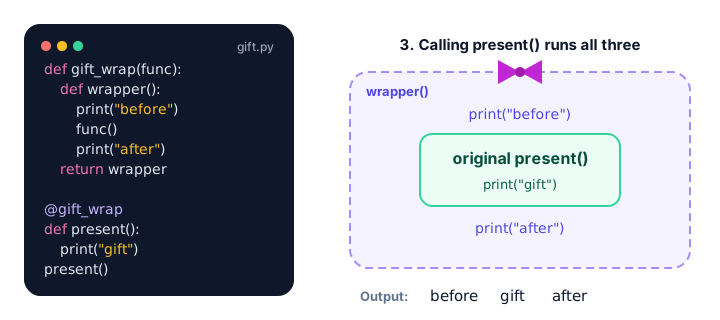
Writing present = gift_wrap(present) works, but it's easy to forget and it comes after the function. Python gives you a shortcut: put @gift_wrap on the line above the definition.
def gift_wrap(func):
    def wrapper():
        print("[Tearing off the paper...]")
        func()
        print("[Thanks for the gift!]")
    return wrapper

@gift_wrap
def present():
    print("It's a new pair of headphones!")

present()
[Tearing off the paper...]
It's a new pair of headphones!
[Thanks for the gift!]@gift_wrap above def present() means exactly the same as present = gift_wrap(present) after it. It's just cleaner to read.
Decorating functions that take arguments
Our wrapper() takes no arguments, so it only works for functions that take none. To wrap any function, accept *args and **kwargs and pass them straight through (see *args and **kwargs). Also return the original function's result, or it gets lost.
def log_call(func):
    def wrapper(*args, **kwargs):
        print(f"Calling {func.__name__} with {args} {kwargs}")
        result = func(*args, **kwargs)
        print(f"{func.__name__} returned {result}")
        return result
    return wrapper

@log_call
def add_to_cart(item, price, quantity=1):
    return price * quantity

total = add_to_cart("mug", 12.5, quantity=2)
print("Total:", total)
Calling add_to_cart with ('mug', 12.5) {'quantity': 2}
add_to_cart returned 25.0
Total: 25.0This is a real logging decorator. You can put @log_call on any function in your program to see how it's being called, then remove it when you're done.
Why use functools.wraps?
There's a hidden problem: after decorating, the function's name and docstring belong to the wrapper, not the original.
def plain(func):
    def wrapper(*args, **kwargs):
        return func(*args, **kwargs)
    return wrapper

@plain
def checkout():
    """Pay for everything in the cart."""
    return "Paid"

print(checkout.__name__)
print(checkout.__doc__)
wrapper
NoneThat confuses error messages, debugging tools and help pages. The fix is the wraps decorator from the built-in functools module. Put it on your wrapper and it copies the original's name and docstring over:
from functools import wraps

def plain(func):
    @wraps(func)
    def wrapper(*args, **kwargs):
        return func(*args, **kwargs)
    return wrapper

@plain
def checkout():
    """Pay for everything in the cart."""
    return "Paid"

print(checkout.__name__)
print(checkout.__doc__)
checkout
Pay for everything in the cart.💡 Tip
Make @wraps(func) a habit. Every decorator you write should use it. It costs one line and saves you from confusing bugs later.
How do you make a decorator with arguments?
Sometimes you want to configure a decorator, like @repeat(3). For that, you need one more layer: a function that takes the setting and returns a decorator.
from functools import wraps

def repeat(times):
    def decorator(func):
        @wraps(func)
        def wrapper(*args, **kwargs):
            for _ in range(times):
                func(*args, **kwargs)
        return wrapper
    return decorator

@repeat(3)
def cheer(team):
    print(f"Go, {team}!")

cheer("Lions")
Go, Lions!
Go, Lions!
Go, Lions!Read @repeat(3) in two steps: first repeat(3) runs and returns decorator, then decorator wraps cheer. Three levels of functions look scary at first, but each one has a single job.
Real-world decorators: timing and login checks
Timing a function. Want to know how long something takes? time.perf_counter() from the built-in time module returns a precise clock reading in seconds, so the difference between two readings is the elapsed time.
import time
from functools import wraps

def timer(func):
    @wraps(func)
    def wrapper(*args, **kwargs):
        start = time.perf_counter()
        result = func(*args, **kwargs)
        elapsed = time.perf_counter() - start
        print(f"{func.__name__} took {elapsed:.4f} seconds")
        return result
    return wrapper

@timer
def build_playlist(song_count):
    return [f"Song {n}" for n in range(1, song_count + 1)]

songs = build_playlist(100_000)
print(len(songs))
build_playlist took 0.0123 seconds
100000The time on your computer will be different every run; that's expected.
Requiring login. Websites often block certain pages until you sign in. A decorator can do that check once, for every protected function:
from functools import wraps

current_user = {"name": "Priya", "logged_in": False}

def login_required(func):
    @wraps(func)
    def wrapper(*args, **kwargs):
        if not current_user["logged_in"]:
            print("Please log in first.")
            return None
        return func(*args, **kwargs)
    return wrapper

@login_required
def view_order_history():
    print(f"Showing orders for {current_user['name']}")

view_order_history()
current_user["logged_in"] = True
view_order_history()
Please log in first.
Showing orders for PriyaNotice the wrapper can decide not to call the original function at all. Web frameworks such as Flask and Django use decorators exactly like this.
Stacking multiple decorators
You can put more than one decorator on a function. They are applied from the bottom up: the one closest to def wraps first.
def stars(func):
    def wrapper():
        return "*" + func() + "*"
    return wrapper

def brackets(func):
    def wrapper():
        return "[" + func() + "]"
    return wrapper

@stars
@brackets
def label():
    return "SALE"

print(label())*[SALE]*This is the same as label = stars(brackets(label)). Swap the two lines and you'd get [*SALE*].
Common mistakes with decorators
1. Forgetting to return the wrapper
def gift_wrap(func):
    def wrapper():
        func()
    # oops: no "return wrapper"

@gift_wrap
def present():
    print("Headphones!")

present()
TypeError: 'NoneType' object is not callableA function without return gives back None, so present becomes None.
2. Forgetting to return the result
If your wrapper calls func(*args, **kwargs) but doesn't return its value, every decorated function silently returns None. Always write return func(*args, **kwargs) or store and return result.
3. A wrapper that doesn't accept arguments
def gift_wrap(func):
    def wrapper():
        return func()
    return wrapper

@gift_wrap
def greet(name):
    print("Hi", name)

greet("Leo")
TypeError: gift_wrap.<locals>.wrapper() takes 0 positional arguments but 1 was givenUse def wrapper(*args, **kwargs) so the wrapper works with any function.
4. Adding brackets to a decorator that takes no settings
Write @gift_wrap, not @gift_wrap(). With brackets, Python calls gift_wrap() with no function and you get TypeError: gift_wrap() missing 1 required positional argument: 'func'. Only decorators built with an extra layer, like @repeat(3), take brackets.
Practice exercise
🏋️ Try it yourself
A coffee shop app has a function order_summary(drink, size) that returns a string like "large latte". Write a decorator called uppercase that turns whatever the function returns into capital letters. Use functools.wraps, then print the result and the function's name.
Show solution
from functools import wraps

def uppercase(func):
    @wraps(func)
    def wrapper(*args, **kwargs):
        result = func(*args, **kwargs)
        return result.upper()
    return wrapper

@uppercase
def order_summary(drink, size):
    return f"{size} {drink}"

print(order_summary("latte", "large"))
print(order_summary.__name__)
LARGE LATTE
order_summaryWhat's next?
Decorators wrap extra steps around a function. Next, you'll learn a related idea that wraps setup and cleanup steps around a block of code: Python context managers.
Key takeaways
- A decorator is a function that takes a function, wraps extra behavior around it and returns the wrapped version.
- Decorators work because Python functions are objects: they can be stored, passed around and returned.
- Writing @decorator above def func() is the same as func = decorator(func).
- Give the wrapper *args and **kwargs and return the original result so it works with any function.
- Use @wraps(func) from functools to keep the original function name and docstring.
- A decorator with settings, like @repeat(3), needs an extra outer function that returns the decorator.
Frequently asked questions
What is a decorator in Python in simple words?
A decorator is a wrapper for a function. It takes your function, adds extra steps before or after it (like logging or checking a login), and gives you back the wrapped function without changing the original code.
What does the @ symbol mean in Python?
Placed above a function definition, @name applies a decorator. @timer above def load() means the same as writing load = timer(load) after the function.
Why should I use functools.wraps in a decorator?
Without it, the decorated function takes the wrapper name and loses its docstring, which makes debugging and help pages confusing. @wraps(func) copies the original name, docstring and other details onto the wrapper.
Can a Python function have more than one decorator?
Yes. Stack them on separate lines above the def. They are applied from the bottom up, so the decorator closest to the function wraps it first.
What are some real uses of decorators?
Common uses include logging function calls, measuring how long code takes, checking that a user is logged in, caching results (functools.lru_cache), retrying failed operations and registering web routes in frameworks like Flask.