Python with Statement (Opening Files Safely)
Updated 7 min read Aimerscrew
In the last two lessons, every file you opened needed a matching close(). Forget it once, or let an error skip it, and strange bugs follow. The Python with statement fixes this: it opens a file and guarantees it gets closed, no matter how the block ends. It's the way professional Python code opens files, and after this lesson it'll be your way too.
🌍 Real-life example
Think of a self-closing door on an office fridge. You open it, grab your lunch, and walk away. The door closes by itself, whether you left calmly or rushed off because your phone rang. You never have to remember to shut it. The with statement is a self-closing door for files.
Why does closing a file matter?
When you write to a file, Python doesn't send every character to the disk right away. It collects text in a buffer (a small waiting area in memory) and saves it in batches, because disks are slow. Closing the file flushes the buffer, which means it writes out everything still waiting. Watch what happens before and after close():
notes = open("notes.txt", "w", encoding="utf-8")
notes.write("Buy milk\n")

reader = open("notes.txt", encoding="utf-8")
print(repr(reader.read()))
reader.close()

notes.close()

reader = open("notes.txt", encoding="utf-8")
print(repr(reader.read()))
reader.close()
''
'Buy milk\n'Before close(), the file on disk was still empty. Unclosed files cause other problems too:
- Lost data if the program crashes before the buffer is saved.
- Locked files: on Windows, another program may be unable to rename or delete a file you left open.
- Running out of file handles: operating systems limit how many files one program can have open at once, which matters in long-running programs like web servers.
What is the with statement in Python?
The with statement runs an indented block of code inside a "setup and cleanup" wrapper. For files, the setup is opening the file and the cleanup is closing it. Here's the pattern:
with open("guests.txt", encoding="utf-8") as file:
    content = file.read()

print(content)
print("Closed?", file.closed)
Alice
Bob
Chloe
Diego
Closed? TrueLet's break down the first line:
withstarts the statement.open("guests.txt", encoding="utf-8")opens the file, exactly as before.as filestores the file object in a variable namedfile.- The colon and the indented block are the code that uses the file.
As soon as the indented block ends, Python closes the file for you. The closed attribute proves it. (guests.txt is the four-name file from How to Read Files in Python.)
How do you write to a file with the with statement?
Every mode works the same way. Here we append a diary entry:
with open("diary.txt", "a", encoding="utf-8") as diary:
    diary.write("Went for a run in the park.\n")
    diary.write("Tried a new pasta recipe.\n")

with open("diary.txt", encoding="utf-8") as diary:
    print(diary.read())
Went for a run in the park.
Tried a new pasta recipe.Compare that with the old way: no close() lines, and the indentation shows at a glance which code uses the file.
Does with close the file even when there's an error?
Yes, and that's its biggest advantage. Below, int() fails because the first line of the guest list is a name, not a number. The error jumps straight out of the block, yet the file is still closed:
try:
    with open("guests.txt", encoding="utf-8") as file:
        first_line = file.readline()
        number = int(first_line)
        print("This line never runs")
except ValueError:
    print("The first line isn't a number!")

print("Closed?", file.closed)
The first line isn't a number!
Closed? True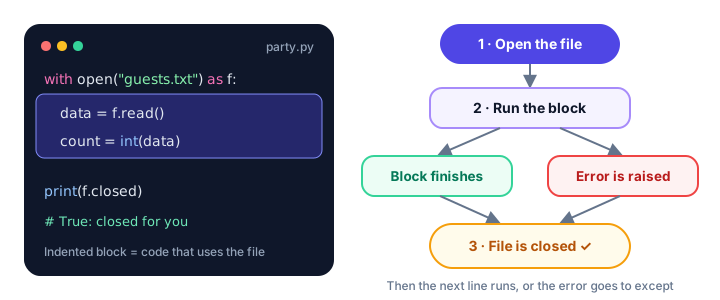
Without with, you'd need a try/finally block (from Python try except) to get the same safety:
file = open("guests.txt", encoding="utf-8")
try:
    content = file.read()
finally:
    file.close()
Both versions behave the same, but the with version is shorter and impossible to get wrong.
How do you open multiple files in one with statement?
Separate them with commas. Both files are closed when the block ends. This example turns a guest list into name badges:
with open("guests.txt", encoding="utf-8") as guests, open("badges.txt", "w", encoding="utf-8") as badges:
    for line in guests:
        badges.write(f"HELLO, my name is {line.strip()}\n")

with open("badges.txt", encoding="utf-8") as badges:
    print(badges.read())
HELLO, my name is Alice
HELLO, my name is Bob
HELLO, my name is Chloe
HELLO, my name is DiegoWhen the line gets long, Python 3.10 and newer let you wrap the files in parentheses, one per line:
with (
    open("guests.txt", encoding="utf-8") as guests,
    open("badges.txt", "w", encoding="utf-8") as badges,
):
    for line in guests:
        badges.write(f"Welcome, {line.strip()}!\n")

with open("badges.txt", encoding="utf-8") as badges:
    print(badges.readline().strip())
Welcome, Alice!Real-world example: building an RSVP list
You invited friends to a party and saved their replies in rsvp.txt:
Alice,yes
Bob,no
Chloe,yes
Diego,maybe
Emma,yes
This program reads the replies and writes only the confirmed guests to a new file for the caterer:
confirmed = 0

with open("rsvp.txt", encoding="utf-8") as replies, open("confirmed.txt", "w", encoding="utf-8") as output:
    for line in replies:
        name, answer = line.strip().split(",")
        if answer == "yes":
            output.write(name + "\n")
            confirmed += 1

print(f"{confirmed} guests confirmed. Plates to order: {confirmed + 1}")

with open("confirmed.txt", encoding="utf-8") as output:
    print(output.read())
3 guests confirmed. Plates to order: 4
Alice
Chloe
EmmaThe + 1 is a plate for the host. Notice that the program reads confirmed.txt only after the first with block has closed it, so all the names have been saved.
with and context managers
A file object works with with because it's a context manager: an object that knows how to set something up when the block starts and clean it up when the block ends. Files aren't the only ones. Database connections, network connections and locks that stop two parts of a program from changing the same data at once are all commonly used with with.
You can even write your own context managers, for example a timer that measures how long a block takes. You'll learn how in Python Context Managers.
📝 Note
The variable created by as still exists after the block (that's how we checked file.closed), but the file it points to is closed. You can look at it; you just can't read from or write to it anymore.
Common mistakes with the with statement
1. Using the file after the block ends
with open("guests.txt", encoding="utf-8") as file:
    first = file.readline()

second = file.readline()
ValueError: I/O operation on closed file.Keep every line that reads or writes the file inside the indented block, or save what you need in a variable first.
2. Forgetting the colon or the indentation
Like if and for, a with line must end with :, and the code that uses the file must be indented beneath it.
3. Calling close() inside with
It isn't an error, but it's unnecessary. Let with do the closing.
4. Reading a file you're still writing in the same block
Text you wrote may still be in the buffer. Finish writing, let the block end, then open the file again to read it, as the RSVP example does.
Practice exercise
🏋️ Try it yourself
Using with, read guests.txt and write a new file seating.txt where each guest gets a table number, starting at 1 (Table 1: Alice). Then print the contents of seating.txt.
Show solution
with open("guests.txt", encoding="utf-8") as guests, open("seating.txt", "w", encoding="utf-8") as seating:
    table = 1
    for line in guests:
        seating.write(f"Table {table}: {line.strip()}\n")
        table += 1

with open("seating.txt", encoding="utf-8") as seating:
    print(seating.read())
Table 1: Alice
Table 2: Bob
Table 3: Chloe
Table 4: DiegoWhat's next?
You can now read and write text files safely. Many real files hold tables of data, like spreadsheets exported from Excel. Next, learn how to work with CSV files in Python.
Key takeaways
- The with statement opens a file and closes it automatically when the indented block ends.
- The file is closed even if an error happens inside the block, so no data is lost and no file stays locked.
- Syntax: with open("name.txt", encoding="utf-8") as file: followed by an indented block.
- Open several files at once by separating them with commas; all of them are closed at the end.
- Using the file object after the block raises ValueError: I/O operation on closed file.
- Files are context managers; other objects such as database connections and locks work with with too.
Frequently asked questions
What does the with statement do in Python?
It runs a block of code with a setup step before it and a cleanup step after it. With open(), the setup opens the file and the cleanup closes it, even if an error happens inside the block.
Do I need to call close() when using with open()?
No. The with statement closes the file automatically as soon as the indented block finishes, so calling close() yourself is unnecessary.
Can I open two files with one with statement?
Yes. Separate them with commas: with open("a.txt") as source, open("b.txt", "w") as target:. In Python 3.10 and newer you can also wrap them in parentheses, one per line.
Why should I use with instead of open() and close()?
With is shorter and safer. If an error happens between open() and close(), the close() line is skipped and the file stays open. The with statement always closes it.
What is a context manager in Python?
A context manager is an object that defines what happens when a with block starts and ends. File objects are the most common example; database connections and locks are others.