Python Context Managers
Updated 9 min read Aimerscrew
Python context managers make sure that setup and cleanup always happen in pairs: open and close, start and stop, lock and unlock. You've already used one every time you wrote with open(...). In this lesson, you'll learn what happens behind the with statement and how to write your own context managers, both as classes and with the handy contextlib module.
🌍 Real-life example
Think of a hotel stay. You check in at the front desk, you enjoy your stay, and you check out when you leave. Even if your trip is cut short by a storm, you still check out and hand back the key. A context manager is that front desk: it runs the "check in" step when the with block starts and guarantees the "check out" step when it ends, no matter what happened in between.
What is a context manager in Python?
A context manager is an object that defines what should happen when a with block starts and when it ends. The start step usually grabs a resource (a file, a network connection, a lock), and the end step releases it. The key promise: the end step always runs, even if the code inside the block crashes.
A quick recap of the with statement
In the with statement lesson, you opened files like this:
with open("notes.txt", "w") as file:
    file.write("Buy milk")
# the file is closed here automatically
Here, open() returns a file object, which is a context manager. When the block finishes, Python closes the file for you. Now let's see how that works by building our own.
How do you create a context manager with a class?
Any class becomes a context manager when it has two magic methods:
__enter__(self)runs when thewithblock starts. Whatever it returns is stored in the variable afteras.__exit__(self, exc_type, exc_value, traceback)runs when the block ends. The three extra parameters describe an error, if one happened.
class HotelStay:
    def __init__(self, guest):
        self.guest = guest

    def __enter__(self):
        print(f"Checking in {self.guest}")
        return self

    def __exit__(self, exc_type, exc_value, traceback):
        print(f"Checking out {self.guest}")
        return False

with HotelStay("Leo") as stay:
    print(f"{stay.guest} is enjoying the pool")

print("Trip over")
Checking in Leo
Leo is enjoying the pool
Checking out Leo
Trip overPython called __enter__ first, then ran the indented block, then called __exit__. Because __enter__ returned self, the name stay refers to the HotelStay object.
Cleanup still runs when an error happens
This is the real reason context managers exist. Watch what happens when the block raises an error:
class HotelStay:
    def __init__(self, guest):
        self.guest = guest

    def __enter__(self):
        print(f"Checking in {self.guest}")
        return self

    def __exit__(self, exc_type, exc_value, traceback):
        print(f"Checking out {self.guest}")
        return False

with HotelStay("Mia"):
    print("Ordering room service")
    raise ValueError("The kitchen is closed")
Checking in Mia
Ordering room service
Checking out Mia
ValueError: The kitchen is closedMia still checked out before the error stopped the program. Without a context manager, you'd need a try/finally block (see try and except) every single time to get the same guarantee.
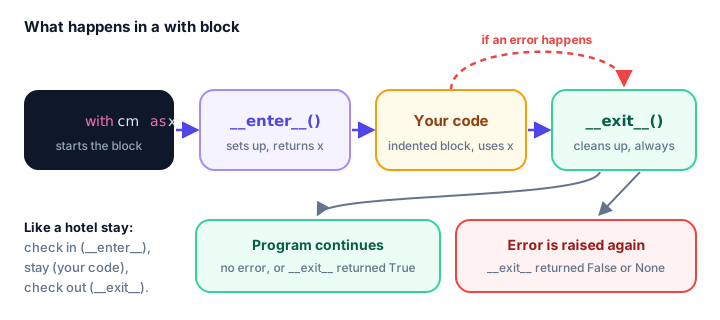
How can __exit__ suppress an exception?
When an error happens inside the block, Python passes its details to __exit__. If __exit__ returns True, Python treats the error as handled and continues after the with block. If it returns False or None, the error carries on as usual.
class Inspector:
    def __enter__(self):
        return self

    def __exit__(self, exc_type, exc_value, traceback):
        print("exc_type:", exc_type)
        print("exc_value:", exc_value)
        return True   # swallow the error

with Inspector():
    print(10 / 0)

print("Program keeps going")
exc_type: <class 'ZeroDivisionError'>
exc_value: division by zero
Program keeps goingWhen the block finishes without an error, all three values are None. That's how __exit__ can tell a normal finish from a crash.
⚠️ Be careful
Returning True hides every error, including bugs you'd want to see. Only swallow errors on purpose, and only the specific types you expect.
For the common case of "ignore this one kind of error", Python has a ready-made context manager, contextlib.suppress:
from contextlib import suppress

menu = {"latte": 4.5, "tea": 3.0}

with suppress(KeyError):
    print(menu["mocha"])

print("Menu check finished")
Menu check finishedThe easy way: contextlib.contextmanager
Writing a whole class for a small context manager can feel heavy. The contextmanager decorator from contextlib lets you write one as a single function using yield, which you met in Python generators:
from contextlib import contextmanager

@contextmanager
def hotel_stay(guest):
    print(f"Checking in {guest}")
    try:
        yield guest
    finally:
        print(f"Checking out {guest}")

with hotel_stay("Ava") as name:
    print(f"{name} is at the beach")
Checking in Ava
Ava is at the beach
Checking out AvaEverything before yield is the setup (like __enter__). The value you yield goes into the as variable. Everything after yield is the cleanup (like __exit__). Wrapping yield in try/finally makes sure the cleanup runs even if the block raises an error.
| Class-based | @contextmanager |
|---|---|
Setup goes in __enter__ | Setup goes before yield |
Return value of __enter__ goes to as | The yielded value goes to as |
Cleanup goes in __exit__ | Cleanup goes after yield (in finally) |
| Best for bigger objects with state and methods | Best for short setup/cleanup pairs |
Using several context managers at once
You can list more than one context manager in a single with, separated by commas. They are entered left to right and exited in the reverse order, like stacked plates:
from contextlib import contextmanager

@contextmanager
def hotel_stay(guest):
    print(f"Checking in {guest}")
    try:
        yield guest
    finally:
        print(f"Checking out {guest}")

with hotel_stay("Ava"), hotel_stay("Ben"):
    print("Both guests are in")
Checking in Ava
Checking in Ben
Both guests are in
Checking out Ben
Checking out AvaReal-world context managers you can write
Temporarily changing a setting. Imagine a music app that mutes the volume during a video call, then restores it afterward. A context manager makes sure the old value always comes back:
from contextlib import contextmanager

settings = {"currency": "USD", "volume": 7}

@contextmanager
def temporary_setting(key, value):
    old_value = settings[key]
    settings[key] = value
    try:
        yield
    finally:
        settings[key] = old_value

print("Before:", settings["volume"])
with temporary_setting("volume", 0):
    print("During the call:", settings["volume"])
print("After:", settings["volume"])
Before: 7
During the call: 0
After: 7Timing a block of code. time.perf_counter() from the built-in time module returns a precise clock reading in seconds:
import time
from contextlib import contextmanager

@contextmanager
def timer(label):
    start = time.perf_counter()
    try:
        yield
    finally:
        elapsed = time.perf_counter() - start
        print(f"{label}: {elapsed:.3f} seconds")

with timer("Sorting scores"):
    scores = sorted(range(1_000_000), reverse=True)
Sorting scores: 0.041 secondsThe number you see will be different on your computer and on every run.
A bank transfer that commits or rolls back. Databases use transactions: a group of changes that either all succeed (commit) or are all undone (roll back). Moving money is the classic case: you never want the money to leave one account without arriving in the other. Here's a simple version with a dictionary:
class Transaction:
    def __init__(self, accounts):
        self.accounts = accounts

    def __enter__(self):
        self.backup = dict(self.accounts)
        print("Transaction started")
        return self.accounts

    def __exit__(self, exc_type, exc_value, traceback):
        if exc_type is None:
            print("Committed: changes saved")
        else:
            self.accounts.clear()
            self.accounts.update(self.backup)
            print(f"Rolled back because: {exc_value}")
        return True   # for this demo, keep the program running

balances = {"alice": 100, "bob": 50}

with Transaction(balances) as accounts:
    accounts["alice"] -= 30
    accounts["bob"] += 30
print(balances)

with Transaction(balances) as accounts:
    accounts["alice"] -= 500
    if accounts["alice"] < 0:
        raise ValueError("not enough money")
    accounts["bob"] += 500
print(balances)
Transaction started
Committed: changes saved
{'alice': 70, 'bob': 80}
Transaction started
Rolled back because: not enough money
{'alice': 70, 'bob': 80}The second transfer failed halfway, after Alice's money was taken. The context manager restored the backup, so nobody lost a cent. Real database libraries, such as Python's built-in sqlite3, offer context managers that work the same way.
Common mistakes with context managers
1. Forgetting to return something from __enter__
class Playlist:
    def __enter__(self):
        self.songs = ["Intro", "Sunrise"]
        # oops: no "return self"

    def __exit__(self, exc_type, exc_value, traceback):
        return False

with Playlist() as playlist:
    print(playlist.songs)
AttributeError: 'NoneType' object has no attribute 'songs'The as variable gets whatever __enter__ returns. With no return, that's None.
2. Leaving out try/finally around yield
In a @contextmanager function, code after a bare yield is skipped if the block raises an error. Always put the cleanup in a finally block so it runs no matter what.
3. Using the resource after the block ends
Once the with block finishes, the resource is cleaned up. For example, writing to a file after its with block gives ValueError: I/O operation on closed file. Keep all the work inside the indented block.
4. Returning True from __exit__ by accident
Returning True silently swallows every error, which hides real bugs. Return False (or nothing) unless you really mean to handle the error.
Practice exercise
🏋️ Try it yourself
Write a context manager called cooking using @contextmanager. It takes a recipe name, prints Preheating oven for pizza before the block and Oven off after it, even if something goes wrong. Test it with a block that prints Baking for 12 minutes.
Show solution
from contextlib import contextmanager

@contextmanager
def cooking(recipe):
    print(f"Preheating oven for {recipe}")
    try:
        yield
    finally:
        print("Oven off")

with cooking("pizza"):
    print("Baking for 12 minutes")
Preheating oven for pizza
Baking for 12 minutes
Oven offWhat's next?
You can now guarantee cleanup with your own context managers. Next, learn how to make your code easier to read and catch mistakes earlier with Python type hints.
Key takeaways
- A context manager sets something up when a with block starts and cleans it up when the block ends.
- The cleanup step always runs, even if the code inside the block raises an error.
- A class becomes a context manager by defining __enter__ and __exit__.
- Whatever __enter__ returns is stored in the variable after as.
- If __exit__ returns True the error is swallowed; False or None lets it continue.
- contextlib.contextmanager turns a generator function into a context manager: setup before yield, cleanup after it.
- contextlib.suppress(SomeError) ignores one specific kind of error inside a with block.
Frequently asked questions
What is a context manager in Python?
It is an object used with the with statement that runs setup code when the block starts and cleanup code when it ends. File objects are the best-known example: they close themselves automatically.
What do __enter__ and __exit__ do?
__enter__ runs at the start of the with block and its return value is assigned to the as variable. __exit__ runs at the end of the block, always, and receives details of any exception that occurred.
How do I create a context manager without a class?
Use the @contextmanager decorator from contextlib on a generator function. Put setup code before yield, yield the value for the as variable, and put cleanup code after yield inside a finally block.
Does __exit__ run if there is an exception?
Yes. That is the main benefit of a context manager. __exit__ receives the exception type, value and traceback, and can choose to swallow the error by returning True.
When should I use a context manager?
Use one whenever something must be undone or released afterward: closing files, releasing locks, ending database transactions, restoring a changed setting or stopping a timer.