Python Project: To-Do List App (Command Line)
Updated 13 min read Aimerscrew
A Python to-do list app is a classic project because it looks like real software: a menu, a list of items you can change, and data that's still there when you come back tomorrow. In this project, you'll build a command-line to-do app step by step. You'll store tasks in a list of dictionaries, drive the app with a menu loop, and save everything to a JSON file.
🌍 Real-life example
Apps like Google Tasks, Microsoft To Do and Todoist all do the same three things at their core: keep a list of tasks, let you tick them off, and save them somewhere so they don't vanish when you close the app. Your version saves to a file on your computer instead of the cloud, but the idea is identical.
What you'll build
Your app will show a one-line menu and let you:
- View all tasks, numbered, with
[x]for done and[ ]for not done, - Add a new task,
- Mark a task as done,
- Delete a task,
- Quit, with every change already saved to
tasks.json.
Here's a quick look. The user typed 1 at the menu prompt:
===== TO-DO LIST =====
Loaded 3 task(s) from tasks.json.

[1] View  [2] Add  [3] Done  [4] Delete  [5] Quit
Choose an option (1-5): 1

Your tasks:
  1. [ ] Buy oat milk
  2. [x] Book flight to Lisbon
  3. [ ] Call the dentist
Concepts used in this project
| Concept | Where it's used | Lesson |
|---|---|---|
| Lists and dictionaries | Storing tasks | lists, dictionaries |
append() and pop() | Adding and deleting tasks | list methods |
enumerate() | Numbering tasks on screen | built-in functions |
while loop + match | The menu | while loop, match-case |
| Functions | One function per menu action | functions |
json, with open() | Saving and loading tasks | JSON, with statement |
pathlib.Path | Checking if the file exists | pathlib |
try/except | Handling a damaged file | try-except |
How the app is organized
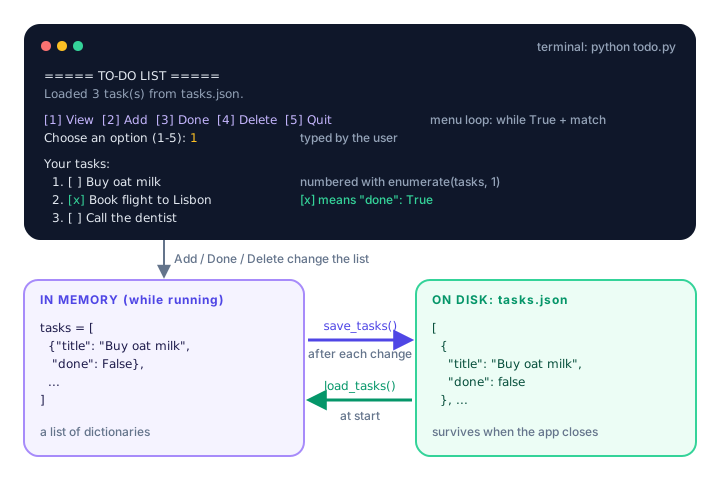
The app has three layers. What you see is the terminal screen. While the program runs, tasks live in memory as a Python list. To keep them after the program ends, they're copied to disk as a JSON file.
Step 1: Choose how to store a task
Each task needs two pieces of information: its text and whether it's finished. A dictionary is perfect for that, and a list of those dictionaries holds all tasks in order. Let's start with some sample data and a function that prints it nicely:
def show_tasks(tasks):
    if not tasks:
        print("Your list is empty. Add a task first!")
        return
    print("\nYour tasks:")
    for number, task in enumerate(tasks, start=1):
        mark = "x" if task["done"] else " "
        print(f"  {number}. [{mark}] {task['title']}")


tasks = [
    {"title": "Buy oat milk", "done": False},
    {"title": "Book flight to Lisbon", "done": True},
]
show_tasks(tasks)
show_tasks([])
Your tasks:
  1. [ ] Buy oat milk
  2. [x] Book flight to Lisbon
Your list is empty. Add a task first!
How it works:
if not tasks:isTruewhen the list is empty, because an empty list is falsy.enumerate(tasks, start=1)gives you a counter and the item at the same time. People count from 1, so we start there instead of 0.- The conditional expression
"x" if task["done"] else " "picks the checkbox mark in one line.
Step 2: Add, complete and delete tasks
Every action is just a list or dictionary operation. Here they are on their own, so you can see exactly what happens to the data:
tasks = []

tasks.append({"title": "Water the plants", "done": False})   # add
tasks.append({"title": "Pay rent", "done": False})
print(tasks)

tasks[1]["done"] = True       # complete task number 2 (index 1)
removed = tasks.pop(0)        # delete task number 1 (index 0)

print("Deleted:", removed["title"])
print(tasks)
[{'title': 'Water the plants', 'done': False}, {'title': 'Pay rent', 'done': False}]
Deleted: Water the plants
[{'title': 'Pay rent', 'done': True}]Notice that the user sees task number 2, but in the list it sits at index 1. Your code must always subtract 1 when turning a task number into an index.
Now let's wrap these operations in functions that talk to the user. choose_task() is shared by "complete" and "delete": it shows the list, asks for a number, and returns the matching index, or None if the input is invalid.
def add_task(tasks):
    title = input("What do you need to do? ").strip()
    if not title:
        print("A task needs some text.")
        return
    tasks.append({"title": title, "done": False})
    save_tasks(tasks)
    print(f"Added: {title}")


def choose_task(tasks, action):
    """Ask for a task number. Return its index, or None if invalid."""
    show_tasks(tasks)
    if not tasks:
        return None
    text = input(f"Number of the task to {action}: ").strip()
    if not text.isdigit() or not 1 <= int(text) <= len(tasks):
        print("That's not a valid task number.")
        return None
    return int(text) - 1


def complete_task(tasks):
    index = choose_task(tasks, "mark as done")
    if index is None:
        return
    tasks[index]["done"] = True
    save_tasks(tasks)
    print(f"Nice work! Done: {tasks[index]['title']}")


def delete_task(tasks):
    index = choose_task(tasks, "delete")
    if index is None:
        return
    removed = tasks.pop(index)
    save_tasks(tasks)
    print(f"Deleted: {removed['title']}")
A few things to notice:
1 <= int(text) <= len(tasks)is a chained comparison: it checks that the number is between 1 and the number of tasks in one go. Python checkstext.isdigit()first, and thanks to short-circuiting,int(text)never runs on bad input like"two".- We test
index is Nonerather thanif not index, because index0(the first task) is valid but falsy. See identity operators. - The functions change the list in place. Lists are mutable, so
main()sees every change without needing areturn. - Each function calls
save_tasks(), which you'll write in Step 4.
Step 3: How do you build a menu loop in Python?
A command-line app usually runs inside a while True loop: show the menu, read a choice, do the action, repeat. The loop only ends when the user picks "Quit". A match statement makes the choices easy to read:
MENU = "\n[1] View  [2] Add  [3] Done  [4] Delete  [5] Quit"


def main():
    tasks = load_tasks()
    print("===== TO-DO LIST =====")
    print(f"Loaded {len(tasks)} task(s) from {DATA_FILE}.")

    while True:
        print(MENU)
        choice = input("Choose an option (1-5): ").strip()

        match choice:
            case "1":
                show_tasks(tasks)
            case "2":
                add_task(tasks)
            case "3":
                complete_task(tasks)
            case "4":
                delete_task(tasks)
            case "5":
                print("Goodbye! Your tasks are saved.")
                break
            case _:
                print("Please type a number from 1 to 5.")
The choices are compared as strings ("1", not 1), so the program never has to convert the input and can't crash on letters. The case _: branch catches anything else, like 7 or x.
💡 Tip
Keep the menu loop short. Each case should call one function and nothing more. When you later add a feature, you write a new function and add one case, without touching the others.
Step 4: How do you save a to-do list to a file?
Right now, every task disappears when the program ends, because variables only live in memory. To keep data between runs, you need to write it to a file. JSON (JavaScript Object Notation) is a text format that looks almost exactly like Python lists and dictionaries, which makes it ideal here. See what json.dumps() turns our list into:
import json

tasks = [{"title": "Buy oat milk", "done": False}]
print(json.dumps(tasks, indent=2))
[
{
"title": "Buy oat milk",
"done": false
}
]Python's False became JSON's false, and indent=2 made it easy for humans to read. Now the two functions that write and read the file:
import json
from pathlib import Path

DATA_FILE = Path("tasks.json")


def load_tasks():
    """Read tasks from the JSON file, or start with an empty list."""
    if not DATA_FILE.exists():
        return []
    with open(DATA_FILE, encoding="utf-8") as file:
        return json.load(file)


def save_tasks(tasks):
    """Write all tasks to the JSON file."""
    with open(DATA_FILE, "w", encoding="utf-8") as file:
json.dump(tasks, file, indent=2)- On the very first run,
tasks.jsondoesn't exist yet, soload_tasks()returns an empty list instead of crashing. "w"mode replaces the whole file each time. That's what we want: the file should always match the current list.- Saving after every change means nothing is lost even if the user closes the terminal window without choosing "Quit".
Step 5: Handle a damaged file
What if someone edits tasks.json by hand and breaks it, say by deleting a bracket? json.load() would raise a json.JSONDecodeError and the app would crash on start. A try/except block turns that into a friendly warning:
import json

broken_text = '[{"title": "Buy oat milk", "done": false'
try:
    tasks = json.loads(broken_text)
except json.JSONDecodeError:
    print("Warning: tasks.json is damaged, starting with an empty list.")
    tasks = []
print(tasks)
Warning: tasks.json is damaged, starting with an empty list.
[]The finished load_tasks() below uses the same idea with json.load(), which reads from a file instead of a string.
The complete to-do list app
Here's everything together. Save it as todo.py in its own folder and run python todo.py. The app creates tasks.json next to wherever you run it.
import json
from pathlib import Path

DATA_FILE = Path("tasks.json")

MENU = "\n[1] View  [2] Add  [3] Done  [4] Delete  [5] Quit"


def load_tasks():
    """Read tasks from the JSON file, or start with an empty list."""
    if not DATA_FILE.exists():
        return []
    try:
        with open(DATA_FILE, encoding="utf-8") as file:
            return json.load(file)
    except json.JSONDecodeError:
        print("Warning: tasks.json is damaged, starting with an empty list.")
        return []


def save_tasks(tasks):
    """Write all tasks to the JSON file."""
    with open(DATA_FILE, "w", encoding="utf-8") as file:
        json.dump(tasks, file, indent=2)


def show_tasks(tasks):
    if not tasks:
        print("Your list is empty. Add a task first!")
        return
    print("\nYour tasks:")
    for number, task in enumerate(tasks, start=1):
        mark = "x" if task["done"] else " "
        print(f"  {number}. [{mark}] {task['title']}")


def add_task(tasks):
    title = input("What do you need to do? ").strip()
    if not title:
        print("A task needs some text.")
        return
    tasks.append({"title": title, "done": False})
    save_tasks(tasks)
    print(f"Added: {title}")


def choose_task(tasks, action):
    """Ask for a task number. Return its index, or None if invalid."""
    show_tasks(tasks)
    if not tasks:
        return None
    text = input(f"Number of the task to {action}: ").strip()
    if not text.isdigit() or not 1 <= int(text) <= len(tasks):
        print("That's not a valid task number.")
        return None
    return int(text) - 1


def complete_task(tasks):
    index = choose_task(tasks, "mark as done")
    if index is None:
        return
    tasks[index]["done"] = True
    save_tasks(tasks)
    print(f"Nice work! Done: {tasks[index]['title']}")


def delete_task(tasks):
    index = choose_task(tasks, "delete")
    if index is None:
        return
    removed = tasks.pop(index)
    save_tasks(tasks)
    print(f"Deleted: {removed['title']}")


def main():
    tasks = load_tasks()
    print("===== TO-DO LIST =====")
    print(f"Loaded {len(tasks)} task(s) from {DATA_FILE}.")

    while True:
        print(MENU)
        choice = input("Choose an option (1-5): ").strip()

        match choice:
            case "1":
                show_tasks(tasks)
            case "2":
                add_task(tasks)
            case "3":
                complete_task(tasks)
            case "4":
                delete_task(tasks)
            case "5":
                print("Goodbye! Your tasks are saved.")
                break
            case _:
                print("Please type a number from 1 to 5.")


main()
Sample run
A first run with no tasks.json yet. The user typed everything after each prompt's colon or question mark: menu choices, three task names, and 2 to mark the flight as booked.
===== TO-DO LIST =====
Loaded 0 task(s) from tasks.json.

[1] View  [2] Add  [3] Done  [4] Delete  [5] Quit
Choose an option (1-5): 2
What do you need to do? Buy oat milk
Added: Buy oat milk

[1] View  [2] Add  [3] Done  [4] Delete  [5] Quit
Choose an option (1-5): 2
What do you need to do? Book flight to Lisbon
Added: Book flight to Lisbon

[1] View  [2] Add  [3] Done  [4] Delete  [5] Quit
Choose an option (1-5): 2
What do you need to do? Call the dentist
Added: Call the dentist

[1] View  [2] Add  [3] Done  [4] Delete  [5] Quit
Choose an option (1-5): 3

Your tasks:
  1. [ ] Buy oat milk
  2. [ ] Book flight to Lisbon
  3. [ ] Call the dentist
Number of the task to mark as done: 2
Nice work! Done: Book flight to Lisbon

[1] View  [2] Add  [3] Done  [4] Delete  [5] Quit
Choose an option (1-5): 7
Please type a number from 1 to 5.

[1] View  [2] Add  [3] Done  [4] Delete  [5] Quit
Choose an option (1-5): 5
Goodbye! Your tasks are saved.
After that run, tasks.json contains:
[
  {
    "title": "Buy oat milk",
    "done": false
  },
  {
    "title": "Book flight to Lisbon",
    "done": true
  },
  {
    "title": "Call the dentist",
    "done": false
  }
]
Run the app again and it starts with Loaded 3 task(s) from tasks.json. Your list survived. Here's a second session where the user deletes a task and then types an invalid number:
===== TO-DO LIST =====
Loaded 3 task(s) from tasks.json.

[1] View  [2] Add  [3] Done  [4] Delete  [5] Quit
Choose an option (1-5): 4

Your tasks:
  1. [ ] Buy oat milk
  2. [x] Book flight to Lisbon
  3. [ ] Call the dentist
Number of the task to delete: 3
Deleted: Call the dentist

[1] View  [2] Add  [3] Done  [4] Delete  [5] Quit
Choose an option (1-5): 4

Your tasks:
  1. [ ] Buy oat milk
  2. [x] Book flight to Lisbon
Number of the task to delete: 9
That's not a valid task number.

[1] View  [2] Add  [3] Done  [4] Delete  [5] Quit
Choose an option (1-5): 5
Goodbye! Your tasks are saved.
Common mistakes in this project
1. Forgetting to subtract 1 from the task number
The user's "task 1" is at index 0. Using the number directly deletes the wrong task, or crashes on the last one:
tasks = ["Buy oat milk", "Pay rent"]
print(tasks[2])
IndexError: list index out of range2. Comparing the menu choice with a number
input() returns a string, so case 1: would never match "1". Either compare with strings (as we do) or convert the input with int() first.
3. Opening the file in "w" mode to read it
open(DATA_FILE, "w") empties the file the moment it opens. Use the default read mode ("r") in load_tasks() and "w" only in save_tasks().
4. Only saving when the user quits
If the program crashes or the window is closed, every change since the start is lost. Saving after each change is safer, and for a small list it's instant.
Ideas to extend it
🏋️ Challenges
- Edit a task. Add a menu option that renames a task. Reuse
choose_task()to pick it. - Due dates. Store a
"due"key like"2026-11-03"and show overdue tasks with a!using the datetime module. - Clear completed. Add an option that removes every done task in one go with a list comprehension.
- Priorities. Let the user give each task a priority (high, medium, low) and show high-priority tasks first using
sorted()with akey. - Use a class. Turn each task into a dataclass, and convert it to a dictionary only when saving.
Show a hint for challenge 3
tasks = [
    {"title": "Buy oat milk", "done": False},
    {"title": "Book flight to Lisbon", "done": True},
    {"title": "Pay rent", "done": True},
]
tasks = [task for task in tasks if not task["done"]]
print(tasks)
[{'title': 'Buy oat milk', 'done': False}]What's next?
Your to-do app remembers data between runs, just like real software. Next, you'll build a password generator and learn why the secrets module is the safe choice for anything security-related.
Key takeaways
- Store each task as a dictionary like {"title": "Buy milk", "done": False} and keep all tasks in a list.
- A while True loop with a match statement is a simple, readable way to build a command-line menu.
- Users count from 1 but lists count from 0, so subtract 1 when turning a task number into an index.
- json.dump() saves a list of dictionaries to a file and json.load() reads it back, so data survives between runs.
- Check that the file exists and catch json.JSONDecodeError so a missing or damaged file never crashes the app.
- Give each menu action its own function to keep the main loop short and easy to extend.
Frequently asked questions
How do you make a to-do list in Python?
Keep tasks in a list of dictionaries, show a menu inside a while loop, and write small functions to add, complete and delete tasks. Save the list to a JSON file so it is still there next time.
How do I save a list to a file in Python?
Import json, open the file in "w" mode with a with statement, and call json.dump(your_list, file). Read it back later with json.load(file).
Should I use JSON or a text file for a to-do app?
JSON is easier, because it keeps the structure of your data: each task stays a dictionary with its title and done status. A plain text file would force you to write your own code to split and rebuild that information.
Why does my to-do app delete the wrong task?
Most likely you used the task number shown to the user as the list index. The first task is number 1 on screen but index 0 in the list, so subtract 1 before calling pop().
Can I build a to-do app with a graphical window in Python?
Yes. Once the logic works on the command line, you can add a window with a library such as tkinter, which comes with Python, or build a web version with a framework like Flask. The list and JSON code stays the same.