Python *args and **kwargs
Updated 7 min read Aimerscrew
Some functions can't know in advance how many values they'll receive. A checkout total might add up 2 prices or 20. A profile builder might get a name only, or a name plus a city, a job title and a favorite color. Python *args and **kwargs handle exactly this: they let one function accept any number of arguments. In this lesson, you'll learn how each one works, how to combine them with normal parameters, and how to use * and ** to unpack values when calling a function.
🌍 Real-life example
A supermarket checkout doesn't ask how many items you'll buy before you start. You put down as many as you like and the cashier scans them all. That's *args: "give me any number of items". Now picture a hotel registration form with optional fields like arrival time, room preference or dietary needs. Each answer has a label. That's **kwargs: "give me any number of labeled details".
What is *args in Python?
Putting a * before a parameter name tells Python: "collect all the extra positional arguments into a tuple with this name". The name args is just a convention; the star is what matters.
def show_args(*args):
    print(args)
    print(type(args))

show_args("pen", "notebook", "stapler")
show_args()
('pen', 'notebook', 'stapler')
<class 'tuple'>
()
<class 'tuple'>With no arguments, args is simply an empty tuple. Because it's a tuple, you can loop over it, check its length or index it like any other tuple.
Real-world example: total any number of prices
def checkout_total(*prices):
    total = 0
    for price in prices:
        total += price
    print(f"{len(prices)} items, total: ${total:.2f}")

checkout_total(4.99, 12.50)
checkout_total(2.25, 3.75, 9.99, 1.01, 15.00)
checkout_total()
2 items, total: $17.49
5 items, total: $32.00
0 items, total: $0.00Notice the parameter is called prices, not args. Picking a descriptive name makes your function much easier to understand.
What is **kwargs in Python?
Two stars, **, collect all the extra keyword arguments into a dictionary. Each argument name becomes a key and each value becomes the value. kwargs is short for "keyword arguments".
def show_kwargs(**kwargs):
    print(kwargs)
    print(type(kwargs))

show_kwargs(city="Lisbon", nights=3, breakfast=True)
{'city': 'Lisbon', 'nights': 3, 'breakfast': True}
<class 'dict'>Real-world example: building a user profile
A sign-up form has one required field and lots of optional ones. **kwargs lets the caller send whichever extra details they have:
def build_profile(username, **details):
    print(f"Profile: {username}")
    for field, value in details.items():
        print(f"  {field}: {value}")

build_profile("maria_r", city="Madrid", job="Designer", plan="Pro")
build_profile("tom99")
Profile: maria_r
city: Madrid
job: Designer
plan: Pro
Profile: tom99Dictionaries keep keys in the order they were added, so the fields print in the same order the caller wrote them.
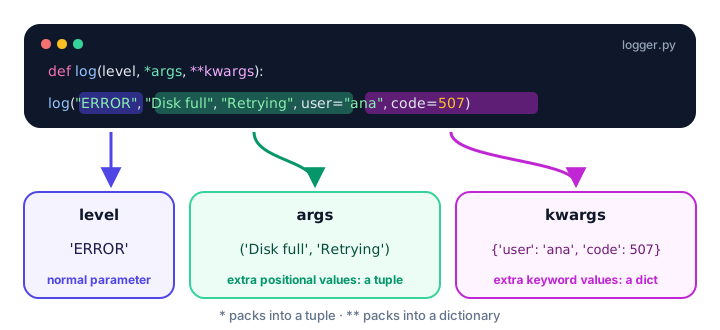
How do you use *args and **kwargs together?
You can combine normal parameters, *args and **kwargs in one function. The order in the definition must be:
- Normal positional parameters
*args- Keyword-only parameters (with or without defaults)
**kwargs(always last)
Here's a logging function that uses all of them:
def log(level, *messages, sep=" | ", **context):
    line = f"[{level}] " + sep.join(messages)
    if context:
        extras = [f"{key}={value}" for key, value in context.items()]
        line += "  (" + ", ".join(extras) + ")"
    print(line)

log("INFO", "Server started")
log("ERROR", "Disk full", "Retrying in 5s", user="ana", code=507)
log("DEBUG", "a", "b", "c", sep=" -> ")
[INFO] Server started
[ERROR] Disk full | Retrying in 5s (user=ana, code=507)
[DEBUG] a -> b -> cBecause sep comes after *messages, it's keyword-only: the only way to set it is by name, like sep=" -> ". Every positional value after level is swallowed by *messages. The extras line is a list comprehension that turns each key and value into text like user=ana.
💡 Tip
This is exactly how print() works. Its signature is roughly print(*objects, sep=" ", end="\n", ...). That's why you can pass it any number of values, and why sep and end must be passed by name.
Unpacking arguments with * and ** when calling
The stars also work in the opposite direction. In a call, * spreads a list or tuple out into separate positional arguments, and ** spreads a dictionary out into keyword arguments.
def book_table(name, guests, time):
    print(f"Table for {guests} under {name} at {time}")

booking = ["Okafor", 4, "7:30 PM"]
book_table(*booking)

details = {"name": "Chen", "guests": 2, "time": "8:00 PM"}
book_table(**details)
Table for 4 under Okafor at 7:30 PM
Table for 2 under Chen at 8:00 PMbook_table(*booking) is the same as writing book_table("Okafor", 4, "7:30 PM"). book_table(**details) is the same as book_table(name="Chen", guests=2, time="8:00 PM").
Unpacking is handy with built-in functions too:
scores = [88, 92, 79]
print(*scores)
print(*scores, sep=", ")
print(max(*scores))
88 92 79
88, 92, 79
92| Where | * | ** |
|---|---|---|
In a definition def f(...) | Packs extra positional args into a tuple | Packs extra keyword args into a dict |
In a call f(...) | Unpacks a list or tuple into positional args | Unpacks a dict into keyword args |
When should you use *args and **kwargs?
- Use
*argswhen a function naturally works on "any number of the same kind of thing": prices, scores, file names, messages. - Use
**kwargsfor optional, labeled extras that you pass along or store, like profile fields or settings. - Don't use them just to avoid writing parameters. If a function always needs exactly a name and an age, write
def f(name, age). Clear parameters catch mistakes, and editors can show them as hints.
Common mistakes with *args and **kwargs
1. Putting **kwargs before *args
def broken(**kwargs, *args):
    pass
SyntaxError: arguments cannot follow var-keyword argument**kwargs must always be the last parameter.
2. Expecting a list instead of a tuple
def add_tag(*tags):
    tags.append("new")

add_tag("sale", "summer")
AttributeError: 'tuple' object has no attribute 'append'*args is a tuple, which can't be changed. Convert it first with list(tags) if you need to modify it.
3. Passing a list without unpacking it
def checkout_total(*prices):
    print(len(prices), "item(s)")

cart = [4.99, 12.50, 3.00]
checkout_total(cart)
checkout_total(*cart)
1 item(s)
3 item(s)Without the star, the whole list arrives as one argument.
4. Unpacking a dictionary with keys that don't match
def book_table(name, guests, time):
    print(name, guests, time)

book_table(**{"name": "Lee", "people": 3, "time": "6 PM"})
TypeError: book_table() got an unexpected keyword argument 'people'When you use **, every key must match a parameter name (unless the function also accepts **kwargs).
Practice exercise
🏋️ Try it yourself
Write a function order_summary(customer, *items, **options). It should print the customer's name, each item on its own line, and then each option as key: value. Call it for Priya, who orders a burger, fries and a lemonade, with the options table=12 and takeaway=False.
Show solution
def order_summary(customer, *items, **options):
    print(f"Order for {customer}:")
    for item in items:
        print(f"- {item}")
    for key, value in options.items():
        print(f"{key}: {value}")

order_summary("Priya", "burger", "fries", "lemonade", table=12, takeaway=False)
Order for Priya:
- burger
- fries
- lemonade
table: 12
takeaway: FalseWhat's next?
So far, most of your functions have printed their results. Next, you'll learn how functions hand results back to the caller with the Python return statement, so you can store, combine and reuse them.
Key takeaways
- *args collects any number of extra positional arguments into a tuple.
- **kwargs collects any number of extra keyword arguments into a dictionary.
- The names args and kwargs are conventions; the * and ** are what matter, so use descriptive names.
- Parameter order is: normal parameters, *args, keyword-only parameters, then **kwargs last.
- Parameters written after *args are keyword-only and must be passed by name.
- In a call, * unpacks a list or tuple into positional arguments and ** unpacks a dict into keyword arguments.
Frequently asked questions
What is the difference between *args and **kwargs in Python?
*args collects extra positional arguments into a tuple, while **kwargs collects extra keyword arguments (name=value pairs) into a dictionary. Use *args for any number of plain values and **kwargs for any number of labeled values.
Do I have to call them args and kwargs?
No. Only the * and ** are required. Names like *prices or **options are often clearer, but args and kwargs are the widely recognized defaults.
What type is args in Python?
args is always a tuple, even when it is empty. kwargs is always a dictionary. Convert args with list(args) if you need to change it.
What is the correct order of *args and **kwargs in a function?
Normal parameters first, then *args, then any keyword-only parameters, and **kwargs last, for example def f(a, *args, flag=False, **kwargs).
What does * mean when calling a function in Python?
In a call, * unpacks a list or tuple so each item becomes a separate positional argument, and ** unpacks a dictionary so each key-value pair becomes a keyword argument.