Python Data Types
Updated 7 min read Aimerscrew
Not all values are the same kind of thing. A name is text, a price is a number, and "is this user logged in?" is a yes-or-no answer. Python data types tell Python what kind of value it's working with, which decides what you can do with it. In this lesson, you'll get a friendly tour of every built-in type, learn how to check a value's type, and see which types can be changed after they're created.
What is a data type?
A data type is a category of values that share the same behavior. You can add two numbers, but you can't add a number to a word. You can make text uppercase, but you can't make a number uppercase. The type decides which actions make sense.
In Python, you never declare a type yourself. Python looks at the value and works it out, as you saw in Python variables.
city = "Toronto"   # Python knows this is text
year = 2026        # and this is a whole number
print(type(city))
print(type(year))
<class 'str'>
<class 'int'>What are the built-in data types in Python?
Python's built-in types fall into a handful of groups. Here's the big picture before we look at each one briefly.
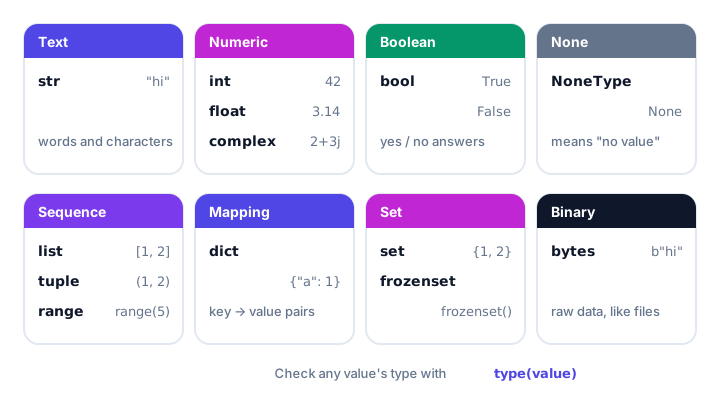
| Category | Type | Example | Holds |
|---|---|---|---|
| Text | str | "Hello" | Letters, words, any text |
| Numeric | int | 42 | Whole numbers |
| Numeric | float | 19.99 | Numbers with a decimal point |
| Numeric | complex | 2+3j | Numbers with an imaginary part |
| Boolean | bool | True | Only True or False |
| None | NoneType | None | "No value" or "nothing yet" |
| Sequence | list | ["a", "b"] | An ordered collection you can change |
| Sequence | tuple | (4, 5) | An ordered collection you can't change |
| Sequence | range | range(10) | A sequence of numbers |
| Mapping | dict | {"size": "M"} | Key-value pairs |
| Set | set | {1, 2, 3} | Unique items, no order |
| Set | frozenset | frozenset({1, 2}) | A set you can't change |
| Binary | bytes | b"hi" | Raw bytes, like file data |
Simple types: text, numbers, booleans and None
These types hold a single value each.
Text: str
A string (str) is text inside quotes. Single or double quotes both work.
song = "Bohemian Rhapsody"
artist = 'Queen'
print(song, "by", artist)
Bohemian Rhapsody by QueenNumbers: int, float and complex
An int (integer) is a whole number, positive or negative. A float is a number with a decimal point. A complex number has a real and an imaginary part, written with a j; you'll only need it for science and engineering math.
followers = 1500
temperature = -3.5
signal = 2 + 3j
print(type(followers), type(temperature), type(signal))
<class 'int'> <class 'float'> <class 'complex'>Numbers get a full lesson of their own in Python numbers.
True or False: bool
A boolean (bool) has only two possible values: True and False. Booleans answer yes-or-no questions, and they power every decision your program makes.
is_open = True
has_stock = False
print(is_open, has_stock)
True FalseMore on these in Python booleans.
No value: None
None is a special value meaning "nothing here" or "not set yet". It's the only value of the type NoneType. Think of an empty "middle name" field on a form.
middle_name = None
print(middle_name)
print(type(middle_name))
None
<class 'NoneType'>Collections: list, tuple, range, dict, set
Collections hold many values in one variable. Each kind has a different job:
playlist = ["Intro", "Sunrise", "Encore"]      # list: ordered, changeable
location = (51.5, -0.12)                        # tuple: ordered, fixed
countdown = range(5)                            # range: the numbers 0 to 4
menu = {"latte": 4.5, "muffin": 3.25}           # dict: key -> value
lucky_numbers = {7, 3, 7, 1}                    # set: duplicates removed

print(playlist)
print(location)
print(list(countdown))
print(menu["latte"])
print(lucky_numbers)
['Intro', 'Sunrise', 'Encore']
(51.5, -0.12)
[0, 1, 2, 3, 4]
4.5
{1, 3, 7}- list: an ordered collection you can add to, remove from and change, like a streaming playlist.
- tuple: like a list, but fixed once created. Good for values that belong together, like map coordinates.
- range: a memory-friendly sequence of numbers, mostly used in loops.
- dict (dictionary): stores key-value pairs, so you look things up by name, like prices on a menu.
- set: unique items with no guaranteed order. Duplicates disappear automatically. A frozenset is a set that can't be changed.
📝 Note
Empty curly braces {} create an empty dictionary, not an empty set. For an empty set, write set().
Binary: bytes
bytes hold raw data as numbers from 0 to 255. You'll meet them when reading images, sending data over a network, or encoding text. A bytes value is written with a b before the quotes:
data = "café".encode()
print(data)
print(type(data))
b'caf\xc3\xa9'
<class 'bytes'>As a beginner you can safely set bytes aside for now. (Python also has bytearray and memoryview for binary data, but they're rarely needed early on.)
How do you check the data type of a variable?
Use type() to ask "what type is this?" and isinstance() to ask "is this a certain type?" The second one returns True or False.
age = 30

print(type(age))
print(isinstance(age, int))
print(isinstance(age, str))
print(isinstance(age, (int, float)))   # is it either one?
<class 'int'>
True
False
True💡 Tip
Use type() when you're exploring or debugging. Use isinstance() in real code that makes decisions based on a type, because it also accepts several types at once and handles related types correctly. For example, isinstance(True, int) is True, because bool is a special kind of int.
What is the difference between mutable and immutable types?
A mutable value can be changed after it's created. An immutable value can't; to "change" it, you create a new value.
cart = ["apples", "bread"]
cart.append("milk")       # changes the same list
print(cart)

name = "sam"
name.upper()              # makes a NEW string, original untouched
print(name)

name = name.upper()       # store the new string
print(name)
['apples', 'bread', 'milk']
sam
SAMTry to change a single letter of a string and Python refuses:
name = "sam"
name[0] = "S"
TypeError: 'str' object does not support item assignment| Mutable (can change) | Immutable (can't change) |
|---|---|
list, dict, set, bytearray | str, int, float, complex, bool, None, tuple, range, frozenset, bytes |
Real-world example: a user profile
🌍 Real-life example
Think of your profile on a music streaming app. Every field on that screen is a different data type behind the scenes. Your name is text, your age is a whole number, and your settings are a set of labeled options.
| Profile field | Example value | Data type |
|---|---|---|
| Name | "Jordan Lee" | str |
| Age | 34 | int |
| Height in meters | 1.78 | float |
| Premium member? | True | bool |
| Favorite genres | ["jazz", "lo-fi", "indie"] | list |
| Settings | {"theme": "dark", "autoplay": False} | dict |
| Middle name | None | NoneType |
name = "Jordan Lee"
age = 34
height_m = 1.78
is_premium = True
favorite_genres = ["jazz", "lo-fi", "indie"]
settings = {"theme": "dark", "autoplay": False}

print(name, "is", age, "and likes", favorite_genres[0])
print("Premium:", is_premium, "| Theme:", settings["theme"])
Jordan Lee is 34 and likes jazz
Premium: True | Theme: darkHow do you set a specific data type?
Each type has a constructor, a function with the same name as the type, that creates a value of that type. This is handy when you need to turn one type into another:
quantity = int("25")
price = float(7)
label = str(3.5)
letters = list("abc")
unique = set([1, 1, 2])
point = tuple([4, 5])
profile = dict(name="Ava", age=29)

print(quantity, price, label)
print(letters, unique, point)
print(profile)
25 7.0 3.5
['a', 'b', 'c'] {1, 2} (4, 5)
{'name': 'Ava', 'age': 29}Converting between types has a few surprises, which you'll learn in Python type conversion.
Common mistakes with data types
1. Mixing text and numbers
print("Score: " + 10)TypeError: can only concatenate str (not "int") to strConvert the number first: "Score: " + str(10), or use a comma inside print().
2. Thinking a number in quotes is a number
print("5" + "3")53"5" is a string, so + joins the text instead of adding.
3. Comparing a type to a string
print(type(5) == "int")
print(type(5) == int)
False
TrueCompare against the type itself (int), not the word "int". Better still, use isinstance().
4. Converting text that isn't a whole number
print(int("3.5"))ValueError: invalid literal for int() with base 10: '3.5'Practice exercise
🏋️ Try it yourself
Create variables for a product in an online store: its title ("Running Shoes"), price (89.99), stock count (12), whether it's on sale (False) and a list of sizes (8, 9, 10). Print the type of each one.
Show solution
title = "Running Shoes"
price = 89.99
stock = 12
on_sale = False
sizes = [8, 9, 10]

print(type(title))
print(type(price))
print(type(stock))
print(type(on_sale))
print(type(sizes))
<class 'str'>
<class 'float'>
<class 'int'>
<class 'bool'>
<class 'list'>What's next?
You've met every built-in type. Now it's time to go deeper into the ones you'll use most, starting with Python numbers.
Key takeaways
- A data type tells Python what kind of value it has and what you can do with it.
- Main types: str (text), int, float and complex (numbers), bool (True/False) and NoneType (None).
- Collections: list, tuple, range, dict, set and frozenset; bytes holds raw binary data.
- Check a type with type(value), or test it with isinstance(value, int).
- Lists, dicts and sets are mutable; strings, numbers, tuples and frozensets are immutable.
- Constructors like int(), str(), list() and dict() create a value of a specific type.
Frequently asked questions
How many data types are there in Python?
Python has around a dozen commonly used built-in types: str, int, float, complex, bool, NoneType, list, tuple, range, dict, set, frozenset and bytes, plus a few rarer ones like bytearray and memoryview.
How do I check the data type of a variable in Python?
Call type(variable) to see its type, for example type(42) tells you the value is an int. To test for a specific type, use isinstance(variable, int), which returns True or False.
What is the difference between a list and a tuple?
Both are ordered collections. A list is mutable, so you can add, remove and change items. A tuple is immutable and cannot be changed after it is created.
Is a string mutable in Python?
No. Strings are immutable. Methods like upper() return a new string, so you must store the result, for example name = name.upper().
What is None in Python?
None is a special value that means no value or nothing yet. It is the only value of the NoneType type and is often used as a placeholder.