Python f-Strings (String Formatting)
Updated 7 min read Aimerscrew
Programs constantly mix text with values: "Hello, Maya!", "Your total is $24.50", "3 new messages". Python f-strings are the cleanest way to build that kind of text. In this lesson, you'll learn how to put variables and calculations inside strings, round numbers, add thousands separators, line up columns, and read the older formatting styles you'll still see in other people's code.
🌍 Real-life example
Look at a supermarket receipt. Item names line up on the left, prices line up on the right, every price has exactly two decimals, and the total sits neatly at the bottom. A program printed that receipt, and f-strings are exactly the tool for the job.
What is an f-string in Python?
An f-string (short for "formatted string literal") is a string with the letter f right before the opening quote. Inside it, anything you put in curly braces {} is replaced with its value.
name = "Maya"
age = 31
print(f"Hello, {name}! You are {age} years old.")
Hello, Maya! You are 31 years old.Compare that with joining pieces by hand, as in Python strings:
name = "Maya"
age = 31
print("Hello, " + name + "! You are " + str(age) + " years old.")
Hello, Maya! You are 31 years old.Same result, but the f-string needs no + signs, no str() calls and no fiddling with spaces. It reads almost like the final sentence.
Putting expressions inside f-strings
The braces can hold any expression, meaning any piece of code that produces a value: math, method calls, comparisons and more.
price = 12
quantity = 3
city = "lisbon"

print(f"Total: {price * quantity}")
print(f"Destination: {city.title()}")
print(f"Letters in city: {len(city)}")
print(f"Bulk order? {quantity >= 10}")
Total: 36
Destination: Lisbon
Letters in city: 6
Bulk order? FalseHow do f-strings work?
Each pair of braces has two possible parts: the value to show, and, after a colon, an optional format spec that controls how it looks.
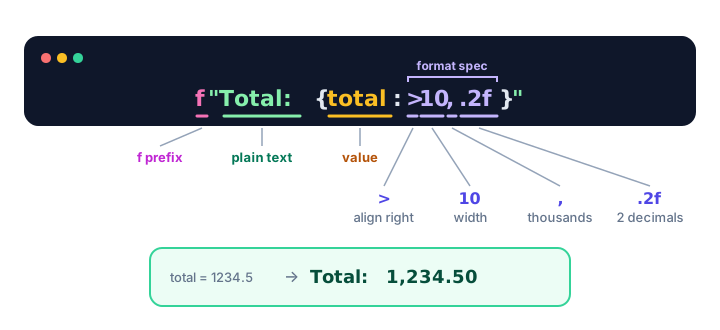
How do you round to 2 decimal places in an f-string?
Add :.2f after the value. The f here means "fixed-point number", and .2 means "two digits after the decimal point". Python rounds for you.
price = 4.5
tax = 0.0825 * 19.99
pi = 3.14159

print(f"Price: ${price:.2f}")
print(f"Tax: ${tax:.2f}")
print(f"Pi: {pi:.3f}")
print(f"Whole number: {pi:.0f}")
Price: $4.50
Tax: $1.65
Pi: 3.142
Whole number: 3This fixes the classic problem from Python numbers, where a calculation like 0.1 + 0.2 prints 0.30000000000000004. With {0.1 + 0.2:.2f}, you get 0.30.
Thousands separators and percentages
A comma in the format spec groups digits in thousands. A percent sign multiplies by 100 and adds %.
population = 8336817
salary = 72500.5
completed = 0.874

print(f"Population: {population:,}")
print(f"Salary: ${salary:,.2f}")
print(f"Progress: {completed:.1%}")
print(f"Progress: {completed:.0%}")
Population: 8,336,817
Salary: $72,500.50
Progress: 87.4%
Progress: 87%You can also use _ instead of , (as in {population:_}) if you prefer 8_336_817.
How do you set width and alignment in an f-string?
A number after the colon sets the width: the minimum number of characters the value takes up. Python fills the extra space with spaces. By default, numbers line up on the right and text lines up on the left:
for n in [7, 42, 315]:
    print(f"[{n:5}]")

print(f"[{'tea':6}]")
[ 7]
[ 42]
[ 315]
[tea ](That loop simply repeats the line for each number. You'll learn loops in the Python for loop.) To choose the alignment yourself, put a symbol before the width:
| Spec | Meaning | Example | Result |
|---|---|---|---|
< | Align left | f"[{'ok':<6}]" | [ok ] |
> | Align right | f"[{'ok':>6}]" | [ ok] |
^ | Center | f"[{'ok':^6}]" | [ ok ] |
*^ | Center, fill with * | f"[{'ok':*^6}]" | [**ok**] |
05 | Pad a number with zeros | f"{42:05}" | 00042 |
Width and precision combine. {price:>8.2f} means "right-align in 8 characters, with 2 decimals". That's how you build neat columns:
print(f"{'Item':<12}{'Price':>8}")
print(f"{'Bagel':<12}{2.5:>8.2f}")
print(f"{'Cold brew':<12}{4.25:>8.2f}")
print(f"{'Fruit cup':<12}{10:>8.2f}")
Item Price
Bagel 2.50
Cold brew 4.25
Fruit cup 10.00Debugging with f"{x=}"
Put an equals sign right after the expression and Python prints both the code and its value. It's a quick way to check what your variables hold while you work:
score = 87
bonus = 5
print(f"{score=}")
print(f"{score + bonus=}")
print(f"{bonus = }")
score=87
score + bonus=92
bonus = 5Spaces around the = are kept in the output, as the last line shows. You'll find more debugging tricks in Python debugging.
Format spec cheat sheet
| Format | Code | Output |
|---|---|---|
| Insert a value | f"{name}" | Maya |
| 2 decimal places | f"{3.14159:.2f}" | 3.14 |
| Thousands separator | f"{1500000:,}" | 1,500,000 |
| Separator + decimals | f"{1234.5:,.2f}" | 1,234.50 |
| Percentage | f"{0.25:%}" / f"{0.25:.0%}" | 25.000000% / 25% |
| Width 6 | f"[{42:6}]" | [ 42] |
| Zero padding | f"{7:03}" | 007 |
| Debug | f"{x=}" | x=10 |
Older ways: .format() and %
f-strings arrived in Python 3.6. Before that, people used two other styles, and you'll still meet them in tutorials, books and older projects. You don't need to write them, but you should be able to read them.
The .format() method puts empty braces in the string and fills them with arguments in order:
name = "Leo"
total = 18.5
print("Hi {}, you owe ${:.2f}".format(name, total))
Hi Leo, you owe $18.50The oldest style uses % placeholders: %s for a string, %d for a whole number and %.2f for a decimal:
name = "Leo"
total = 18.5
print("Hi %s, you owe $%.2f" % (name, total))
Hi Leo, you owe $18.50All three print the same text. For new code, prefer f-strings: the values sit right where they appear, so the code is easier to read.
Real-world example: a coffee shop receipt
shop = "Bean There"
latte, latte_qty = 4.75, 2
muffin, muffin_qty = 3.2, 1
tax_rate = 0.08

subtotal = latte * latte_qty + muffin * muffin_qty
tax = subtotal * tax_rate
total = subtotal + tax

print(f"{shop:^26}")
print("-" * 26)
print(f"{latte_qty} x {'Latte':<12}{latte * latte_qty:>10.2f}")
print(f"{muffin_qty} x {'Muffin':<12}{muffin * muffin_qty:>10.2f}")
print("-" * 26)
print(f"{'Subtotal':<16}{subtotal:>10.2f}")
tax_label = f"Tax ({tax_rate:.0%})"
print(f"{tax_label:<16}{tax:>10.2f}")
print(f"{'TOTAL':<16}{total:>10.2f}")
Bean There
--------------------------
2 x Latte 9.50
1 x Muffin 3.20
--------------------------
Subtotal 12.70
Tax (8%) 1.02
TOTAL 13.72Every line is exactly 26 characters wide, so the prices form a clean column. Change a price or quantity and the receipt stays perfectly aligned.
Common mistakes with f-strings
1. Forgetting the f
name = "Ava"
print("Welcome, {name}!")
Welcome, {name}!Without the f prefix, the braces are just ordinary characters. Write f"Welcome, {name}!".
2. Putting the format spec in the wrong place
price = 9.5
print(f"${price}:.2f")$9.5:.2fThe format spec must be inside the braces: f"${price:.2f}".
3. Using a decimal format on text
amount = "25"
print(f"{amount:.2f}")
ValueError: Unknown format code 'f' for object of type 'str'Values from input() are strings. Convert first: f"{float(amount):.2f}".
4. Wanting real braces in the output
To print a literal { or } in an f-string, double it: f"{{score}} is {10}" prints {score} is 10.
Practice exercise
🏋️ Try it yourself
A runner finished a 42195 meter marathon in 3.7375 hours. Using f-strings, print the distance with a thousands separator, the time rounded to 2 decimals, the average speed in km/h rounded to 1 decimal, and a debug line for the hours variable.
Show solution
meters = 42195
hours = 3.7375

print(f"Distance: {meters:,} m")
print(f"Time: {hours:.2f} hours")
print(f"Average speed: {meters / 1000 / hours:.1f} km/h")
print(f"{hours=}")
Distance: 42,195 m
Time: 3.74 hours
Average speed: 11.3 km/h
hours=3.7375What's next?
You can now build any message you need. Next, learn how to put line breaks, tabs and tricky characters like quotes and backslashes inside strings in Python escape characters and raw strings.
Key takeaways
- An f-string starts with f before the quote, and anything in {braces} is evaluated and inserted, like f"Hi {name}".
- Braces can hold any expression: math, method calls or comparisons.
- Add a format spec after a colon: {x:.2f} for 2 decimals, {x:,} for thousands separators and {x:.1%} for percentages.
- A number sets the width, like {x:8}; use <, > or ^ to align left, right or center, and a character before them to fill.
- f"{x=}" prints both the expression and its value, which is handy for debugging.
- Older code uses "{}".format(x) and "%s" % x; read them, but write f-strings in new code.
Frequently asked questions
What does the f mean in a Python f-string?
The f stands for "formatted". It tells Python to look for expressions in curly braces inside the string and replace them with their values.
How do you format a number to 2 decimal places in Python?
Use the format spec .2f inside an f-string, for example f"{price:.2f}". Python rounds the number and always shows exactly two decimals, so 4.5 becomes 4.50.
How do you add commas to a number in Python?
Use a comma in the format spec: f"{1500000:,}" gives 1,500,000. Combine it with decimals as f"{amount:,.2f}".
How do you align text in an f-string?
Give a width and an alignment symbol after the colon: < for left, > for right and ^ for center. For example, f"{name:>10}" right-aligns name in 10 characters.
Which Python version supports f-strings?
f-strings were added in Python 3.6. The {x=} debugging form was added in Python 3.8, and Python 3.12 relaxed the rules so you can reuse the same quote type inside the braces.
Should I use f-strings or format() in Python?
Use f-strings for new code: they are shorter, easier to read and usually faster. The format() method is still useful when the template string is stored separately from the values.