Python Escape Characters and Raw Strings
Updated 6 min read Aimerscrew
How do you put a line break inside a string? Or a double quote inside a string that's already wrapped in double quotes? Python escape characters solve both problems. In this lesson, you'll learn the most useful escape sequences, how to print quotes and backslashes, and how raw strings save you from headaches with Windows file paths.
🌍 Real-life example
Think of a text message where you press Enter to start a new line, or a shipping label where the address sits on three lines. On screen, it looks like separate lines, but it's stored as one string. A hidden "new line" character, written \n in Python, marks each break.
What is an escape character in Python?
An escape character is a backslash \ placed before another character to give it a special meaning. The backslash plus the next character is called an escape sequence. Python reads the pair as one special character.
print("Line one\nLine two")
print("Name:\tAisha")
Line one
Line two
Name: Aisha\n started a new line, and \t inserted a tab, a wide gap that's used to line text up.
Common Python escape sequences
| Escape sequence | Meaning | Example | Prints |
|---|---|---|---|
\n | New line | "Hi\nthere" | Hi, then there on the next line |
\t | Tab | "A\tB" | A, a tab gap, then B |
\\ | One backslash | "C:\\Users" | C:\Users |
\' | Single quote | 'It\'s' | It's |
\" | Double quote | "Say \"hi\"" | Say "hi" |
\u + 4 hex digits | Unicode character | "caf\u00e9" | café |
📝 Note
An escape sequence takes two characters to type but becomes just one character in the string. len("a\nb") is 3, not 4.
print(len("a\nb"))
print(len("a\\b"))
3
3How do you print quotes inside a string?
You have three options. As you saw in Python strings, the easiest is to wrap the text in the other kind of quote. When your text contains both kinds, escape the one that matches the outer quotes:
print("The sign said \"No parking\".")
print('Don\'t forget your umbrella.')
print("It's called \"the Big Apple\".")
The sign said "No parking".
Don't forget your umbrella.
It's called "the Big Apple".Triple quotes are the third option. They let you use both kinds of quotes freely, as long as the text doesn't contain three in a row:
print("""She asked, "Isn't it late?" and we laughed.""")She asked, "Isn't it late?" and we laughed.How do you print a backslash in Python?
Because a backslash starts an escape sequence, a single real backslash has to be written as \\:
print("Path: C:\\Users\\Kim\\Music")
print("Use \\n to start a new line")
Path: C:\Users\Kim\Music
Use \n to start a new lineNew lines and tabs in practice
One string with \n can print a whole block of lines, and \t can line up simple columns:
ticket = "FLIGHT TICKET\nFrom:\tMadrid\nTo:\tChicago\nSeat:\t14C"
print(ticket)
FLIGHT TICKET
From: Madrid
To: Chicago
Seat: 14CTabs jump to the next "tab stop" (usually every 8 characters), so short labels line up nicely. For precise, guaranteed alignment, use the width options in f-strings, like {label:<8}.
You've actually met \n before: it's the default value of print()'s end parameter, from the Python print() function. That's why every print() starts a new line.
What is a raw string in Python?
A raw string is a string with an r before the opening quote. In a raw string, backslashes are just ordinary characters, so escape sequences are turned off.
print("Tab:\tdone")
print(r"Tab:\tdone")
Tab: done
Tab:\tdone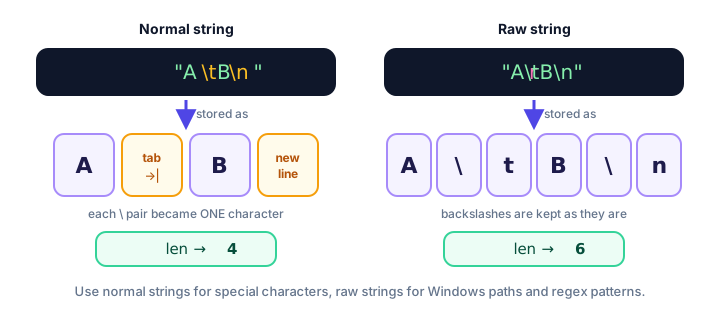
Why use raw strings for Windows paths?
Windows file paths are full of backslashes, and some of them accidentally form escape sequences. Watch what happens to this folder name:
folder = "C:\new_photos\trip"
print(folder)
C:
ew_photos rip\n became a line break and \t became a tab, so the path is broken. Fix it with a raw string, or by doubling every backslash:
folder = r"C:\new_photos\trip"
same_folder = "C:\\new_photos\\trip"
print(folder)
print(folder == same_folder)
C:\new_photos\trip
True💡 Tip
Python on Windows also accepts forward slashes in paths: "C:/new_photos/trip" works fine and needs no escaping. You'll see a cleaner way to handle paths in Python pathlib.
Raw strings and regular expressions (a preview)
Regular expressions (regex) are mini-patterns for searching text, like "find every 5-digit number". They use lots of backslashes, such as \d for "any digit". Writing patterns as raw strings keeps those backslashes intact:
pattern = r"\d\d\d-\d\d\d\d"
print(pattern)
print(len(pattern))
\d\d\d-\d\d\d\d
15You'll put patterns like this to work in Python regular expressions. For now, just remember: regex pattern means raw string.
⚠️ Be careful
If you write an unknown escape like "\d" in a normal string, Python 3.12 keeps the backslash but prints a SyntaxWarning: invalid escape sequence '\d'. Future versions may turn this into an error, so use a raw string or \\ instead.
Real-world example: printing a formatted message
guest = "Jordan"
note = "Bring your \"golden ticket\" to the front desk."
message = "Welcome, " + guest + "!\n\n\tCheck-in: 3 PM\n\tCheck-out: 11 AM\n\n" + note
print(message)
Welcome, Jordan!
Check-in: 3 PM
Check-out: 11 AM
Bring your "golden ticket" to the front desk.Two \n in a row create an empty line, and \t indents the details.
Common mistakes with escape characters
1. Ending a raw string with a backslash
folder = r"C:\Users\Kim\"SyntaxError: unterminated string literal (detected at line 1)Even in a raw string, \" stops the quote from closing the string. Leave off the final backslash, or write "C:\\Users\\Kim\\".
2. Using a forward slash instead of a backslash
print("Hello/nWorld")Hello/nWorldEscape sequences always use the backslash \, the one above the Enter key on most keyboards.
3. Forgetting to escape a matching quote
print('It's sunny')SyntaxError: unterminated string literal (detected at line 1)The apostrophe closed the string early. Use "It's sunny" or 'It\'s sunny'.
4. Expecting a raw string to change how print() works
The r only changes how Python reads the text you typed in your code. It doesn't affect text that comes from input() or a file: a backslash typed by a user is already stored as a plain backslash.
Practice exercise
🏋️ Try it yourself
Using a single print() call, print this exactly, with a tab before each recipe step:
Grandma's "Famous" Pancakes
	1. Mix flour and milk
	2. Cook until golden
Saved to: C:\recipes\new
Show solution
print("Grandma's \"Famous\" Pancakes\n\t1. Mix flour and milk\n\t2. Cook until golden\nSaved to: C:\\recipes\\new")Grandma's "Famous" Pancakes
1. Mix flour and milk
2. Cook until golden
Saved to: C:\recipes\newThe apostrophe needs no escape because the string uses double quotes. The double quotes and backslashes do need escaping, especially \\new, which would otherwise become a line break followed by ew.
What's next?
That wraps up strings! Next, you'll teach your programs to make decisions with Python if, elif and else statements.
Key takeaways
- An escape sequence is a backslash plus a character, like \n or \t, and it becomes one special character in the string.
- \n starts a new line, \t adds a tab, \\ gives one backslash, and \' or \" put a quote inside a string.
- You can also include quotes by wrapping the text in the other kind of quote or in triple quotes.
- A raw string, written r"...", turns escapes off and keeps every backslash.
- Use raw strings (or forward slashes) for Windows paths, and raw strings for regex patterns.
- A raw string cannot end with a single backslash.
Frequently asked questions
What does \n mean in Python?
\n is the newline escape sequence. When printed, it ends the current line and continues on the next one. It counts as one character in the string.
How do you print a backslash in Python?
Write two backslashes in a normal string, for example print("C:\\Users") prints C:\Users, or use a raw string such as r"C:\Users".
What is the r before a string in Python?
The r prefix makes a raw string, where backslashes are treated as ordinary characters instead of starting escape sequences. It is common for Windows paths and regular expressions.
How do you put double quotes inside a string in Python?
Wrap the string in single quotes ('He said "hi"'), escape the quotes with a backslash ("He said \"hi\""), or use triple quotes.
Why does my Windows file path print strangely in Python?
Parts of the path such as \n or \t are being read as escape sequences. Use a raw string like r"C:\new\test", double the backslashes, or use forward slashes.