Python match-case Statement
Updated 6 min read Aimerscrew
When one value can have many possible options, a long chain of elif lines starts to feel repetitive. The Python match case statement, added in Python 3.10, gives you a cleaner way to write it. In this lesson, you'll learn how match-case works, how to match several values at once, capture values, add conditions with guards, and decide when it's a better fit than if/elif.
🌍 Real-life example
Think of a vending machine. You press a button code, like A1 or B3. The machine compares your code against its list: A1 is chips, B3 is water, and any code it doesn't know shows "Invalid selection". That's a match-case: one value checked against a list of possible cases, with a default at the end.
What is match-case in Python?
A match statement takes one value (called the subject) and compares it with a series of patterns, each written after the keyword case. Python runs the block of the first pattern that matches and then skips the rest. Other languages have a similar feature called "switch".
light = "yellow"

match light:
    case "green":
        print("Go")
    case "yellow":
        print("Slow down")
    case "red":
        print("Stop")
Slow downThe structure looks like this:
match light:names the value you want to check, followed by a colon.- Each
case pattern:is indented undermatch. - The code to run is indented again under its
case.
⚠️ Python 3.10 or newer
match-case doesn't exist in Python 3.9 or older; you'll get a SyntaxError. Check your version with python --version in the terminal.
How do you add a default case?
If no pattern matches, Python simply skips the whole match statement. To handle "anything else", add case _: at the end. The underscore _ is a wildcard: it matches any value, like else does in an if statement.
code = "C7"

match code:
    case "A1":
        print("Salted chips")
    case "B3":
        print("Sparkling water")
    case _:
        print("Invalid selection")
Invalid selection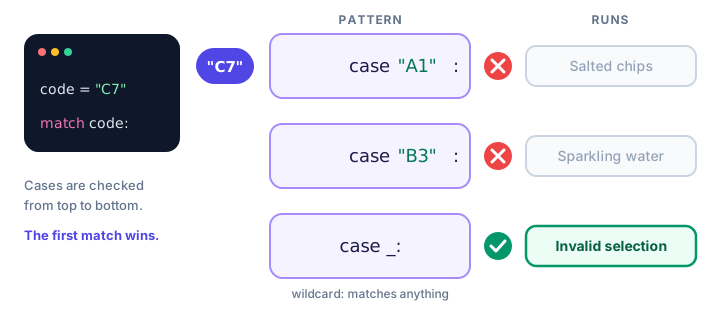
_ at the end catches anything left over.Always put case _: last. Because it matches everything, Python won't even let you place other cases after it.
How do you match several values in one case?
Use the | symbol (read it as "or") to list alternatives in a single case. Here is a simple command menu for a text game:
command = "n"

match command:
    case "north" | "n":
        print("You walk north into the forest.")
    case "south" | "s":
        print("You head back to the village.")
    case "quit" | "q" | "exit":
        print("Thanks for playing!")
    case _:
        print("I don't understand that command.")
You walk north into the forest.Patterns can be numbers too. HTTP status codes, which every website returns, are a great fit:
status = 404

match status:
    case 200:
        print("OK: page loaded")
    case 301 | 302:
        print("Redirecting...")
    case 404:
        print("Not Found: check the URL")
    case 500 | 502 | 503:
        print("Server problem: try again later")
    case _:
        print(f"Unexpected status {status}")
Not Found: check the URLHow do you capture a value in a case?
A plain name in a pattern (other than _) is a capture pattern. It matches anything, just like the wildcard, but it also stores the value in that variable so you can use it:
size = "extra large"

match size:
    case "small" | "medium" | "large":
        print(f"{size.title()} coffee coming up!")
    case other:
        print(f"Sorry, we don't have '{other}'.")
Sorry, we don't have 'extra large'.⚠️ A name is not a comparison
case other: does not compare with a variable called other. It catches every value and assigns it to other. To compare against a value, write the value itself ("small", 404) in the pattern.
How do you add a condition with a guard?
A guard is an if condition written after a pattern. The case only matches when the pattern fits and the guard is True. Guards are handy for ranges, which plain patterns can't express:
temperature = 31

match temperature:
    case t if t < 0:
        print("Freezing: wear a heavy coat")
    case t if t < 18:
        print("Cool: bring a jacket")
    case t if t < 28:
        print("Pleasant: T-shirt weather")
    case _:
        print("Hot: stay in the shade")
Hot: stay in the shadeEach case captures the number as t and then checks the guard. If the guard is false, Python moves on to the next case.
Matching tuples and sequences
match-case really shines when the subject has several parts. Here a point on a grid is stored as a pair of numbers, written (x, y). This is a tuple, which you'll study in the Data Structures chapter; for now, think of it as values grouped in parentheses.
point = (0, 5)

match point:
    case (0, 0):
        print("At the origin")
    case (0, y):
        print(f"On the y-axis at y = {y}")
    case (x, 0):
        print(f"On the x-axis at x = {x}")
    case (x, y):
        print(f"At x = {x}, y = {y}")
On the y-axis at y = 5The pattern (0, y) means: "a pair whose first item is 0; capture the second item as y." Doing the same with if/elif would take noticeably more code.
You can also split a typed command into words with .split() (from string methods) and match the pieces. .split() returns a list of words, written in square brackets like ["add", "milk"]:
user_input = "add milk"

match user_input.split():
    case ["add", item]:
        print(f"Added {item} to your shopping list.")
    case ["remove", item]:
        print(f"Removed {item}.")
    case ["show"]:
        print("Showing your list...")
    case _:
        print("Unknown command")
Added milk to your shopping list.When should you use match-case instead of if/elif?
| Use match-case when... | Use if/elif when... |
|---|---|
| You compare one value against many fixed options | Each branch checks a different variable or condition |
| You want to unpack a tuple or list and grab its parts | Conditions are mostly ranges like score >= 90 |
Options group nicely with | | You need to support Python 3.9 or older |
Neither is "better". If your elif chain keeps repeating command == ..., match-case will probably read more clearly.
Common mistakes with match-case
1. Using a variable name to compare
target = 7
guess = 3

match guess:
    case target:
        print("You guessed it!")
You guessed it!Wrong answer, but it says "You guessed it!". case target: is a capture pattern, so it matches anything and overwrites target with 3. Use if guess == target: instead, or a guard: case g if g == target:.
2. Putting the wildcard before other cases
day = "Sat"

match day:
    case _:
        print("Some day")
    case "Sat":
        print("Weekend")
SyntaxError: wildcard makes remaining patterns unreachable3. Expecting fall-through
In some languages, a switch keeps running into the next case unless you write break. Python never does this. Exactly one case runs (or none), so you don't need break inside a match.
Practice exercise
🏋️ Try it yourself
Write a match statement for a day variable. Print Weekend: relax! for "Saturday" or "Sunday", Almost there! for "Friday", Work day for the other weekdays, and Not a valid day for anything else. Test it with day = "Sunday".
Show solution
day = "Sunday"

match day:
    case "Saturday" | "Sunday":
        print("Weekend: relax!")
    case "Friday":
        print("Almost there!")
    case "Monday" | "Tuesday" | "Wednesday" | "Thursday":
        print("Work day")
    case _:
        print("Not a valid day")
Weekend: relax!What's next?
You've now seen every way Python makes decisions. Next comes the other big part of control flow: repeating code. Start with Python for loops.
Key takeaways
- match-case (Python 3.10+) compares one subject value against a list of case patterns.
- Only the first matching case runs; there is no fall-through and no break is needed.
- case _: is the wildcard default and must come last.
- Use | to match several values in one case, such as case 301 | 302:.
- A bare name like case other: captures any value; it does not compare with a variable.
- Add a guard with if after a pattern for extra conditions, such as ranges.
- Patterns can unpack tuples and lists, for example case (0, y): or case ["add", item]:.
Frequently asked questions
Does Python have a switch statement?
Yes, since Python 3.10 the match-case statement does the job of a switch, and more. Before 3.10, programmers used if/elif/else chains or dictionaries instead.
What Python version supports match case?
Python 3.10 and newer. Older versions raise a SyntaxError when they see match-case code.
What does case _ mean in Python?
The underscore is a wildcard pattern that matches any value. Placed last, it works like else and handles every value that no earlier case matched.
Is match case faster than if elif in Python?
For simple value checks the speed is about the same. Choose match-case for readability when comparing one value to many options or unpacking structured data.
Can match case check a range of numbers?
Not with a plain pattern, but you can use a guard: case n if 1 <= n <= 10:. The case only matches when the guard condition is True.