Python print() Function
Updated 6 min read Aimerscrew
You've used print() since your very first program, but it can do a lot more than show a single message. The Python print function lets you control the spacing between values, keep output on one line, format prices neatly, and even write to a file. In this lesson, you'll learn every part of print() you'll actually use, and finish by printing a tidy shop receipt.
🌍 Real-life example
Look at a printed receipt from a café. Item names line up on the left, prices line up on the right, every price has exactly two decimals, and there's a dashed line before the total. Every one of those details is something you can control with print().
What does print() do in Python?
print() is a built-in function that displays values on the screen (more precisely, in the console or terminal where your program runs). Whatever you put inside the parentheses gets shown, followed by a new line.
print("Good morning!")
print(42)
print(3.5 * 2)
Good morning!
42
7.0Notice that print() shows the result of an expression: 3.5 * 2 is calculated first, then 7.0 is printed.
How do you print multiple values?
Separate the values with commas. print() converts each one to text and puts a single space between them, so you can mix strings and numbers freely:
team = "Lions"
score = 3
print("Final score:", team, score)
print(7, 4.5, True, None)
Final score: Lions 3
7 4.5 True NoneThis is often easier than joining text with +, which only works with strings (see Python type conversion for why).
How do sep and end work in print()?
print() has two settings that control the spacing in its output:
sep(separator) is placed between values. The default is a space," ".endis added after the last value. The default is a new line,"\n".
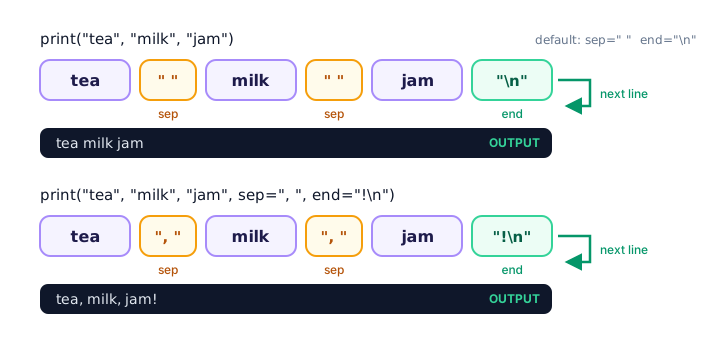
Changing the separator with sep
print("2026", "10", "25", sep="-")
print("red", "green", "blue", sep=", ")
print("No", "spaces", "here", sep="")
2026-10-25
red, green, blue
NospaceshereChanging the ending with end
Because end is normally a new line, each print() starts on a fresh line. Change end and the next print() continues on the same line:
print("Apples", end=" | ")
print("Bananas", end=" | ")
print("Cherries")
Apples | Bananas | CherriesHow do you print on the same line in Python?
Set end="" (an empty string). Nothing is added after the value, so the next output appears right next to it. This is great for progress messages:
print("Uploading", end="")
print("...", end="")
print(" done!")
Uploading... done!The last print() uses the default end, so the line finishes with a new line as usual.
Printing an empty line
Call print() with nothing inside to print a blank line. It's a simple way to space out your output:
print("Chapter 1")
print()
print("It was a rainy Tuesday.")
Chapter 1
It was a rainy Tuesday.What are f-strings in Python?
An f-string (formatted string) is a string with the letter f before the opening quote. Inside it, anything in curly braces {} is replaced by its value. It's the most popular way to build messages in modern Python.
name = "Lena"
drink = "latte"
cups = 2
print(f"{name} ordered {cups} cups of {drink}.")
print(f"Two cups cost {cups * 4.25} dollars.")
Lena ordered 2 cups of latte.
Two cups cost 8.5 dollars.As the second line shows, you can put whole calculations inside the braces.
Formatting numbers with f-strings
Add a colon and a format code after the value to control how it looks. The most useful one is .2f, which means "show as a float with 2 decimal places", which is perfect for money:
price = 8.5
total = 1234567.891
print(f"Price: ${price:.2f}")
print(f"Revenue: ${total:,.2f}")
Price: $8.50
Revenue: $1,234,567.89The comma in :,.2f adds thousands separators. Formatting also rounds the number for display without changing the value stored in the variable.
💡 Tip
Forgetting the f is a classic slip. print("Hi {name}") prints the braces literally: Hi {name}. If you see curly braces in your output, check for the missing f.
Escape characters: \n, \t and friends
An escape character is a backslash followed by a letter, which stands for something you can't easily type inside a string:
| Escape | Meaning |
|---|---|
\n | New line |
\t | Tab (jumps to the next column) |
\" | A double quote inside a double-quoted string |
\\ | A real backslash |
print("Name:\tMaya\nCity:\tToronto")
print("She said \"see you soon\"")
Name: Maya
City: Toronto
She said "see you soon"Printing to a file with file=
By default, print() writes to the screen, but the file parameter can send output somewhere else, such as a text file. You'll learn about files properly later; for now, just know it exists:
with open("notes.txt", "w") as notes:
    print("Buy oat milk", file=notes)
This prints nothing on the screen. Instead, the line Buy oat milk is written into notes.txt.
📝 Note
print() also has a flush parameter. Python sometimes holds output briefly before showing it, and flush=True forces it out immediately. You'll only need it for things like live progress bars.
Real-world example: printing a receipt
Let's combine everything. The format code ^24 centers text in 24 characters, and >19.2f right-aligns a number in 19 characters with 2 decimals, so the prices line up in a column.
store = "Corner Coffee"
latte = 4.50
muffin = 3.25
tax = (latte + muffin) * 0.08
total = latte + muffin + tax

print("=" * 24)
print(f"{store:^24}")
print("=" * 24)
print(f"Latte{latte:>19.2f}")
print(f"Muffin{muffin:>18.2f}")
print(f"Tax{tax:>21.2f}")
print("-" * 24)
print(f"TOTAL{total:>19.2f}")
print("Thank you!", "See you soon.", sep="  ")
========================
Corner Coffee
========================
Latte 4.50
Muffin 3.25
Tax 0.62
------------------------
TOTAL 8.37
Thank you! See you soon."=" * 24 repeats the = character 24 times, a quick way to draw a line.
Common mistakes with print()
1. Forgetting the parentheses
print "Hello"SyntaxError: Missing parentheses in call to 'print'. Did you mean print(...)?In old Python 2 tutorials, print had no parentheses. In Python 3, it's a function, so parentheses are required.
2. Joining a number with + instead of a comma
points = 12
print("Points: " + points)
TypeError: can only concatenate str (not "int") to strUse print("Points:", points) or print(f"Points: {points}").
3. Expecting sep to add a space after the last value
sep only goes between values. To add something at the very end, use end.
4. Using a forward slash for escapes
"Line one/nLine two" prints the /n as normal text. Escape characters always use a backslash: \n.
Practice exercise
🏋️ Try it yourself
A streaming app shows your playlist stats. Create variables for the playlist name ("Road Trip"), the number of songs (18) and the total minutes (67.456). Print the three song genres "pop", "rock" and "jazz" on one line separated by / , then print Road Trip: 18 songs, 67.46 minutes using an f-string.
Show solution
playlist = "Road Trip"
songs = 18
minutes = 67.456

print("pop", "rock", "jazz", sep=" / ")
print(f"{playlist}: {songs} songs, {minutes:.2f} minutes")
pop / rock / jazz
Road Trip: 18 songs, 67.46 minutesWhat's next?
Congratulations, you've finished the Python basics chapter! You can now store values, work with numbers and booleans, convert between types, read input and print results neatly. Next up is the Operators chapter, starting with Python arithmetic operators: adding, subtracting, dividing and more. Before you move on, you can test yourself with the Python quiz.
Key takeaways
- print() shows values in the console, followed by a new line.
- Pass several values separated by commas; print() puts a space between them.
- sep controls what goes between values, and end controls what goes after the last one.
- Use end="" to keep the next print() on the same line, and print() alone for a blank line.
- f-strings like f"Total: {total:.2f}" insert values and format numbers.
- Escape characters such as \n (new line) and \t (tab) add special characters to strings.
- The file= parameter can send output to a file instead of the screen.
Frequently asked questions
How do I print on the same line in Python?
Pass end="" to print(), for example print("Loading", end=""). The next print() then continues on the same line.
What is sep in Python print?
sep is the text print() puts between multiple values. It is a space by default, and print("a", "b", sep="-") prints a-b.
How do I print a number with 2 decimal places in Python?
Use an f-string with the .2f format code, for example print(f"{price:.2f}"). This shows 8.5 as 8.50.
What is the difference between sep and end in print()?
sep is placed between the values in one print() call, while end is added once after the last value. By default sep is a space and end is a new line.
How do I print a blank line in Python?
Call print() with nothing inside the parentheses. You can also add \n inside a string to start a new line.