Python User Input with input()
Updated 6 min read Aimerscrew
So far, every program you've written has used values typed directly into the code. Real programs talk to people: they ask questions and react to the answers. Python input is how you do that. The built-in input() function pauses your program, waits for the user to type something, and hands you what they typed. In this lesson, you'll learn how to use input(), turn answers into numbers, read several values at once, and deal with unexpected answers.
🌍 Real-life example
Think of a self-checkout machine asking "How many bags did you use?". It waits, you tap a number, and it adds the cost to your bill. input() is your program's version of that question: it stops, listens, and continues once the person answers.
How do you get user input in Python?
Call input() and store the result in a variable. Inside the parentheses, you can put a prompt: a message that tells the user what to type.
name = input("What is your name? ")
print("Nice to meet you,", name)
What is your name? Maya
Nice to meet you, MayaIn the output above, Python printed the prompt What is your name? and then waited. The word Maya on the first line is what the user typed before pressing Enter. Python didn't print it; it appears because the user's typing shows up on screen. In all the examples in this lesson, the text right after the prompt is what the user typed.
💡 Tip
End your prompt with a space, like "What is your name? ". Without it, the user's answer sticks to the question: What is your name?Maya.
Does input() always return a string?
Yes, always. Even if the user types digits, input() gives you text. Watch what happens when we try to do math with it:
age = input("How old are you? ")
print(type(age))
print(age + 1)
How old are you? 30
<class 'str'>
TypeError: can only concatenate str (not "int") to strThe user typed 30, but Python stored the string "30". You can't add the number 1 to text, so Python raises a TypeError.
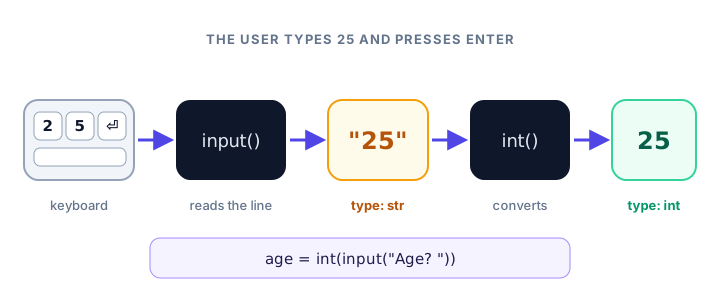
How do you convert input to an int or a float?
Wrap input() in a conversion function, which you met in Python type conversion. Use int() for whole numbers and float() for decimals:
age = int(input("How old are you? "))
print("Next year you will be", age + 1)
How old are you? 30
Next year you will be 31Python works from the inside out: first input() returns "30", then int() turns it into 30, and finally the number is stored in age.
price = float(input("Item price: $"))
print("With 10% off:", price * 0.9)
Item price: $50
With 10% off: 45.0📝 Note
If the user might type a decimal like 2.5, use float(). Using int() on "2.5" causes a ValueError, because the text doesn't look like a whole number.
How do you read multiple values from one line?
Sometimes it's nicer to let the user type several answers on one line. The string method .split() breaks text into pieces wherever there are spaces, and you can unpack the pieces into separate variables:
first, last = input("First and last name: ").split()
print("Last name:", last)
First and last name: Ada Lovelace
Last name: LovelaceEach piece is still a string, so convert them before doing math:
a, b = input("Enter two numbers: ").split()
total = int(a) + int(b)
print("Sum:", total)
Enter two numbers: 12 30
Sum: 42To split on something other than spaces, pass it in. For example, .split(",") splits "red,green,blue" at each comma.
Removing extra spaces with strip()
People often type stray spaces by accident. The string method .strip() removes spaces from the start and end of the text (but not the middle):
city = input("Your city: ")
print("[" + city + "]")
print("[" + city.strip() + "]")
Your city: Paris
[ Paris ]
[Paris]Here the user typed two spaces, then Paris, then two more spaces. The square brackets show exactly where the text begins and ends. A tidy habit is to strip text answers right away: city = input("Your city: ").strip().
What happens if the user types something invalid?
If your code expects a number and the user types a word, the conversion fails and the program crashes:
tickets = int(input("How many tickets? "))How many tickets? two
ValueError: invalid literal for int() with base 10: 'two'You'll learn proper error handling later, but here's a preview. A try block runs code that might fail, and the except block runs only if it does:
text = input("How many tickets? ")

try:
    tickets = int(text)
    print("Booking", tickets, "tickets")
except ValueError:
    print("Please type a whole number, like 2")
How many tickets? two
Please type a whole number, like 2If the user had typed 2, the program would print Booking 2 tickets instead.
Real-world example: a tip calculator
Here's a small, complete program that asks two questions and does the math. The :.2f inside the f-strings shows each amount with exactly two decimal places (more on this in the print() lesson).
bill = float(input("Bill amount: $"))
tip_percent = int(input("Tip percent: "))

tip = bill * tip_percent / 100
total = bill + tip

print(f"Tip: ${tip:.2f}")
print(f"Total: ${total:.2f}")
Bill amount: $64.50
Tip percent: 20
Tip: $12.90
Total: $77.40Real-world example: a unit converter
Runners in the US think in miles, while most of the world uses kilometers. This program converts between them:
km = float(input("Distance in kilometers: "))
miles = km * 0.621371
print(km, "km is about", round(miles, 1), "miles")
Distance in kilometers: 5
5.0 km is about 3.1 milesThe user typed 5, but float() turned it into 5.0, which is why the output shows a decimal point.
Common mistakes with input()
1. Forgetting to convert before doing math
a = input("First number: ")
b = input("Second number: ")
print(a + b)
First number: 5
Second number: 3
53No error, but the wrong answer: the two strings were glued together. Use int(a) + int(b).
2. Using int() when the user might type a decimal
weight = int(input("Weight in kg: "))Weight in kg: 72.5
ValueError: invalid literal for int() with base 10: '72.5'Use float() for anything that can have decimals.
3. Typing the wrong number of values for split()
If your code expects two values (a, b = input().split()) but the user types three, Python raises a ValueError about "too many values to unpack". Make your prompt clear, for example "Enter width and height: ".
4. Forgetting the space at the end of the prompt
input("Your email:") makes the answer appear as Your email:sam@example.com. Add a space before the closing quote.
Practice exercise
🏋️ Try it yourself
Write a program for a coffee shop. Ask for the customer's name and how many coffees they want. Each coffee costs $3.50. Remove extra spaces from the name, then print a message like Thanks, Leo! Your total is $10.50.
Show solution
name = input("Your name: ").strip()
coffees = int(input("How many coffees? "))

total = coffees * 3.50
print(f"Thanks, {name}! Your total is ${total:.2f}")
Your name: Leo
How many coffees? 3
Thanks, Leo! Your total is $10.50What's next?
Your programs can now ask questions and use the answers. Next, master the other side of the conversation, showing results neatly, in the Python print() function.
Key takeaways
- input() pauses the program, shows an optional prompt and waits for the user to press Enter.
- input() always returns a string, even when the user types digits.
- Wrap input() in int() or float() to get a number, for example int(input("Age: ")).
- Use .split() to read several values from one line, then convert each piece.
- Use .strip() to remove accidental spaces from the start and end of an answer.
- Invalid input raises a ValueError; a try/except block lets you handle it politely.
Frequently asked questions
What does input() return in Python?
It always returns a string containing exactly what the user typed, without the Enter key. Convert it with int() or float() if you need a number.
How do I take integer input in Python?
Wrap input() in int(), for example age = int(input("Age: ")). If the user might type a decimal, use float() instead.
How do I take multiple inputs in one line in Python?
Call split() on the result, for example a, b = input().split(). Each piece is a string, so convert it if you need numbers.
How do I stop my program crashing on bad input?
Put the conversion inside a try block and catch ValueError in an except block, where you can show a friendly message instead of an error.
What is the prompt in input()?
The prompt is the optional text you pass to input(), such as input("Your name: "). Python prints it before waiting, so the user knows what to type.