Python for Loops
Updated 6 min read Aimerscrew
Imagine printing a greeting for 500 customers by writing 500 print() lines. Nobody wants that. A Python for loop lets you write the code once and run it for every item in a collection. In this lesson, you'll learn how for loops work, how to loop over lists, strings and numbers, and how to use loops to add up totals, count things and build tables.
🌍 Real-life example
When you press play on a playlist, your music app does the same thing for each song: load it, show the title, play it, then move to the next one. It stops by itself after the last song. That's exactly what a for loop does: for each item, do this.
What is a for loop in Python?
A for loop repeats a block of code once for every item in a sequence. Each repetition is called an iteration. Here's the playlist idea in code:
playlist = ["Blinding Lights", "Levitating", "Shape of You"]

for song in playlist:
    print("Now playing:", song)

print("Playlist finished.")
Now playing: Blinding Lights
Now playing: Levitating
Now playing: Shape of You
Playlist finished.The square brackets create a list: several values stored in order under one name. You'll study lists in depth in Python lists; for now, that's all you need to know.
The for loop has four parts:
- the keyword
for, - a loop variable (
song) that holds the current item, - the keyword
infollowed by the sequence to loop over (playlist), - a colon and an indented loop body: the code that runs on every iteration.
The final print() isn't indented, so it runs only once, after the loop is done. Indentation works just like it does with if statements.
How does a for loop work step by step?
On each iteration, Python takes the next item from the sequence, stores it in the loop variable, and runs the body. When there are no items left, the loop ends and the program continues with the next unindented line.
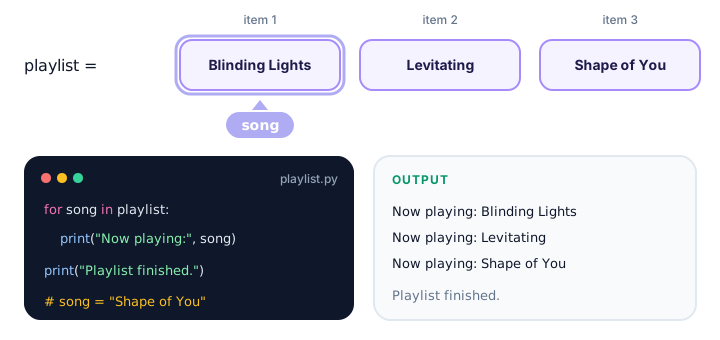
song points to the next item, and the body prints one line.You never have to tell the loop when to stop or move to the next item. Python handles that for you.
How do you loop through a string?
A string is a sequence of characters, so a for loop visits one character at a time:
for letter in "Hey!":
    print(letter)
H
e
y
!Here's something more useful: counting the vowels in a word by combining a loop with an if statement.
word = "education"
vowels = 0

for char in word:
    if char in "aeiou":
        vowels += 1

print(f"'{word}' has {vowels} vowels.")
'education' has 5 vowels.How do you repeat code a set number of times?
When you don't have a list and just want to repeat something, use range(). range(5) produces the numbers 0, 1, 2, 3 and 4: five numbers, starting at 0.
for i in range(3):
    print("Hip hip hooray!", i)
Hip hip hooray! 0
Hip hip hooray! 1
Hip hip hooray! 2range() can also start at other numbers and count in steps. You'll learn all of that in the Python range() lesson.
💡 Tip
Name the loop variable after one item: for song in playlist, for price in prices, for student in students. Short names like i are fine for plain counting with range().
How do you add up a total with a for loop?
A very common pattern is the accumulator: create a variable before the loop, then update it on every iteration. Here's a shopping cart total:
cart_prices = [12.99, 4.50, 29.00, 3.25]
total = 0

for price in cart_prices:
    total += price

print(f"Items: {len(cart_prices)}")
print(f"Total: ${total:.2f}")
Items: 4
Total: $49.74The line total = 0 must come before the loop. If it were inside, the total would reset to 0 on every iteration. (len() gives the number of items in a list, the same way it gives the length of a string.)
How do you count items that match a condition?
Counting works the same way, but you only add 1 when a condition is true:
temperatures = [18, 25, 31, 22, 34, 29, 16]
hot_days = 0

for temp in temperatures:
    if temp >= 30:
        hot_days += 1

print(f"Hot days this week: {hot_days}")
Hot days this week: 2Nested for loops
You can put a loop inside another loop. The inner loop runs completely for each iteration of the outer loop. A multiplication table is the classic example:
for row in range(1, 4):
    for col in range(1, 4):
        print(f"{row * col:4}", end="")
    print()
1 2 3
2 4 6
3 6 9range(1, 4) gives 1, 2 and 3. The :4 inside the f-string pads each number to 4 characters so the columns line up, end="" keeps the numbers on the same line (see print()), and the empty print() starts a new row. The inner loop runs 3 times for each of the 3 outer iterations, so the body runs 9 times in total.
Getting the position with enumerate()
Sometimes you need the item and its position. The built-in enumerate() gives you both on each iteration:
podium = ["Lewis", "Max", "Charles"]

for place, driver in enumerate(podium, start=1):
    print(f"{place}. {driver}")
1. Lewis
2. Max
3. CharlesWithout start=1, counting begins at 0. You'll see enumerate() again in the built-in functions lesson.
| You want to... | Loop pattern |
|---|---|
| Do something with each item | for item in items: |
| Visit each character of a string | for char in text: |
| Repeat something n times | for i in range(n): |
| Add up values | total = 0 before, total += item inside |
| Know each item's position | for i, item in enumerate(items): |
Common mistakes with for loops
1. Forgetting the colon or the indent
for city in ["Paris", "Tokyo"]
    print(city)
SyntaxError: expected ':'2. Resetting the accumulator inside the loop
for steps in [4000, 6500, 8200]:
    total = 0
    total += steps

print(total)8200Because total = 0 runs on every iteration, only the last number survives. Move it above the loop to get 18700.
3. Indenting a line that should run once
scores = [8, 9, 7]
total = 0
for s in scores:
    total += s
    print("Final total:", total)
Final total: 8
Final total: 17
Final total: 24The summary line is inside the loop, so it prints three times. Un-indent it so it runs after the loop.
4. Trying to loop over a number
for i in 5:
    print(i)
TypeError: 'int' object is not iterableA number isn't a sequence. To repeat 5 times, write for i in range(5):.
Practice exercise
🏋️ Try it yourself
You logged your running distances (in km) for the week: [5.2, 3.0, 7.5, 0, 4.8, 10.0, 0]. Write a for loop that calculates the total distance and counts the rest days (days with 0 km). Print Total: 30.5 km and Rest days: 2.
Show solution
runs = [5.2, 3.0, 7.5, 0, 4.8, 10.0, 0]
total = 0
rest_days = 0

for km in runs:
    total += km
    if km == 0:
        rest_days += 1

print(f"Total: {total} km")
print(f"Rest days: {rest_days}")
Total: 30.5 km
Rest days: 2What's next?
A for loop is perfect when you know what you're looping over. But what if you want to keep going until something happens, like until the user types the right password? That's the job of the Python while loop.
Key takeaways
- A for loop runs its indented body once for each item in a sequence.
- The loop variable holds the current item and changes on every iteration.
- You can loop over lists, strings, range() and other sequences; the loop stops by itself after the last item.
- Use range(n) to repeat code n times, counting from 0 to n - 1.
- To total or count, create the variable before the loop and update it inside.
- A nested loop runs the inner loop completely for every outer iteration.
- enumerate() gives you each item together with its position.
Frequently asked questions
How does a for loop work in Python?
Python takes the items of a sequence one by one, stores the current item in the loop variable and runs the indented body. When there are no items left, the loop ends automatically.
What is the difference between a for loop and a while loop?
A for loop goes through a known sequence of items, such as a list or range(10). A while loop keeps running as long as a condition is True, which suits situations where you do not know in advance how many repetitions you need.
How do you loop a specific number of times in Python?
Use range(): for i in range(10): runs the body 10 times, with i going from 0 to 9.
How do you get the index in a Python for loop?
Use enumerate(): for index, item in enumerate(items): gives you the position and the item on each iteration. Add start=1 to count from 1.
Why do I get TypeError: int object is not iterable?
You tried to loop directly over a number, for example for i in 5:. Wrap the number in range(), as in for i in range(5):.