Python Custom Exceptions
Updated 8 min read Aimerscrew
Built-in exceptions like ValueError are great for general problems, but they can't describe the rules of your program. "Sold out", "card declined" and "not enough money in the account" all deserve their own names. Python custom exceptions let you create those names in just two lines of code. In this lesson, you'll create your own exception types, add extra information to them, organize them into a family, and catch them cleanly.
🌍 Real-life example
A hospital doesn't send every patient to a room labeled "Problem". It has an emergency room, a fracture clinic and an eye clinic, so each case goes to the people who know how to handle it. Custom exceptions do the same for errors: an OutOfStockError goes to the code that suggests other products, while a PaymentDeclinedError goes to the code that asks for another card.
Why create custom exceptions?
Imagine an online shop where every problem raises ValueError. The code that calls it can't easily tell "this item is sold out" from "the coupon is invalid", because both look the same. Custom exceptions give each problem its own type, which brings three benefits:
- Clear tracebacks:
InsufficientFundsErrorexplains itself before you even read the message. - Precise handling: you can catch one specific problem and let others pass.
- No accidental catches: your
except OutOfStockErrorwill never swallow an unrelatedValueErrorcaused by a bug.
How do you create a custom exception in Python?
A custom exception is a class. Classes are a big topic you'll study properly in Python classes and objects. For now, you only need this pattern:
class InsufficientFundsError(Exception):
    pass
Here's what each part means:
classcreates a new type. Exception names use CapitalizedWords and usually end inError.(Exception)means "this is a kind ofException". Your new type gets all the normal exception behavior for free. This is called inheritance.passmeans "nothing extra to add". You sawpassin break, continue and pass.
Now you can raise it exactly like a built-in exception:
class InsufficientFundsError(Exception):
    pass

def withdraw(balance, amount):
    if amount > balance:
        raise InsufficientFundsError(f"Need ${amount}, only ${balance} available")
    return balance - amount

print(withdraw(100, 30))
withdraw(40, 75)
70
InsufficientFundsError: Need $75, only $40 availableThe last line of the traceback now names your error. Anyone reading it knows the problem immediately.
💡 Tip
Instead of pass, you can write a short docstring inside the class, like """Raised when an account has too little money.""". It does the same job as pass and documents the error at the same time.
Catching your own exceptions
You catch a custom exception with try and except, the same way you learned in Python try except. Here's a small shop with two custom errors, each handled differently:
class OutOfStockError(Exception):
    """The item exists but none are left."""


class InvalidCouponError(Exception):
    """The coupon code is unknown or expired."""


stock = {"mug": 3, "poster": 0}
coupons = {"WELCOME10": 10}


def buy(item, quantity, coupon=None):
    if stock.get(item, 0) < quantity:
        raise OutOfStockError(f"Only {stock.get(item, 0)} {item}(s) left")
    if coupon is not None and coupon not in coupons:
        raise InvalidCouponError(f"Coupon {coupon} is not valid")
    stock[item] = stock[item] - quantity
    return f"Bought {quantity} {item}(s)"


orders = [("mug", 2, "WELCOME10"), ("poster", 1, None), ("mug", 1, "FREESTUFF")]

for item, quantity, coupon in orders:
    try:
        print(buy(item, quantity, coupon))
    except OutOfStockError as e:
        print("Sold out:", e)
    except InvalidCouponError as e:
        print("Coupon problem:", e)
Bought 2 mug(s)
Sold out: Only 0 poster(s) left
Coupon problem: Coupon FREESTUFF is not validThe buy() function only decides what went wrong. The loop decides what to do about each kind of problem.
How do you build an exception hierarchy?
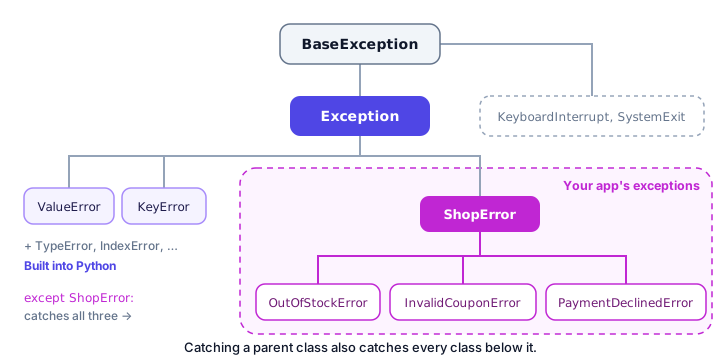
As an app grows, it's useful to give all its errors one shared "parent". You create a base exception for your app and make every specific error inherit from it instead of directly from Exception:
class ShopError(Exception):
    """Base class for every error in our shop."""

class OutOfStockError(ShopError):
    pass

class InvalidCouponError(ShopError):
    pass

class PaymentDeclinedError(ShopError):
    pass

print(issubclass(OutOfStockError, ShopError))
print(issubclass(OutOfStockError, Exception))
print(issubclass(ShopError, OutOfStockError))
True
True
FalseThe built-in issubclass(A, B) answers "is A a kind of B?". An OutOfStockError is a kind of ShopError, which is a kind of Exception. It doesn't work the other way round: not every shop error is an out-of-stock error.
Catching a whole family of errors
The big win of a hierarchy: except ShopError catches every exception that inherits from it. That's perfect for a "something went wrong with your order" fallback:
class ShopError(Exception):
    pass

class OutOfStockError(ShopError):
    pass

class InvalidCouponError(ShopError):
    pass

problems = [OutOfStockError("No mugs left"), InvalidCouponError("Expired code")]

for problem in problems:
    try:
        raise problem
    except ShopError as e:
        print(f"{type(e).__name__}: {e}")
OutOfStockError: No mugs left
InvalidCouponError: Expired codeYou can also mix both styles: catch the specific errors you have special plans for first, then except ShopError last as a catch-all for the rest of the family. Python checks except blocks from top to bottom, so specific types must come before their parent.
⚠️ Be careful
If you put except ShopError above except OutOfStockError, the second block can never run, because the parent catches the error first. Always order except blocks from most specific to most general.
Adding extra data to a custom exception
Sometimes the code that catches an error needs more than a message, for example the exact amount a customer is short. You can store extra values on the exception. This uses __init__ and self, which you'll learn in __init__ and self, so treat this as a preview:
class InsufficientFundsError(Exception):
    def __init__(self, balance, amount):
        self.balance = balance
        self.amount = amount
        self.shortfall = amount - balance
        super().__init__(f"Need ${amount}, only ${balance} available")


try:
    raise InsufficientFundsError(40, 75)
except InsufficientFundsError as e:
    print(e)
    print("Short by:", e.shortfall)
Need $75, only $40 available
Short by: 35In plain words: when the error is created, it remembers the balance, the amount and the shortfall, and super().__init__(...) passes the message to the normal Exception setup so print(e) still works. The except block can then read e.shortfall and show "Add $35 to complete this payment".
Custom exceptions vs built-in exceptions
| Use a built-in exception when… | Create a custom exception when… |
|---|---|
| The problem is general, like a bad value or wrong type | The problem is a rule of your app, like "sold out" |
| Callers don't need to tell it apart from similar errors | Callers need to handle it differently from other errors |
| You're writing a small script | You're writing a module or app others will use |
Example: raise ValueError("Age must be positive") | Example: raise OutOfStockError("No mugs left") |
Common mistakes with custom exceptions
1. Inheriting from BaseException
Always inherit from Exception (or your own base error). BaseException is reserved for special cases like the program exiting, and except Exception won't catch errors built on it directly.
2. Forgetting the brackets around Exception
class OutOfStockError: creates an ordinary class, not an exception. raise OutOfStockError("No mugs left") then fails with a confusing TypeError: OutOfStockError() takes no arguments instead of raising your error.
3. Making too many exception types
You don't need a new class for every if statement. Create one only when some caller will actually catch it separately. Two or three well-named errors beat twenty that nobody handles.
4. Names that don't say what happened
MyError or ShopProblem2 tell the reader nothing. Describe the situation: OutOfStockError, PaymentDeclinedError, InvalidCouponError.
Practice exercise
🏋️ Try it yourself
You're building a flight booking system. Create a base exception BookingError and two children: FlightFullError and InvalidSeatError. Write book_seat(seat, taken) that raises InvalidSeatError if seat is not between 1 and 30, and FlightFullError if taken already has 30 seats. Otherwise, return "Seat N booked". Test it with seats 12 and 45, catching BookingError.
Show solution
class BookingError(Exception):
    pass

class FlightFullError(BookingError):
    pass

class InvalidSeatError(BookingError):
    pass

def book_seat(seat, taken):
    if seat < 1 or seat > 30:
        raise InvalidSeatError(f"Seat {seat} does not exist")
    if len(taken) >= 30:
        raise FlightFullError("This flight is full")
    taken.append(seat)
    return f"Seat {seat} booked"

taken = [1, 2, 3]
for seat in [12, 45]:
    try:
        print(book_seat(seat, taken))
    except BookingError as e:
        print(f"Booking failed ({type(e).__name__}): {e}")
Seat 12 booked
Booking failed (InvalidSeatError): Seat 45 does not existWhat's next?
You can now design your own errors. Next, learn practical Python debugging tips for beginners, so you can track down the bugs that don't raise any error at all.
Key takeaways
- Create a custom exception with a short class: class OutOfStockError(Exception): pass.
- Raise and catch custom exceptions exactly like built-in ones, with raise and try/except.
- Name exceptions in CapitalizedWords ending in Error so they describe what happened.
- Give your app one base exception, like ShopError, and make specific errors inherit from it.
- except ShopError catches every child exception; put specific except blocks before their parent.
- You can store extra data, such as a shortfall amount, on a custom exception for the handler to use.
Frequently asked questions
How do you create a custom exception in Python?
Define a class that inherits from Exception, for example class InsufficientFundsError(Exception): pass. Then raise it with raise InsufficientFundsError("message").
Should custom exceptions inherit from Exception or BaseException?
From Exception. BaseException is meant for system-level events like KeyboardInterrupt and SystemExit, and errors based on it slip past except Exception.
When should I use a custom exception instead of ValueError?
Use a custom exception when the error is a rule of your own program and the calling code needs to handle it differently from other errors, such as OutOfStockError in a shop.
How do I add a message to a custom exception?
Pass it when you raise the exception: raise OutOfStockError("No mugs left"). With the simple pass version, print(e) in the except block shows that message.
What is an exception hierarchy?
It is a family tree of exception classes. You create one base error for your app and make specific errors inherit from it, so catching the base class handles the whole family.