Python Regular Expressions (re module)
Updated 8 min read Aimerscrew
Python regex (short for regular expressions) lets you search text by describing the shape of what you want instead of the exact words. Want every phone number in a message, every price on a receipt or every hashtag in a post? One short pattern can find them all. In this lesson, you'll learn the most useful functions of Python's built-in re module and the pattern symbols you'll use every day.
🌍 Real-life example
Imagine you lost your boarding pass and the airline agent asks for your booking code. You don't remember it, but you know it's "two capital letters followed by four digits". Scanning your inbox for that shape (like BA4821) is exactly what a regular expression does. String methods like find() need the exact text; a regex only needs the pattern.
What is a regular expression?
A regular expression is a small text pattern made of normal characters and special symbols. For example, \d means "any digit", so \d\d\d matches any three digits in a row, like 555 or 042. Python's re module reads these patterns and finds the parts of a string that fit them.
To use it, import the module at the top of your file:
import re

message = "Your order #4821 ships on Friday."
match = re.search(r"\d+", message)

print(match)
print(match.group())
<re.Match object; span=(12, 16), match='4821'>
4821re.search() returns a Match object that describes what it found: the matched text and its position (span). Calling .group() gives you the matched text itself.
Why do regex patterns use raw strings?
You probably noticed the r before the pattern: r"\d+". That makes it a raw string, where backslashes are kept as plain characters. In a normal string, Python treats backslashes as escape characters (see escape characters), which clashes with regex symbols:
print(len("\n"), len(r"\n"))
print(r"\d+ and \s")
1 2
\d+ and \s"\n" is one newline character, but r"\n" is two characters: a backslash and an n. Regex needs to see the backslash, so always write patterns as raw strings.
💡 Tip
Make it a reflex: every regex pattern starts with r". Python 3.12 even prints a SyntaxWarning: invalid escape sequence if you write "\d" without the r.
Common regex patterns (cheat table)
| Symbol | Matches | Example pattern | Would match |
|---|---|---|---|
\d | Any digit 0–9 | \d\d | 42 |
\w | Letter, digit or underscore | \w+ | user_1 |
\s | Whitespace (space, tab, newline) | a\sb | a b |
. | Any character except a newline | c.t | cat, cut |
* | 0 or more of the previous item | go*l | gl, goool |
+ | 1 or more of the previous item | go+l | gol, goool |
? | 0 or 1 of the previous item (optional) | colou?r | color, colour |
{n} | Exactly n of the previous item | \d{4} | 2024 |
[...] | Any one character in the brackets | [aeiou] | e |
^ | Start of the string | ^Hi | Hi there |
$ | End of the string | \.pdf$ | report.pdf |
\b | Word boundary (edge of a word) | \bcat\b | cat but not category |
\ | Escapes a special symbol | \$\d+ | $25 |
Uppercase versions mean the opposite: \D is any non-digit, \W any non-word character, \S any non-space. Ranges work inside brackets, so [A-Z] means any capital letter.
import re

print(re.findall(r"colou?r", "color or colour?"))
print(re.findall(r"go+al", "gal goal gooooal"))
print(re.findall(r"\b\w{5}\b", "The quick brown fox jumps"))
['color', 'colour']
['goal', 'gooooal']
['quick', 'brown', 'jumps']What is the difference between re.search and re.match?
re.search() looks for the pattern anywhere in the string. re.match() only checks the very beginning. Both return None when there is no match.
import re

print(re.match(r"\d+", "2024 was a leap year"))
print(re.match(r"\d+", "Year 2024"))
print(re.search(r"\d+", "Year 2024"))
<re.Match object; span=(0, 4), match='2024'>
None
<re.Match object; span=(5, 9), match='2024'>There's also re.fullmatch(), which succeeds only if the whole string fits the pattern. It's perfect for checking input. Because these functions can return None, check the result before calling .group():
import re

match = re.search(r"\d+", "No numbers here")
if match:
    print("Found:", match.group())
else:
    print("No match")
No matchHow do you find all matches with re.findall?
re.findall() returns a list of every match. This is the function you'll use most for pulling data out of text:
import re

post = "Sunset at the beach #travel #summer #nofilter"
print(re.findall(r"#\w+", post))

receipt = "Coffee $3.50, bagel $2.25, juice $4"
print(re.findall(r"\$\d+\.?\d*", receipt))
['#travel', '#summer', '#nofilter']
['$3.50', '$2.25', '$4']In the price pattern, \$ is a literal dollar sign (escaped, because $ alone means "end of string"), \d+ is the dollars, \.? an optional dot and \d* any cents.
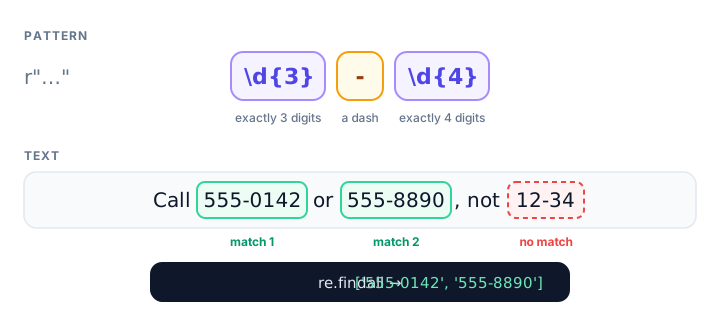
Capturing parts of a match with groups
Round brackets ( ) in a pattern create a group, which captures that part of the match separately:
import re

flight = "Flight BA284 departs at 09:45 from gate B7"
match = re.search(r"(\d{2}):(\d{2})", flight)

print(match.group())
print(match.group(1))
print(match.group(2))
print(match.groups())
09:45
09
45
('09', '45')group() (or group(0)) is the whole match, group(1) the first bracket, and so on. You can also give groups names with (?P<name>...), which makes long patterns easier to read:
import re

flight = "Flight BA284 departs at 09:45 from gate B7"
match = re.search(r"(?P<airline>[A-Z]{2})(?P<number>\d+)", flight)

print(match.group("airline"))
print(match.group("number"))
BA
284When a pattern has one group, re.findall() returns just the captured part, which is handy for grabbing numbers without symbols:
import re

receipt = "Coffee $3.50, bagel $2.25, juice $4"
amounts = re.findall(r"\$(\d+\.?\d*)", receipt)
print(amounts)
print(sum(float(a) for a in amounts))
['3.50', '2.25', '4']
9.75How do you replace text with re.sub?
re.sub(pattern, replacement, text) replaces every match. It's great for cleaning and hiding data:
import re

card = "Card number: 4111 1111 1111 1234"
print(re.sub(r"\d{4} \d{4} \d{4}", "**** **** ****", card))

messy = "Too    many     spaces   here"
print(re.sub(r"\s+", " ", messy))
Card number: **** **** **** 1234
Too many spaces hereSplitting text with re.split
The string method split() (from string methods) splits on one fixed separator. re.split() can split on a pattern, such as "a comma or a semicolon, plus any spaces":
import re

shopping = "milk, eggs;bread;  butter,jam"
print(re.split(r"[,;]\s*", shopping))
['milk', 'eggs', 'bread', 'butter', 'jam']Real-world example: checking emails and finding phone numbers
A simple email check. Real email rules are very complicated, but a simple "something@something.something" check catches most typos in a sign-up form:
import re

def looks_like_email(text):
    return re.fullmatch(r"[\w.+-]+@[\w-]+\.[\w.-]+", text) is not None

addresses = ["sam@example.com", "anna.lee+news@mail.co.uk",
             "no-at-sign.com", "two@@example.com", "bob@site"]

for address in addresses:
    print(f"{address:26} {looks_like_email(address)}")
sam@example.com True
anna.lee+news@mail.co.uk True
no-at-sign.com False
two@@example.com False
bob@site Falsere.fullmatch means the whole string must fit, the same as wrapping the pattern in ^...$ with re.search.
Extracting phone numbers. People write phone numbers in many styles. One pattern with optional parts handles them all:
import re

contacts = ("Reach Maya at 555-201-3344, the front desk at "
            "(555) 987-6543, or the fax at 555.111.2222.")

phone_pattern = r"\(?\d{3}\)?[-.\s]?\d{3}[-.]\d{4}"
for phone in re.findall(phone_pattern, contacts):
    print(phone)
555-201-3344
(555) 987-6543
555.111.2222Reading it piece by piece: an optional (, three digits, an optional ), an optional dash, dot or space, three digits, a dash or dot, then four digits.
📝 Note
If you use the same pattern many times, compile it once with re.compile(): phone_re = re.compile(phone_pattern), then call phone_re.findall(text). To ignore upper and lower case, pass re.IGNORECASE, as in re.findall(r"python", text, re.IGNORECASE).
Common mistakes with regex
1. Calling .group() when nothing matched
import re

match = re.search(r"\d+", "no digits")
print(match.group())
AttributeError: 'NoneType' object has no attribute 'group'Always check if match: first.
2. Using re.match when you meant re.search
re.match(r"\d+", "Year 2024") returns None because the string doesn't start with a digit. Use re.search to look anywhere.
3. Greedy .* grabbing too much
* and + are greedy: they match as much as possible. Add ? after them to match as little as possible:
import re

line = 'She ordered "tea" and "cake"'
print(re.findall(r'".*"', line))
print(re.findall(r'".*?"', line))
['"tea" and "cake"']
['"tea"', '"cake"']4. Forgetting to escape special characters
A plain . matches any character, so r"3.50" also matches 3x50. Write r"3\.50" to match a real dot. The same goes for $ ( ) + ? *.
Practice exercise
🏋️ Try it yourself
A weather report says: "Mon 18C, Tue 21C, Wed 17C, Thu 23C". Use re.findall with a group to get the temperatures as a list of strings, then print the highest temperature as a number.
Show solution
import re

report = "Mon 18C, Tue 21C, Wed 17C, Thu 23C"
temps = re.findall(r"(\d+)C", report)
print(temps)
print("Highest:", max(int(t) for t in temps))
['18', '21', '17', '23']
Highest: 23What's next?
That wraps up the Intermediate Python chapter. Time to put everything together in real programs, starting with a fun first project: a Python number guessing game.
Key takeaways
- A regular expression is a pattern that describes the shape of text, such as \d{3} for three digits.
- Use Python's built-in re module and always write patterns as raw strings like r"\d+".
- re.search finds the first match anywhere, re.match only at the start, and re.fullmatch requires the whole string to match.
- re.findall returns a list of all matches; re.sub replaces them; re.split splits text on a pattern.
- Round brackets create groups you can read with match.group(1) or by name with (?P<name>...).
- Search functions return None when nothing matches, so check the result before calling .group().
- Quantifiers * and + are greedy; add ? to make them match as little as possible.
Frequently asked questions
What is regex in Python?
Regex (regular expressions) is a mini-language for describing text patterns. Python supports it through the built-in re module, which can search, extract, replace and split text that matches a pattern.
What is the difference between re.search and re.match?
re.search scans the whole string and returns the first match anywhere. re.match only succeeds if the pattern matches at the very start of the string. Both return None when there is no match.
Why do we use r before regex strings in Python?
The r makes a raw string, so backslashes are kept as they are. Regex symbols such as \d and \b need the backslash, and without r Python may treat it as an escape character.
How do I find all numbers in a string with Python regex?
Use re.findall(r"\d+", text), which returns a list of every run of digits as strings. Convert them with int() or float() if you need numbers.
How do I validate an email address with regex in Python?
A simple check is re.fullmatch(r"[\w.+-]+@[\w-]+\.[\w.-]+", email). It catches common typos, but full email rules are complex, so real apps also send a confirmation email.
Is regex slow in Python?
For everyday text it is fast. If you reuse a pattern many times, compile it once with re.compile for a small speed gain, and prefer simple string methods when an exact substring search is enough.