Python range() Function
Updated 6 min read Aimerscrew
The Python range() function gives you a sequence of whole numbers, like 0, 1, 2, 3, 4. Pair it with a for loop and you can repeat code an exact number of times, count backwards, or jump in steps. In this lesson you'll learn all three ways to call range() and the one rule that trips up almost every beginner.
🌍 Real-life example
Picture a theater usher handing out seat numbers 1 to 10, or a gym plan that says "train every other day: day 1, 3, 5, 7...". Both are just evenly spaced whole numbers with a start, an end and a gap. That is exactly what range() describes.
What is the range() function in Python?
range() is a built-in function that produces a sequence of integers (whole numbers). It takes up to three arguments: range(start, stop, step). The sequence begins at start, moves by step, and ends just before stop.
for number in range(5):
    print(number)
0
1
2
3
4Five numbers, starting at 0, and 5 itself is not included. Keep that in mind; it's the most important fact about range().
range(stop): counting from zero
With one argument, range(n) counts from 0 up to n - 1, which gives you exactly n numbers. It's the quickest way to say "do this n times":
for _ in range(3):
    print("Hip hip hooray!")
Hip hip hooray!
Hip hip hooray!
Hip hip hooray!The underscore _ is a normal variable name. Programmers use it to say "I need the loop, but I don't care about the number."
range(start, stop): choosing where to begin
Give two arguments and the first one becomes the starting number. This is handy when counting from 1 feels more natural, like seat numbers:
for seat in range(1, 6):
    print(f"Seat {seat} is ready")
Seat 1 is ready
Seat 2 is ready
Seat 3 is ready
Seat 4 is ready
Seat 5 is readyTo get 1 to 5, you write range(1, 6): the stop value is always one past the last number you want.
range(start, stop, step): skipping numbers
The third argument, step, is the gap between numbers. It defaults to 1. Here's a "train every other day" plan for two weeks:
for day in range(1, 15, 2):
    print(f"Day {day}: workout")
Day 1: workout
Day 3: workout
Day 5: workout
Day 7: workout
Day 9: workout
Day 11: workout
Day 13: workoutThe next value after 13 would be 15, which is not below the stop value 15, so the sequence ends. A step of 5 is great for things like timers or price tiers:
for minutes in range(0, 30, 5):
    print(minutes, end=" ")
0 5 10 15 20 25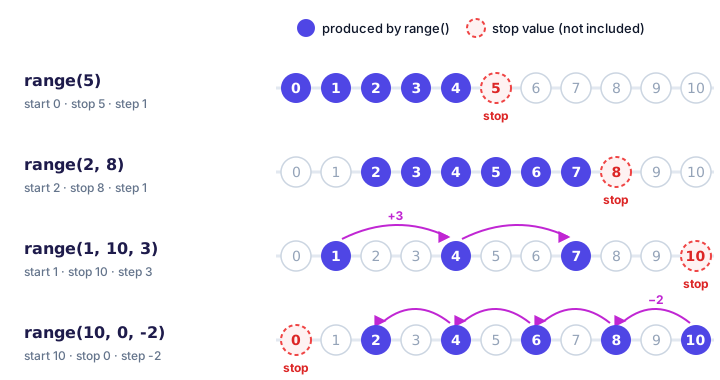
How do you count backwards with range()?
Use a negative step. The start must now be larger than the stop, and again the stop value is left out:
for n in range(5, 0, -1):
    print(n)
print("Happy New Year!")
5
4
3
2
1
Happy New Year!Notice the countdown ends at 1, not 0, because 0 is the stop value. To include 0, write range(5, -1, -1).
range() is lazy: it doesn't store every number
If you print a range directly, you don't see a list of numbers:
seats = range(1, 6)
print(seats)
print(type(seats))
range(1, 6)
<class 'range'>A range is lazy: it only remembers its start, stop and step, and works out each number at the moment it's needed. That's why range(1_000_000_000) is created instantly and uses almost no memory, even though it describes a billion numbers.
Turning a range into a list
When you do want to see all the values, pass the range to list(). (You'll learn all about lists in Python lists.)
print(list(range(5)))
print(list(range(2, 11, 2)))
print(list(range(10, 0, -3)))
[0, 1, 2, 3, 4]
[2, 4, 6, 8, 10]
[10, 7, 4, 1]Length and membership
Ranges work with len() and the in operator from membership operators, and both are instant because Python can calculate the answer instead of counting:
evens = range(0, 101, 2)
print(len(evens))
print(42 in evens)
print(7 in evens)
51
True
FalseQuick reference: the three forms of range()
| Call | Produces | Meaning |
|---|---|---|
range(4) | 0, 1, 2, 3 | From 0, stop before 4 |
range(3, 7) | 3, 4, 5, 6 | From 3, stop before 7 |
range(0, 10, 3) | 0, 3, 6, 9 | From 0 in steps of 3 |
range(6, 0, -2) | 6, 4, 2 | Count down in steps of 2 |
range(5, 2) | (nothing) | Empty: can't go up from 5 to 2 |
Real-world example: numbering a playlist
Here's a small program that prints a numbered tracklist and a total running time. The range runs from 1 to the number of tracks, inclusive:
track_count = 4
minutes_per_track = 3

for track in range(1, track_count + 1):
    print(f"Track {track} of {track_count}")

print(f"Total time: {track_count * minutes_per_track} minutes")
Track 1 of 4
Track 2 of 4
Track 3 of 4
Track 4 of 4
Total time: 12 minutesWriting track_count + 1 as the stop is a common and clear way to say "up to and including track_count."
Common mistakes with range()
1. Expecting the stop value to be included (off-by-one)
for n in range(1, 10):
    print(n, end=" ")
1 2 3 4 5 6 7 8 9If you wanted 1 to 10, use range(1, 11). An "off-by-one" error means your loop runs one time too many or too few, and with range() it almost always comes from forgetting that the stop is excluded.
2. Counting down without a negative step
print(list(range(10, 1)))[]No error, just an empty range, so a loop over it silently does nothing. To go down, add a negative step: range(10, 1, -1).
3. Using a step of zero
range(0, 10, 0)ValueError: range() arg 3 must not be zero4. Passing decimal numbers
for price in range(0.5, 3.0):
    print(price)
TypeError: 'float' object cannot be interpreted as an integerrange() only works with integers. If you need 0.5, 1.0, 1.5..., loop over whole numbers and divide: for n in range(1, 7): print(n / 2).
📝 Note
A range that comes from user input needs converting first: range(int(input("How many? "))). The input() function always returns text, as you saw in type conversion.
Practice exercise
🏋️ Try it yourself
The Summer Olympics take place every 4 years. Use range() to print every Summer Olympics year from 2000 to 2032, inclusive, one per line. Then print how many years are in your range using len(). (Ignore the one-year delay in 2021; this is just about the pattern.)
Show solution
olympic_years = range(2000, 2033, 4)

for year in olympic_years:
    print(year)
print(f"That's {len(olympic_years)} Games.")
2000
2004
2008
2012
2016
2020
2024
2028
2032
That's 9 Games.The stop is 2033 (not 2032) so that 2032 is included.
What's next?
You can now control exactly how many times a loop runs. Next, learn how to change a loop's flow from the inside, stopping early or skipping a turn, with Python break, continue and pass.
Key takeaways
- range() produces a sequence of whole numbers and is most often used with a for loop.
- range(stop) counts from 0 up to, but not including, stop.
- range(start, stop) chooses the first number; the stop value is still excluded.
- A third argument sets the step; a negative step counts down and needs start greater than stop.
- A range is lazy: it stores only start, stop and step. Use list(range(...)) to see every value.
- Most range bugs are off-by-one errors: to include n, use n + 1 as the stop.
Frequently asked questions
Does Python range include the last number?
No. range() stops just before the stop value, so range(1, 5) gives 1, 2, 3 and 4. To include 5, write range(1, 6).
How do you make range go backwards in Python?
Use a negative step and a start that is larger than the stop, for example range(10, 0, -1) gives 10 down to 1.
Why does print(range(5)) not show the numbers?
A range object is lazy and only stores its start, stop and step. Wrap it in list(), as in print(list(range(5))), to see the actual numbers.
Can Python range use decimal numbers?
No. range() accepts only integers and raises a TypeError for floats. Loop over integers and divide them, for example n / 10, to get decimal steps.
What does range(len(x)) mean in Python?
It produces the positions 0 up to len(x) - 1, one for each item in x. It is used when a loop needs the position of each item, not just the item itself.